Repository navigation
NS Port Builder v0.1.0 — macOS GUI front end

NS Port Builder — a macOS window for the whole pipeline (unpack → module rewrite → shader compile → slim IPA → RomFS archive shards), so a first build does not need a terminal.
界面截图(点开)
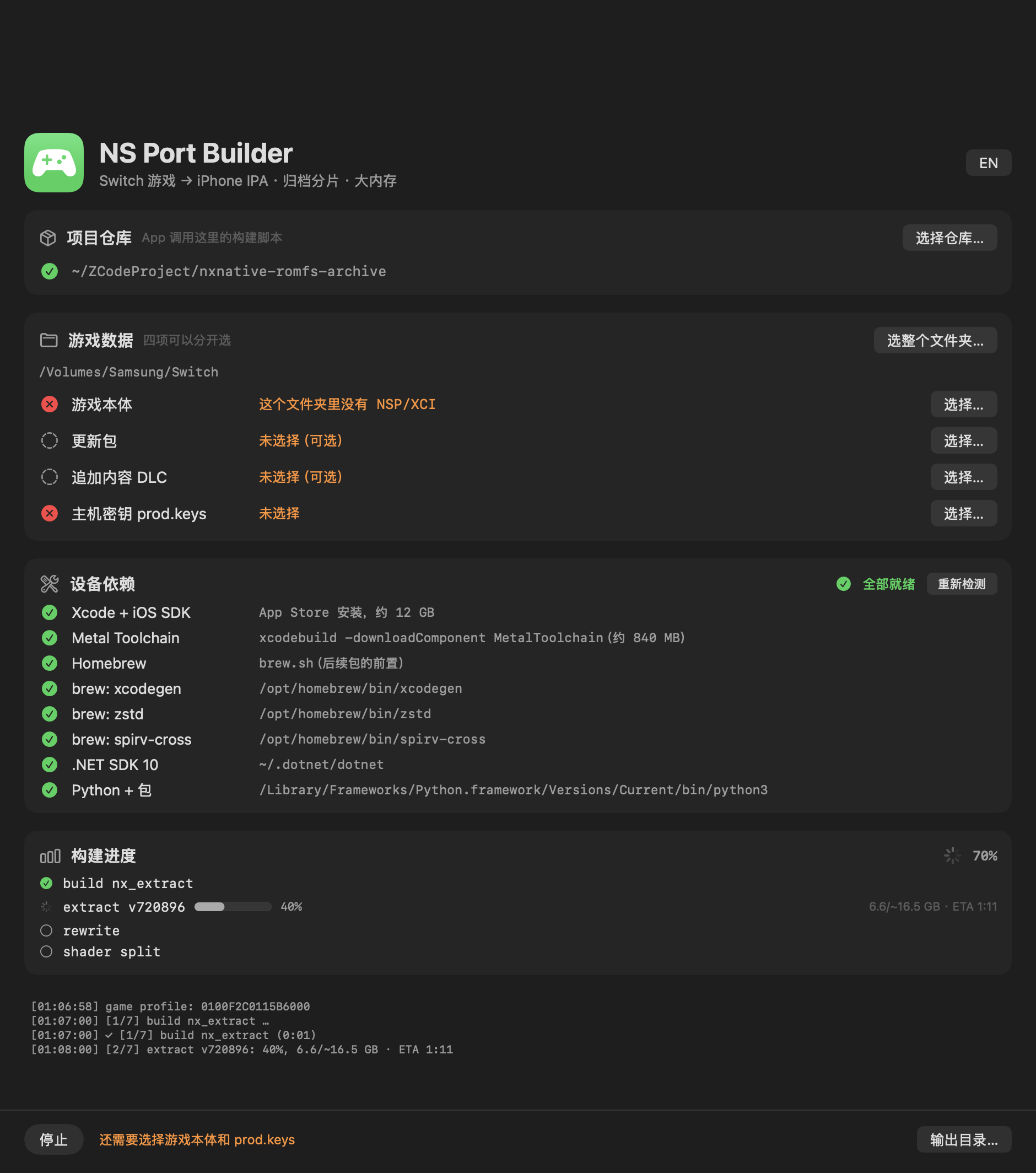
What this build is
NS-Port-Builder-macOS-arm64.zip — the app itself, ad-hoc signed, Apple Silicon, macOS 13+.
Unzip it anywhere and double-click. (Because the signature is ad-hoc, the first launch needs
right-click → Open, or xattr -dr com.apple.quarantine "NS Port Builder.app".)
This is a front end only. It drives the scripts of
nxnative-romfs-archive, so you also need a
clone of that repository on the same Mac. The app finds it automatically when it sits next to the
checkout, and otherwise you pick it once with 选择仓库… (the row turns green when the folder is a
real checkout — it contains dm/tools/nx_extract/Program.cs).
What it does
- Four inputs, picked separately: base game, update, add-on content (DLC, multi-select) and
prod.keys.选整个文件夹…fills all four at once by title ID (…000base,…800update,
base + 0x1000 + nDLC), skipping 0-byte files. Files in different folders are staged as
symlinks, and the build folder still lands next to the base game. - Device dependencies, detected and installable: Xcode + iOS SDK, the Metal Toolchain,
Homebrew,xcodegen/zstd/spirv-cross, the .NET SDK and the Python packages. Each row
shows ✓ / ✗; a missing one gets an 安装 button that runs the real installer. 开始构建 stays
disabled until everything is green, so a first build does not die halfway through. - Progress from the script's own stages: the app parses the
[k/n]lines the build writes, so
the list follows the real plan with a live percentage per stage — no guessed five-step list. - Archive shards at the end, which is what makes a large game installable at all.
Paths are shown with your home directory abbreviated to ~.
Verified games
| Game | Status |
|---|---|
| The Legend of Zelda: Tears of the Kingdom (0100F2C0115B6000, v1.0.0 + update 1.4.3) | Verified — builds, installs and runs on an iPhone; 304,243 files packed into 127 archive shards, every file byte-verified against the source |
| Hades II (0100A00019DE0000, base + update) | Verified — builds, installs and runs on an iPhone; 33-file archive |
Every other game is unverified. nxnative needs a per-game profile (dm/games/<title ID>/) and,
for a game without one, the build falls back to a survey plus a provisional profile whose values
are guessed — it may not boot. If you try another title, expect to bring it up yourself, and please
report what you find.
Requirements
- An Apple Silicon Mac (the app is arm64 only; the build scripts themselves also run on Intel)
- macOS 13 or later
- ~6 GB free beyond the NSPs for the extraction; the shader compile is the long step (~50 minutes
for Tears of the Kingdom) - Your own game files and
prod.keys— nothing is bundled
Notes
- No game data, keys or firmware are included. Bring your own dumped NSPs.
- The app is a convenience wrapper; the command line remains the reference. Every option and
limitation documented in the repository applies here too. - Sideloading to the phone (AltStore, Sideloadly, Xcode) is outside this app's scope — see
dm/ios/ENTITLEMENTS.mdfor the memory-limit entitlement that a large game needs.
中文说明
NS Port Builder —— 一个 macOS 窗口,把整条流水线(解包 → 模块改写 → shader 编译 → 瘦身 IPA → RomFS 归档分片)包起来,第一次构建不用碰终端。
这个包是什么
NS-Port-Builder-macOS-arm64.zip 就是 App 本身,ad-hoc 签名,Apple Silicon,macOS 13+。解压到任意位置双击即可。因为用的是 ad-hoc 签名,首次启动需要右键 → 打开,或者执行 xattr -dr com.apple.quarantine "NS Port Builder.app"。
这只是前端。 它调用的是 nxnative-romfs-archive 里的脚本,所以这台 Mac 上还需要 clone 那个仓库。App 会自己找:放在仓库旁边能自动发现,找不到就用「选择仓库…」指定一次(目录里有 dm/tools/nx_extract/Program.cs 才算真正的仓库,那一行会变绿)。
它能做什么
- 四项输入分开选:游戏本体、更新包、追加内容 DLC(可多选)、
prod.keys。用「选整个文件夹…」可以按 title ID 一次填满四项(…000本体、…800更新、base + 0x1000 + nDLC),0 字节文件自动跳过。文件分散在不同文件夹时,App 会用软链接搭一个暂存目录,构建产物仍然落在本体旁边。 - 设备依赖检测 + 一键安装:Xcode + iOS SDK、Metal Toolchain、Homebrew、
xcodegen/zstd/spirv-cross、.NET SDK、Python 包。每项显示 ✓ / ✗,缺失的直接点「安装」跑真正的安装程序。依赖没齐时「开始构建」是禁用的,不会跑到一半才失败。 - 进度来自脚本自己的阶段:App 解析构建输出的
[k/n]行,列表跟着真实的构建计划走,每个阶段带实时百分比,不是猜出来的五步。 - 最后自动产出归档分片,这是大体积游戏能装进手机的关键。
路径显示时会把家目录缩写成 ~。
已验证的游戏
| 游戏 | 状态 |
|---|---|
| 塞尔达传说:王国之泪(0100F2C0115B6000,v1.0.0 + 更新 1.4.3) | 已验证 —— 构建、安装、在 iPhone 上运行;304,243 个文件归档成 127 片,逐字节校验全部通过 |
| Hades II(0100A00019DE0000,本体 + 更新) | 已验证 —— 构建、安装、在 iPhone 上运行;33 个文件的归档 |
其他游戏均未验证。 nxnative 需要每个游戏自己的 profile(dm/games/<title ID>/);没有 profile 时会退化成「调研 + 推测参数」的临时 profile,可能无法启动。如果你试了别的游戏,请做好自行 bring-up 的准备,也欢迎把结果反馈过来。
环境要求
- Apple Silicon Mac(App 只有 arm64;构建脚本本身在 Intel 上也能跑)
- macOS 13 或更高
- 除 NSP 外额外预留约 6 GB 空间用于解包;shader 编译是最慢的一步(王国之泪约 50 分钟)
- 你自己的游戏文件和
prod.keys—— 包里不含任何游戏数据
注意事项
- 不含任何游戏数据、密钥或固件,请使用自己 dump 的 NSP。
- 这个 App 只是便捷封装,命令行仍是权威;仓库里记录的所有选项和限制在这里同样适用。
- 往手机侧载(AltStore、Sideloadly、Xcode)不在这个 App 的范围内 —— 大体积游戏需要的内存上限 entitlement 见
dm/ios/ENTITLEMENTS.md。