Repository navigation
Releases: MiniBandit/MKW-3DS
Release list
MKW 3DS v0.5.2

v0.5.2: Windows quick-update fix
⚠️ Who can use the quick-update QR code, and who has to build
| You are… | What to do |
|---|---|
Built your game with v0.5.0 or newer (Windows, Mac or Linux) and copied build/release/sd-card/3ds to your SD card |
✅ Scan the QR code below. No rebuild needed. |
| Built with v0.4.1 or older | ❌ The QR code will NOT work. Download the builder below, build again, install the full CIA and copy the SD folder. |
| Never built the game | ❌ The update is not the game. You must build it yourself from your own USA Mario Kart Wii disc (RMCE01) with the builder below. |
| Built with v0.5.0 or newer but never copied the SD folder | ❌ Copy build/release/sd-card/3ds to the root of your SD card first. The update replaces the game's built-in files, so it needs that folder. |
Not sure which version you built with? Build again with this builder: it always works.
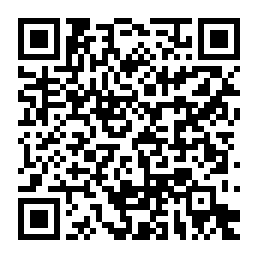
📱 Quick-update QR code (v0.5.0+ builds only)
In FBI: Remote Install → Scan QR Code, then scan this. Only for people who already built v0.5.0 or newer and copied the SD folder.
What's new
- Fixed: Windows builds were refused by the v0.5.1 quick update ("game files are from a different builder"). Games built on Windows with v0.5.0 or v0.5.1 now work with this update: no rebuild needed.
- Fixed: crash when closing the game
- Fixed: race-start sound on OK, and no hop/drift sounds after finishing (thanks DarthMDev)
- The update shows what's new once, on the first launch
Downloads
MKW-3DS-Update.cia: the quick update, for v0.5.0+ builds only (about 2 MB, no game files)MKW-3DS-Builder-v0.5.2-macOS.zip/-Windows.zip: the builder, for everyone who hasn't built yet or built with an older version
How to build (first time, or older than v0.5.0)
- Download the builder for your computer and extract it.
- Run it with your USA Mario Kart Wii disc (RMCE01).
- Install
build/release/mkw-3ds.ciawith FBI and copybuild/release/sd-card/3dsto the root of your SD card.
Please don't share built CIAs: they contain Nintendo's game files. Full credit to dudewhat for the original port, and thanks to Epic0522 and DarthMDev.
MKW 3DS v0.5.1
v0.5.1: crash fix + the first quick update
⚠️ Who can use the quick-update QR code, and who has to build
| You are… | What to do |
|---|---|
Built your game with v0.5.0 or newer and copied build/release/sd-card/3ds to your SD card |
✅ Scan the QR code (README, or download MKW-3DS-Update.cia below and install it with FBI). No rebuild needed. |
| Built with v0.4.1 or older | ❌ The QR code will NOT work. Download the builder below, build again, install the full CIA and copy the SD folder. |
| Never built the game | ❌ The update is not the game. You must build it yourself from your own USA Mario Kart Wii disc (RMCE01) with the builder below. |
| Built with v0.5.0 but never copied the SD folder | ❌ Copy build/release/sd-card/3ds to the root of your SD card first, then scan. |
Not sure which version you built with? Build again with this builder: it always works.
📱 Quick-update QR code (v0.5.0+ builds only)
In FBI: Remote Install → Scan QR Code, then scan this. Only for people who already built v0.5.0 or newer and copied the SD folder. Everyone else: use the builder below.
What's new
- Fixed: crash when closing the game
- Fixed: race-start sound on OK, and no hop/drift sounds after finishing (thanks DarthMDev)
- The update shows what's new once, on the first launch
- Quick updates are now a normal CIA update installed over your game (your saves and SD files stay)
Downloads
MKW-3DS-Update.cia: the quick update for v0.5.0+ builds only (about 2 MB, no game files)MKW-3DS-Builder-v0.5.1-macOS.zip/-Windows.zip: the builder, for everyone who hasn't built yet or built with an older version
How to build (first time, or older than v0.5.0)
- Download the builder for your computer and extract it.
- Run it with your USA Mario Kart Wii disc (RMCE01).
- Install
build/release/mkw-3ds.ciawith FBI and copybuild/release/sd-card/3dsto the root of your SD card.
Please don't share built CIAs: they contain Nintendo's game files. Full credit to dudewhat for the original port, and thanks to Epic0522 and DarthMDev.
MKW 3DS v0.5.1 beta (quick update test)
⚠️ Quick-update test build. Needs a game built with v0.5.0 or newer.
If you built your game with v0.4.1 or older, this does not work for you: download the v0.5.0 builder, build again and install the full CIA.
This is the update CIA only (about 2 MB, no Nintendo files). It is not the game: installed on its own, nothing appears on the HOME Menu.
Fixed
- The crash every time the game is closed (0.5.0)
- Race-start sound on OK, and hop/drift sounds after finishing (DarthMDev)
The game shows what's new on the first launch after updating, and says it will show once.
MKW 3DS v0.5.0
v0.5.0: one last rebuild. Build once with this builder; after this, new features (award ceremony, Battle, more menus and effects) arrive as small quick updates without rebuilding.
New
- New graphics by Epic0522: richer lighting, kart shadows, water, effects and menu highlights
- 50cc (karts only) and 100cc (bikes only) Grand Prix, with the original game's speeds
- Grand Prix fix: races 2–4 no longer run short of memory (freezes, missing Lakitu)
- Lakitu: one screen wipe and one rescue after a fall, no second grab
- Old 3DS: smoother drawing (thanks DarthMDev)
- SD card: about 4,800 files instead of 24,900: much faster to copy, and no more "Error 0x80070052" when copying
- First launch shows what's new on the bottom screen (once per version)
- Builder: works on Linux (#18), clear message for modified/Wiimmfi discs (#16), less memory use on many-core PCs
How to install
- Download the builder for your computer below and extract it (over your old builder folder is fine).
- Run it with your USA Mario Kart Wii disc (RMCE01).
- Install
build/release/mkw-3ds.ciawith FBI, and copybuild/release/sd-card/3dsto the root of your SD card (delete your old3ds/mkw-3dsfolder first for a clean copy).
There is no update CIA for this version: v0.5.0 must be built. Please don't share built CIAs. Full credit to dudewhat for the original port, and thanks to Epic0522 and DarthMDev.
MKW 3DS v0.4.1
Builder fixes on top of v0.4.0 (quick updates); see v0.4.0's notes for how quick updates work.
Fixes
- Windows: no more
FileNotFoundError ... build\host-tools\sprite-scales.jsonat the menu archive step. - macOS with Python from python.org: no more
CERTIFICATE_VERIFY_FAILEDwhen downloading the packaging tools. It now falls back to macOS's owncurl(downloads are still checksum-checked).
Stopped partway? Extract v0.4.1 over the same folder and run it again.
Downloads
- Builder:
MKW-3DS-Builder-v0.4.1-macOS.ziporMKW-3DS-Builder-v0.4.1-Windows.zip - Update CIA:
MKW-3DS-Update.cia(attached automatically a few minutes after release). It needs game files from the v0.4.1 builder: copybuild/release/sd-card/3dsto your SD card.
macOS tip: if the builder can't install its Python packages, use Python 3.13 (python.org), delete the .venv folder and run it again. Python 3.15 is too new for one of the packages.
Still the USA version only (RMCE01). Please don't share built full CIAs; the update CIA is fine to share. Full credit to dudewhat for the original port.
MKW 3DS v0.4.0: Quick updates
Quick updates are here 🏁
From now on you only convert your disc once. After that, updates are a small update CIA (about 2 MB, no Nintendo files) that you can install straight from your 3DS.
First time (or coming from an older version)
- Run this version's builder with your USA disc (
.iso/.wbfs). Already built before? Extract it over your old folder: it only redoes what changed. - Install
build/release/mkw-3ds.ciawith FBI, as before. - New: copy the folder
build/release/sd-card/3dsto the root of your SD card.
Every update after that
Install MKW-3DS-Update.cia (attached below by GitHub automatically), any of these ways:
- FBI: Remote Install → Scan QR Code → scan the FBI code in the README
- Universal-Updater: add the store from the README's QR code once, then just press install when there's an update
- Download it from this page and install it with FBI
If an update ever needs newer game files, the game tells you on start-up: run the latest builder again and copy sd-card/3ds over again.
Downloads
- Builder (first time / new game files):
MKW-3DS-Builder-v0.4.0-macOS.ziporMKW-3DS-Builder-v0.4.0-Windows.zip - Update CIA:
MKW-3DS-Update.cia(appears a few minutes after release)
The update CIA has its own simple icon: the full CIA's icon is made from your disc, which GitHub doesn't have.
Still the USA version only (RMCE01). Europe support is tracked in #11. Please don't share built full CIAs: they contain Nintendo's game files. The update CIA is fine to share. Full credit to dudewhat for the original port.
MKW 3DS v0.3.5
Builder reliability release. The zips contain the builder only: no Nintendo files and no CIA.
Downloads
- macOS:
MKW-3DS-Builder-v0.3.5-macOS.zip, then double-clickBuild MKW CIA.command - Windows:
MKW-3DS-Builder-v0.3.5-Windows.zip, then double-clickBuild MKW CIA.bat
Fixes
- Windows no longer needs
clang++. The menu step used to compile a helper with clang++, which most Windows PCs don't have; its result now ships with the builder. - Updating in the same folder now works. Each step remembers which version of the code made it, so steps that changed in an update are redone. Previously an update could skip them (e.g. the 12-vehicle conversion).
- Readable Windows logs.
build-cia-log.txtis now normal UTF-8 text (it was UTF-16, with spaces between every letter), and progress shows as it happens. - Building on any drive: packaging falls back to copying files on drives without hard-link support (exFAT/FAT32 USB drives).
- Clear message when the disc path doesn't exist.
- Time Trials: best times now save even if the
3ds/mkw-3dsfolder doesn't exist on your SD card.
Stopped partway on an older version? Extract v0.3.5 over the same folder and run it again. It continues from where it stopped.
Still the USA version only (RMCE01, a normal .iso or .wbfs). Europe support is tracked in #11.
Known issues
- Some players report a crash in the first race; please open an issue with your console (Old/New 3DS), Mac or Windows build, course/character/vehicle, and a photo of any Luma error screen.
- 50cc, 100cc and Mirror are not available yet. Battle and Team VS are in progress.
Please don't share built CIAs. Full credit to dudewhat for the original port.
MKW 3DS v0.3.4
Windows build fix. The zips contain the builder only: no Nintendo files and no CIA.
Downloads
- macOS:
MKW-3DS-Builder-v0.3.4-macOS.zip, then double-clickBuild MKW CIA.command - Windows:
MKW-3DS-Builder-v0.3.4-Windows.zip, then double-clickBuild MKW CIA.bat
Fixes
- Windows: the build no longer stops at packaging (
pack_race_assets.py...ValueError: Invalid menu movie path), and the packaging steps now handle Windows file paths throughout. - A compiler warning about
fopenduring the menu step on Windows is harmless and can be ignored.
If your build stopped at packaging: extract v0.3.4 over the same folder and run it again. It carries on from where it stopped.
Still the USA version only (RMCE01, a normal .iso or .wbfs). Europe support is tracked in #11.
Known issues
- Some players report a crash in the first race; please open an issue with your console (Old/New 3DS), Mac or Windows build, course/character/vehicle, and a photo of any Luma error screen.
- 50cc, 100cc and Mirror are not available yet. Battle and Team VS are in progress.
Please don't share built CIAs. Full credit to dudewhat for the original port.
MKW 3DS v0.3.3
Windows build fix. The zips contain the builder only: no Nintendo files and no CIA.
Downloads
- macOS:
MKW-3DS-Builder-v0.3.3-macOS.zip, then double-clickBuild MKW CIA.command - Windows:
MKW-3DS-Builder-v0.3.3-Windows.zip, then double-clickBuild MKW CIA.bat
Fixes
- Windows: the build no longer stops at the menu step (
cook_menu_ui.py...KeyError: 'assets/menu-ui/MenuSingle_U/message/Menu.bmg'). File paths are now recorded the same way on every OS. - The builder now says when it's unpacking your disc (a few silent minutes) and numbers each conversion step.
If your v0.3.2 build stopped at the menu step: extract v0.3.3 over the same folder and run it again: it carries on from where it stopped.
Still the USA version only (RMCE01, a normal .iso or .wbfs). Europe support is tracked in #11.
Known issues
- Some players report a crash in the first race; please open an issue with your console (Old/New 3DS), Mac or Windows build, course/character/vehicle, and a photo of any Luma error screen.
- 50cc, 100cc and Mirror are not available yet. Battle and Team VS are in progress.
Please don't share built CIAs. Full credit to dudewhat for the original port.
MKW 3DS v0.3.2
Windows build fixes. The zips contain the builder only: no Nintendo files and no CIA.
Downloads
- macOS:
MKW-3DS-Builder-v0.3.2-macOS.zip, then double-clickBuild MKW CIA.command - Windows:
MKW-3DS-Builder-v0.3.2-Windows.zip, then double-clickBuild MKW CIA.bat
Fixes (Windows)
- The build no longer stops at
node tools/bundle_cooker.mjs(Windows file paths broke the model-exporter bundling) - Text files are read and written as UTF-8 on Windows too
- Linking no longer risks Windows' command-line length limit
If v0.3.1 stopped for you, you can run v0.3.2 in a new folder, or copy it over your existing folder to keep the steps already done.
Still the USA version only (RMCE01, a normal .iso or .wbfs). Europe support is tracked in #11.
Known issues
- Some players report a crash in the first race; please open an issue with your console (Old/New 3DS), Mac or Windows build, course/character/vehicle, and a photo of any Luma error screen.
- 50cc, 100cc and Mirror are not available yet. Battle and Team VS are in progress.
Please don't share built CIAs. Full credit to dudewhat for the original port.