Skip to content

+ Add github-issue-comments-editor-plus.user.js - #38

Closed
Hansimov wants to merge 1 commit into
Mottie:masterfrom
Hansimov:dev-hansimov
Closed

+ Add github-issue-comments-editor-plus.user.js#38
Hansimov wants to merge 1 commit into
Mottie:masterfrom
Hansimov:dev-hansimov

Conversation

@Hansimov

Copy link
Copy Markdown

I add a new userscript github-issue-comments-editor-plus.user.js.
This userscript works at https://github.com/*/issues/*.

Main features of this userscript:

  • Display the area of Write and Preview side by side at the same time
  • Real-time preview the markdown of the writing content
  • Freely resize the width of comments container with a slider (on the right of the fork button)
  • Hide/show the sidebar with a button (on the right of the slider above)
  • Remember the users' preferences at last time
  • Auto-resize the textarea when the contents of comments are changed
  • Show the originally hidden editor toolbar while previewing

Todo:

  • A wiki of this userscript (with more detailed instructions and pictures) should be added.
  • It should work on more GitHub websites where contents of Write and Preview cannot be displayed simultaneously currently.
  • Fix potential bugs

@Mottie

Mottie commented Feb 28, 2018

Copy link
Copy Markdown
Owner

Hi @Hansimov!

Any reason you aren't hosting this userscript yourself? I didn't write it, so it'd be troublesome for me to maintain it. I do like the concept though!

I also have some feedback/comments about the script:

  • Don't use the pinned-octocat.svg for an icon; The userscript won't auto-update on OpenUserJS because it's too large - see @icon dimensions are too large OpenUserJS/OpenUserJS.org#1308.
  • Add // @match https://github.com/*/pull/* so it works in PR comments.
  • It might be better to move the control discussion width slider into a separate userscript because it leaves the sidebar at the top and if I use it with GitHub-Dark, the side bar overlaps and has a transparent background. And I'd prefer to use the GitHub Wide userstyle to change the width of the page.
  • The "preview" tab should be removed/disabled since it doesn't appear to change anything; it's distracting to see the tab switch from "Write" to "Preview" once I start typing; but I guess that's how you get the userscript to generate previews.
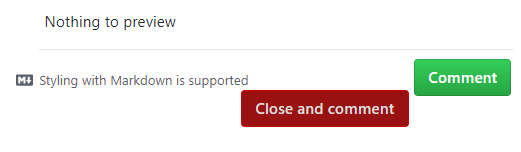
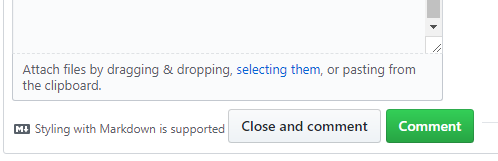
  • The "Styling with Markdown is supported" text under the comment should be hidden as it wraps the moves the "Close and comment" button.
  • After I add a comment, the preview window still shows the previous content. It doesn't clear and update until I start typing again.

@Hansimov

Hansimov commented Mar 1, 2018

Copy link
Copy Markdown
Author

Hi, @Mottie !
Thanks a lot for your kind suggestions!


Any reason you aren't hosting this userscript yourself?

I thought that it would be easier for someone to find such a userscript after he discovers your repository.
And you are right, it'd be troublesome for others to maintain it.
I would host it on my github later.
It would be an honor for me that if my userscript could be covered in your Other userscripts not hosted here.

Don't use the pinned-octocat.svg for an icon

I have not written any userscript before, so I use this line in your github-issue-comments.user.js.
I would replace this icon by something with more appropriate size.

Add // @match https://github.com/*/pull/* so it works in PR comments.

I will try this later.
Since I have not tested its functionalities on other sites, some elements might not work well and some changes and improvements are needed.

It might be better to move the control discussion width slider into a separate userscript because it leaves the sidebar at the top and if I use it with GitHub-Dark, the side bar overlaps and has a transparent background. And I'd prefer to use the GitHub Wide userstyle to change the width of the page.

Sorry for that ugly design :p.
I did not take its compatibility with other userscripts into consideration.
And I will have a try at the GitHub Wide userstyle. I did not hear of it before.
I would improve this if time permits.

The "preview" tab should be removed/disabled since it doesn't appear to change anything; it's distracting to see the tab switch from "Write" to "Preview" once I start typing; but I guess that's how you get the userscript to generate previews.

I keep the Preview tab visible just for "conventions". Yes, it is better and cleaner to remove it.
You are right that I simulate the click event on the Preview tab to generate real-time previews.
It will have no effect if I only change the visibility of it, so I will implement this afterwards.

The "Styling with Markdown is supported" text under the comment should be hidden as it wraps the moves the "Close and comment" button.

I have not encountered this problem. What I get is always like this:

close-and-comment

I guess that it might depend on platforms, devices or browser versions.
So it is really a good idea to remove the "Styling with Markdown is supported" text to avoid unseen bugs and make the editor look neater.

After I add a comment, the preview window still shows the previous content. It doesn't clear and update until I start typing again.

I also note this and write it in the comment of my codes.
It is a disaster to an "obsessive".
I will fix this later.


You are so kind to test my userscript and give so many useful and important suggestions.
And your project is a great help to me and it has inspired me a lot.
I would have no confidence to write such a userscript without your works.
Thanks again!

@Mottie

Mottie commented Mar 1, 2018

Copy link
Copy Markdown
Owner

It would be an honor for me that if my userscript could be covered in your Other userscripts not hosted here.

Sure! Those userscripts are actually all mostly written by me as well. They just don't live in this repository.

I would replace this icon by something with more appropriate size.

Actually, nevermind... you're right, I thought I switched from svg to using a png, but it was actually the other way around. I'm having an "off" day.

Sorry for that ugly design :p

The design isn't ugly, it's just that messing with GitHub's content width usually messes up a bunch of stuff. That's why I suggested separating it from your preview userscript.

some elements might not work well (re: Adding /pull)

I actually added it when I first started testing and yeah, a bunch of JS errors popped up, so I quickly removed it.

You are right that I simulate the click event on the Preview tab to generate real-time previews.

For inspiration, take at look at https://github.com/DrewML/octo-preview - it's a chrome extension that does something very similar to your userscript. He actually uses GitHub's API to render the markdown; but in his case you'd run into the API rate limits pretty quickly.

It is a disaster to an "obsessive".

Yes, I freely admit that I am obsessive

@Hansimov

Hansimov commented Mar 2, 2018

Copy link
Copy Markdown
Author

Hi, @Mottie!

I have hosted this userscript on this repo in my GitHub.

The link you suggested (https://github.com/DrewML/octo-preview) inspires me and makes me have the idea that create a brand-new preview renderer instead of suffering from the original one.
Although the project has not been updated for about two years, the idea and methods are good.

So an important improvement the userscript v1.1 is that I create a new preview renderer, using markedjs, which supports GitHub Flavored Markdown (GFM) used in the GitHub issues, wikis or pull requests.

With this new preview renderer, we will no longer suffer from the annoying Loading preview ... page each time we update the preview.
And this is almost the main reason why I decide to reimplement the preview renderer.

Also, when we use the original GFM renderer, it seems that it would send requests to the server each time when we click the preview button, so that sometimes it will stop at the Loading preview ... page if the network has errors or something similar happens.
While the marked.js is only loaded once when the webpage is open, the new renderer can work well even when the network is unconnected.

Currently, the only known flaw of the new renderer is that it cannot render :emoji:, I may fix this afterwards (of course, if time permits :p).

I have listed a lot on the Todo item. (And it seems to be longer and longer.)
I hope I can implement all of them one day.

@darkred

darkred commented Mar 2, 2018

Copy link
Copy Markdown
Collaborator

Hi @Hansimov. I like your concept a lot.
Just two things to consider for your TODO:

  • The script to work in 'New issue' too, not only for editing existing issues/comments.
  • Currently your script doesn't work if you navigate into an issue page from another page , unless you refresh the page (F5). That's because GitHub uses the History API or more specifically history.pushState() [1], i.e. it changes the URL without reloading a page.
    Mottie's great approach for many/most of his scripts for GitHub is using his library, mutations.
    i.e. the userscript is set to run on document-idle and the @require code listens for the document becoming interactive/complete.

[1] https://stackoverflow.com/questions/7591087/how-does-github-change-the-url-without-reloading-a-page

@Mottie

Mottie commented Mar 2, 2018

Copy link
Copy Markdown
Owner

You can replace the emoji's yourself with a bit of regex and this JSON - https://api.github.com/emojis

@Hansimov

Hansimov commented Mar 4, 2018

Copy link
Copy Markdown
Author

Hi, @darkred !

The script to work in 'New issue' too, not only for editing existing issues/comments.

Yes, I noticed this yesterday. I will apply the script to New issue later.

Currently your script doesn't work if you navigate into an issue page from another page , unless you refresh the page (F5).
...
Mottie's great approach for many/most of his scripts for GitHub is using his library, mutations.

Wow! This problem has confused me for days. I will have a try at the mutation library.


Hi, @Mottie !

You can replace the emoji's yourself with a bit of regex and this JSON - https://api.github.com/emojis

OK, I will try this. It may take some time to add this feature.


Thank you for all of your suggestions!

@Bluscream

Copy link
Copy Markdown

Great work!

Sign up for free to join this conversation on GitHub. Already have an account? Sign in to comment

Labels

Projects

None yet

Development

Successfully merging this pull request may close these issues.

4 participants