Repository navigation
Multron Download Manager v0.0.1

Multron Download Manager v0.0.1
The first release of the new Multron Download Manager, rewritten from the ground up in Rust (Tauri v2) with a redesigned interface. One app for direct links, videos, cloud-drive files and torrents on Windows, macOS and Linux.
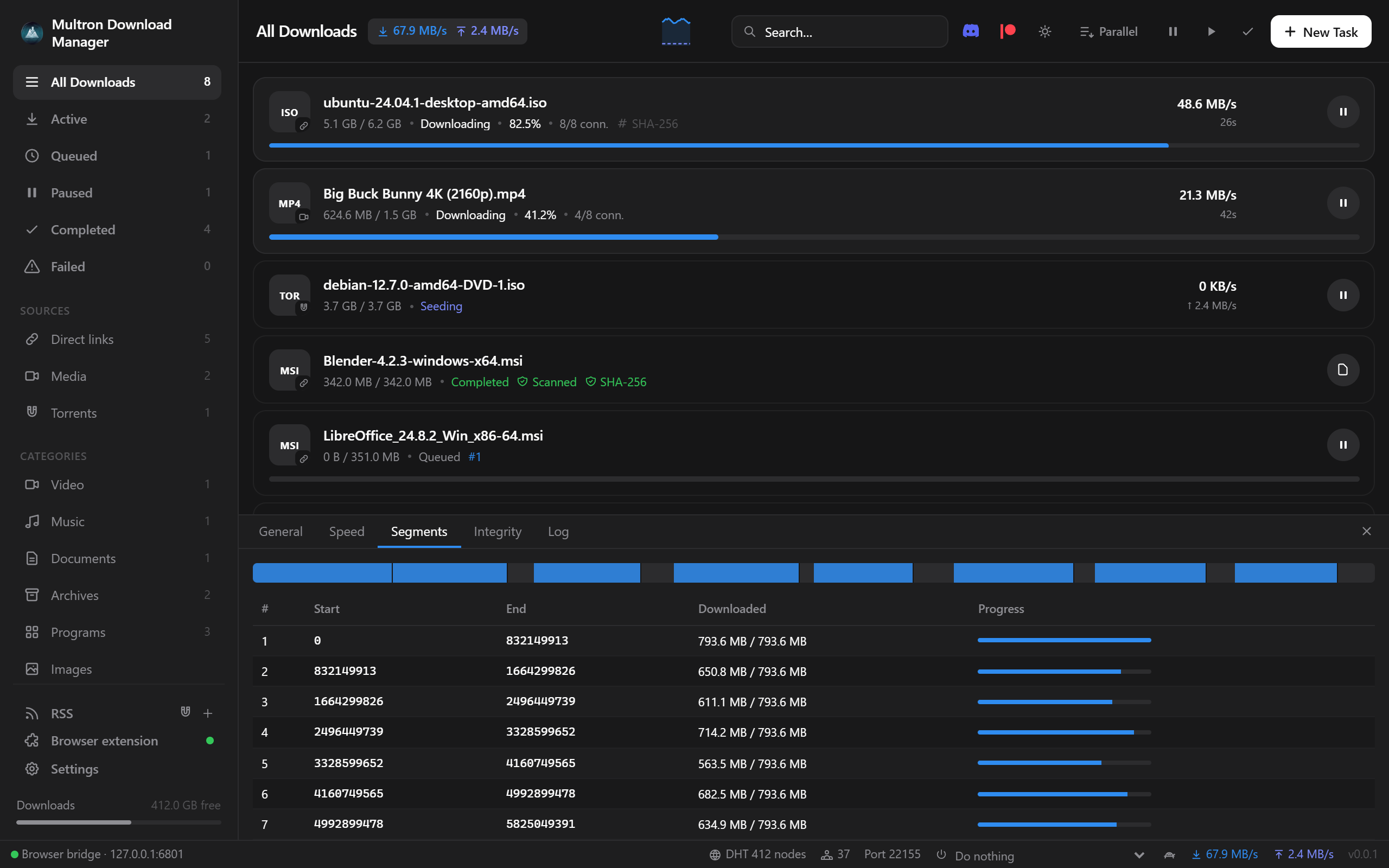
Highlights
- Faster downloads. Every file is split across 8 connections by default (1–64, changeable while the download runs). Idle connections take over the slowest remaining parts, and data is written straight into the final file at its offset, so there is no merge step at the end. Disk space is checked before a download starts, and resuming is safe: if the file changed on the server, Multron Download Manager notices (ETag / If-Range) and starts over instead of producing a broken file.
- Videos from 1,800+ sites. YouTube, Reddit, Instagram, X, TikTok, Facebook, Vimeo, Twitch and many more come through yt-dlp. Multron Download Manager downloads yt-dlp from GitHub and keeps it and FFmpeg up to date automatically (no Python needed). On Windows and macOS it also installs FFmpeg automatically, with the multi-connection engine; the download shows FFmpeg's own progress while it installs.
- Network changes do not break downloads. Turning a VPN or GoodbyeDPI on or off no longer fails a download: Multron Download Manager waits for the network, gets fresh links and continues. Broken video pieces are fetched again instead of ending with an FFmpeg error.
- MP4 videos play everywhere. MP4 downloads use H.264 video and AAC audio, so they show a picture in every player, not only in players with AV1 support.
- YouTube just works. Videos are downloaded without your browser cookies, which YouTube often rejects ("The page needs to be reloaded"). Cookies are only used when YouTube asks you to sign in. The real video title is shown right away.
- Download from anywhere. Google Drive (including large files and Docs/Sheets/Slides export), MEGA (decrypted while downloading), Dropbox, MediaFire, Pixeldrain and GitHub links work directly.
- Built-in torrent client. BiglyBT-style tabs: Speed, Files, Options, Sources, Peers, Pieces, Info, Privacy and Log. You also get custom trackers, seeding rules, a SOCKS5 proxy, interface binding, IP filters (block or allow, from a file or URL) and listen port 22155.
- SHA-256 verification. Optionally enter the expected hash for each download and have it checked automatically when the download finishes. Checksum files published next to the download are found automatically.
New in this release
Browser takeover
- The extension now catches every download in the browser:
- Clicks on file links go straight to Multron Download Manager, so the browser never starts them.
- Downloads that start some other way are paused instantly, moved to Multron Download Manager and removed from the browser.
- If Multron Download Manager is closed, the extension starts it in the tray and hands over the download. Only if it cannot be started does the browser download the file itself.
- The download buttons always show what will be downloaded — the video, song or file name — on every site, including YouTube Shorts; the name is also used for the download in Multron.
- A browser extension setup assistant:
- It finds your installed browsers: Chrome (incl. Beta, Dev, Canary), Edge (incl. Beta, Dev, Canary), Brave, Opera, Opera GX, Vivaldi, Chromium / Ungoogled Chromium, Arc, Dia, Yandex, Naver Whale, Thorium, Supermium, Cent, Comodo Dragon, Epic, Avast / AVG / CCleaner Secure Browser, Sidekick, Wavebox, Firefox (incl. Developer Edition and Nightly), LibreWolf, Waterfox, Floorp, Zen and Mullvad Browser, plus any other browser registered with Windows.
- It prepares a permanent extension folder and opens the browser's extensions page with the path already on your clipboard.
- The extension then connects by itself; you only press Allow in Multron.
- Manage the extension from Multron Download Manager: installed browsers are listed with an Install extension button, and each connected extension can be reinstalled or removed from its browser. Remove completely takes it out of every browser and removes Multron Download Manager’s browser registration.
Download from any page
- Download video sits on the video itself, on every site. In Reddit, Instagram, X, YouTube, TikTok and Facebook feeds, each video is resolved to its own post.
- Reddit videos download without signing in. Multron Download Manager takes them from the player's stream and names each file after the post title.
v.redd.itlinks work the same way. - Download all from this page collects every video, image, audio file, file link, magnet and post on the page:
- It can scroll infinite feeds for you.
- Galleries come as original-size images, and ads are skipped.
- On Reddit it also picks up videos, GIFs, images and video links posted in the comments, named after the post and the commenter.
- In Multron Download Manager you filter by type, search, select, pick one quality for all, and save into a folder named after the page.
Torrents
- Play video and audio while the torrent downloads, with seeking.
- Create torrents from your own files or folders and seed them right away.
- Force recheck, export the .torrent file, and copy the magnet link.
- Queue limits for active downloads and seeds; seeding limits by ratio or time (pause, remove, or remove with files).
- Watch folder for .torrent files, and RSS feeds with automatic download rules.
- Speed scheduler: a turtle button for slower limits, which can switch on automatically for chosen hours and days.
- After downloads: run a program for each finished file; when everything is done, sleep, shut down or quit.
Safer downloads
- SmartScreen. Finished files are marked as downloaded from the internet, so Windows SmartScreen checks them when they are opened (Gatekeeper on macOS). If SmartScreen is off or was removed from the system, Multron Download Manager shows a warning.
- Antivirus scan. Finished downloads are scanned with Microsoft Defender or with your installed antivirus (through AMSI, files up to 50 MB), and found threats are flagged.
- The result names the antivirus that did the scan.
- If no antivirus is turned on, the file is marked Not scanned instead of clean.
- If your antivirus blocks or removes a file, the download is marked Threat found.
- Every file of multi-file torrents and media downloads is checked.
Both are on by default and can be turned off in Settings → Security.
More protection:
- Redirects from HTTPS to unencrypted HTTP are blocked (on by default), and connections require TLS 1.2 or newer.
- File names are cleaned of right-to-left override and other invisible characters, so a program cannot disguise itself as a document.
- On Linux and macOS the data folder, which holds download history and cookies, is private to your user account.
Managing the list
- Select several downloads with Ctrl+click, Shift+click or Ctrl+A, then pause, resume or remove them together. Delete removes the selection.
- Clear the list from the ✓ button: Clear finished, Clear failed or Clear all….
- Delete from disk also removes the temporary pieces of unfinished video downloads, retries files that are still in use, and tells you if a file could not be deleted.
Queue and speed
- Sequential download. The Parallel / One at a time button in the toolbar switches between downloading side by side and one after another.
- Queue order. Queued downloads show their place (
#1,#2…) and can be moved with ↑ / ↓ (double-click moves to the top or bottom). - Speed limit per download. The gauge button gives one-click limits: Unlimited, 256 KB/s, 512 KB/s, 1, 2, 5 or 10 MB/s.
Appearance
- Light, dark or match the system theme. It follows Windows, macOS and Linux as they switch. The sun/moon button in the toolbar switches manually.
- Accent colors: Blue (default), Cyan, Green, Orange, Purple, Red, Pink, Teal and Gray.
- Transparency effects in three strengths (Light, Medium, Strong):
- Windows 11: Acrylic or Mica
- Windows 10: Blur
- macOS: vibrancy
- Linux: solid backgrounds; theme and colors still apply
System
- Mandatory updates:
- When Multron Download Manager starts and a new version is available, it downloads it (with progress), installs it and restarts before the app can be used.
- A file is installed only if its hash matches
SHA256SUMS.txt. - Without an internet connection Multron Download Manager starts normally and tries again next time.
- Start with the system. The option reads Start with Windows on Windows, Open at login on macOS, and Start when I log in on Linux (an autostart entry). Multron Download Manager starts hidden in the tray.
Also included
- Shows the overall download progress on the taskbar button, with a spinning ring in its corner (also on the tray icon), and in the tray tooltip, and flashes the taskbar button when a download finishes in the background.
- Runs in the background with a tray icon: closing the window keeps downloads, seeding and the browser connection alive.
- Drag and drop
.torrentfiles, paste any link to add it, and open.torrentfiles andmagnet:links with Multron. - Uses your system language by default — English, Turkish, German, French, Spanish, Italian, Portuguese (Brazil), Russian, Japanese, Chinese (Simplified), Chinese (Traditional) and Korean (English when there is no translation), and the installer follows the Windows language too. Translations are plain language files (
frontend/src/lang/<code>.json), so new languages are easy to add.
License
Multron Download Manager is source-available, proprietary software. You may install and use it, and share the official installers unchanged and free of charge; the source code may be read but not copied, reused or modified. See LICENSE and THIRD-PARTY-NOTICES.md.
Installing
Pick the file for your system from the table below.
- Windows: the installer adds WebView2 if it is missing.
- macOS: builds are not notarized yet. Right-click the app and choose Open the first time.
- Linux: every package is built on the distribution it is for, for both x86_64 and arm64: a
.deband an AppImage built on Ubuntu 24.04 (Ubuntu 24.04+, Linux Mint 22+, Debian 13+), a.debbuilt on Debian 12 for Debian 12 and LMDE 6 (*_debian12_*.deb), an.rpmbuilt on Fedora 43 (*_fedora_*.rpm) and an.rpmbuilt on openSUSE Leap 16 that also runs on Tumbleweed (*_opensuse_*.rpm, install withsudo zypper install --allow-unsigned-rpm ./<file>.rpm).
Notes
- Firefox removes temporarily loaded extensions when it closes. Run the setup assistant again after restarting Firefox.
- The Chromium extension now has a fixed ID, so the extension can start Multron. If you loaded an earlier copy, reload it from the extensions page and press Allow in Multron Download Manager once.
- Automatic updates start with the next release: v0.0.1 installs by hand, and later versions install themselves.
Downloads
| Platform | File |
|---|---|
| Windows 10/11 (x64) | Multron-Download-Manager-*-x64-Setup.exe |
| macOS Apple Silicon | *_aarch64.dmg |
| macOS Intel | *_x64.dmg |
| Ubuntu 24.04+ / Mint 22+ / Debian 13+ (apt) | *_amd64.deb / *_arm64.deb → sudo apt install ./file.deb |
| Debian 12 bookworm / LMDE 6 (apt) | *_debian12_amd64.deb / *_debian12_arm64.deb → sudo apt install ./file.deb |
| Fedora 43+ (dnf) | *_fedora_x86_64.rpm / *_fedora_aarch64.rpm → sudo dnf install ./file.rpm |
| openSUSE Leap 16 / Tumbleweed (zypper) | *_opensuse_x86_64.rpm / *_opensuse_aarch64.rpm → sudo zypper install --allow-unsigned-rpm ./file.rpm |
| Any Linux | *.AppImage |
| Browser extension | multron-browser-extension-chromium-*.zip (Chrome, Edge, Brave, Opera, Vivaldi) / multron-browser-extension-firefox-*.zip |
Verify downloads with SHA256SUMS.txt.
macOS builds are not notarized: right-click → Open the first time, or run xattr -cr "/Applications/Multron Download Manager.app".