English · 한국어
A CLI and library that draws cloud architecture diagrams (SVG/PNG) from YAML. Ships 793 AWS · 216 GCP · 3,453 brand/OSS icons.
Built for AI CLIs — archdraw never calls an LLM. The agent writes the YAML; archdraw draws it.
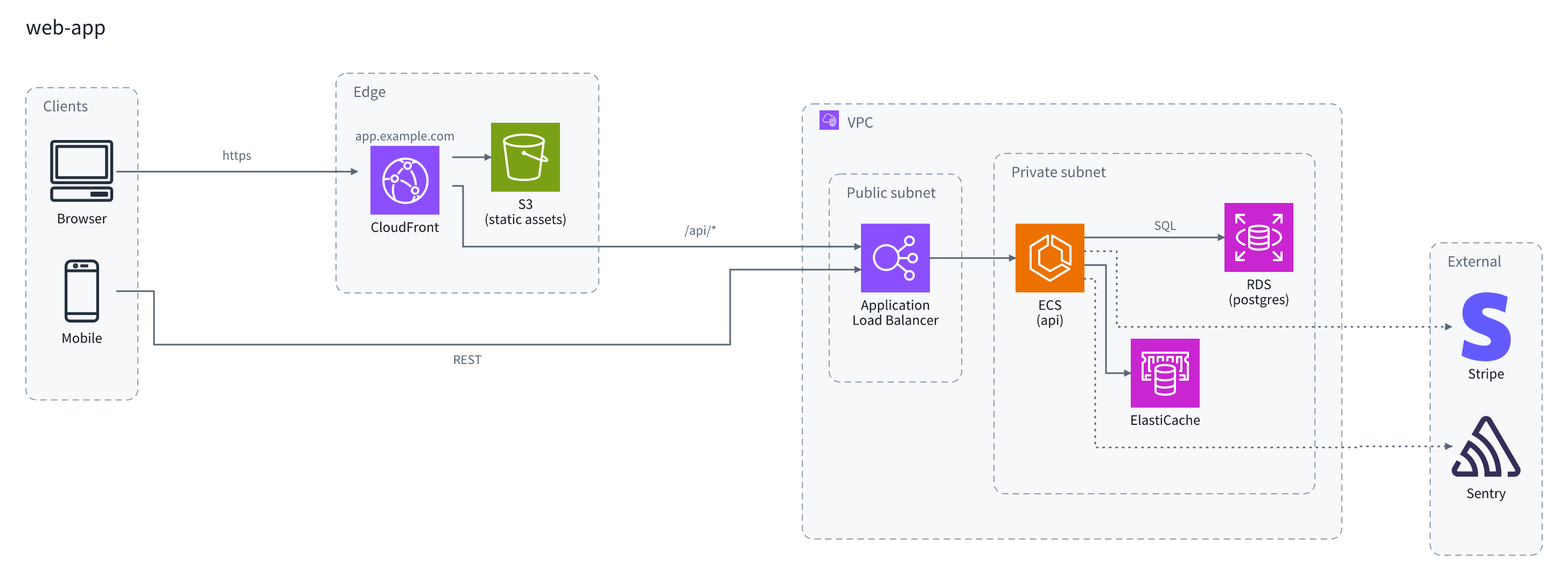
That picture is examples/web-app.yaml, rendered as-is.
npx archdraw examples/web-app.yaml -o web-app.pngNo install needed:
cat <<'YAML' | npx archdraw - -o out.png
provider: aws
nodes:
  - { id: alb, type: alb, label: public alb }
  - { id: api, type: ecs, label: api }
  - { id: atlas, label: MongoDB Atlas }
edges:
  - { from: alb, to: api, label: https }
  - { from: api, to: atlas, label: query }
YAML
A node with a type is drawn as a vendor icon; one without is drawn as a labelled box — so a third party with no icon still makes it into the picture.
archdraw <input> [-o out] [-p aws,brands] [--theme dark]  # render. `-` reads stdin; without -o, writes stdout
archdraw <input> --check                                  # validate only. exits 1 on failure
archdraw types <query> [-p aws,brands]                    # search the types you can use
archdraw schema [--flat] # print the input contract as JSON Schema| Option | |
|---|---|
-o, --out <file> |
.png rasterises, .html writes one self-contained page with the traffic moving along the edges, anything else is SVG. Omit for stdout |
-p, --provider <names> |
Icon packs to load. Comma-separated (aws,gcp,brands). Defaults to the diagram's own provider |
-s, --scale <n> |
PNG scale factor, between 0 and 10. Defaults to 2 |
--theme <name> |
light or dark. Defaults to light |
--check |
Validate without writing anything |
After a render, an edge that travelled more than twice its direct distance is named on stderr — a group boundary drawn between two things that talk a lot is what makes a diagram sprawl.
A type that does not resolve fails with candidates rather than being silently substituted — better than drawing the wrong icon.
Unknown type 'lambdaa'.
  Did you mean: lambda?
Two shapes are accepted. People find the nested shape (children) easier; generators find the recursion-free flat shape (parent) easier. Both produce the same picture.
# nested
groups:
  - id: vpc
    label: Production VPC
    kind: vpc
    children:
      - { id: api, type: ecs, label: API }
# flat
nodes:
- { id: vpc, kind: vpc, label: Production VPC }
- { id: api, type: ecs, label: API, parent: vpc }Every field is in docs/schema.md. For the machine-readable form, npx archdraw schema emits JSON Schema derived from the zod definitions, so it cannot drift from the docs.
The syntax does not change with scale. Every picture below is YAML from examples/, rendered as-is.
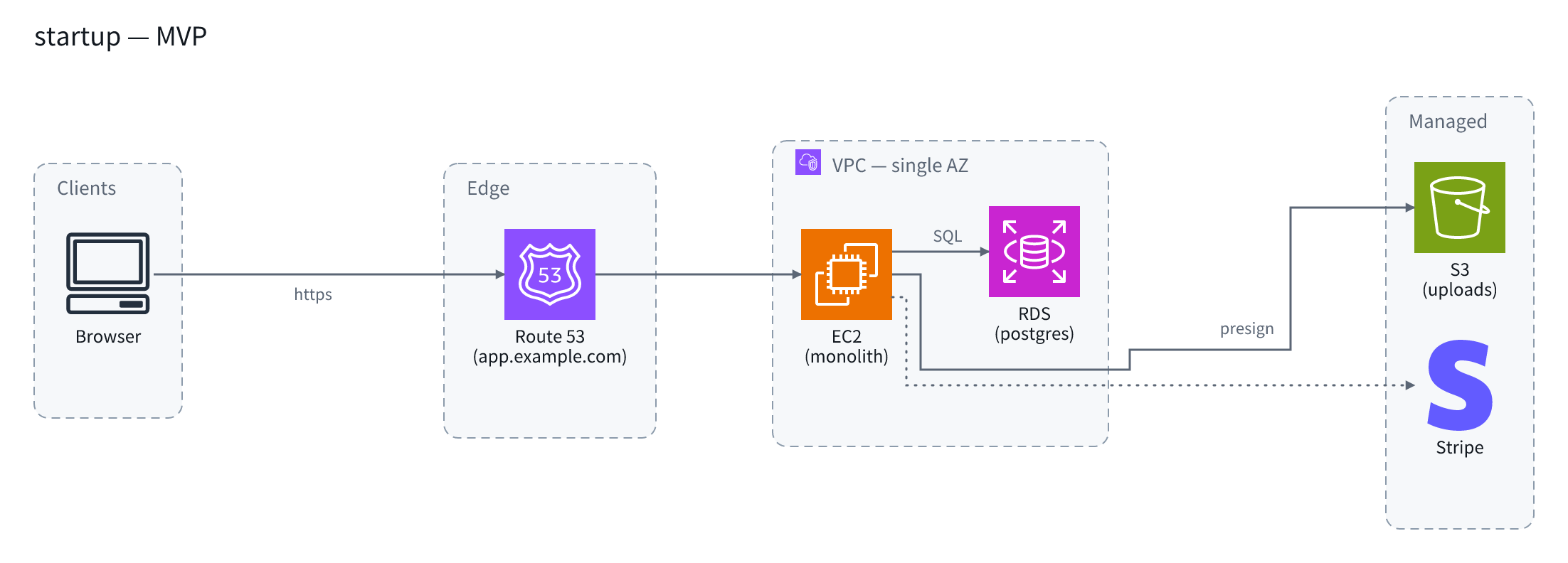
npx archdraw examples/startup.yaml -o startup.pngEarly — examples/startup.yaml
Single AZ. One EC2 instance is the whole application; everything else is managed.
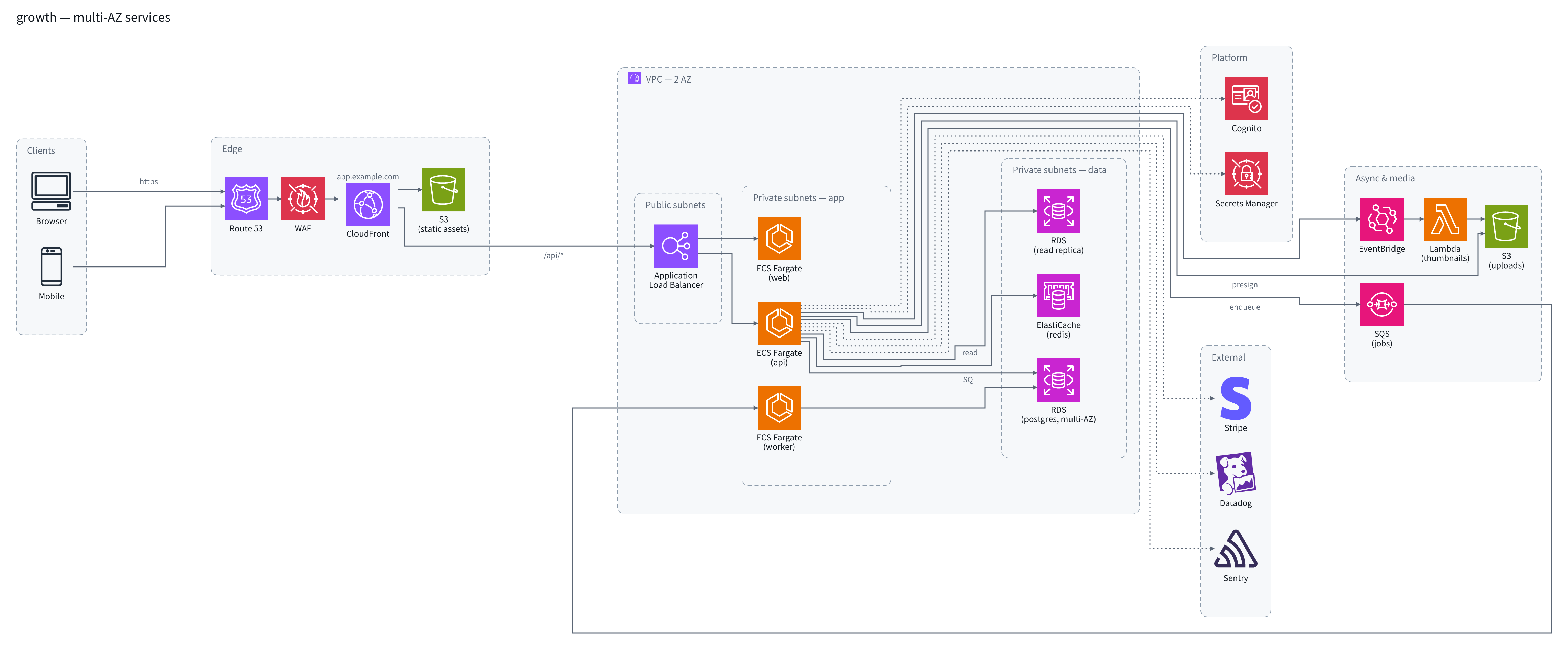
Growing — examples/growth.yaml
Multi-AZ. The monolith is split into ECS services, with queues, cache, a read replica and observability pulled apart.
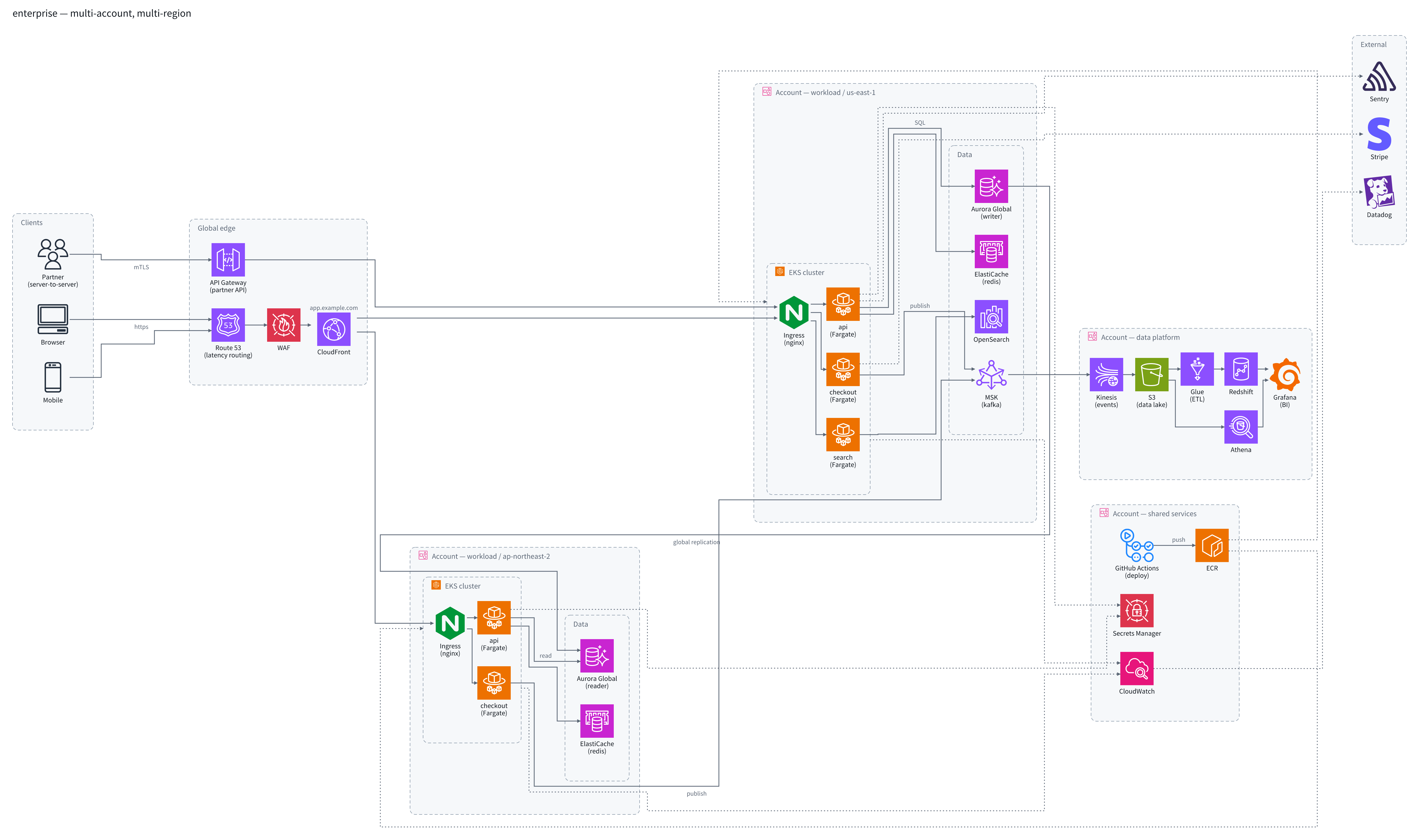
Large — examples/enterprise.yaml
Accounts draw the boundaries and two regions run in parallel. EKS, Aurora Global and MSK carry a data platform and a shared-services account on top.
docs/schema.md |
The input contract — every field, both input shapes, what gets rejected |
docs/agents.md |
Using it from an agent — explore vocabulary → validate → render |
examples/ |
The source YAML for the four examples above |
| Package | Role |
|---|---|
archdraw |
The CLI. Bundles all three icon packs and a font, so npx works straight away |
@archdraw/core |
Parse, validate, ELK layout, SVG render. Carries no icon assets |
@archdraw/react |
The <Architecture /> component |
@archdraw/icons-aws · @archdraw/icons-gcp |
Official cloud icons plus a slug/alias registry. Zero dependencies |
@archdraw/icons-brands |
Brand and OSS icons (Simple Icons, CC0). Redis, nginx, MongoDB and friends |
- The SVG renderer never touches the DOM. A browser and Node run the same code and get the same result.
- PNGs rasterise with the bundled Noto Sans KR alone — no reliance on system fonts, so the same input gives the same picture on any machine. See
packages/cli/fontsfor the Latin and Hangul coverage. - ELK does the layout. Edges route orthogonally and steer around the icons.
pnpm install
pnpm build          # tsdown (ESM + d.mts)
pnpm test           # vitest — includes core's SVG snapshots
pnpm typecheck
pnpm lint           # biome
pnpm icons:sync aws # official icon distribution → packages/icons-aws/svg
pnpm changeset      # propose a version
Node 22+, pnpm 10. pnpm icons:sync uses unzip.
The code is MIT. Icon and font assets belong to their owners and follow their own terms — see each package's NOTICE.