Repository navigation
Releases: Nongfsq/ftop
Release list
ftop 0.2.5

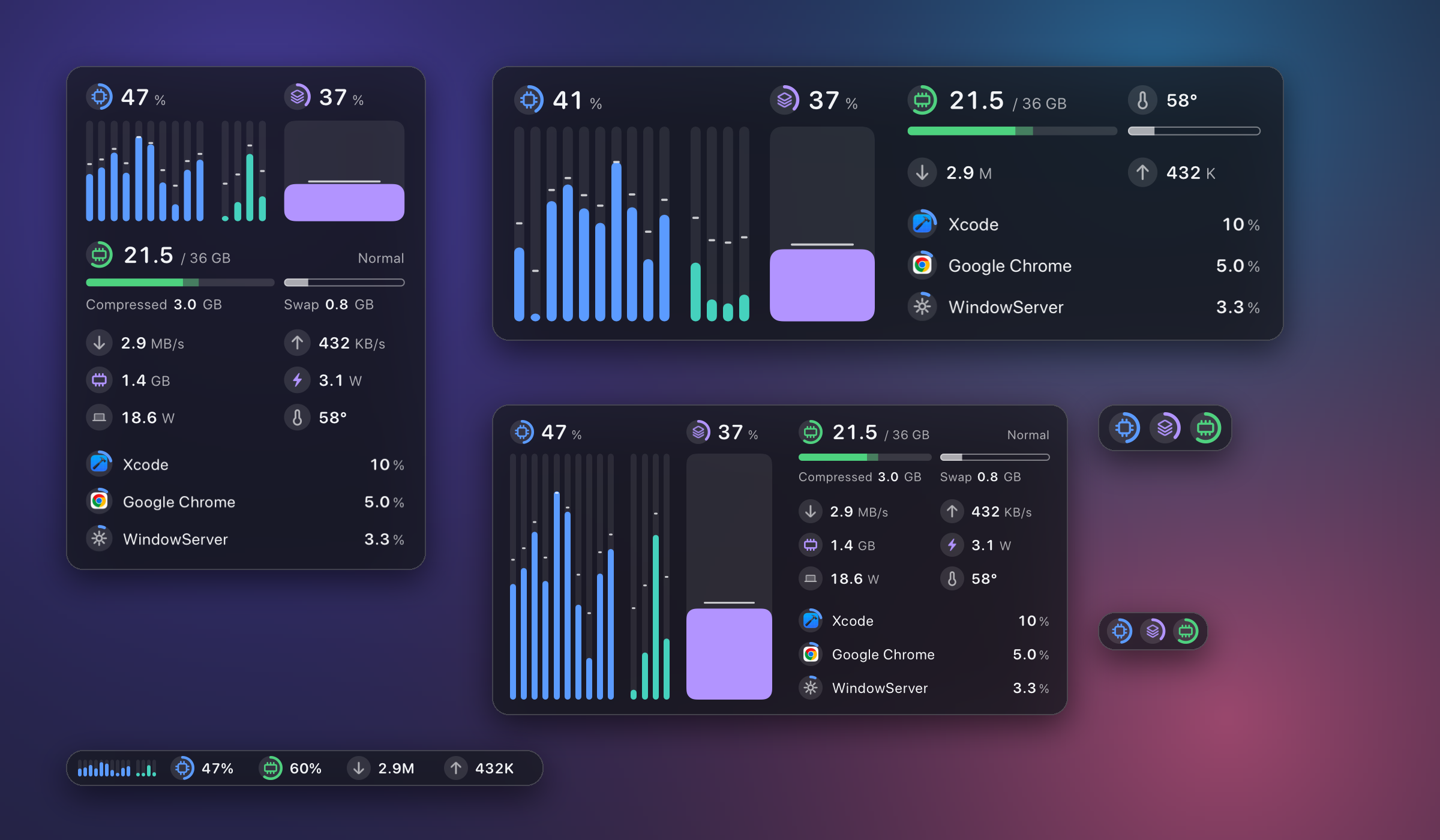
- The GPU has a column of its own. It stands beside the core columns and is read the same way: the fill is usage, the line across it is the current frequency. Its badge and figure sit above it, as the processor's sit above the cores. Suggested in #8.
- At every size. Compact, full, and detailed layouts show the wide column; the corner layout puts the GPU's block on the right; the rich strip and the vertical strip carry a small column. The plain strip and the smallest layout are unchanged.
- The temperature moved down a row. Nothing stands above the columns now except the figure they belong to.
This closes #8: three kinds of core in three groups (0.2.2), core frequencies on the M6 (0.2.3), GPU frequency on the M6 (0.2.4), and the GPU's column.
Install: 0.1.1 and later update themselves. Otherwise download Ftop-0.2.5-arm64.zip, unpack, move Ftop.app to ~/Applications, then follow the two commands in the README. Requires Apple Silicon and macOS 15 or later. The app is ad-hoc signed and not notarized.
ftop 0.2.4
- GPU frequency on chips that list more states than their table has values. On an M6 the system reports 15 GPU states (P1–P15) while the GPU's frequency table has 13 values, and ftop showed no GPU frequency at all. It now reads the n-th state at the n-th table value as long as the states past the end of the table were not used in the interval. Part of #8.
- Nothing is guessed for a state the table does not cover. If the GPU does run in such a state, the frequency reads as unavailable for that interval and
ftop doctornames the state, for example "the GPU ran in P14, which its frequency table of 13 values does not cover". - The table's length comes from the chip. The GPU's node says how many states it has (
perf-state-count); ftop uses that instead of assuming. On chips where the counts already matched, the figures are computed as before. ftop doctor --statesprints more for the GPU: the number of states the node declares, every value of the frequency table in order, and which states lie past the table and whether the sample used them.
Not verified on an M6. That the system's n-th state is the table's n-th value is inferred from two samples of one machine. If you have an M6, the output of ftop doctor --states while the GPU is busy is what confirms it.
Install: 0.1.1 and later update themselves. Otherwise download Ftop-0.2.4-arm64.zip, unpack, move Ftop.app to ~/Applications, then follow the two commands in the README. Requires Apple Silicon and macOS 15 or later. The app is ad-hoc signed and not notarized.
ftop 0.2.3
- A process's CPU is a share of the whole machine. The list showed percent of one core (so a browser could read 455%) under a title row that shows a share of the machine. Both now use the same unit: a process using half of a ten-core Mac reads 50%.
ftop probeandftop probe --jsonuse it too. - Core channels with a cluster prefix are read. On an M6 the system names its per-core channels
EACC_ECPU0,PACC0_PCPU0,PACC0_MCPU2; ftop skipped all of them and reported "0 channels" for every kind of core. They are now recognised. Part of #8. Whether frequencies appear on an M6 is not known yet: its frequency tables may differ too, and nothing is guessed, so they may still read as unavailable. ftop doctor --statesshows what a frequency needs, for the CPU and the GPU. The tables used and where they came from, every candidate table in the device tree with its size and first bytes, how the system numbers each core, and each channel's states. If a frequency is missing on your Mac, this output is what to attach to an issue.- New chips are looked up by what the system reports. When the usual place has no frequency table, ftop takes the tables from the one node that has them, and the GPU's steps from the node its driver is attached to. A missing frequency now says exactly what is missing.
Install: 0.1.1 and later update themselves. Otherwise download Ftop-0.2.3-arm64.zip, unpack, move Ftop.app to ~/Applications, then follow the two commands in the README. Requires Apple Silicon and macOS 15 or later. The app is ad-hoc signed and not notarized.
ftop 0.2.2
- Three kinds of core get three groups. A chip that reports three kinds of core, such as the M6 (super, performance, efficiency), had its performance and efficiency cores drawn as one group. The panel now draws one group per kind the chip reports, with colors stepping evenly between the palette's two core colors. Chips with two kinds look as before. Part of #8; the frequencies missing on that chip are not fixed yet.
- The menu bar shows the reading you choose. Instead of the text
CPU 18%it is now one of processor, memory, GPU, download, upload, or whole-machine power, drawn as the reading's glyph and its number. Choose it under More in the settings block ("Menu bar shows"), or asmenuBarShowsin the settings file. - An unpinned panel stays out of full-screen apps. Unpinned, the panel lives on one desktop like an ordinary window. Pinned, it stays on top on every desktop and over full-screen apps.
- No white corners on the settings block.
ftop doctorsays more about missing frequencies. It lists every distinct reason a core has no frequency, not only the first.
Install: 0.1.1 and later update themselves. Otherwise download Ftop-0.2.2-arm64.zip, unpack, move Ftop.app to ~/Applications, then follow the two commands in the README. Requires Apple Silicon and macOS 15 or later. The app is ad-hoc signed and not notarized.
ftop 0.2.1
- A hidden panel that comes back can be traced. Opening any copy of
Ftop.appwhile one is running shows the running panel. That is intended, but with several copies on one Mac it looked like the panel returned by itself. Every show request is now logged with where it came from: theftopcommand, a second copy and its path, or the app being opened again. See #6. ftop doctorlists duplicate copies. When more than oneFtop.appis on the Mac it prints each path and says to keep one.- Opening the app again shows the panel. Opening the running copy from Finder or Spotlight now brings a hidden panel back; before, only opening a different copy did.
To read the log:
log show --last 1h --info --predicate 'subsystem == "dev.ftop" AND category == "lifecycle"' | grep "show:"Install: 0.1.1 and later update themselves. Otherwise download Ftop-0.2.1-arm64.zip, unpack, move Ftop.app to ~/Applications, then follow the two commands in the README. Requires Apple Silicon and macOS 15 or later. The app is ad-hoc signed and not notarized.
ftop 0.2.0
A redesign of how the panel looks, moves, and is set up.
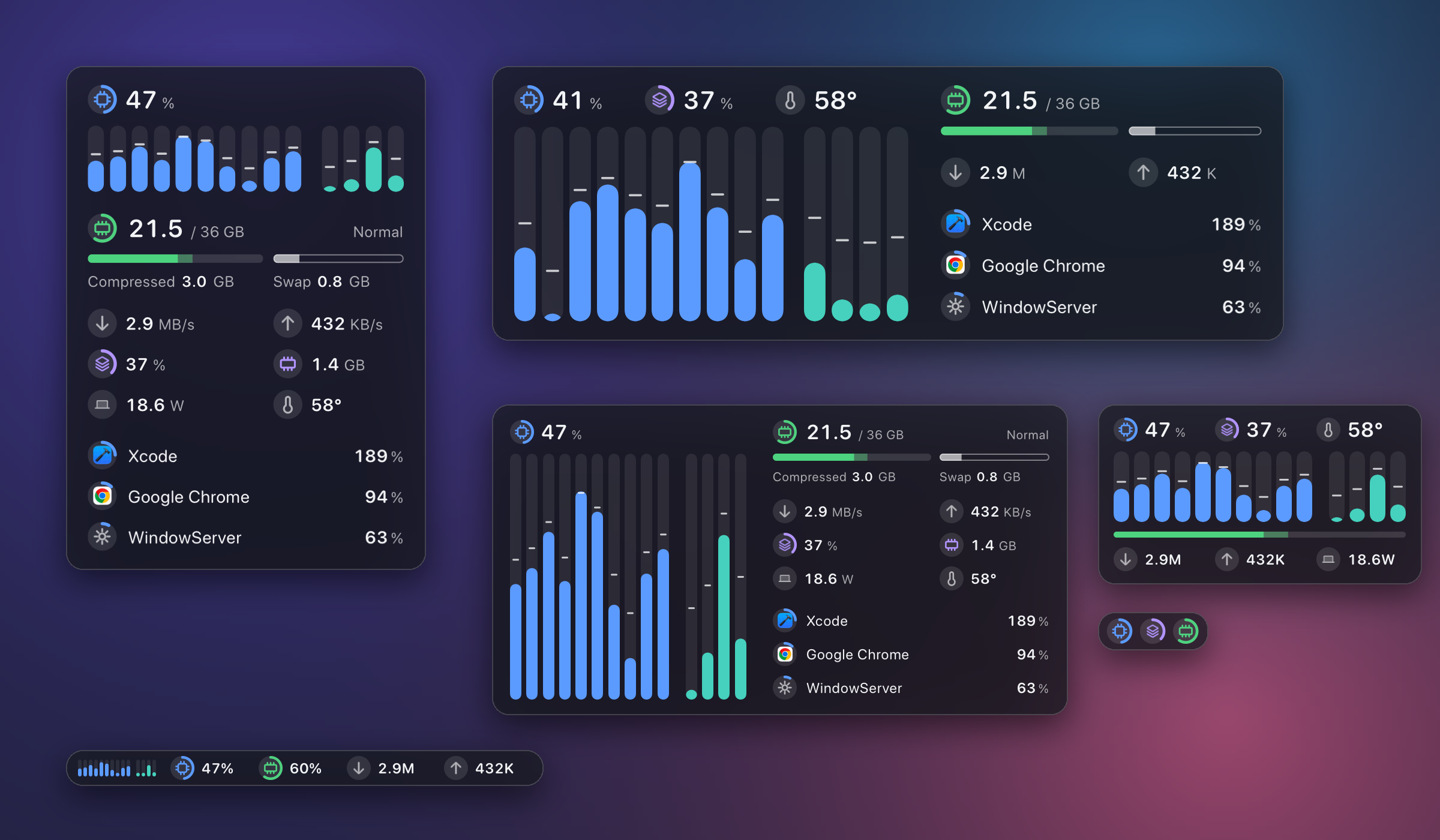
- One badge system. Every figure is led by the same round badge; a badge with an arc is a gauge. One type size per row, and almost no text. Core columns are capsules that ease to each new reading.
- Processes with app icons. Helper processes are folded into the app they belong to. Click a row for a card with its CPU, memory, and the processes inside it. Large windows continue the list in a second column and can rank by memory.
- A list that rests. A process takes its place the moment it becomes busy and leaves it slowly; apps trading the lead by a point no longer swap every second. A row passing its neighbor slides; one going further turns over where it stands.
- Settings in one place. Right-click the panel or the menu bar number for one block of round switches: what to show, behavior, colors, and under More the settings that have a value. The old menu and settings window are gone.
- A smoother snap. After a resize the window settles onto its layout in step with the display.
- Cheaper. The largest layout costs about 0.9% of one core and 52 MB (it was about 4% during development of the new process list); smaller ones stay under 0.8%.
- GPU and whole-machine power are on the panel; one temperature figure, labeled with where it comes from.
If you granted system processes: this version needs a newer helper. Run sudo ftop grant once more; until then ftop doctor says the helper is outdated and the list still works.
Install: 0.1.1 updates itself. Otherwise download Ftop-0.2.0-arm64.zip, unpack, move Ftop.app to ~/Applications, then follow the two commands in the README. Requires Apple Silicon and macOS 15 or later. The app is ad-hoc signed and not notarized.
ftop 0.1.1
- M5 Pro and other new chips. ftop no longer needs to know a chip to read its cores. Core types are taken as the system reports them (an M5 Pro has
MandPcores, which made the whole CPU section unavailable in 0.1.0), and groups and names come from the kernel's own performance levels: "Super" and "Performance" cores on an M5 Pro. A core the system says nothing about is still shown. Fixes #1. - Frequency on more chips. Each core uses the frequency table that fits what it reports instead of two fixed ones. Where none fits, frequency is shown as unavailable.
ftop doctor --statesprints the tables and channels, which is what to attach to a report. - Updates. ftop looks for a new release once a day and installs it, then restarts the panel. In Settings this can be set to Check Only or Off.
ftop updatelooks now;ftop versionprints what is installed. An update never changes the helper installed bysudo ftop grant.
Not yet confirmed on an M5 Pro itself: per-core frequency there may still show as unavailable.
Install: download Ftop-0.1.1-arm64.zip, unpack, move Ftop.app to ~/Applications, then follow the two commands in the README. Requires Apple Silicon and macOS 15 or later. The app is ad-hoc signed and not notarized. 0.1.0 has no updater, so this one update is by hand; later ones install themselves.
ftop 0.1.0
First release of ftop: a small, quiet system monitor for Apple Silicon Macs, shown as one floating glass panel that works at any size.
- Per-core usage and frequency for performance and efficiency cores, chip temperature
- Memory (used, compressed, swap, pressure), network speed, top processes by CPU and by memory
- Drag to any size; the window snaps to the layout that fits
CPU n%in the menu bar; pin and hide buttons; settings window- About 1% of one core while visible, close to 0 when hidden or covered
Install: download Ftop-0.1.0-arm64.zip, unpack, move Ftop.app to ~/Applications, then follow the two commands in the README. Requires Apple Silicon and macOS 15 or later. The app is ad-hoc signed and not notarized.