Repository navigation
Screen and window
src/capture/screen_capture.h, src/capture/screen_capture_win32.cpp,
src/capture/window_capture_win32.cpp
Since 7.0. Source → Picture source takes a monitor or one program's window instead of a card. Everything after the capture is the same: the passes, the recording, the replay, screenshots, the camera. What is about a card, the video standard and the card input, is hidden. Since 7.1 an HDR monitor comes in HDR.
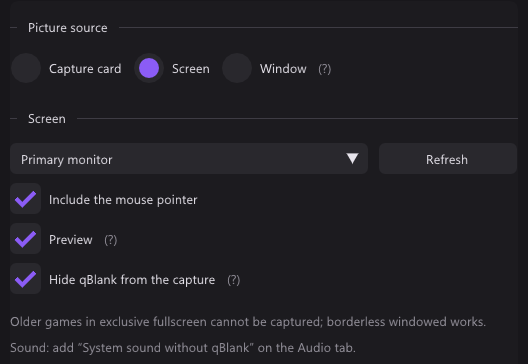
DXGI Desktop Duplication, on a device of its own on the monitor's adapter.
- The duplication hands out the desktop's texture whenever something on it changed, and the pointer apart from it. Each picture is copied into a slot, the pointer drawn over it, and the slot published: one copy on the GPU, two tiny draws for the pointer.
- Three textures, shared with the renderer
(
SharedFrames); the frame buffer only says which is newest. A renderer on another adapter gets RGB32 bytes instead, like a card's. - A frame in which only the pointer moved brings no picture; the last one is kept and the pointer drawn again.
- Taken in the monitor's own pixels (qBlank is DPI aware); in eight bits, or in HDR on an HDR monitor.
- A monitor that is gone falls back to the primary one. One that changes size starts the capture anew.
Windows.Graphics.Capture through its ABI headers, on a device on the renderer's adapter.
- The compositor hands each picture to a frame pool, whose handler only wakes the capture thread. That copies the part the program draws in into a slot: one copy on the GPU, like the screen's.
- Covered windows still come through, minimised ones do not.
- Kept in the config by program and title: a window is a new one each time the program starts. Not found, it takes that program's frontmost window, since a title moves on. A program not running is waited for, every few seconds, without a log line.
- A size change counts once the window has held it a moment; dragging the edge would otherwise restart the capture at every step.
- Newer systems leave out the pointer, the yellow frame and the rate limit.
- The list is what the taskbar shows: visible, not cloaked, not a tool window, with a title; never qBlank's own.
Since 7.1. On a monitor Windows runs in HDR, screen and window come as half floats (RGBA16F, scRGB: linear, 1.0 = 80 nits) instead of eight bits.
- Asked of the duplication (
DuplicateOutput1with FP16 first) and of the frame pool (R16G16B16A16Float) only when the monitor is in HDR, as OBS does. On an SDR monitor the duplication sends eight bits anyway, and WGC's half floats come empty for GDI windows. - Only where the picture stays on the GPU. Read back to another adapter it stays eight bits, brought down by Windows.
- The desktop's SDR white comes from
DisplayConfig(SDR_WHITE_LEVEL), the peak fromIDXGIOutput6::GetDesc1. Shown on the HDR tab: Source: HDR, white at … nits. HDR switched, the white slider moved or the window taken to another screen restarts the capture; asked once a second, as WGC hears nothing of it. - On an HDR screen the picture is shown 1:1. On an ordinary one, and in SDR recordings and screenshots, the desktop's white is white and brighter clips, as in Windows' own SDR copy; tone mapping would sink the white to grey. HDR recordings and screenshots keep the range, white at the desktop's.
- The pointer is drawn into the half floats in one pass that reads the desktop, at the desktop's white; the masked kind inverts what is under it.
- Paper white and source peak are the card's; the screen says its own.
Tested on an SDR monitor with forced half floats, through a window that draws with a swap chain: picture and colours match the eight-bit capture exactly, frame age the same. Desktop Duplication in half floats and the HDR pointer want an HDR screen.
| Setting | Does |
|---|---|
| Include the mouse pointer | Drawn in, or not |
| Preview | Off, the window shows only resolution, frame rate and recording time, and redraws less often |
| Hide qBlank from the capture | Screen only, default on: WDA_EXCLUDEFROMCAPTURE keeps qBlank out of every capture, Remote Play and Remote Desktop included. Off, it shows there, and records itself when it stands on the captured screen. Windows 10 2004 and later |
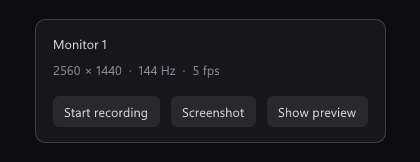
The frame rate there counts pictures that changed: a desktop at rest shows few.
Sound comes from System sound without qBlank in the recording sources.
Older games in exclusive fullscreen own the screen, and Windows shares that picture with no capture. qBlank cannot get past it, so it says so:
- After 2 s without a frame it asks
SHQueryUserNotificationState. Silence alone says little: a desktop at rest sends nothing either. -
QUNS_RUNNING_D3D_FULL_SCREENon the captured screen, or the window's program in front: a toast, A game holds the picture in exclusive fullscreen, and the advice to switch the game to windowed or borderless. - Over once frames flow again. A stray one now and then does not count; Desktop Duplication lets the odd one through meanwhile.
Tested with F.E.A.R. 2. A hook into the game, as OBS's game capture does, is not part of qBlank.
The header is neutral; the two _win32.cpp files are the platform's.