Deployment
🌐 English · Deutsch
For production you build the SvelteKit app with adapter-node and run it with node build, rather than npm run dev. The fastest path is the ready-made systemd installer; Docker and a manual build are also supported. This page covers the production build, the installer, the systemd unit, Docker, an nginx reverse proxy, and the five gotchas that bite people in real deployments. Configure your .env first (Configuration).
npm ci
npm run build
node -r dotenv/config build      # starts adapter-node (default port 3000)
node builddoes NOT read.env. adapter-node only uses real environment variables. Load them withnode -r dotenv/config build(needsnpm i dotenv),set -a; . ./.env; set +a, or a systemdEnvironmentFile=(below). This is the single most common production mistake.
From the project folder on the server:
cp .env.example .env && nano .env     # configure once
sudo bash deploy/install-service.sh   # builds + installs the systemd service + starts it
The script is idempotent: it creates the dks system user if needed, runs npm ci && npm run build, writes the systemd unit, then enables and starts it. It is configurable via environment variables:
APP_DIR=/opt/dks/redbot-dks-dashboard SERVICE_USER=dks SERVICE_NAME=dks-dashboard \
  sudo -E bash deploy/install-service.sh
Afterwards:
journalctl -u dks-dashboard -f          # live logs
sudo systemctl restart dks-dashboard    # restart
sudo bash deploy/update.sh              # update: fetch + build + restart
The installer writes a unit equivalent to this. Note the EnvironmentFile= line — this is how .env reaches node build in production:
# /etc/systemd/system/dks-dashboard.service
[Unit]
Description=PDC Redbot Webapp (SvelteKit/adapter-node)
After=network.target

[Service]
Type=simple
WorkingDirectory=/opt/dks/redbot-dks-dashboard
EnvironmentFile=/opt/dks/redbot-dks-dashboard/.env
ExecStart=/usr/bin/node build
Restart=on-failure
RestartSec=5
User=dks
Group=dks
NoNewPrivileges=true
PrivateTmp=true
ProtectSystem=full
ProtectHome=true

[Install]
WantedBy=multi-user.target
sudo systemctl daemon-reload && sudo systemctl enable --now dks-dashboardThe systemd
.envformat is oneKEY=valueper line — noexport, no quotes.
cp .env.example .env
docker compose up -d --build      # http://localhost:3000
If the bot runs on the host while the app runs in a container, point the gateway at the host:
GATEWAY_URL=http://host.docker.internal:6970The compose file maps host.docker.internal via extra_hosts, so this also works on Linux.
The docker-compose.yml is a full stack: it starts Red-DiscordBot (official image) and the webapp together — after the first start you install and bind the pdc_webdashboard cog inside Red ([p]pdcdashboard bind 0.0.0.0 6970) so the webapp container can reach the gateway. The complete walkthrough — Discord app setup, Red + cogs, compose, reverse proxy, troubleshooting — lives in docs/SELF-HOSTING.md in the repo.
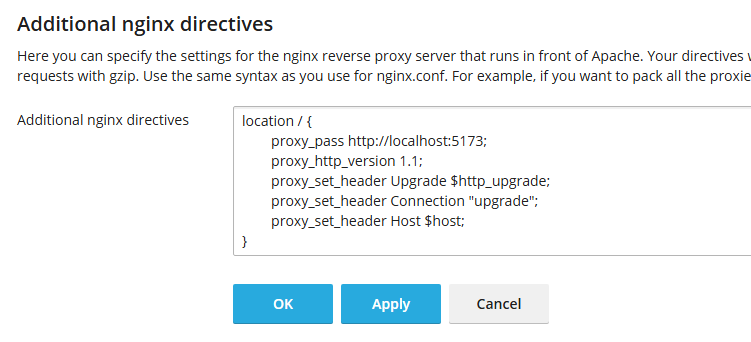
A single catch-all location / proxying to the Node port is enough. Do not add a root/try_files that would intercept /_app/….
server {
    server_name your-domain;
    location / {
        proxy_pass http://127.0.0.1:3000;
        proxy_http_version 1.1;
        proxy_set_header Upgrade $http_upgrade;
        proxy_set_header Connection "upgrade";
        proxy_set_header Host $host;
        proxy_set_header X-Forwarded-For $proxy_add_x_forwarded_for;
        proxy_set_header X-Forwarded-Proto $scheme;
        proxy_set_header X-Forwarded-Host $host;
    }
}
When behind HTTPS, also set the reverse-proxy variables in .env (otherwise you get e.g. a 403 on logout):
ORIGIN=https://your-domain
PROTOCOL_HEADER=x-forwarded-proto
HOST_HEADER=x-forwarded-host-
node builddoes not read.env. Usenode -r dotenv/config build,set -a; . ./.env; set +a, or systemdEnvironmentFile=. -
Behind an HTTPS reverse proxy set
ORIGIN,PROTOCOL_HEADERandHOST_HEADER, or actions like logout fail with 403. -
A Tailwind config must exist. Without
tailwind.config.(cjs|js), Tailwind emits only the base layer and the page is (almost) unstyled. Never delete it; commit it to git. With"type":"module",tailwind.config.cjs(CommonJS) is most robust. -
The proxy must pass
/_app/through. A single catch-alllocation /to the Node port is enough; noroot/try_filesintercepting/_app/.... -
CDN cache (e.g. Cloudflare): assets are cached
immutable. While iterating, purge the cache after rebuilds or use "Development Mode".
- Configuration — env loading and reverse-proxy variables
- Self-Update — updating the running deployment from GitHub
- Getting Started — local development setup