View Package and Class Structure
This page expands on the in that it will focus on a specific element of the system, specifically the organization and structure of the views. Only the more interesting portions are documented.
More details about the subscriber, component, and eventbus can be found at:
- Eventbus
- Subscribers
- Components
The goal of the view architecture is to help us keep the code as maintainable as possible. The architecture is very similar to an MVP architecture but not quite there yet. We seem to be heading in that direction but I do not believe we are prepared yet to make the full jump, we first need to complete the refactorings to meet the guidelines of this page, after which we can make that decision. Trying to do so now would be too challenging due to how coupled and intertwined the code is combined with the rapid changes going in the development view at the moment. Therefore right now our goal is to separate out all the GUI from the business logic as well as the event handling code so that when we're ready that transition will be possible and we can make that decision at that time. This will also greatly reduce merge conflicts and make the code more maintainable.
Below is a screenshot of the direction were planning to go with the view package and component structure (not all package refactorings are in dev and some are not yet even done).
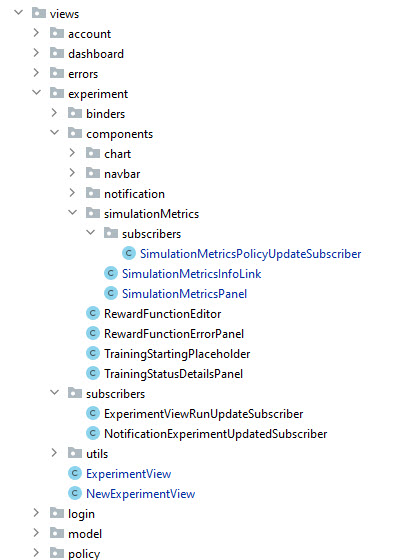
In essence the view architecture is mainly comprised of the view, components, and subscribers. The structure is:
view
├── ViewClass
├── binders
│   ├── BinderClasses
│   └── ...
├── components
│   ├── SimpleComponentClasses
│   ├── ...
│   ├── complexComponentPackages
│   │     ├── ComponentClass(es)
│   │     └── subcribers
│   │           ├── ComponentNameSubscriberNames
│   │           └── ...
│   └── ...
├── subscribers
│   ├── ViewSubscribers
│   └── ...
├── utils
│   └── ...
└── ...
The views should be as barebones as possible. They should mainly consist of putting the components together. Right now they are also injecting services, DAO's, etc. but eventually we'll want to re-investigate that once things are refactored (as well as determine who injects what where). For now though we want to keep the views as simple as possible and view them more as the glue that ties things together.
**IMPORTANT NOTE: The view should NOT contain any subscriber inner classes, these should be in their own subscriber classes. The only reference to the subscribers should be the instantiation for the eventbus.
Right now they are of limited use but often binders can be re-used so by putting them in a special location it makes it a lot easier to refactor them to a shared location when we need to reuse them. An example of this would be say the binder for naming an experiment should we add the ability to rename experiments in multiple locations.
Simple components that have no subcomponents or subscribers can just be located in the components package. All other components, that is anything but a simple component, should be in it's own package. See Complex Components just below.
**IMPORTANT NOTE: Component classes should only contain UI code and NOT business logic. That should either be done in the subscriber or in a separate class outside of the component class. The Component classes should also NOT contain any subscriber inner classes.
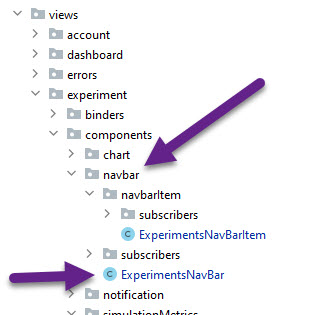
Complex components should have their own packages and potentially subscriber sub-packages. Looking at the image above you can see that the simulationMetrics component package has it's own subscribers sub-packages. Sub-components that have their own subscribers and/or sub-components should also be in their own packages such as the navbar (it's a bit complex because there is a subcomponent (navbarItem) with it's own subscriber):
**IMPORTANT NOTE: dev is NOT yet refactored as show in the image below.
Subscribers are the place where you put all the eventbus subscriber classes for the view level only. Do NOT combine subscribers together in a single class or in the view as inner classes, each subscriber should have it's own class.
** IMPORTANT TIP: Components should attach their own subscribers. The View only attaches subscribers for the whole view such as a popup notification. Component specific subscribers need to be subscribed in the component itself. So for example the navbar subscriber for when an experiment changes state to say running is attached in the navbar component in the onAttach() method.
The subscriber should as much as possible only send in the highest level object and let the component know how to render itself. So for example in the SimulationMetricsPanel we have:
@Override
public void handleBusEvent(PolicyUpdateBusEvent event) {
    PushUtils.push(getUiSupplier(), ui -> {
	Policy policy = PolicyUtils.selectBestPolicy(event.getPolicies());
	    if (simulationMetricsPanel.isShowSimulationMetrics() && ...) {
		PolicyUtils.updateSimulationMetricsData(policy);
		simulationMetricsPanel.updateSimulationMetrics(policy);
	    }
    });
}

@Override
public boolean filterBusEvent(PolicyUpdateBusEvent event) {
	return simulationMetricsPanel.getExperiment().getId() == event.getExperimentId();
}
Where the filter (if condition) on when to handle the event is found in filterBusEvent() rather than an extra if condition in handleBusEvent().
Subscribers will automatically filter out events from the same view (UI) unless explicitly told to also listen to events fired from itself. This can be done by overloading the constructor to and setting the isListenForEventOnSameUI parameter to true.
The code for handleBusEvent() basically calls the business logic required then updates the panel with the simplest object which in this case is the Policy. The components are responsible for figuring out how to render the Policy and get what they need from it.
** IMPORTANT TIP: It is very important to put the if condition for the filter in the method filterBusEvent() and NOT in the handleBusEvent() method because the first is filtered right away BEFORE any thread is created whereas the second is filter AFTER requiring a thread for each event.
handleBusEvent() will almost always want to push an update to the UI as shown in the above code snippet. As a result you will need to pass the UI to the subscriber in the constructor.