Webapp System Architecture
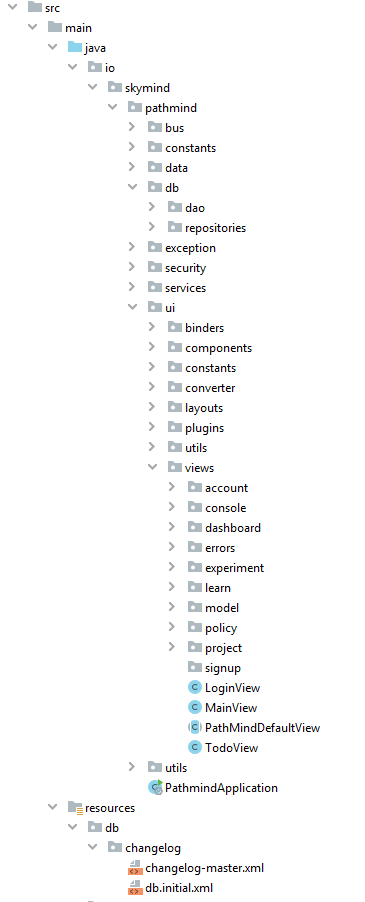
Below is a screenshot of the current project structure. This page will focus on the core sections and folders and explain what they are and what they do from a high level perspective. Only the more interesting parts will be covered and as a result this is NOT an extensive or detailed document.
Please note that most of the hooks for the backend will be in either calls to the db packages, call to the services packages, updates to the eventbus, or through pushes through the StatusUpdater interface. All backend code that is used in the GUI (the views) should only be through these 4 possible hooks (all described below).
Backend: The eventbus can be used by the backend to push notifications of updates to the front end. All you need to do on the backend is publish and event to the bus and any front end components that are interested will pick them up automatically.
This is where all the eventbus code framework is located. The event bus passes PathmindBusEvent of which we currently have PolicyUpdateBusEvent and ProjectUpdateBusEvent. To keep things simpler we're only passing a single type of busevent for now and so we use the PathmindBusEvent.BusEventType to detect the type of bus event through filters. In most cases we don't have to cast to the specific bus event type as we only need the data id once we know the type.
Similarly most of the time the GUI components are looking for the same types of events with the same filter conditions therefore there is a utils package to help detect interesting since it's often the same code. Currently we have only have PolicyBusEventUtils but this is expected to expand. The filtering is more involved then just the right type of event, for example for the policy it also detects if it's for the same experiment and so on.
For a more detailed explanation please refer to the Data Model page.
Every data model object extends the Data class which consists of the id and name attribute. After that if a data model object is archivable (project, model, and experiment) then they will also extend the ArchivableData class. In other words Experiment extends ArchivableData and ArchivableData extends Data.
Each data model object contains a 1 to 1 mapping of the database columns. Beyond that most data model objects will also contain any data they need for the screens (views) so please be aware that if it's not on the screen then it may not be available in the data model. We could include all fields but for now I've kept them as minimal as possible. That being said all data model classes currently contain all the parent objects along with their name and id. So for example the Experiment class contains it's parent Model class (with name and id) as well as it's parent Project class (with name and id). Anything beyond the name and id in the parent objects are NOT guaranteed, again it's only what is needed on the screens beyond that.
Under the data package there is a utils sub-package which includes all the helper methods specific for each data model class that needs to be used in multiple places. Right now most of it is to generate fake data but for example RunUtils has a getElapsedTime method to be consistent since it's more than just reading a couple of values.
For a more detailed explanation please refer to the Data Model page.
Backend: The db package is separated into two sub-packages called dao and repositories. The repositories package is meant to hold simple and single SQL queries and calls. Anything that is transactional, involves more than one query, etc. should be located in the dao package. Right now in most cases the dao is a pass-through to the repositories layer (DAO extends Repository) but this is expected to change as more backend database code is implemented.
IMPORTANT: The front end should only ever use the DAO package.
Right now it's very miminal since we're still learning the details and so only contains the InvalidDataException which is used when someone tries to enter a view with an invalid ID in the URL. The PathMindException is the parent exception of all custom exceptions.
Right now the security is managed through some simple custom code using the SecurityUtils class as I didn't know what we were planning to use to manage users, if we had roles, etc.
In essence we use the VaadinSession to store the PathmindUser once they are logged in and nullify the value on logout. Then to determine if a user is logged in we look to see if they are in the session. If they aren't we throw an AuthenticationException which brings them to the login page. This means that anywhere we need to get the user's id we just do SecurityUtils.getUserId() and if it's null it throws the AuthenticationException.
To prevent anyone from randomly typing in a URL and trying to bypass the login the main class PathMindDefaultView overwrites the beforeEnter method and does a check to see if the user is logged in and if not automatically forwards them to the login page. Since all views extends the PathMindDefaultView (except the LoginView) this is automatically done on every single view without the developer having to remember to do any login checks. Just a quick heads up the PathMindDefaultView does a lot more than just security checks so every single view (again other than the LoginView) needs to extend the PathMindDefaultView.
Backend: This package is meant to be where the backend service hooks are located. In other words outside of events through the event bus, progress bar updates though StatusUpdater, or calls to the database layer, all other backend hooks should come through the services package. So for example a training run should be hooked through the services package.
All the GUI code is located here. The more interesting sections are discussed below.
In cases where the same form elements are used in multiple places then common binders are located here to avoid having to replicate all the mapping, validation, etc. logic.
This is the package where common components are located.
Backend: The StatusUpdater consists of the ability to give a progress percentage, error messages, and notify when a task is successfully completed. Right now successfully completed is fileSuccessfullyVerified but this should be more generic and something like successfullyCompleted (I have not yet refactored it as I don't fully know all the new updated hooks). We should also include a failedCompleted method because we may not want to rely on whether or not there is an error as a way of terminating the task (we want to show all the errors as they occur and not stop the process when we encounter the first error for example).
Anywhere we need a searchbox we can just override SearchBox and all we need to do is supply it the grid as well as the isMatch method which then uses SearchUtils.contains(attribute) on each column to update the grid.
When we need the ability to archive items in a grid we can just add the ArchivesTabPanel to the screen and it will add all the necessary code to the grid to be able to manage archiving. IMPORTANT: Save is currently NOT implemented as there is no database support for it but I suspect it will just be an extra Consumer in the constructor which will be a lambda on how to save the item to the database. Something along the lines of project -> projectDAO.archive(project)
ui.layouts
Every page other than the login uses the MainLayout as it's layout.
There's several important classes here that you need to know that will greatly simplify your life and coding.
-
ExceptionWrapperUtilsneeds to be used on any button click action that can result in an exception. The benefit is that it not only saves you from having to write all the try/catch code but it also means that the error handling is consistent through the application (log the error, go to the error view, etc.) -
FormUtilsneeds to be used any time a form needs to be validated -
GuiUtilsshould be used to setup simple components in a consistent manner such asgetBoldLabeland so on -
NotificationUtilsshould always be used for any popup notification so that we have consistent popup styles -
PushUtilsshould be used for all push code as it will deal with errors and saves the developer from having to remember to wrap everything in anaccesscall -
WrapperUtilsis probably the most important and most used utils class. Any time you need to setup aHorizontalLayout,VerticalLayout, orSplitPaneyou should always use this class as it makes the code a lot more readable AND it applies the same consistent formatting and styles throughout the application.
All views are located here. Each view has it's own package and within that package there can be sub-packages such as components, binders, and so on. However if something is used beyond it's view then it should be promoted to the shared components package. View classes should be minimal and very simple to follow. They should always be kept as clean and simple as possible and refer to outside classes. They should be as close to pseudocode as possible.
The more interesting views are discussed below:
All views (except for the LoginView) extends PathMindDefaultView. In addition to setting up the components and structure PathMindDefaultView also does the login checks and so on. Below we will only cover the main methods of interest that tend to be overriden more frequently:
-
loadDataTheloadDatamethod is meant to load the data from the database and as such will throw anInvalidDataExceptionif no data is found. The benefit of this is thatPathMindDefaultViewknows how to handle this exception and will consistently handle data errors. From the developers perspective your code is just DAO.getData and then if that fails you throw an exception. Generally theloadDatamethod is very short and simple. -
getTitlePanelThegetTitlePaneljust returns aScreenTitlePanel(title and subtitle such as Project: projectName) but this is expected to be refactored shortly to match the new screen designs. Basically this is to setup the equivalent of an h1 tag but is more involved. Please keep in mind that this is different thangetPageTitlewhich is used for the browser tab name. -
getMainContentThegetMainContentis as expected, where the main components for the screen are generated. In most cases this method will consistent ofWrapperUtils. The goal of this method is to first containsetupmethods (as needed) and then to add the components in a simple to read way. The use ofWrapperUtilscombined with good code formatting (indentations) should make the layout and flow of the screen simple to understand. There should be no code in that method that creates any components including buttons, etc. unless it can be embedded in a single line. This method should JUST create the components and should NOT load the component with data. -
updateScreenTheupdateScreenis where the data model (that was retrieved withloadDatais mapped into the components of the screen. In some cases this is done through the Binder and in other cases it's just populated. The goal here is that each screen component only needs 1 line to populate itself. -
subscribeToEventBusThesubscribeToEventBusis only used by some screens but it must be done last in the process as it can sometimes need certain things to be setup beforehand.
Before getting into some specific views I just wanted to note that we use HasUrlParameter to pass around the data model id's as a way of letting the views know which data to load. It is however possible that we may need to pass more than one id in which case we do view/id1/id2 and use HasUrlParameter<String> and then split the parameter up. For now only ExperimentView needs this so the code is located in that class but should it become needed elsewhere then it will be refactored to be used in a consistent manner.
This view is the most complex because it includes the new project wizard. Each panel of the wizard is located in the views.project.components.wizard package.
It needs to be refactored to keep it maintainable like the other views but since it's been in so much flux I've avoided doing it so far.
Is special in that everything needs to be manually setup.
This is where the JOOQ database setup code is located. The project Readme file has details on the conventions and standards.
Rather than use profiles in Maven the project is instead setup to use System Environment variables.