Repository navigation
Reporting a bug
When the game crashes, the tool shows an error, or something looks wrong, please send:
-
The logs: in the tool, Report a bug / Suggest (bottom right, also Tools -> Report a bug...). Write a few
words of what happened, add a screenshot if you like (Add a screenshot..., or take one with Win+Shift+S /
PrintScreen and press Ctrl+V in the report window), press Send - the tool's log, the game's
system.log.txtand the crash report of the game's last run (REX / M2EX) go to the author at once, no account needed, and you get a report number. The crash doctor reads the game's log first and says in one line, at the top of the window and on the report's first line, why the game stopped - the line the engine writes after a crash (a picture or model it could not find, a Script Error with its file and line), or that the game was closed in the usual way. On Windows the window also takes a picture of the editor's own window as it was (nothing else of the screen) - Leave the window's picture out if you do not want it. The author's answer comes back to the editor (see Answers to my reports below). When the tool itself shows an error, it offers the same window. A long game log is cut to fit: its start (where the game reads the mod's files and says what it does not like), every error and warning line of the middle, and its end - a game log of several MB goes as about 100 KB. A big screenshot goes made smaller (a JPEG, at most 2560 pixels wide), so a few fit the 4 MB a report can carry. The editor's log also holds a short picture of the loaded mod (its factions, towns, map size, which files are its own - counts and names, no files), so the author sees what the mod is. With a mod loaded,mod_files.txtgoes too (untick it to leave it out): the list of the mod's files - name, size, date, and whether the game has the file with the same size - never their contents. Anonymous: before anything leaves, the logs lose your Windows user name (also inside folder paths), the computer's name, e-mail addresses, Steam IDs, IP addresses and the player's name of REX's crash report; add your own words to hide (your nick). Show what is sent shows every line that goes. The contact field is optional; with remember it ticked (the default) every next report fills it in by itself - it is kept in Tools > Settings > Reports too, and unticking it forgets it. Rather send it yourself? Tools -> Save logs (zip) (or Save as zip in the report window) - the same logs, the names cut out, saved inCampaignEditor\CampaignEditor_logsnext to the exe. - A video or a screenshot of what you did and what went wrong.
- Which game and mod (Rome / REX / BI / Medieval II / M2EX, the mod's name) and the editor's version (in the window's title).
Send them as a GitHub issue or on Discord. With the logs the cause is usually found and fixed the same day: they name the file, the line and the game's own error.
Video: how to send a bug report and a suggestion.
Every report - bug or idea - arrives as its own numbered entry with its logs and is read:
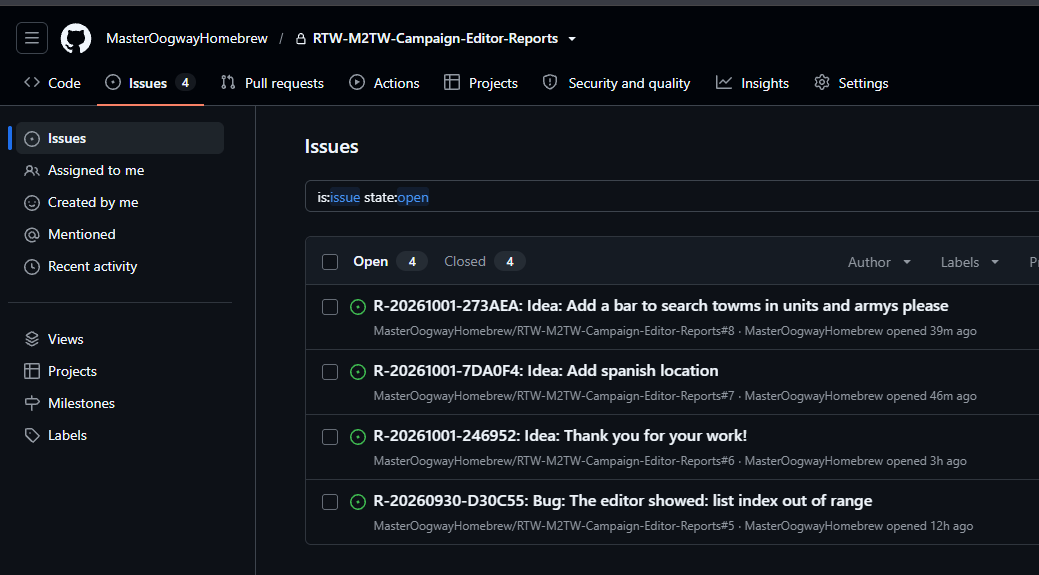
The author answers every report - a question ("which picture?"), "fixed in the next build", or why not. You see the answer in the editor itself: the report window's second tab, Answers to my reports. It lists the reports you sent from this editor, each with its state (open / closed - fixed / closed - not planned) and the talk so far. The editor looks for new answers when it starts (every few hours), Check now looks at once, and the Report a bug / Suggest button says "(1 new)" when one came (the status line says it too).
To reply - answer a question, add details, say "still broken in the new build" - pick the report, write in Your answer to the author, add a screenshot or tick with the newest logs if it helps, and press Send the answer. It goes to the same report.
Private: the editor asks only by the reports' numbers (random, known only to you) and gets back only the answers to them. Switch the start-up look off in Tools > Settings > Reports.
An idea or a wish? The same button: pick "an idea", write what the editor should do - it reaches the author the same way (no logs needed).
Security problems: see SECURITY.md - report them privately, not in an issue.
Tools > The game's log in plain words reads the game's newest system.log.txt for the mod and explains it: what
crashed, which file and line the game could not read (the line is shown as it reads now) and what to do. If no log
is found, the window says how to switch the game's log on (REX and M2EX keep it on; the original games need two
lines under [log] in their preference file).