Releases: Poetrynan/Muster
Release list
Muster v0.1.7

Muster v0.1.7
Bug Fixes
- Fixed macOS Intel builds stuck in queue since v0.1.2 — restored the
macos-15-intelrunner label — thanks @AndyXu02 - Added a manual platform selector in the release workflow to backfill missing Intel DMGs
- Fixed
workflow_dispatchreleases not honoring the requested tag - Fixed "Monash SSO & Credential Security" showing Windows-specific details (Credential Manager / DPAPI) on macOS — now detects the platform and shows macOS Keychain instead — thanks @Mashirl
- Download links in release notes now point directly to the assets (no more scrolling to the bottom)
Downloads
| Platform | Type | File |
|---|---|---|
| 🪟 Windows | NSIS Setup (Recommended) | Muster_0.1.7_x64-setup.exe |
| 🪟 Windows | MSI | Muster_0.1.7_x64_en-US.msi |
| 🍏 macOS | Apple Silicon | Muster_0.1.7_aarch64.dmg |
| 🍏 macOS | Intel | Muster_0.1.7_x64.dmg |
Muster v0.1.6
Bug Fixes
- Quiz submission dialog on the Assignments page no longer shows "Not submitted" for finished quizzes (the v0.1.5 fix only covered the course-detail dialog)
Tests
- Added 3 regression tests using a real FIT4005-FIT5125 (MST template) course page: section-link extraction, resource parsing, and scoped section parsing
Downloads
| Platform | Type | File |
|---|---|---|
| 🪟 Windows | NSIS Setup (Recommended) | Muster_0.1.6_x64-setup.exe |
| 🪟 Windows | MSI | Muster_0.1.6_x64_en-US.msi |
| 🍏 macOS | Apple Silicon | Muster_0.1.6_aarch64.dmg |
| 🍏 macOS | Intel | Muster_0.1.6_x64.dmg |
Muster v0.1.5
Bug Fixes
- Quiz submission dialog no longer shows "Not submitted" for finished quizzes (wrong Moodle route used)
- Grades now include the max score: "13" → "13 / 13"
- Feedback no longer leaks raw HTML markup from Moodle
- Grades panel no longer stuck at "0/0 · no data" after re-login (launch sync now fetches grades + calendar)
- Empty-state illustration restored in the grades panel
New
- Downloads organized into per-course folders (e.g.
Downloads/Muster/FIT5215/…), toggle in Settings → Downloads
Downloads
| Platform | Type | File |
|---|---|---|
| 🪟 Windows | NSIS Setup (Recommended) | Muster_0.1.5_x64-setup.exe |
| 🪟 Windows | MSI | Muster_0.1.5_x64_en-US.msi |
| 🍏 macOS | Apple Silicon | Muster_0.1.5_aarch64.dmg |
| 🍏 macOS | Intel | Muster_0.1.5_x64.dmg |
✨ Muster v0.1.4 — Update Banner & Dynamic Versions
v0.1.4 adds a silent update check on launch with an in-app banner when a
newer release exists, makes the app version fully runtime-driven (no more
hardcoded version strings anywhere), and attaches structured system info
(reported from Rust, not a user-agent string) to feedback submissions.
✨ What's New
1. Update banner — know when a new version ships
On launch, Muster silently checks GitHub for a newer release. When one exists,
a banner appears inside the app (after login, on the dashboard): "New
version v0.1.5 available — tap to view". Tapping opens the release page; the
X dismisses it for the session. No update → no banner, zero noise.
2. Version numbers are no longer hardcoded
Previously the version shown in About, the login footer, the update check and
feedback had to be bumped by hand on every release — v0.1.3 shipped with a
stale v0.1.1 baseline. Now every version string comes from the runtime
(tauri.conf.json via getVersion): the About page, login footer (4
languages), update-check baseline and feedback attachments can never drift
again. The version is maintained in exactly one place.
3. Feedback carries real structured system info
Feedback submissions now attach a structured system report obtained from Rust
(get_system_info) instead of a raw browser user-agent string:
{
  "os": "windows",
  "arch": "x86_64",
  "osVersion": "10.0.26200",
  "isAppleSilicon": false,
  "appVersion": "0.1.4"
}
On macOS it reports e.g. "os": "macos", "arch": "aarch64",
"osVersion": "15.5", "isAppleSilicon": true. No UA parsing, no fake data —
exact OS family, kernel/product version, architecture and app version.
🐛 Bug Fixes
1. About page / login footer showed a stale version ❌→✅
The About page and the login footer (all four languages) could display an old
version when a release forgot to bump the hardcoded constant. Root-caused and
eliminated: version display is now fully runtime-driven (see What's New #2).
2. Update check could report the wrong baseline ❌→✅
The update-check baseline was a hardcoded constant that drifted (v0.1.2
shipped with a v0.1.1 baseline, which would have prompted a false "update
available"). The baseline is now the actual runtime version.
3. Feedback attached a confusing browser user-agent ❌→✅
Feedback used to send a WebView user-agent string (Mozilla/5.0 … Edg/…)
that looked fake and didn't identify the app. It now sends precise structured
system info from Rust (see What's New #3).
🪟🍏 Downloads
| Platform | Type | File |
|---|---|---|
| 🪟 Windows | 64-bit NSIS Setup (Recommended) | Muster_0.1.4_x64-setup.exe |
| 🪟 Windows | 64-bit MSI Installer | Muster_0.1.4_x64_en-US.msi |
| 🍏 macOS | Apple Silicon (M1 / M2 / M3 / M4) | Muster_0.1.4_aarch64.dmg |
| 🍏 macOS | Intel x86_64 | Muster_0.1.4_x64.dmg |
macOS first launch: right-click the app → Open (or run
xattr -dr com.apple.quarantine /Applications/Muster.app) to bypass Gatekeeper for unsigned development builds.
🐛 Muster v0.1.3 — Version Display Hotfix
v0.1.3 fixes version-number inconsistencies left over from the v0.1.2 release:
the About page and the login footer still showed v0.1.1, and the update-check
baseline was stale, which would have prompted v0.1.2 users with a false
"new version available" notice.
🐛 Fixed in v0.1.3
1. About page showed the wrong version ❌→✅
The Settings → About page (and the login-page footer, in all four languages)
still displayed v0.1.1. The version baseline is now v0.1.3 everywhere:
About page, login footer (zh/en/ja/ko), update-check baseline.
2. Stale update-check baseline ❌→✅
APP_CURRENT_VERSION had not been bumped for the multi-platform release, so
installed v0.1.2 users would always see a false "update available" prompt.
The baseline is now v0.1.3 and matches the installer versions.
3. README installer names synchronized ❌→✅
The English/中文/日本語/한국어 READMEs now reference the current installer
names (Muster_0.1.3_*) for Windows and both macOS variants.
🪟🍏 Downloads
| Platform | Type | File |
|---|---|---|
| 🪟 Windows | 64-bit NSIS Setup (Recommended) | Muster_0.1.3_x64-setup.exe |
| 🪟 Windows | 64-bit MSI Installer | Muster_0.1.3_x64_en-US.msi |
| 🍏 macOS | Apple Silicon (M1 / M2 / M3 / M4) | Muster_0.1.3_aarch64.dmg |
| 🍏 macOS | Intel x86_64 | Muster_0.1.3_x64.dmg |
macOS first launch: right-click the app → Open (or run
xattr -dr com.apple.quarantine /Applications/Muster.app) to bypass Gatekeeper for unsigned development builds.
🎉 Muster v0.1.2 — Multi-Platform Release (Windows & macOS)
Muster is a modern, high-performance desktop companion for Monash Moodle. It aggregates your deadlines, course resources, grades, and announcements into a clean, lightning-fast native interface.
v0.1.2 is our first multi-platform release, adding official macOS application support (Apple Silicon & Intel DMG installers) alongside extensive reliability fixes, instant course loading, and accurate assignment tracking.
🌟 What's New in v0.1.2
1. 🍏 Official macOS Support (Apple Silicon & Intel)
- Native DMG Installers: Separate optimized builds for Apple Silicon (M1/M2/M3/M4) and Intel-based Macs.
- WKWebView Cookie Sync: Direct HttpOnly session extraction from macOS WebKit data store for seamless Okta SSO authentication.
- macOS Menu Bar Tray: Integrated status bar tray menu with a custom macOS monochrome template icon.
- Apple Keychain Integration: Session cookies and credentials are secure in Apple's native Keychain.
Tip
macOS First-Launch Note (Gatekeeper):
As an open-source student project, Muster binaries are self-signed. On first launch, macOS Gatekeeper may display a security prompt. Simply navigate to System Settings → Privacy & Security and click "Open Anyway" (or run xattr -cr /Applications/Muster.app in Terminal).
2. 🪟 Submission Tracking & Course Sync Fixes
- Real Submission State: Assignments now reflect live Moodle submission state (Submitted, Graded, or To be submitted) instead of defaulting to pending.
- Quiz Integration: Quizzes and weightings are merged into unified deadline tables across all units.
- No Login Flash: Returning users go straight to the dashboard with zero white flash.
- Instant Tab Switching: All course tabs (Overview, Handbook, Schedule, Recordings, Contacts) are cached upon login for instant rendering.
- Download Manager: Course resources download with live progress bars, transfer speeds, and direct "Show in fold...
Contributors


Assets 6
Muster v0.1.6
Muster v0.1.6
Bug Fixes
- Quiz submission dialog on the Assignments page no longer shows "Not submitted" for finished quizzes (the v0.1.5 fix only covered the course-detail dialog)
Tests
- Added 3 regression tests using a real FIT4005-FIT5125 (MST template) course page: section-link extraction, resource parsing, and scoped section parsing
Downloads
| Platform | Type | File |
|---|---|---|
| 🪟 Windows | NSIS Setup (Recommended) | Muster_0.1.6_x64-setup.exe |
| 🪟 Windows | MSI | Muster_0.1.6_x64_en-US.msi |
| 🍏 macOS | Apple Silicon | Muster_0.1.6_aarch64.dmg |
| 🍏 macOS | Intel | Muster_0.1.6_x64.dmg |
Muster v0.1.5
Muster v0.1.5
Bug Fixes
- Quiz submission dialog no longer shows "Not submitted" for finished quizzes (wrong Moodle route used)
- Grades now include the max score: "13" → "13 / 13"
- Feedback no longer leaks raw HTML markup from Moodle
- Grades panel no longer stuck at "0/0 · no data" after re-login (launch sync now fetches grades + calendar)
- Empty-state illustration restored in the grades panel
New
- Downloads organized into per-course folders (e.g.
Downloads/Muster/FIT5215/…), toggle in Settings → Downloads
Downloads
| Platform | Type | File |
|---|---|---|
| 🪟 Windows | NSIS Setup (Recommended) | Muster_0.1.5_x64-setup.exe |
| 🪟 Windows | MSI | Muster_0.1.5_x64_en-US.msi |
| 🍏 macOS | Apple Silicon | Muster_0.1.5_aarch64.dmg |
| 🍏 macOS | Intel | Muster_0.1.5_x64.dmg |
✨ Muster v0.1.4 — Update Banner & Dynamic Versions
v0.1.4 adds a silent update check on launch with an in-app banner when a
newer release exists, makes the app version fully runtime-driven (no more
hardcoded version strings anywhere), and attaches structured system info
(reported from Rust, not a user-agent string) to feedback submissions.
✨ What's New
1. Update banner — know when a new version ships
On launch, Muster silently checks GitHub for a newer release. When one exists,
a banner appears inside the app (after login, on the dashboard): "New
version v0.1.5 available — tap to view". Tapping opens the release page; the
X dismisses it for the session. No update → no banner, zero noise.
2. Version numbers are no longer hardcoded
Previously the version shown in About, the login footer, the update check and
feedback had to be bumped by hand on every release — v0.1.3 shipped with a
stale v0.1.1 baseline. Now every version string comes from the runtime
(tauri.conf.json via getVersion): the About page, login footer (4
languages), update-check baseline and feedback attachments can never drift
again. The version is maintained in exactly one place.
3. Feedback carries real structured system info
Feedback submissions now attach a structured system report obtained from Rust
(get_system_info) instead of a raw browser user-agent string:
{
  "os": "windows",
  "arch": "x86_64",
  "osVersion": "10.0.26200",
  "isAppleSilicon": false,
  "appVersion": "0.1.4"
}
On macOS it reports e.g. "os": "macos", "arch": "aarch64",
"osVersion": "15.5", "isAppleSilicon": true. No UA parsing, no fake data —
exact OS family, kernel/product version, architecture and app version.
🐛 Bug Fixes
1. About page / login footer showed a stale version ❌→✅
The About page and the login footer (all four languages) could display an old
version when a release forgot to bump the hardcoded constant. Root-caused and
eliminated: version display is now fully runtime-driven (see What's New #2).
2. Update check could report the wrong baseline ❌→✅
The update-check baseline was a hardcoded constant that drifted (v0.1.2
shipped with a v0.1.1 baseline, which would have prompted a false "update
available"). The baseline is now the actual runtime version.
3. Feedback attached a confusing browser user-agent ❌→✅
Feedback used to send a WebView user-agent string (Mozilla/5.0 … Edg/…)
that looked fake and didn't identify the app. It now sends precise structured
system info from Rust (see What's New #3).
🪟🍏 Downloads
| Platform | Type | File |
|---|---|---|
| 🪟 Windows | 64-bit NSIS Setup (Recommended) | Muster_0.1.4_x64-setup.exe |
| 🪟 Windows | 64-bit MSI Installer | Muster_0.1.4_x64_en-US.msi |
| 🍏 macOS | Apple Silicon (M1 / M2 / M3 / M4) | Muster_0.1.4_aarch64.dmg |
| 🍏 macOS | Intel x86_64 | Muster_0.1.4_x64.dmg |
macOS first launch: right-click the app → Open (or run
xattr -dr com.apple.quarantine /Applications/Muster.app) to bypass Gatekeeper for unsigned development builds.
🐛 Muster v0.1.3 — Version Display Hotfix
v0.1.3 fixes version-number inconsistencies left over from the v0.1.2 release:
the About page and the login footer still showed v0.1.1, and the update-check
baseline was stale, which would have prompted v0.1.2 users with a false
"new version available" notice.
🐛 Fixed in v0.1.3
1. About page showed the wrong version ❌→✅
The Settings → About page (and the login-page footer, in all four languages)
still displayed v0.1.1. The version baseline is now v0.1.3 everywhere:
About page, login footer (zh/en/ja/ko), update-check baseline.
2. Stale update-check baseline ❌→✅
APP_CURRENT_VERSION had not been bumped for the multi-platform release, so
installed v0.1.2 users would always see a false "update available" prompt.
The baseline is now v0.1.3 and matches the installer versions.
3. README installer names synchronized ❌→✅
The English/中文/日本語/한국어 READMEs now reference the current installer
names (Muster_0.1.3_*) for Windows and both macOS variants.
🪟🍏 Downloads
| Platform | Type | File |
|---|---|---|
| 🪟 Windows | 64-bit NSIS Setup (Recommended) | Muster_0.1.3_x64-setup.exe |
| 🪟 Windows | 64-bit MSI Installer | Muster_0.1.3_x64_en-US.msi |
| 🍏 macOS | Apple Silicon (M1 / M2 / M3 / M4) | Muster_0.1.3_aarch64.dmg |
| 🍏 macOS | Intel x86_64 | Muster_0.1.3_x64.dmg |
macOS first launch: right-click the app → Open (or run
xattr -dr com.apple.quarantine /Applications/Muster.app) to bypass Gatekeeper for unsigned development builds.
🎉 Muster v0.1.2 — Multi-Platform Release (Windows & macOS)
Muster is a modern, high-performance desktop companion for Monash Moodle. It aggregates your deadlines, course resources, grades, and announcements into a clean, lightning-fast native interface.
v0.1.2 is our first multi-platform release, adding official macOS application support (Apple Silicon & Intel DMG installers) alongside extensive reliability fixes, instant course loading, and accurate assignment tracking.
🌟 What's New in v0.1.2
1. 🍏 Official macOS Support (Apple Silicon & Intel)
- Native DMG Installers: Separate optimized builds for Apple Silicon (M1/M2/M3/M4) and Intel-based Macs.
- WKWebView Cookie Sync: Direct HttpOnly session extraction from macOS WebKit data store for seamless Okta SSO authentication.
- macOS Menu Bar Tray: Integrated status bar tray menu with a custom macOS monochrome template icon.
- Apple Keychain Integration: Session cookies and credentials are secure in Apple's native Keychain.
Tip
macOS First-Launch Note (Gatekeeper):
As an open-source student project, Muster binaries are self-signed. On first launch, macOS Gatekeeper may display a security prompt. Simply navigate to System Settings → Privacy & Security and click "Open Anyway" (or run xattr -cr /Applications/Muster.app in Terminal).
2. 🪟 Submission Tracking & Course Sync Fixes
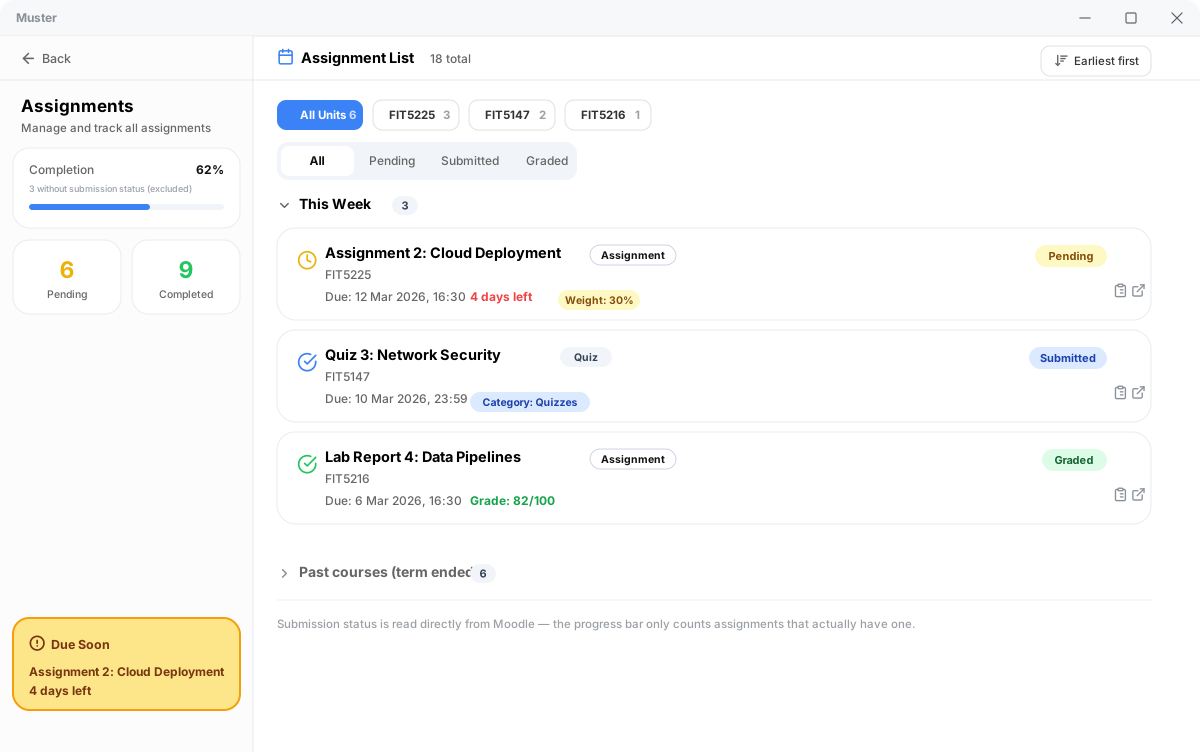
- Real Submission State: Assignments now reflect live Moodle submission state (Submitted, Graded, or To be submitted) instead of defaulting to pending.
- Quiz Integration: Quizzes and weightings are merged into unified deadline tables across all units.
- No Login Flash: Returning users go straight to the dashboard with zero white flash.
- Instant Tab Switching: All course tabs (Overview, Handbook, Schedule, Recordings, Contacts) are cached upon login for instant rendering.
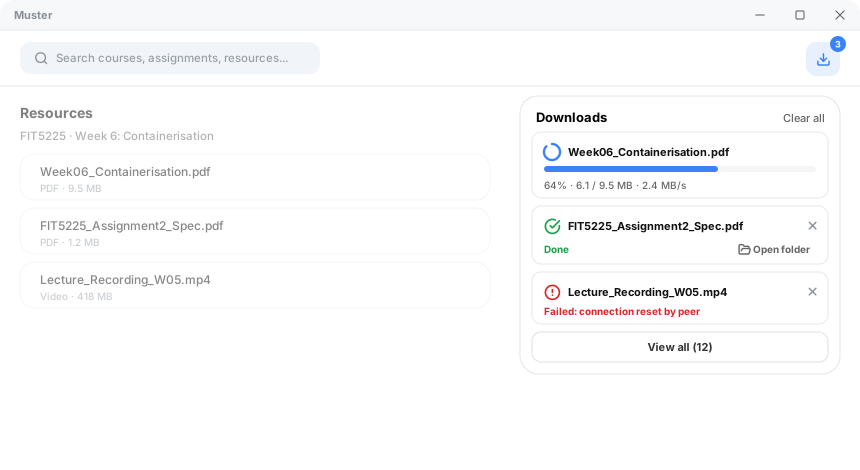
- Download Manager: Course resources download with live progress bars, transfer speeds, and direct "Show in folder" actions.
🖼️ Feature Walkthrough
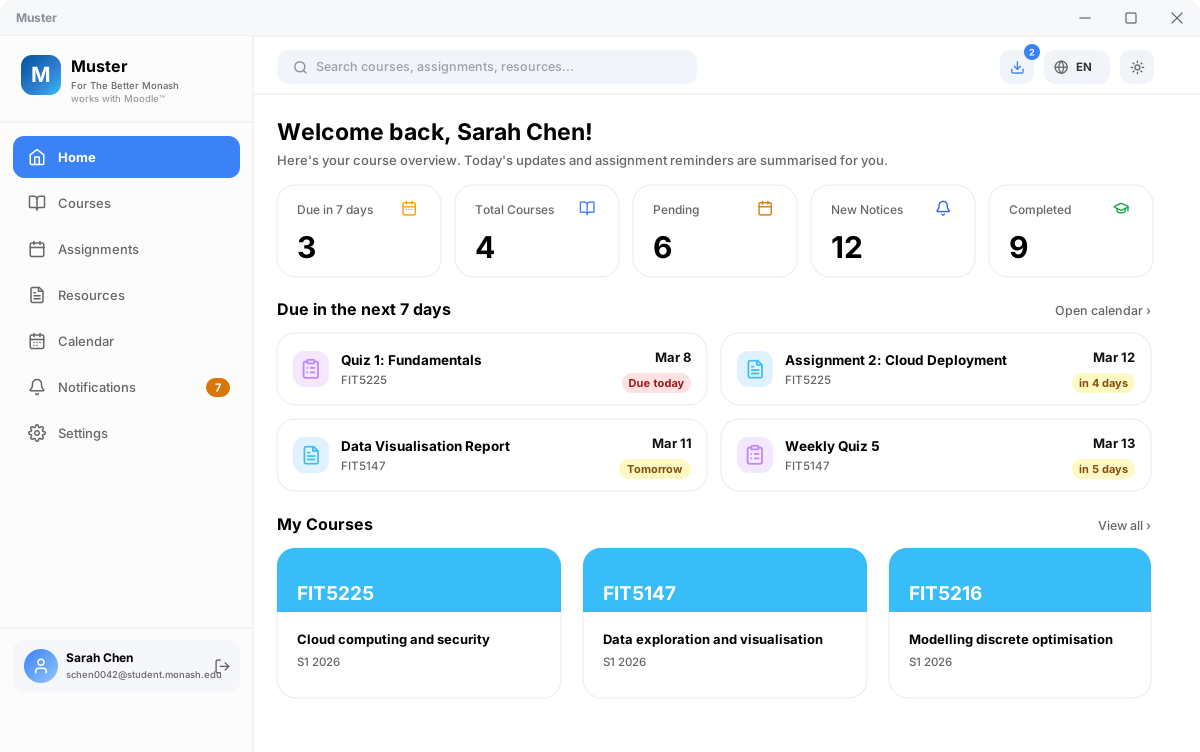
📊 Consolidated Dashboard
📝 Assignment Tracker & Real Submission Status
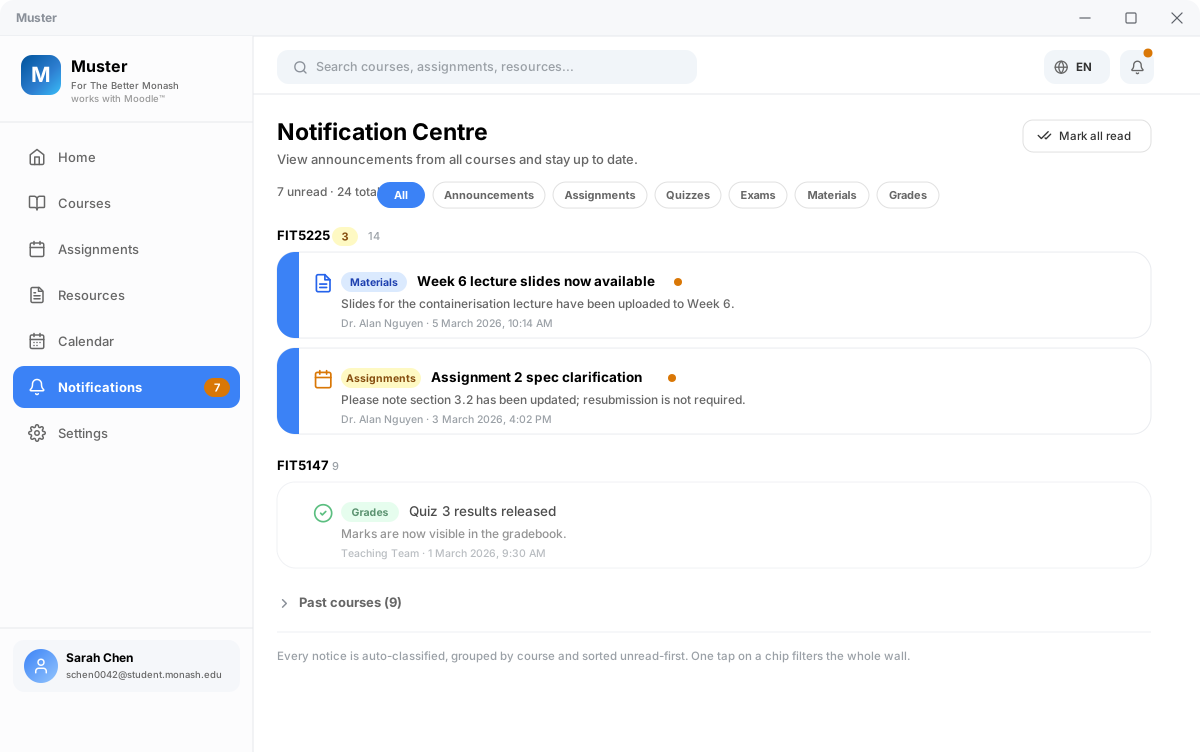
📢 Smart Announcement Centre
📥 High-Speed Download Manager
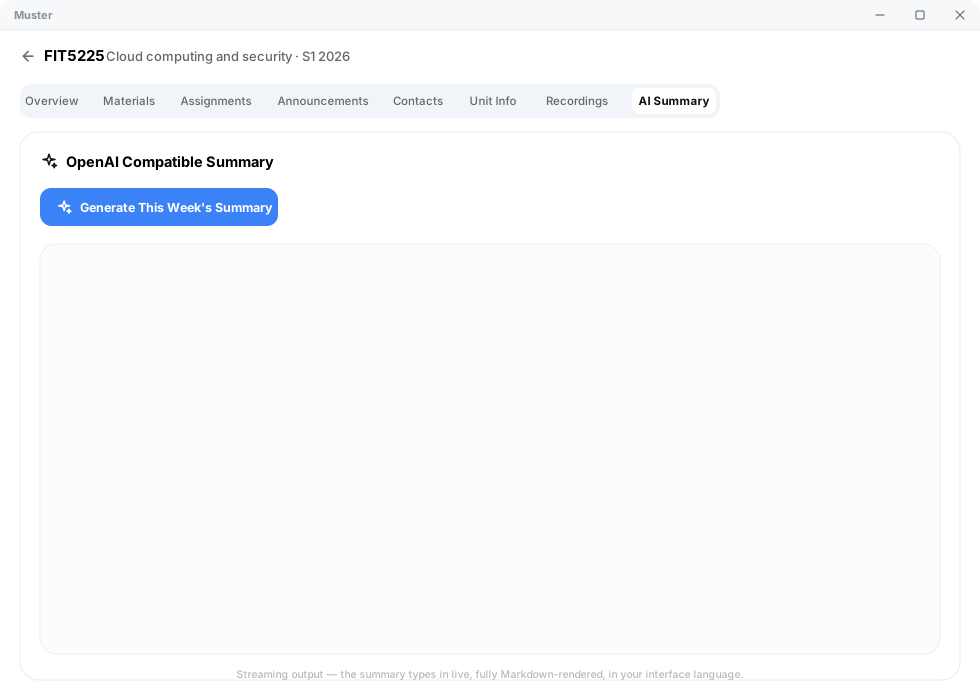
🤖 AI-Powered Course Summaries
📦 Downloads & Installation
| Platform | Architecture / Type | File Name | Status |
|---|---|---|---|
| 🪟 Windows | 64-bit NSIS Setup (Recommended) | Muster_0.1.2_x64-setup.exe |
✅ Stable |
| 🪟 Windows | 64-bit MSI Installer | Muster_0.1.2_x64_en-US.msi |
✅ Stable |
| 🍏 macOS | Apple Silicon (M1 / M2 / M3 / M4) | Muster_0.1.2_aarch64.dmg |
🧪 New |
| 🍏 macOS | Intel x86_64 | Muster_0.1.2_x64.dmg |
🧪 New |
Made with ❤️ for students by Poetrynan. Released under the PolyForm Noncommercial License 1.0.0.
Muster v0.1.4
✨ Muster v0.1.4 — Update Banner & Dynamic Versions
v0.1.4 adds a silent update check on launch with an in-app banner when a
newer release exists, makes the app version fully runtime-driven (no more
hardcoded version strings anywhere), and attaches structured system info
(reported from Rust, not a user-agent string) to feedback submissions.
✨ What's New
1. Update banner — know when a new version ships
On launch, Muster silently checks GitHub for a newer release. When one exists,
a banner appears inside the app (after login, on the dashboard): "New
version v0.1.5 available — tap to view". Tapping opens the release page; the
X dismisses it for the session. No update → no banner, zero noise.
2. Version numbers are no longer hardcoded
Previously the version shown in About, the login footer, the update check and
feedback had to be bumped by hand on every release — v0.1.3 shipped with a
stale v0.1.1 baseline. Now every version string comes from the runtime
(tauri.conf.json via getVersion): the About page, login footer (4
languages), update-check baseline and feedback attachments can never drift
again. The version is maintained in exactly one place.
3. Feedback carries real structured system info
Feedback submissions now attach a structured system report obtained from Rust
(get_system_info) instead of a raw browser user-agent string:
{
  "os": "windows",
  "arch": "x86_64",
  "osVersion": "10.0.26200",
  "isAppleSilicon": false,
  "appVersion": "0.1.4"
}
On macOS it reports e.g. "os": "macos", "arch": "aarch64",
"osVersion": "15.5", "isAppleSilicon": true. No UA parsing, no fake data —
exact OS family, kernel/product version, architecture and app version.
🐛 Bug Fixes
1. About page / login footer showed a stale version ❌→✅
The About page and the login footer (all four languages) could display an old
version when a release forgot to bump the hardcoded constant. Root-caused and
eliminated: version display is now fully runtime-driven (see What's New #2).
2. Update check could report the wrong baseline ❌→✅
The update-check baseline was a hardcoded constant that drifted (v0.1.2
shipped with a v0.1.1 baseline, which would have prompted a false "update
available"). The baseline is now the actual runtime version.
3. Feedback attached a confusing browser user-agent ❌→✅
Feedback used to send a WebView user-agent string (Mozilla/5.0 … Edg/…)
that looked fake and didn't identify the app. It now sends precise structured
system info from Rust (see What's New #3).
🪟🍏 Downloads
| Platform | Type | File |
|---|---|---|
| 🪟 Windows | 64-bit NSIS Setup (Recommended) | Muster_0.1.4_x64-setup.exe |
| 🪟 Windows | 64-bit MSI Installer | Muster_0.1.4_x64_en-US.msi |
| 🍏 macOS | Apple Silicon (M1 / M2 / M3 / M4) | Muster_0.1.4_aarch64.dmg |
| 🍏 macOS | Intel x86_64 | Muster_0.1.4_x64.dmg |
macOS first launch: right-click the app → Open (or run
xattr -dr com.apple.quarantine /Applications/Muster.app) to bypass Gatekeeper for unsigned development builds.
🐛 Muster v0.1.3 — Version Display Hotfix
v0.1.3 fixes version-number inconsistencies left over from the v0.1.2 release:
the About page and the login footer still showed v0.1.1, and the update-check
baseline was stale, which would have prompted v0.1.2 users with a false
"new version available" notice.
🐛 Fixed in v0.1.3
1. About page showed the wrong version ❌→✅
The Settings → About page (and the login-page footer, in all four languages)
still displayed v0.1.1. The version baseline is now v0.1.3 everywhere:
About page, login footer (zh/en/ja/ko), update-check baseline.
2. Stale update-check baseline ❌→✅
APP_CURRENT_VERSION had not been bumped for the multi-platform release, so
installed v0.1.2 users would always see a false "update available" prompt.
The baseline is now v0.1.3 and matches the installer versions.
3. README installer names synchronized ❌→✅
The English/中文/日本語/한국어 READMEs now reference the current installer
names (Muster_0.1.3_*) for Windows and both macOS variants.
🪟🍏 Downloads
| Platform | Type | File |
|---|---|---|
| 🪟 Windows | 64-bit NSIS Setup (Recommended) | Muster_0.1.3_x64-setup.exe |
| 🪟 Windows | 64-bit MSI Installer | Muster_0.1.3_x64_en-US.msi |
| 🍏 macOS | Apple Silicon (M1 / M2 / M3 / M4) | Muster_0.1.3_aarch64.dmg |
| 🍏 macOS | Intel x86_64 | Muster_0.1.3_x64.dmg |
macOS first launch: right-click the app → Open (or run
xattr -dr com.apple.quarantine /Applications/Muster.app) to bypass Gatekeeper for unsigned development builds.
🎉 Muster v0.1.2 — Multi-Platform Release (Windows & macOS)
Muster is a modern, high-performance desktop companion for Monash Moodle. It aggregates your deadlines, course resources, grades, and announcements into a clean, lightning-fast native interface.
v0.1.2 is our first multi-platform release, adding official macOS application support (Apple Silicon & Intel DMG installers) alongside extensive reliability fixes, instant course loading, and accurate assignment tracking.
🌟 What's New in v0.1.2
1. 🍏 Official macOS Support (Apple Silicon & Intel)
- Native DMG Installers: Separate optimized builds for Apple Silicon (M1/M2/M3/M4) and Intel-based Macs.
- WKWebView Cookie Sync: Direct HttpOnly session extraction from macOS WebKit data store for seamless Okta SSO authentication.
- macOS Menu Bar Tray: Integrated status bar tray menu with a custom macOS monochrome template icon.
- Apple Keychain Integration: Session cookies and credentials are secure in Apple's native Keychain.
Tip
macOS First-Launch Note (Gatekeeper):
As an open-source student project, Muster binaries are self-signed. On first launch, macOS Gatekeeper may display a security prompt. Simply navigate to System Settings → Privacy & Security and click "Open Anyway" (or run xattr -cr /Applications/Muster.app in Terminal).
2. 🪟 Submission Tracking & Course Sync Fixes
- Real Submission State: Assignments now reflect live Moodle submission state (Submitted, Graded, or To be submitted) instead of defaulting to pending.
- Quiz Integration: Quizzes and weightings are merged into unified deadline tables across all units.
- No Login Flash: Returning users go straight to the dashboard with zero white flash.
- Instant Tab Switching: All course tabs (Overview, Handbook, Schedule, Recordings, Contacts) are cached upon login for instant rendering.
- Download Manager: Course resources download with live progress bars, transfer speeds, and direct "Show in folder" actions.
🖼️ Feature Walkthrough
📊 Consolidated Dashboard
📝 Assignment Tracker & Real Submission Status
📢 Smart Announcement Centre
📥 High-Speed Download Manager
🤖 AI-Powered Course Summaries
📦 Downloads & Installation
| Platform | Architecture / Type | File Name | Status |
|---|---|---|---|
| 🪟 Windows | 64-bit NSIS Setup (Recommended) | Muster_0.1.2_x64-setup.exe |
✅ Stable |
| 🪟 Windows | 64-bit MSI Installer | Muster_0.1.2_x64_en-US.msi |
✅ Stable |
| 🍏 macOS | Apple Silicon (M1 / M2 / M3 / M4) | Muster_0.1.2_aarch64.dmg |
🧪 New |
| 🍏 macOS | Intel x86_64 | Muster_0.1.2_x64.dmg |
🧪 New |
Made with ❤️ for students by Poetrynan. Released under the PolyForm Noncommercial License 1.0.0.
v0.1.3

Muster v0.1.2
🎉 Muster v0.1.2 — Multi-Platform Release (Windows & macOS)
Muster is a modern, high-performance desktop companion for Monash Moodle. It aggregates your deadlines, course resources, grades, and announcements into a clean, lightning-fast native interface.
v0.1.2 is our first multi-platform release, adding official macOS application support (Apple Silicon & Intel DMG installers) alongside extensive reliability fixes, instant course loading, and accurate assignment tracking.
🌟 What's New in v0.1.2
1. 🍏 Official macOS Support (Apple Silicon & Intel)
- Native DMG Installers: Separate optimized builds for Apple Silicon (M1/M2/M3/M4) and Intel-based Macs.
- WKWebView Cookie Sync: Direct HttpOnly session extraction from macOS WebKit data store for seamless Okta SSO authentication.
- macOS Menu Bar Tray: Integrated status bar tray menu with a custom macOS monochrome template icon.
- Apple Keychain Integration: Session cookies and credentials are secure in Apple's native Keychain.
Tip
macOS First-Launch Note (Gatekeeper):
As an open-source student project, Muster binaries are self-signed. On first launch, macOS Gatekeeper may display a security prompt. Simply navigate to System Settings → Privacy & Security and click "Open Anyway" (or run xattr -cr /Applications/Muster.app in Terminal).
2. 🪟 Submission Tracking & Course Sync Fixes
- Real Submission State: Assignments now reflect live Moodle submission state (Submitted, Graded, or To be submitted) instead of defaulting to pending.
- Quiz Integration: Quizzes and weightings are merged into unified deadline tables across all units.
- No Login Flash: Returning users go straight to the dashboard with zero white flash.
- Instant Tab Switching: All course tabs (Overview, Handbook, Schedule, Recordings, Contacts) are cached upon login for instant rendering.
- Download Manager: Course resources download with live progress bars, transfer speeds, and direct "Show in folder" actions.
🖼️ Feature Walkthrough
📊 Consolidated Dashboard
📝 Assignment Tracker & Real Submission Status
📢 Smart Announcement Centre
📥 High-Speed Download Manager
🤖 AI-Powered Course Summaries
📦 Downloads & Installation
| Platform | Architecture / Type | File Name | Status |
|---|---|---|---|
| 🪟 Windows | 64-bit NSIS Setup (Recommended) | Muster_0.1.2_x64-setup.exe |
✅ Stable |
| 🪟 Windows | 64-bit MSI Installer | Muster_0.1.2_x64_en-US.msi |
✅ Stable |
| 🍏 macOS | Apple Silicon (M1 / M2 / M3 / M4) | Muster_0.1.2_aarch64.dmg |
🧪 New |
| 🍏 macOS | Intel x86_64 | Muster_0.1.2_x64.dmg |
🧪 New |
Made with ❤️ for students by Poetrynan. Released under the PolyForm Noncommercial License 1.0.0.
Muster v0.1.1
🐛 Muster v0.1.1 — Bug-Fix Release
Muster is a modern, high-performance desktop companion for Monash Moodle.
This release fixes submission-status bugs, the login-page flash, deadline
timezone offsets, invisible sync progress and the download experience —
and makes every course tab load instantly after login.
🐛 Bug Fixes
1. Submitted assignments showed "To be submitted" ❌→✅
The assignment list always displayed "pending" even after you submitted your
work — e.g. a quiz finished and submitted at 9:51 PM still showed
"To be submitted". Muster now reads the real submission state from each
assignment/quiz detail page and the course gradebook:
| State | Meaning |
|---|---|
| Submitted | You have a finished attempt / submitted-for-grading entry |
| Graded | A real grade exists in the gradebook (shown with the score) |
| To be submitted | No attempt / no submission yet |
2. Ungraded assignments were wrongly marked "Graded"
A hidden action-menu label inside Moodle's grade table ("Actions / Grade
analysis") was being parsed as a grade, so ungraded items could appear as
"Graded". The parser now reads only the actual grade cell.
3. Assignment grades were not parsed from detail pages
Moodle's non-breaking spaces ( ) and markup broke the old grade
regex; a grade like 0.50 / 1.00 was never recovered. Fixed.
4. Course-detail "Download" button did nothing
The old button tried to open a new browser window (window.open), which the
Tauri shell silently blocks. It now downloads through the app's own download
manager (progress bar, speed, "open folder") — identical to the dashboard
resource rows.
5. No hover tooltip on the Sync / Download buttons
While syncing or cooling down (60 s), the buttons became disabled, and the
browser's native tooltip never shows on disabled buttons. The tooltip now
always appears ("Sync with Moodle" / "Data is up to date…"). The same fix now
covers the resources-page sync button and the resource-row download buttons
(showing "Downloading…" while active).
6. Dashboard assignment stats missed quizzes
The dashboard and assignments page pulled data from a Moodle index page that
lists only regular assignments — quizzes (e.g. FIT5201) were missing from the
counts. All views now share one data source that includes quizzes, weights
and categories.
7. Login page flashed on every launch for signed-in users ❌→✅
Even with a saved session, the landing page appeared for a moment before the
app switched to the dashboard — the UI rendered the login page first and then
restored the session in the background. The app now waits for the session
check before painting anything, so returning users go straight to the
dashboard with no flash.
8. Course tabs only fetched after you clicked them ❌→✅
Previously, the Unit Overview / Unit Info / Schedule / Recordings / Contacts
tabs each started scraping only when you opened that tab, so every tab switch
waited on the network. Now the app fetches all tabs for all courses right
after login (or launch): the full sync grabs resources, assignments,
announcements, the unit dashboard, and recordings on every login, and tab
switches render instantly from the in-memory data. Skeletons now only appear
while data is genuinely still loading — not on every tab switch.
9. Fetch strategy tuned to how Moodle actually behaves
Based on the real page structure:
- Dynamic content (assignments that unlock over the term, announcements,
week-by-week materials, recordings, and the dashboard's rolling "current
week") is fetched live on every login. - Semester-fixed content (Unit Info handbook, the term schedule, and
course contacts) is fetched once and cached — regular logins skip it,
saving roughly three page requests per course.
10. Deadlines were shifted by 10–11 hours (timezone bug) ❌→✅
Moodle renders deadlines in the course timezone (Australia/Melbourne — AEST in
winter, AEDT in summer), but the parser treated them as UTC. Every deadline was
therefore pushed 10–11 hours into the future, so a deadline on "16 August" was
labelled "tomorrow" when today was already the 16th. The parser now interprets
the wall-clock text in the Melbourne timezone (daylight-saving aware) and stores
a correct UTC instant — the date badge and the relative label finally agree.
11. Sync ran with no progress visible anywhere ❌→✅
The progress banner (with the live progress ring) only appeared on the very
first login. On later launches the automatic sync and every manual "sync" click
ran silently — no banner, no percentage. The banner now shows whenever a sync
is running: first run, every launch, and manual syncs.
12. Downloads showed a bare spinner, no percentage ❌→✅
Download buttons (course materials, dashboard resources) now show a circular
progress ring with a live percentage instead of a spinner with no number,
updating in real time.
13. No download manager on the course detail page ❌→✅
The download button (top-right, with an active-download count badge) and its
dropdown panel — identical to the Dashboard — now exist on the course detail
page too, so you never have to go back to the home page to check a download.
Download completion shows the app's stylized toast everywhere (home + course
detail).
14. "Open folder" button did nothing ❌→✅
The download panel's "open folder" button called openPath, which was blocked
by the app's permission policy. The permission is now fully configured —
including the path scope that Tauri requires (allow: [{ "path": "/**" }],
per tauri-apps/tauri#13971). As a safety net, if opening the folder ever fails
the button falls back to "reveal in folder" (selects the file), whose
permission has always been granted — so the folder always opens.
15. Old deadlines survived a logout / re-login ❌→✅
After logging out (or an expired session), the dashboard's "Due in the next 7
days" list could still show deadlines from the previous account, and the grade
section kept an old "x / y" count — while the course list was already empty.
The stored calendar events and grade overview are now cleared on logout, and
the deadline timeline only shows events of courses you actually have, so stale
data can never appear again.
16. Duplicated counts in the notification center ❌→✅
Each course group showed the unread badge and a second muted total next to it
— when every notification was unread the same number appeared twice in a row.
The redundant total is removed; the unread badge is kept.
17. Landing page: unofficial branding + missing ja/ko localization ❌→✅
The login page's brand subtitle now reads "Unofficial Monash Course
Intelligence System" (it is not a Monash product, and the copy now says so).
The landing page previously only had Chinese/English copy and fell back to
English for Japanese/Korean — every string (hero, feature cards, security
notes, sign-in button, footer) is now fully localized in all four interface
languages.
18. Reopening the app re-scraped everything within minutes ❌→✅
Closing and reopening Muster always triggered a full re-scrape, which was
annoying when you just wanted a quick look. The launch auto-sync now has a
1-hour cooldown: reopen within an hour of the last sync (auto or manual)
and the app renders your local data instantly with no network scraping at all;
after an hour it syncs normally, and the manual sync buttons always work.
✨ Improvements
Same data everywhere
Dashboard stats, the assignments page and course-detail tabs now agree with
each other (same quizzes, same statuses, same weights).
Download manager with progress
Every file download (dashboard resources + course materials) now runs through
a shared download manager that reports real-time progress (percentage,
speed) and shows a completion toast. The download button itself displays the
live percentage while in progress.
Smarter tooltips on disabled buttons
Sync / Download buttons no longer use disabled (which swallows native
tooltips) — they switch to aria-disabled so the tooltip always shows.
AI summary timestamp removed
The "Generated at …" line under AI summaries was removed — regenerated
summaries now simply replace the old content without a potentially stale
timestamp.
🔧 How to get the latest status
- Open the app and go to the assignments page.
- After you submit something in Moodle, go back to the dashboard and
click "Sync with Moodle" (rate-limited to once per 60 s). - Open the assignments page again — statuses are now up to date.
🛡 Security & Privacy (unchanged)
- Zero telemetry — no third-party analytics or tracking.
- OS-level keyring — Moodle sessions live in Windows Credential Manager.
- Client-side AI — your API keys never leave the machine.
- Polite requests — all Moodle requests are rate-limited to stay within
the university's acceptable-use guidelines.
Muster v0.1.0
🎉 Muster v0.1.0 — Initial Public Release
Muster is a modern, high-performance desktop companion for Monash Moodle. It aggregates your deadlines, course resources, grades, and announcements into a clean, lightning-fast native interface.
🌟 Key Features & Visual Walkthrough
1. 📊 Consolidated Dashboard & Urgency Tracker
Get a bird's-eye view of your entire semester. Merged deadlines are automatically classified into Due in 7 days, Pending, and Completed, with direct one-click access.
2. 📝 Assignment Tracker & Real Submission Status
Track all assignments and quizzes across units. Real-time submission status, weightings, due dates, and grading feedback in one unified list.
3. 📢 Smart Notification & Announcement Centre
Never miss an urgent update from your lecturers. Announcements are automatically classified by topic (Exam, Assignment, Quiz, General) with direct links to discussion threads.
4. 📥 High-Speed Multi-Thread Download Manager
Download course slides, PDFs, and assignment specs with live progress, transfer speed indicators, and instant folder reveal.
5. 🤖 AI-Powered Course Summaries
Streamline your revision with live AI summaries. Stream Markdown summaries of lecture topics, objectives, and key takeaways directly within the app using your own API key.
🔒 Security & Privacy Guarantee
- Zero Telemetry: No third-party analytics or external tracking servers.
- OS-Level Keyring: Moodle sessions are stored in your operating system's secure credential vault (Windows Credential Manager / macOS Keychain).
- Client-Side AI: Your AI API keys remain in memory and in your local sandbox, never shared or stored remotely.
📦 Downloads & Installation
Note
Platform Support: Muster currently supports Windows 10 / 11 (64-bit). macOS is currently not supported (planned for a future release).
| Platform | Package Type | File | Status |
|---|---|---|---|
| Windows (Recommended) | NSIS Installer | Muster_0.1.0_x64-setup.exe |
✅ Available |
| Windows | Enterprise MSI | Muster_0.1.0_x64_en-US.msi |
✅ Available |
| Windows | Standalone Executable | muster.exe |
✅ Available |
| macOS | Apple Silicon / Intel | — | ⏳ Not currently supported |
Made with ❤️ for students by Poetrynan. Released under the PolyForm Noncommercial License 1.0.0.