Developer Manual
The SlicerAstro functionality is implemented as multiple plug-in modules, bundled as one downloadable extension as shown in figure:
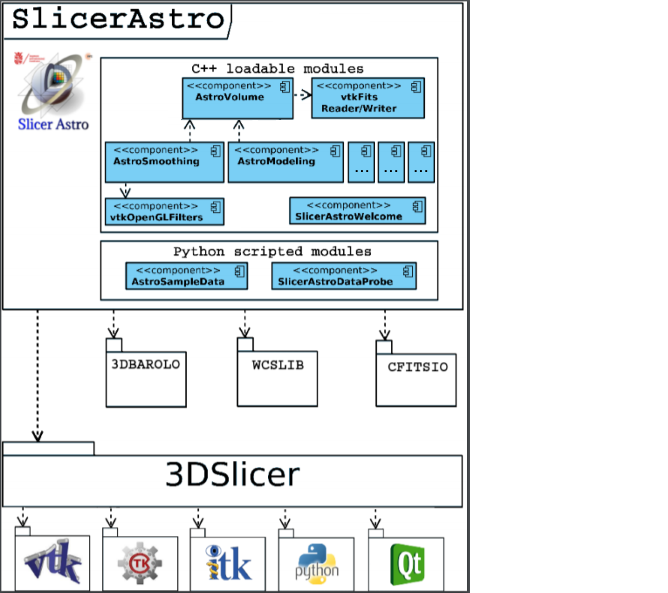
Doxygen documentation is available at the following link.
Before starting developing for SlicerAstro and 3DSlicer, it is advisable to navigate at the following link, where it is possible to find many resources such as tutorial and instructions how's to use QtCreator and QtDesigner with 3DSlicer.
sudo apt-get install subversion git-core git-svnsudo apt-get install make gcc g++ cmake cmake-curses-gui clibx11-dev libxt-dev libgl1-mesa-dev libglu1-mesa-dev libfontconfig-dev libxrender-dev libncurses5-dev install libosmesa6-dev-
- compile qt5.10 following this link```
- Install brew (tested with 1.6.6)
- Install the following with brew: cmake (tested with 3.11.2), Git (2.17.0), Svn (1.10.0)
- Install Xcode (9.4)
- Xquartz (https://www.xquartz.org/ 2.7.11)
- Install qt5.11 with brew (this can not be used for packing. For packing is needed to compile qt from source)
git clone https://github.com/Slicer/Slicer.gitmkdir Slicer-SuperBuild-Debugcd Slicer-SuperBuild-Debugcmake -DCMAKE_BUILD_TYPE:STRING=Debug -DSlicer_VTK_VERSION_MAJOR=9 -DSlicer_VTK_SMP_IMPLEMENTATION=TBB -DSlicer_REQUIRED_QT_VERSION=5.10 -DQt5_DIR=path/qt/lib/cmake/Qt5 -DQT_QMAKE_EXECUTABLE=path/qt/bin/qmake ../Slicer- for High Sierra add:
-DSlicer_USE_PYTHONQT_WITH_TCL=OFF -DCMAKE_OSX_DEPLOYMENT_TARGET=10.13 - if Qt has not been built from source (e.g., in this case the high sierra one) add:
-DSlicer_USE_SYSTEM_QT:BOOL=1 -
make -j 8(8 is the number of cores) git clone https://github.com/Punzo/SlicerAstro.gitmkdir SlicerAstro-Build-Debugcd SlicerAstro-Build-Debugcmake -DSLicer_DIR=/path/Slicer-SuperBuild-Debug/Slicer-build -DCMAKE_BUILD_TYPE:STRING=Debug ../SlicerAstro- for High Sierra add:
-DCMAKE_OSX_DEPLOYMENT_TARGET=10.13 make -j 8- Start 3DSlicer and add SlicerAstro modules in the 3DSlicer Settings (modules)
- Restart 3DSlicer with the option:
--launcher-additional-settings /path/SlicerAstro-SuperBuild-Debug/inner-build/AdditionalLauncherSettings.ini