Developer Manual
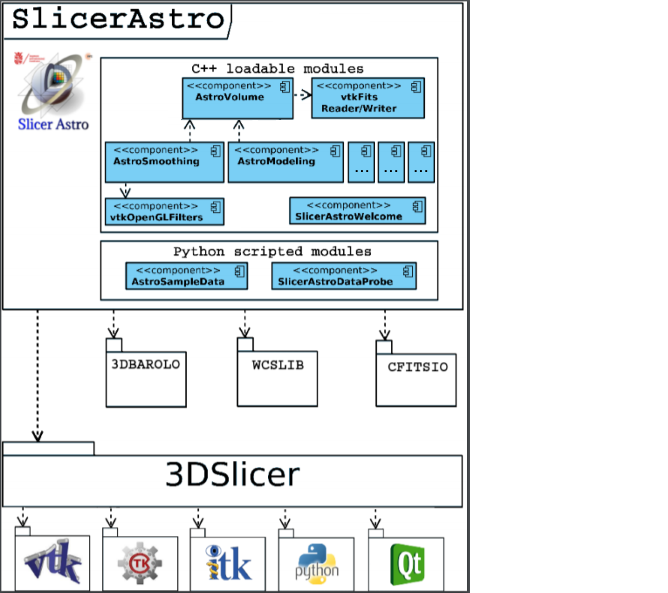
The SlicerAstro functionality is implemented as multiple plug-in modules, bundled as one downloadable extension as shown in figure:
Doxygen documentation is available at the following link.
Before starting developing for SlicerAstro and 3DSlicer, it is advisable to navigate at the following link, where it is possible to find many resources such as tutorial and instructions how's to use QtCreator and QtDesigner with 3DSlicer.
bison build-essential flex gperf ibgstreamer-plugins-base1.0-dev libasound2-dev libatkmm-1.6-dev libbz2-dev libcap-dev libcups2-dev libdrm-dev libegl1-mesa-dev libfontconfig1-dev libfreetype6-dev libgcrypt11-dev libglu1-mesa-dev libgstreamer1.0-dev libicu-dev libnss3-dev libpci-dev libpulse-dev libssl-dev libudev-dev libx11-dev libx11-xcb-dev libxcb-composite0 libxcb-composite0-dev libxcb-cursor-dev libxcb-cursor0 libxcb-damage0 libxcb-damage0-dev libxcb-dpms0 libxcb-dpms0-dev libxcb-dri2-0 libxcb-dri2-0-dev libxcb-dri3-0 libxcb-dri3-dev libxcb-ewmh-dev libxcb-ewmh2 libxcb-glx0 libxcb-glx0-dev libxcb-icccm4 libxcb-icccm4-dev libxcb-image0 libxcb-image0-dev libxcb-keysyms1 libxcb-keysyms1-dev libxcb-present-dev libxcb-present0 libxcb-randr0 libxcb-randr0-dev libxcb-record0 libxcb-record0-dev libxcb-render-util0 libxcb-render-util0-dev libxcb-render0 libxcb-render0-dev libxcb-res0 libxcb-res0-dev libxcb-screensaver0 libxcb-screensaver0-dev libxcb-shape0 libxcb-shape0-dev libxcb-shm0 libxcb-shm0-dev libxcb-sync-dev libxcb-sync-dev libxcb-sync1 libxcb-util-dev libxcb-util0-dev libxcb-util1 libxcb-xf86dri0 libxcb-xf86dri0-dev libxcb-xfixes0 libxcb-xfixes0-dev libxcb-xinerama0 libxcb-xinerama0-dev libxcb-xkb-dev libxcb-xkb1 libxcb-xtest0 libxcb-xtest0-dev libxcb-xv0 libxcb-xv0-dev libxcb-xvmc0 libxcb-xvmc0-dev libxcb1 libxcb1-dev libxcomposite-dev libxcursor-dev libxdamage-dev libxext-dev libxfixes-dev libxi-dev libxrandr-dev libxrender-dev libxslt1-dev libxss-dev libxtst-dev perl python ruby```
- compile qt5.10 following this link
- Install brew (tested with 1.6.6)
- Install the following with brew: cmake (tested with 3.11.2), Git (2.17.0), Svn (1.10.0)
- Install Xcode (9.4)
- Xquartz (https://www.xquartz.org/ 2.7.11)
- Install qt5.11 with brew (this can not be used for packing. For packing is needed to compile qt from source)
git clone https://github.com/Slicer/Slicer.gitmkdir Slicer-SuperBuild-Debugcd Slicer-SuperBuild-Debugcmake -DCMAKE_BUILD_TYPE:STRING=Debug -DSlicer_VTK_VERSION_MAJOR=9 -DSlicer_VTK_SMP_IMPLEMENTATION=TBB -DSlicer_REQUIRED_QT_VERSION=5.10 -DQt5_DIR=path/qt/lib/cmake/Qt5 -DQT_QMAKE_EXECUTABLE=path/qt/bin/qmake ../Slicer- for High Sierra add:
-DSlicer_USE_PYTHONQT_WITH_TCL=OFF -DCMAKE_OSX_DEPLOYMENT_TARGET=10.13 - if Qt has not been built from source (e.g., in this case the high sierra one) add:
-DSlicer_USE_SYSTEM_QT:BOOL=1 -
make -j 8(8 is the number of cores) git clone https://github.com/Punzo/SlicerAstro.gitmkdir SlicerAstro-Build-Debugcd SlicerAstro-Build-Debugcmake -DSLicer_DIR=/path/Slicer-SuperBuild-Debug/Slicer-build -DCMAKE_BUILD_TYPE:STRING=Debug ../SlicerAstro- for High Sierra add:
-DCMAKE_OSX_DEPLOYMENT_TARGET=10.13 make -j 8- Start 3DSlicer and add SlicerAstro modules in the 3DSlicer Settings (modules)
- Restart 3DSlicer with the option:
--launcher-additional-settings /path/SlicerAstro-SuperBuild-Debug/inner-build/AdditionalLauncherSettings.ini