Python Runtime Interop Kit.
Turn Fortran into natural Python APIs.
Build clean, importable native extensions from supported Fortran without
writing low-level binding code. PRIK preserves modules, derived types, arrays,
and native behavior, and generates an editable .pyi contract so you can
shape the Python API.
Project status: Alpha (0.1.x). Core Fortran wrapper workflows are
implemented and tested across supported compilers, but public APIs may still
change before 1.0.


Read the documentation for installation, the user guide, examples, and reference material.
For a complete real-library example, see the 155-routine BLAS correctness project, which builds the same Reference BLAS sources with PRIK and f2py and checks both against independent numerical expectations. The LAPACK correctness project wraps the complete Reference LAPACK implementation corpus once and validates the reviewed 127 SciPy-backed double-precision routines in the dedicated CI lane.
- See it in action
- Key Features
- Performance
- Installation & Quick Start
- How it works
- Native Project Inputs
- Python API
- Development
- License
- Documentation
The complete example below builds with one command:
python3 -m prik points.f90 --out geometryCreate points.f90:
module points
  implicit none

  type :: point
    real(8) :: x = 0.0d0
    real(8) :: y = 0.0d0
  end type point

contains

  subroutine move(item, dx, dy)
    type(point), intent(inout) :: item
    real(8), intent(in) :: dx, dy
    item%x = item%x + dx
    item%y = item%y + dy
  end subroutine move

  real(8) function norm_squared(item) result(value)
    type(point), intent(in) :: item
    value = item%x * item%x + item%y * item%y
  end function norm_squared

end module points
Generated Python API:
import numpy as np
import geometry.points as points

item = points.point(x=np.float64(3.0), y=np.float64(4.0))
points.move(item, np.float64(1.0), np.float64(-2.0))

print(item.x, item.y)             # 4.0 2.0
print(points.norm_squared(item))  # 20.0
No manual bindings are required. From this source, PRIK creates a Python namespace, a class with accessible fields, a mutating procedure, and a function.
Want a different Python API? Edit the generated .pyi contract to rename or
hide exports, flatten namespaces, define constructors and methods, or create
overloads. The
contract guide
shows the available edits.
- Fortran modules exposed as Python namespaces and derived types as classes
- NumPy arrays with explicit dtype, shape, and layout checks
- Allocatable and pointer arrays with explicit lifetime operations
- Immediate Python callbacks and overloaded interfaces
- Editable
.pyicontracts and readable generated docstrings - Early, clear errors when a boundary cannot be wrapped
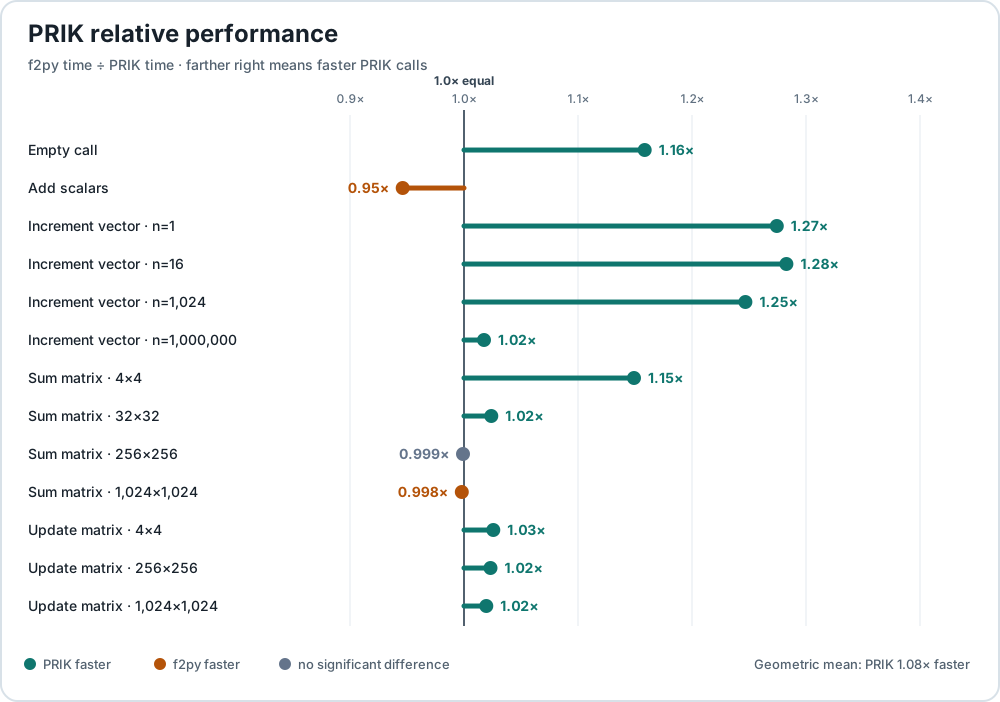
Low wrapper overhead, measured against NumPy's f2py.
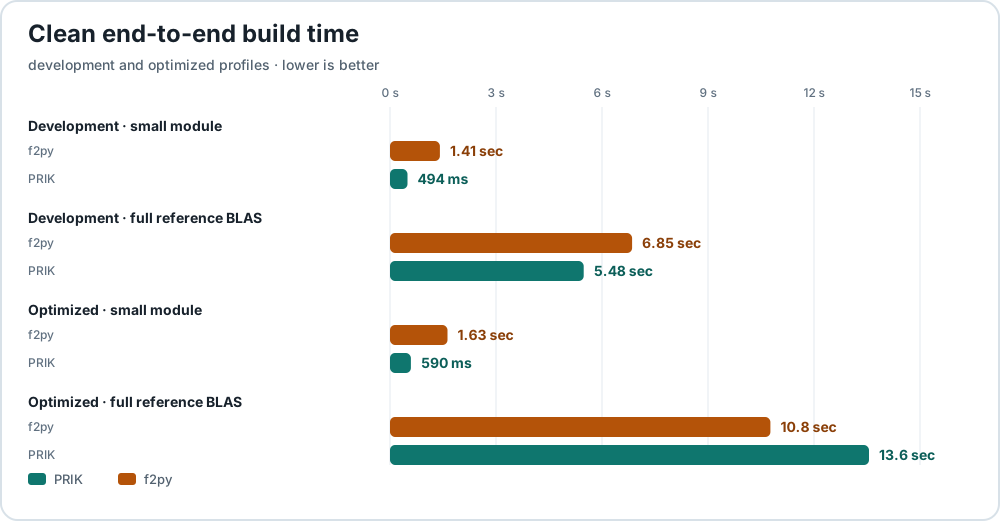
The included benchmark suite runs both tools against the same Fortran kernels through their normal generated interfaces. Results are machine-dependent; the charts below come from the latest successfully deployed benchmark snapshot.
Runtime-call performance — values above 1.0× mean PRIK is faster.
Clean end-to-end build time — lower times are better.
See the complete results, test environment, and one-command reproduction instructions.
PRIK requires Python 3.10 or newer, NumPy, Python development headers, standard build tools, and Fortran and C compilers. GNU Fortran is the default and is tested on Linux and macOS. LLVM Flang is tested on both platforms; Intel IFX is tested on Linux.
Install the published PRIK package in a virtual environment:
python3 -m venv .venv
source .venv/bin/activate
python3 -m pip install --upgrade pip
python3 -m pip install prik
Check the installation:
prik --version
python3 -m prik --help
Contributors can instead clone
PyNumLab/prik and install an editable
checkout with python3 -m pip install -e ".[qa]".
With the points.f90 source from above in the current directory, build the
extension:
python3 -m prik points.f90 --out geometry--out geometry selects the import name and the final shared-library name.
PRIK places the stable import file beside the source and keeps generated build
artifacts under __prik__/:
.
  points.f90
  geometry.so
  __prik__/
    geometry.<extension-suffix>.so
    generated-wrapper sources
    binding_support/
The Python code shown at the top of this README can now import geometry
directly.
Use --out-dir to place the ABI-specific extension and generated files in a
chosen build directory:
python3 -m prik points.f90 \
  --out geometry \
  --out-dir build/geometry
.
geometry.so
build/geometry/
geometry.<extension-suffix>.so
generated-wrapper sources
binding_support/
Generate the editable .pyi contract for the same points.f90:
python3 -m prik generate --pyi points.f90 --out contractsThe command preserves the Fortran module as a contract module:
contracts/
  __init__.pyi
  points.pyi
Generated contracts/points.pyi:
from prik.contracts import Addr, Arg, Float64, native_call

class point:
    def __init__(
        self,
        *,
        x: Float64 = 0.0,
        y: Float64 = 0.0
    ) -> None: ...

    x: Float64 = 0.0
    y: Float64 = 0.0

@native_call([Arg(0), Addr(Arg(1)), Addr(Arg(2))])
def move(
    item: point,
    dx: Float64,
    dy: Float64
) -> None: ...

def norm_squared(
    item: point
) -> Float64: ...
The contract describes the generated Python class, fields, functions, exact NumPy scalar types, and native argument order. Editing it changes the wrapper API; it does not change the Fortran implementation.
After editing the contract, rebuild the same Python API from the package entry and the original Fortran implementation:
python3 -m prik contracts/__init__.pyi \
  --native-fortran-sources points.f90 \
  --out geometry \
  --out-dir build/geometry_from_pyi
The contract build has the same import name and module layout:
.
  geometry.so
  build/geometry_from_pyi/
    geometry.<extension-suffix>.so
    generated-wrapper sources
    binding_support/
Import the extension from the explicit build directory when needed:
import sys

import numpy as np

sys.path.insert(0, "build/geometry_from_pyi")
import geometry.points as points

item = points.point(x=np.float64(3.0), y=np.float64(4.0))
points.move(item, np.float64(1.0), np.float64(-2.0))
print(points.norm_squared(item)) # 20.0Use --verbose when you want to see the compiler commands and confirm which
wrapper flags reached the build:
python3 -m prik points.f90 \
  --out geometry_debug \
  --out-dir build/geometry_debug \
  --jobs 4 \
  --verbose \
  --compiler gfortran \
  --wrapper-fortran-flags=-O2 \
  --wrapper-c-flags=-O2
The verbose output includes native source compilation, generated bridge
compilation, generated Python binding compilation, and the final link command.
Dependency-ready source files and the generated binding may compile
concurrently; --jobs 1 selects a serial diagnostic build.
The custom wrapper flags appear in the relevant command lines:
<fortran compiler> ... -O2 ... generated bridge ...
<python-binding compiler> ... -O2 ... generated Python binding ...
<fortran compiler> -shared ... -O2 ... geometry_debug ...
Fortran sources
  -> compiler preprocessing and target-type probing
  -> Fortran parser
  -> semantic IR construction
  -> post-IR policy completion and ordered wrapper plan
  -> direct native-bridge and Python-binding lowering
  -> native compilation and shared-library link
  -> importable Python extension
For diagnostic and inspection commands beyond the main build path, start with
python3 -m prik --help, then continue to the
CLI command reference.
Fortran builds default to gfortran. For a real project, replace the checked
input path with your source path, use --help to choose the compiler and native
project options you need, and enable --verbose when you want to audit the
exact compiler and linker commands.
Use --out to select generated contract locations, wrapper module names, or
explicit build directories, depending on the command mode.
Public entrypoints cover Fortran extension builds, parsing, semantic
conversion and .pyi emission:
from prik import build_fortran_extension

result = build_fortran_extension(
    "points.f90",
    output_name="geometry",
    output_dir="build/geometry_api",
)
print(result.module_name)
print(result.shared_library)
Parser and semantic entrypoints remain available independently for controlled strings, focused tests, and already-preprocessed inputs.
For native projects with macros, includes, or target flags, use the compiler-preprocessed CLI path or an equivalent preprocessing configuration.
Run the full suite from the repository root:
PYTHONPATH=. python3 -m pytest -qPRIK is distributed under the MIT License. Copyright (c) 2026 Said Hadjout.
Using PRIK does not impose the MIT License on the user's native sources or on
wrapper code derived from those inputs. Users may distribute generated
wrappers under terms of their choice. Files copied from PRIK's
binding_support/ package remain MIT-licensed and must retain the included
license notice when redistributed.
- Documentation — Learn how to install and use PRIK
- Getting Started — Installation, verification, standalone procedures, modules, and rebuild workflow
- User Guide — Data types, functions, modules, arrays, derived types, callbacks, ownership, and runtime behavior
- Changelog — User-visible changes by release