Repository navigation
App JSON Handler
Home · Supported apps · Multi-app examples
JSON Handler is an optional companion for extracting values from JSON and iterating over lists. BLL stores the resulting values. Passing tokens between the apps is not the same as JSON Handler evaluating BLL coding.
- Install JSON Handler and BLL. In BLL create a Number variable for the
sensor reading, such as
CO2. - Follow the sensor-reading example with its fixed sample JSON before connecting a live message source.
- Use a JSON reading card to select
$.CO2as a number. Connect its numeric output to BLL's Set number variable value. - Save the Flow, then test it. The sample should store
913inCO2. Connect parsing and missing-field failures to a short visible error report; do not store an error message or a made-up zero as a valid reading.
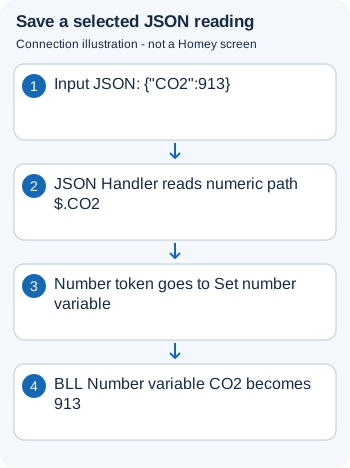
Connection illustration: a JSON path selects a value; the numeric token becomes the BLL variable's value.
See JSON Handler's BLL integration for storing JSON text between runs.
For a bounded list of chronograph names, use the timer-status report. Run iterations sequentially when they update the same BLL text accumulator, and prevent two reports from clearing each other's output. Keep log summaries short rather than logging the entire input JSON.