Is there an existing issue for this?
Is your feature request related to a problem? Please describe
Sometimes, especially for foreign language or poorly named (think: arthouse) movies, auto matching and import doesn't work. So periodically I have to purge the import dump folder and manually process them. In doing so, I have to spend a lot of time trying to determine why a release was rejected (other than when just renaming/matching). It's a laborious process, and prone to failure, as the only way to know why a release failed is to hover over the exclamation icon to see the reason.
I think with a little bit of UX improvement, it'd become a very useful interface. I have heard that some of the *darr folks would rather get rid of it or keep it unusable so that people don't rely on it or over use it, however it's a fact of life with how some of this process works, and at this point it'd be great to have a working interface.
Describe the solution you'd like
First, it probably makes sense to shift from a modal to an actual page + route. The form itself is pretty chunky, and already has nine columns -- so it's probable that it's time to reconsider.
As a seperate page, it should then be easy to unwrap both the custom format and issues / warning graphics, and probably inline the popover message/labels.
If switching to a full page is unlikely, then I did a quick mockup to show a potential way to improve the UX -
1: make the manual import form wider -- i think you can rely on a avg width of 1200px at least at this point.
2: unwrap the reason for failure and make it a column of the primary import form
3: consider folding the release group into the movie name column
4: consider migrating the custom-formats icon into a singular "Issues" column
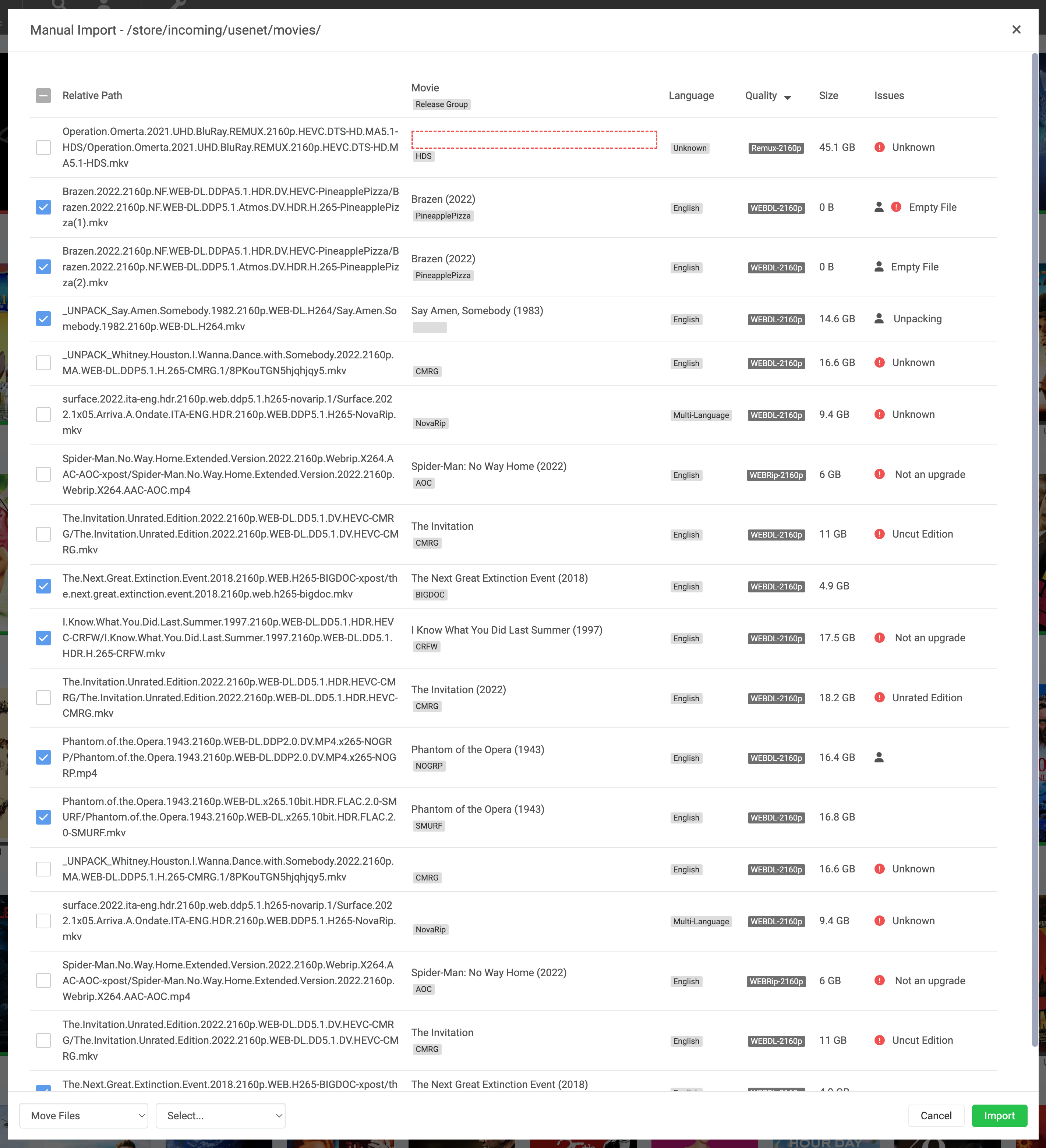
As an added value, it'd be exceptionally useful to have an option to delete as well as import.
Why is this better?
Because I could then easily sort by the specific reason for issue, then quickly uncheck import / check delete for all the "not an upgrade" items. I'd probably process those ones, and then work on the unknowns. Once they were identified, i'd again re-sort on issue and quickly eradicate (uncheck import; check delete) the not-an-upgrade, sample, etc. Finally, that should leave the list i should be able to more specifically import.
Describe alternatives you've considered
I guess I could use the api to generate the list i'd want, and then action it ... but I don't think that's a good way about this. :)
Anything else?
(mockup above ;))
Is there an existing issue for this?
Is your feature request related to a problem? Please describe
Sometimes, especially for foreign language or poorly named (think: arthouse) movies, auto matching and import doesn't work. So periodically I have to purge the import dump folder and manually process them. In doing so, I have to spend a lot of time trying to determine why a release was rejected (other than when just renaming/matching). It's a laborious process, and prone to failure, as the only way to know why a release failed is to hover over the exclamation icon to see the reason.
I think with a little bit of UX improvement, it'd become a very useful interface. I have heard that some of the *darr folks would rather get rid of it or keep it unusable so that people don't rely on it or over use it, however it's a fact of life with how some of this process works, and at this point it'd be great to have a working interface.
Describe the solution you'd like
First, it probably makes sense to shift from a modal to an actual page + route. The form itself is pretty chunky, and already has nine columns -- so it's probable that it's time to reconsider.
As a seperate page, it should then be easy to unwrap both the custom format and issues / warning graphics, and probably inline the popover message/labels.
If switching to a full page is unlikely, then I did a quick mockup to show a potential way to improve the UX -
1: make the manual import form wider -- i think you can rely on a avg width of 1200px at least at this point.
2: unwrap the reason for failure and make it a column of the primary import form
3: consider folding the release group into the movie name column
4: consider migrating the custom-formats icon into a singular "Issues" column
As an added value, it'd be exceptionally useful to have an option to delete as well as import.
Why is this better?
Because I could then easily sort by the specific reason for issue, then quickly uncheck import / check delete for all the "not an upgrade" items. I'd probably process those ones, and then work on the unknowns. Once they were identified, i'd again re-sort on issue and quickly eradicate (uncheck import; check delete) the not-an-upgrade, sample, etc. Finally, that should leave the list i should be able to more specifically import.
Describe alternatives you've considered
I guess I could use the api to generate the list i'd want, and then action it ... but I don't think that's a good way about this. :)
Anything else?
(mockup above ;))