Repository navigation
Toon Shading
Stylized cel rendering integrated into the deferred pipeline. Toon materials run through the same G-buffer, SSGI, shadow and tonemapping stack as PBR materials — only the diffuse ramp and specular gating change — so a toon character renders correctly inside a physically lit scene.
Enable with TOON_ENABLE in ray.conf:
| Value | Behavior |
|---|---|
0 |
Toon shading disabled (default). |
1 |
Toon material support. |
2 |
Toon material support with diffusion (adds the diffusion blur passes). |
| Model ID | Name | Ramp | Per-material controls |
|---|---|---|---|
8 (CUSTOM_ENABLE 8) |
CEL | Hard 2-band anime terminator with a half-strength core shadow |
customA — shadow terminator threshold (0..1), customB — shadow color |
9 (CUSTOM_ENABLE 9) |
TONEBASED | Smooth hardness ramp (0 = soft, 1 = hard cel) |
customA — ramp hardness, customB — shadow color |
Both models:
- take their band edges from the geometry shadow only — screen-space AO never smears the terminator;
- harden incoming soft PCF / contact-shadow gradients so cast-shadow edges stay crisp;
- gate the GGX specular into a stepped anime highlight keyed to the cel threshold;
- receive a flat 2-step ambient fill (IBL luma quantized) so the shadow side stays a clean fill instead of a smooth gradient;
- receive full SSGI — bounced GI is not quantized (a coarse ladder zeroed dim bounce light entirely; fixed in v1.16.0).
Materials/Toon/ mirrors the whole Materials/ tree: every material family duplicated as a ready-made cel-shaded preset (base color/alpha pulled from the model, CUSTOM_ENABLE 8, tuned customA/customB). Assign to a PMX material slot in MME like any other material fx.
Default shadow colors per family:
| Family | customA | customB |
|---|---|---|
| Skin / body / TDA | 0.55 | float3(0.92, 0.78, 0.75) |
| Hair (incl. procedural presets) | 0.45 | float3(0.55, 0.50, 0.78) |
| Eye | 0.70 | float3(0.45, 0.42, 0.55) |
| Cloth | 0.50 | float3(0.62, 0.62, 0.72) |
| Foliage | 0.50 | float3(0.28, 0.42, 0.18) |
| Everything else | 0.50 | float3(0.70, 0.60, 0.75) |
Notes:
-
Editor/is intentionally not duplicated;Programmable/WaterandProgrammable/Wetnessare copied verbatim (legacy self-contained format, not cel-converted). - Emissive templates stay emissive while the PMX defines an emissive color; cel shading takes over once it is zeroed.
- Base templates:
material_toon.fx(hard cel) andmaterial_tonebased.fx(smooth ramp). See Materials & PBR Shading for the PBR counterparts. -
v1.20.0 Features: All Toon materials fully inherit Hashed Alpha Testing (
HASHED_ALPHA_TEST_ENABLE 1for soft anti-aliased anime hair and eyelashes), Detail Normal Maps (DETAIL_MAP_ENABLE 1), and Hex-Tiling (HEX_TILING_ENABLE 1). Hair and Foliage presets exposeHASHED_ALPHA_TEST_ENABLEout-of-the-box.
Global grading applied to CEL / TONEBASED shadow colors, ported from the community toon shaders (HAToon2/PAToon2, M4Toon2, Jashin Toon, T_ToonShader):
| Knob | Default | Effect |
|---|---|---|
TOON_SHADOW_MUL / TOON_SHADOW_ADD
|
1,1,1 / 0,0,0
|
Multiply, then add — global grade on every shadow color. |
TOON_SHADOW_HUE |
0 |
Rotate shadow hue in degrees (−180..180), luminance preserved (YIQ). |
TOON_SHADOW_WARMTH |
0 |
0..1 luminance-preserving warm push — anime skin shadows (T_ToonShader skin mode). |
TOON_AUTOTINT_COLOR |
float3(0.95, 0.80, 1.05) |
Soft pink-lavender tint for shadows over low-saturation albedo (white clothes, skin). 0 = off. |
TOON_AUTOTINT_THRESHOLD |
0.03 |
Max base saturation still treated as colorless. |
TOON_AUTOTINT_STRENGTH |
1.0 |
0..1; tint scales with (1 − saturation). |
TOON_SELF_POWER_SHADOW |
0 |
Fallback for materials with no shadow color: pow(albedo, n), try ~0.98 (Jashin). |
TOON_RIM_STRENGTH / TOON_RIM_POWER
|
0 / 2.5
|
Silhouette rim light folded in before banding, so it inherits the cel bands. 0 = off. |
The approved "crisp cel" baseline:
// Toon pipeline
#define TOON_ENABLE 1               // 2 adds diffusion blur passes
#define OUTLINE_QUALITY 1           // Ray-MMD's screen-space edge outline
                                    // (works on models MMD's outline tab ignores)
#define CONTACT_SHADOW_QUALITY 0    // off — screen-space contact darkening smears
                                    // the flat cel shadow fills

// Look
#define HDR_TONEMAP_OPERATOR 8      // AgX — approved for toon; no need for Reinhard
#define TOON_AUTOTINT_COLOR     float3(0.95, 0.80, 1.05)
#define TOON_AUTOTINT_THRESHOLD 0.03
#define TOON_AUTOTINT_STRENGTH  1.0

// Everything below is fine at defaults for the toon look:
// TOON_SHADOW_MUL/ADD/HUE/WARMTH neutral, TOON_SELF_POWER_SHADOW 0,
// TOON_RIM_STRENGTH 0 (rim reads painterly), GI_ENABLE 2 (toon receivers
// get full SSGI), SSSS_QUALITY 1.
Tips:
-
Shadows too dark globally → lift with
TOON_SHADOW_MUL float3(1.1, 1.1, 1.15). -
Shadow hue off for the whole scene → nudge
TOON_SHADOW_HUEinstead of re-editing every material. -
Per-material tuning wins over global knobs: edit
customA/customBin the assignedMaterials/Toon/...fx.
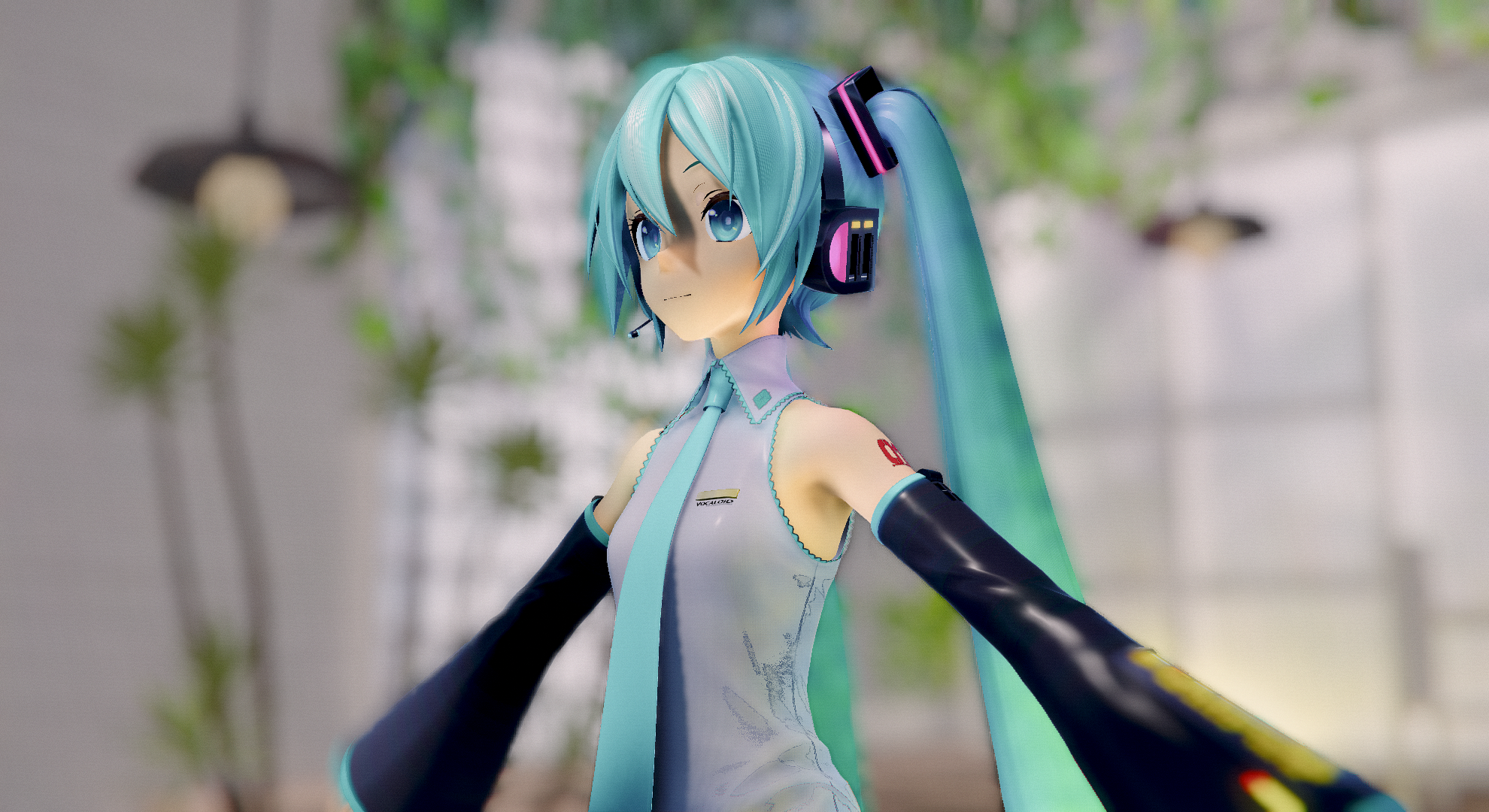
// ray.conf: stock defaults
#define TOON_ENABLE 0
#define OUTLINE_QUALITY 0
#define HDR_TONEMAP_OPERATOR 8
#define GI_ENABLE 2| Notes | Physically based shading: soft shadow gradients, skin SSS, IBL/GI bounce, AgX filmic color. |
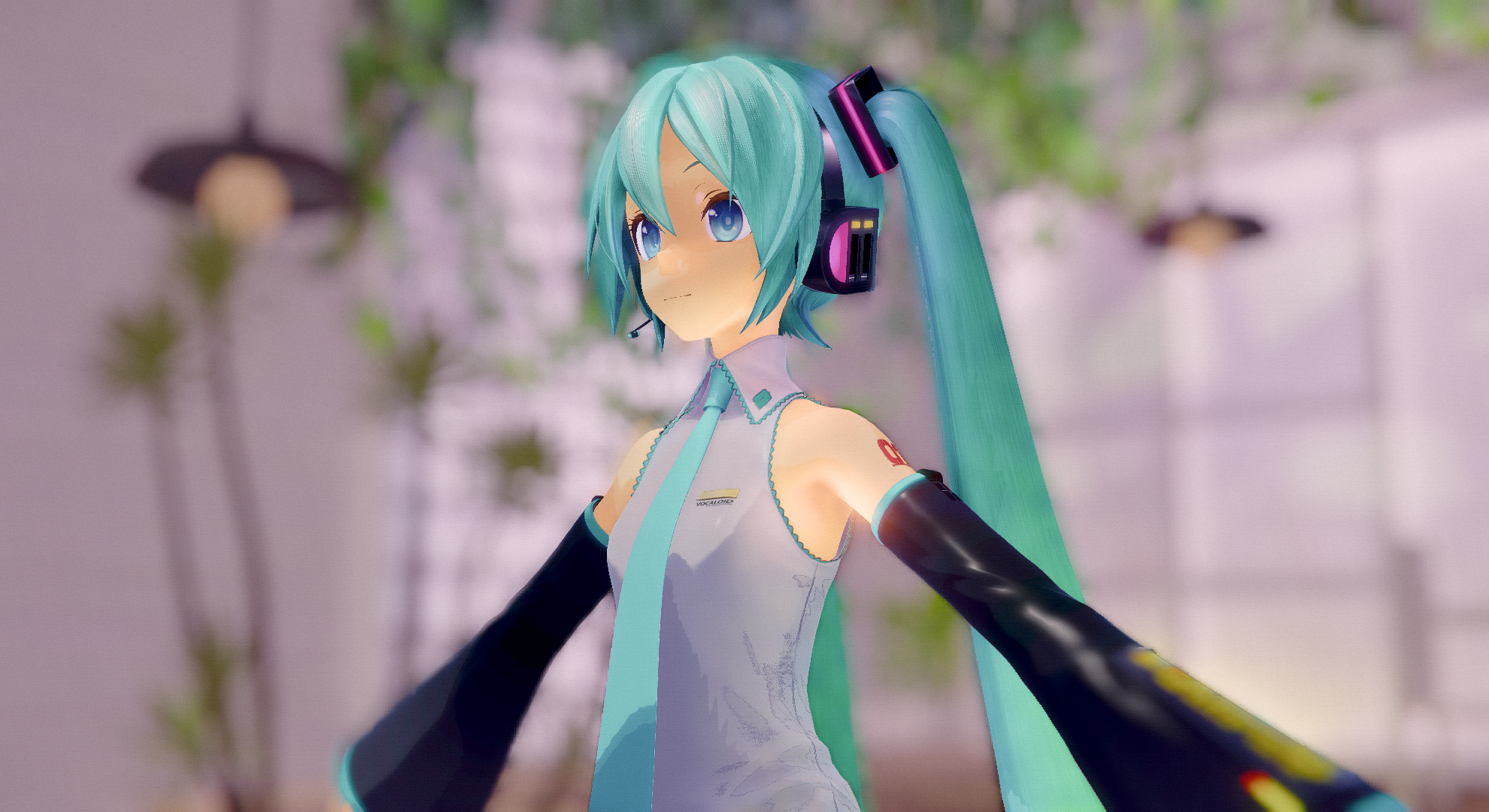
(same scene, Materials/Toon presets assigned)
// ray.conf: crisp cel baseline from section 4
#define TOON_ENABLE 1
#define OUTLINE_QUALITY 1
#define CONTACT_SHADOW_QUALITY 0
#define HDR_TONEMAP_OPERATOR 8
#define GI_ENABLE 2| Scene | Same model / stage / lighting as above. |
| Materials |
Materials/Toon presets: skin, hair, cloth. |
| Notes | Flat shadow fills, stepped highlights, outline, GI bounce on cel bands. |