Repository navigation
Project Output Organization
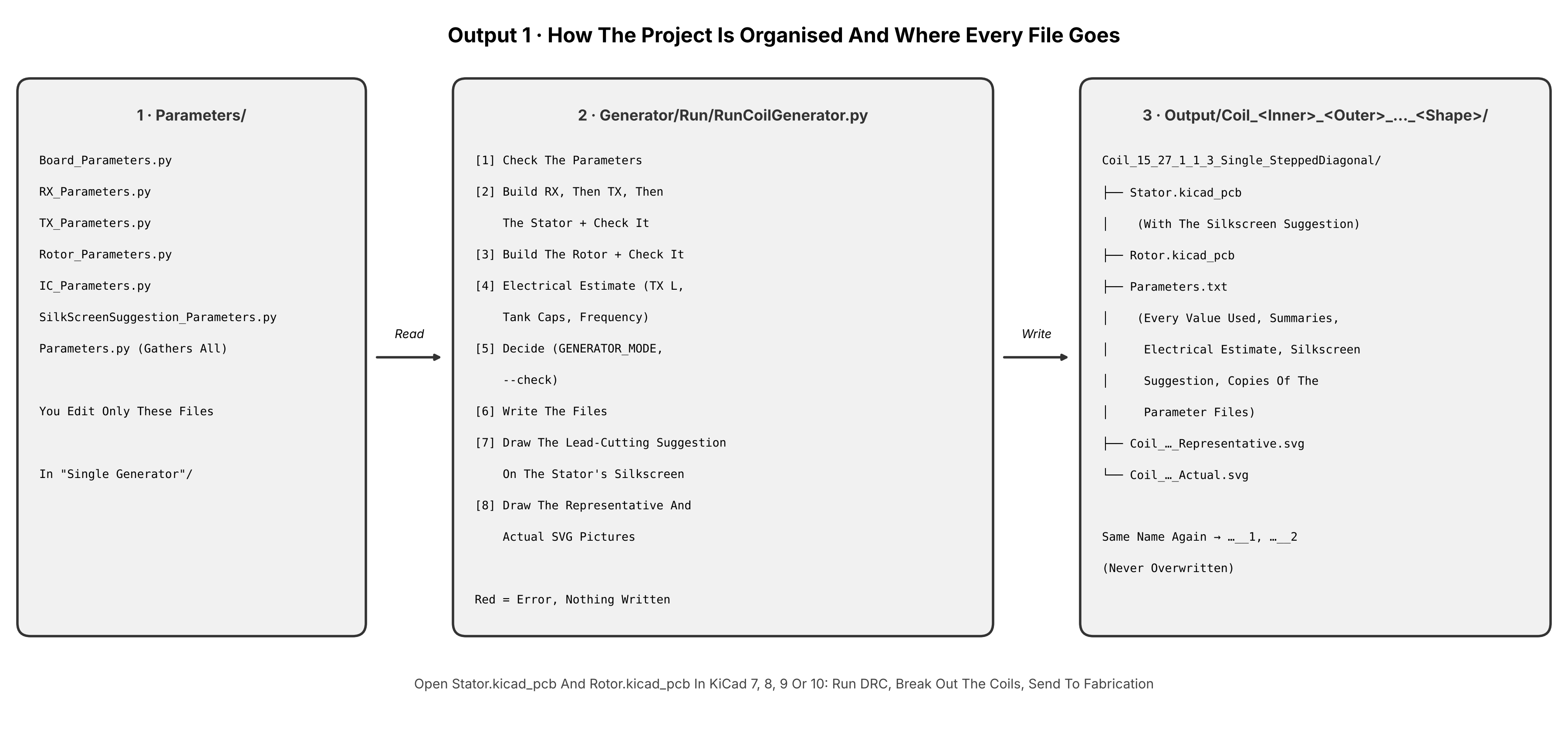
Output 1. You edit only the parameter files. The generator checks them and writes one new folder per run.
Generators/                     The two generators and the files they share
├── Single Coil Set Generator/
│   ├── Parameters/                 Every setting: the only files you edit
│   │   ├── Board_Parameters.py       Output, generator mode, PCB layers, vias, clearance, board outline, air gap, electrical estimate
│   │   ├── RX_Parameters.py          Loops, radii, profile, sub-coils, layers, fingers
│   │   ├── TX_Parameters.py          Turns, pitch, shape, wiring, layers, break style
│   │   ├── Rotor_Parameters.py       The rotor (metal target)
│   │   ├── IC_Parameters.py          The receiver IC limits for the electrical estimate
│   │   ├── SilkScreenSuggestion_Parameters.py   The lead-cutting suggestion on the silkscreen
│   │   └── Parameters.py             Gathers the five coil parameter files (do not edit)
│   ├── Generator/
│   │   ├── Run/                      RunCoilGenerator.py (the program to run; the only one that writes files),
│   │   │                             RunSteps.py (the run steps both generators share), CheckParameters.py, OutputFolders.py
│   │   ├── Checks/                   ParameterRules.py, ConflictRules.py, DesignChecks.py
│   │   ├── Stator/
│   │   │   ├── RX/                   RX_Builder, RX_Coils, RX_Profiles, RX_Fingers
│   │   │   ├── TX/                   TX_Builder, TX_Shapes, TX_Wiring, TX_Windows, TX_Terminal, TX_Electrics
│   │   │   ├── StatorAssembly.py     The finished stator, turned so the TX terminal sits at 0°
│   │   │   └── LeadCutting_SilkscreenSuggestion.py   The last step: the silkscreen suggestion
│   │   ├── Rotor/                    RotorBuilder.py
│   │   └── Core/                     Geometry, board layout, layers, copper, KiCad writer, conflict messages
│   └── Output/
│       └── Coil_<Inner Radius>_<Outer Radius>_<Loops>_<Sub-Coils>_<TX Turns>_<Single|Series|Parallel>_<SteppedDiagonal|SteppedArc|Spiral>/
│           ├── Stator.kicad_pcb
│           ├── Stator.kicad_pro               The stator's design rules for KiCad (clearance, track, via, drill)
│           ├── Rotor.kicad_pcb
│           ├── Rotor.kicad_pro                The rotor's design rules
│           ├── Parameters.txt
│           ├── <Folder Name>_Representative.svg   The boards as a picture to look at
│           └── <Folder Name>_Actual.svg           The copper 1:1 in mm, one Inkscape layer per copper layer
│
├── Dual Coil Set Generator/
│   ├── Parameters/                 Every dual setting: the only files you edit
│   │   ├── Dual_Board_Parameters.py  Output, layers, vias, clearance, edges, gap, TX ends, frequency rules, rotor disc
│   │   ├── Dual_RX1_Parameters.py    RX and fingers of set 1 (inner); Dual_RX2_Parameters.py for set 2 (outer)
│   │   ├── Dual_TX1_Parameters.py    TX ring and frequency of set 1; Dual_TX2_Parameters.py for set 2
│   │   ├── Dual_Rotor1_Parameters.py Ring 1 of the rotor; Dual_Rotor2_Parameters.py for ring 2
│   │   ├── Dual_IC1_Parameters.py    IC limits of set 1; Dual_IC2_Parameters.py for set 2
│   │   ├── Dual_SilkScreenSuggestion_Parameters.py   The lead-cutting suggestion for both sets
│   │   └── Dual_Parameters.py        Gathers the files (do not edit)
│   ├── Dual_Generator/
│   │   ├── Run/                      Dual_RunCoilGenerator.py (the program to run), Dual_OutputFolders.py
│   │   ├── Checks/                   Dual_CheckParameters.py, Dual_ParameterRules.py, Dual_DesignChecks.py
│   │   ├── Core/                     Dual_SetParameters.py (one Single Coil Set Generator parameter set per coil set), Dual_TrackLayout.py (the layout)
│   │   ├── Stator/                   Dual_StatorAssembler.py, Dual_LeadCutting_SilkscreenSuggestion.py
│   │   └── Rotor/                    Dual_RotorBuilder.py
│   └── Output/
│       └── DualCoil_<Bore Radius>_<Outline Radius>_<Set 1 Loops>x<Set 2 Loops>_<Set 1 TX Turns>x<Set 2 TX Turns>/
│           ├── Stator.kicad_pcb
│           ├── Stator.kicad_pro               The stator's design rules for KiCad (clearance, track, via, drill)
│           ├── Rotor.kicad_pcb
│           ├── Rotor.kicad_pro                The rotor's design rules
│           ├── Parameters.txt
│           ├── <Folder Name>_Representative.svg   The boards as a picture to look at
│           └── <Folder Name>_Actual.svg           The copper 1:1 in mm, one Inkscape layer per copper layer
│
└── resources/                  Shared by both generators
    ├── SilkscreenFont.py             The stroke font of the silkscreen lead names
    ├── KiCadReader.py                Reads a written .kicad_pcb back (the silkscreen step, the pictures)
    ├── RepresentativeSVGMaker.py     Draws <Folder Name>_Representative.svg from the written boards
    └── ActualSVGMaker.py             Draws <Folder Name>_Actual.svg from the written boards

regression/                     The regression tests of both generators (see Regression Testing)
├── run_regression.py             Runs the tests: python regression/run_regression.py [single|dual]
├── boards.py                     Makes a new test board
├── RegressionHarness.py          What both suites share
├── RegressionTools.py            The parser and measuring code of both suites
├── SingleCoilSetGenerator_regression/   tests/ and one folder per test board (Board001-default, Board002-..., ...)
└── DualCoilSetGenerator_regression/     The same for the Dual Coil Set Generator

docs/
├── CONTRIBUTING.md               How to get involved, and the contributor agreement
├── licenses/                     The full texts of the three licenses (LICENSE.md, at the root, says which applies where)
├── funding/                      MILESTONES.md and LEDGER.md: the milestones that end the commercial fee, and the public ledger
├── wiki/                         This wiki (copied to the GitHub wiki on every push to main)
├── images/                       The pictures of the README and the wiki
├── logo/                         The logo
└── tools/                        dual_layout_pictures.py: draws the pictures of the Dual Layout page
The Dual Coil Set Generator imports the Single Coil Set Generator's Generator package from the
Single Coil Set Generator folder next to it in Generators, so the two folders must stay side by side. It builds
every coil, rotor ring and silkscreen mark with the Single Coil Set Generator's own code and shares its run steps and
output-folder helpers; it changes nothing in the Single Coil Set Generator and leaves no __pycache__ there.
Its folder name carries the radii, the loops of both sets and the TX turns of both sets, for example
DualCoil_7.25_26.875_1x16_4x4.
The Single Coil Set Generator's folder name carries the board radii, the RX loops and sub-coils, the TX turns, the TX wiring and the TX shape, for example Coil_15_27_1_1_3_Single_SteppedDiagonal. A run never overwrites anything: if a folder name already exists, __1, __2 and so on are added. Parameters.txt lists every value used, marks the parameters that this design does not use, and records the angle the board was turned by to put the TX terminal at 0°. Each board's .kicad_pro holds the design rules KiCad checks it against: MIN_CLEARANCE_MM and the smallest track, via and drill on the board; see KiCad Compatibility. The two SVG pictures are drawn from the written boards at the end of the run; see Output Pictures.
The analyser and optimizer (Analyser_And_Optimizer/ and OptimizerParameters.py) are not on main. They are under construction on the analyser_and_optimizer branch.
python -m pip install -r requirements.txt

cd "Generators/Single Coil Set Generator"
python Generator/Run/RunCoilGenerator.py              # Check, then write Stator + Rotor
python Generator/Run/RunCoilGenerator.py --check      # Check only, write nothing

cd "../Dual Coil Set Generator"
python Dual_Generator/Run/Dual_RunCoilGenerator.py    # The Dual Coil Set Generator: check, then write Stator + Rotor
The generator runs from any folder; it finds the other folders itself. To treat every warning about the finished boards (clearances, the board edge, the page, the rotor) as an error, set GENERATOR_MODE = "strict" in Board_Parameters.py.

| Previous | Next |
|---|---|
| Suggestive Analysis And Optimization | Output Pictures |