
PicView 5.0
This release introduces a new tabbed interface alongside a major architectural overhaul.
Window sizing has been completely rebuilt for more intuitive behavior, while the navigation system now shares image caches across tabs and windows to reduce memory usage.
Highlights
- 🗂️ New tabbed interface
- 🪟 Completely redesigned window sizing
- ⚡ Lower memory usage through shared image caching
- 🖼️ Dockable image gallery
- 🔍 Searchable Settings window
- 📦 Instant archive preview while extraction continues
⚠️ Important Upgrade Notes
- Settings reset: Gallery settings will not be preserved because they have been completely reworked.
Auto-fit windowis also now disabled by default.- Shortcuts: Tab shortcuts (
Ctrl+T/W) must be manually re-added to prevent overwriting your custom bindings.- Current Limitations: Tab creation is currently unavailable when the gallery is docked, and multi-page TIFFs may not render correctly in Side-by-side mode.
- Secondary Windows: The
Image information, andImage effectswindows only support a single tab (the active tab from which they were opened).
What's new
Tabbed interface and window behavior
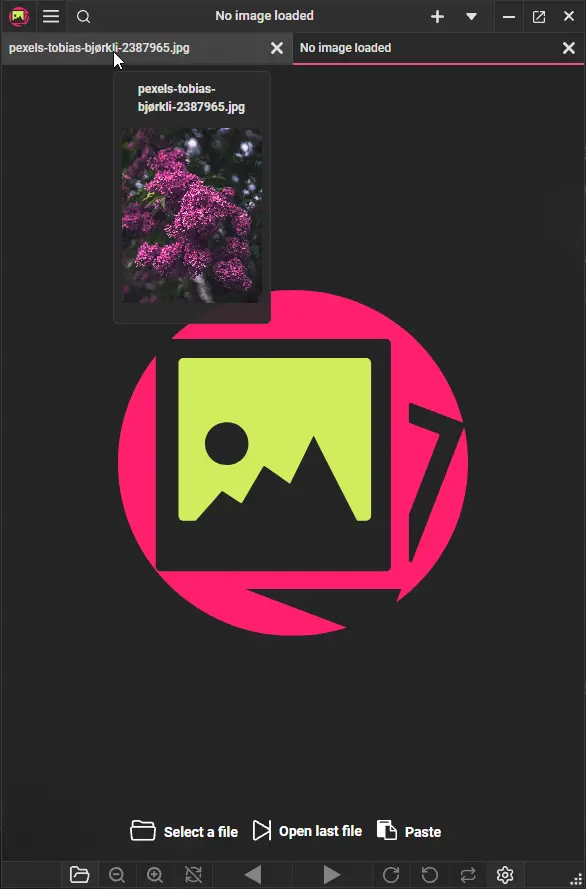
- Introduced a redesigned interface with support for tabbed navigation. When no additional tabs are open, the UI hides the tab panel so it effectively functions as a single image window (just like in prior releases).
Auto-fit windowno longer prevents you from resizing the window manually, and the macOS traffic light buttons are now available by default.- The bottom toolbar has been rebuilt with a focus on zooming and rotation, fixing usability issues on touch-only devices #223.
- Added a new
Renamedialog that shows up when the title bar is not visible. So you can still rename files while the UI is hidden, or when viewing in full screen. - The minimum window size has been lowered from 450 to 315 pixels #205. The window also dynamically adjusts to lower window sizes by hiding some buttons and automatically adjusting button sizes to fit.
- When the UI is hidden, a new toolbar displaying the file name appears when hovering the cursor at the top. Dragging it allows you to move the window.
Zoom and image stretching
- The displayed zoom percentage is now calculated relative to the image's original dimensions, rather than starting at 100% when the image is automatically fitted to the window #325 #288.
- Renamed
Stretch imagetoZoom to fitfor better clarity (behavior remains unchanged).
Image gallery
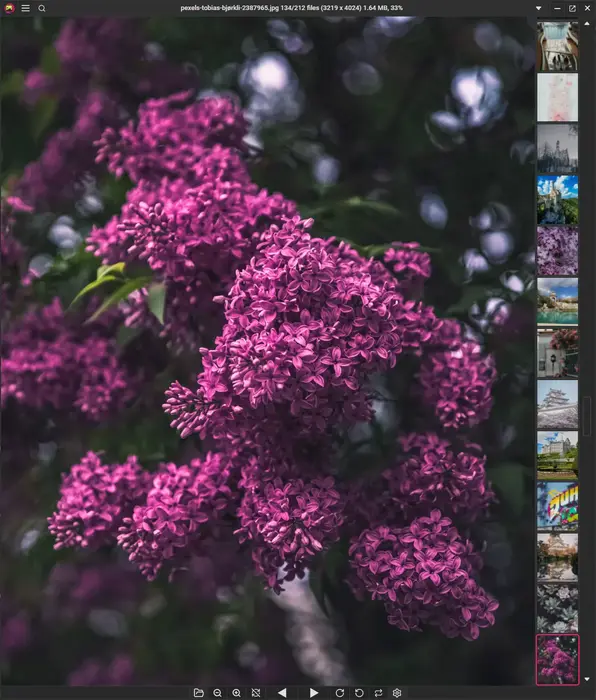
- The image gallery can now be docked to the top, left, or right side of the window, instead of being locked to the bottom.
- Renamed the
Show bottom gallerysetting toShow docked gallery at bottom. - Added an option to control whether the mouse wheel in the docked gallery navigates between images or scrolls the gallery itself #297.
Side-by-side view
- The
Side-by-sideview has been rewritten for improved performance and stability. Fixes #334. - Viewing animated images Side-by-side (GIFs, WEBP) now works correctly.
Settings window
- Added a search bar to quickly find individual settings within the Settings window.
- The window is now resizable and remembers its size and position between sessions.
- The layout is now fully scrollable rather than being restricted to fixed, rigid categories.
- Added new settings to customize mouse side-button behavior. You can now set them to navigate between archives, folders, or stick to standard image navigation #327.
- Added a new dark background color that matches the toolbars in the dark theme.
- Added a setting to choose whether the title bar displays the full file path or only the current file name #321.
- The print window is now resizable and remembers previously used settings, printer selections, and window positions between sessions #307, #256.
- Added a new
Export to PDFoption that converts the current image to a PDF using your last selected print settings. - The print preview now dynamically updates as you navigate through images.
Performance
- Navigation now shares image caches between tabs and windows, significantly reducing memory usage when working with multiple tabs or windows.
- Archive loading has been redesigned, so the first image appears immediately while remaining files continue extracting in the background.
Windows
- Fixed an issue where the title bar menu could be truncated when using languages with longer words #323.
- The window now uses system borders and native shadows.
- Fixed a bug where the group type checkboxes were not selecting and unselecting correctly in the
File Associationswindow.
macOS
- Updated default keyboard shortcuts to better align with native macOS user expectations.
- Fixed the native top menu bar having blank and unclickable items #302.
Bug fixes
- Fixed embedded ICC profile rendering (thanks to @kxn, #349).
- Fixed an issue where navigating between multiple multi-page TIFF files could result in a blank view #306.
- Fixed various issues when starting
Cropmode while the UI is hidden #305. - Fixed an issue where the hover bar occasionally failed to appear.
- Fixed an issue with incorrect window sizing, when rotating when
Auto-fit windowis enabled. - Fixed an issue where the bottom half of the toolbar was not reacting correctly #216.
- Fixed the mouse-side buttons triggering left-button behavior #327.
- Fixed the
Effectswindow not being accessible in theApplication shortcutswindow. - Fixed certain animated GIFs not playing (thanks to @aladin7 #358) #217.
Miscellaneous
- The Previous and Next buttons are now disabled when the beginning or end of the image list is reached.
- The
Image Effectswindow now remembers its previous window position.
Internal updates
- Updated Avalonia to 12.1.0.
- Updated to .NET 11.
- Updated Magick.NET to 14.15.0.
- Updated R3 to 1.3.1.
- Updated SharpCompress to 0.49.1.
- Updated ZLinq to 1.5.6.
Contributors


kxn and aladin7