Reference
MoodleAssistant is an SPA (Single Page Application) built with Blazor:
the app inside the master branch uses the Blazor Server hosting model, but there's a version made with the Blazor WebAssembly hosting model in the master-wasm branch.
Blazor is a client-side web UI framework that shares similarities with JavaScript-based front-end frameworks such as Angular and React. It manages user interactions and updates the UI as needed. Interactions are processed as events, and applications are built from one or more root components rendered within an HTML page.
The method for specifying where components render and how they are connected for user interactions depends on the hosting model.
In Blazor Server applications, components execute on the server. UI events triggered in the browser are transmitted to the server through a real-time connection. These events are routed to the appropriate component instances, which then render and produce a UI diff. The diff is serialized and sent back to the browser, where it updates the DOM.
With Blazor WebAssembly, the apps execute directly on the browser on a .NET runtime, based on WebAssembly. The .NET runtime is downloaded with the app, along with the app assembly and any required dependencies. No browser plugins or extensions are required.
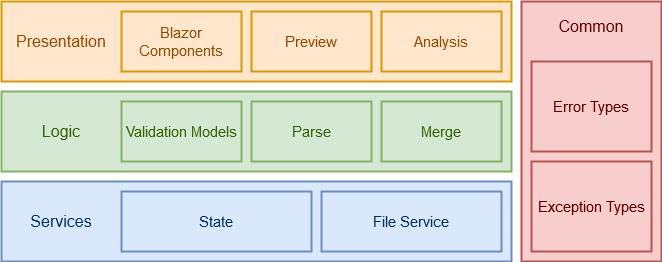
The app is divided into four main groups:
-
Presentation (
Componentsnamespace): Contains all Blazor components that manage UI events and interact with the logic. Manages the question preview and the analysis of the template question. -
Logic (
Logicnamespace): Handles the application's behavior, including tasks such as parameter parsing, merge processes, and validation. -
Services (
Servicesnamespace): Provides the services used by both the Presentation and Logic groups. These services are injected into components and classes via Dependency Injection. - Common: contains all the common error types and exceptions used in the application.
The application supports multiple types of template questions through the use of an Abstract Factory pattern, which provides generic interfaces and classes implemented for each question type:
- ITemplateModel: validates the template file.
- IAnalyzer: analyzes the template question document (used to display the text and all the answers and to highlight the parameters);
- ParameterHandler: manages parameters within the template question.
- IMerger: handles the merging of questions.
- IPreviewHandler: generates preview data for merged questions using the PreviewItem class.
- IReplicatorFactory: creates instances of all the above interfaces.
- Format and FormatExtension: define the question formats.
These interfaces need to be implemented or modified whenever a new type of template question is added.
Currently, the application supports only questions in Moodle XML format.
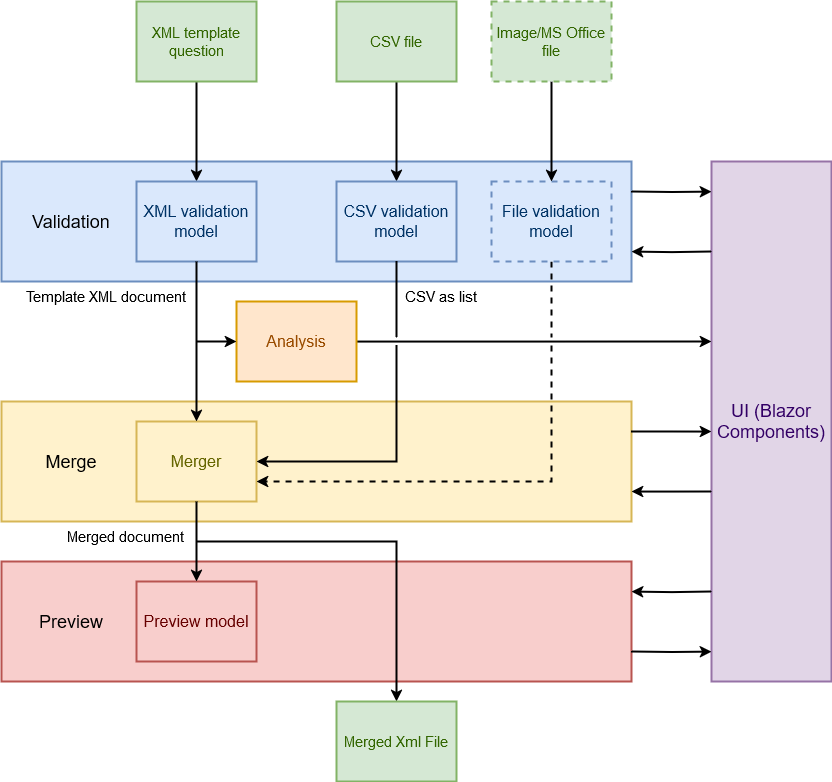
This diagram shows the two input files flow when the user submits them. The process has three main phases:
- Validation: handles the validation of the two files (e.g., invalid format, invalid type, empty file). If successful, the process produces a valid XML document and a list of all the CSV rows. After validation, the system displays an analysis of the template question (e.g., the number of questions/answers and parameters) to the user. If the question includes file-type parameters, a form is shown to upload the required files, which will undergo the same validation process.
- Merge: manages the merging process, taking the template document, the CSV list, and any required files as input, and producing the merged question variants as output.
- Preview: displays a preview of the merged question variants to the user.
Inputs:
- Template question;
- CSV file;
- Image or MS Office files (if file-type parameters are present);
Outputs:
- Merged question file
Here you can find the code documentation.