Repository navigation
Quickstart API
Five minutes from nothing to a verified governance receipt. Everything below runs against the public sandbox at sandbox.id-me.ai, which is the same code as production with its own database and igl_test_ keys.
You need curl and, for the last step, Node.js 20 or newer. The blocks below are written for bash (macOS, Linux, WSL, Git Bash). In Windows PowerShell, curl is an alias for Invoke-WebRequest and a trailing \ does not continue a line, so the bash blocks fail with "-H is not recognized"; use the PowerShell equivalents at the end of the page, or run the bash blocks in Git Bash or WSL.
curl -s -X POST https://sandbox.id-me.ai/sandbox/signup \
  -H "content-type: application/json" \
  -d '{"organization":"Rio Diablo Operating","email":"maria@example.com","jurisdiction":"US-TX"}'
The answer, once, with your key in it:
{
  "tenantId": "9c2d...",
  "identityId": "4b1e...",
  "apiKey": "igl_test_...",
  "clientId": "key_...",
  "scopes": ["igl.read", "igl.write", "igl.execute", "igl.admin"],
  "baseUrl": "https://sandbox.id-me.ai/v1",
  "note": "Store the key now; it is not shown again. Send it as Authorization: Bearer and X-IGL-Tenant-Id: <tenantId>"
}
Keep two values in your shell for the rest of the page:
export IGL_KEY=igl_test_...
export IGL_TENANT=9c2d...
Every request carries both: the key as a bearer token and the tenant id as a header. A request without the header is a 400 tenant_required; a key used with a tenant it does not belong to is a 403 tenant_mismatch.
curl -s "https://sandbox.id-me.ai/v1/identities/me?purpose=identity-introduction" \
  -H "authorization: Bearer $IGL_KEY" -H "x-igl-tenant-id: $IGL_TENANT"
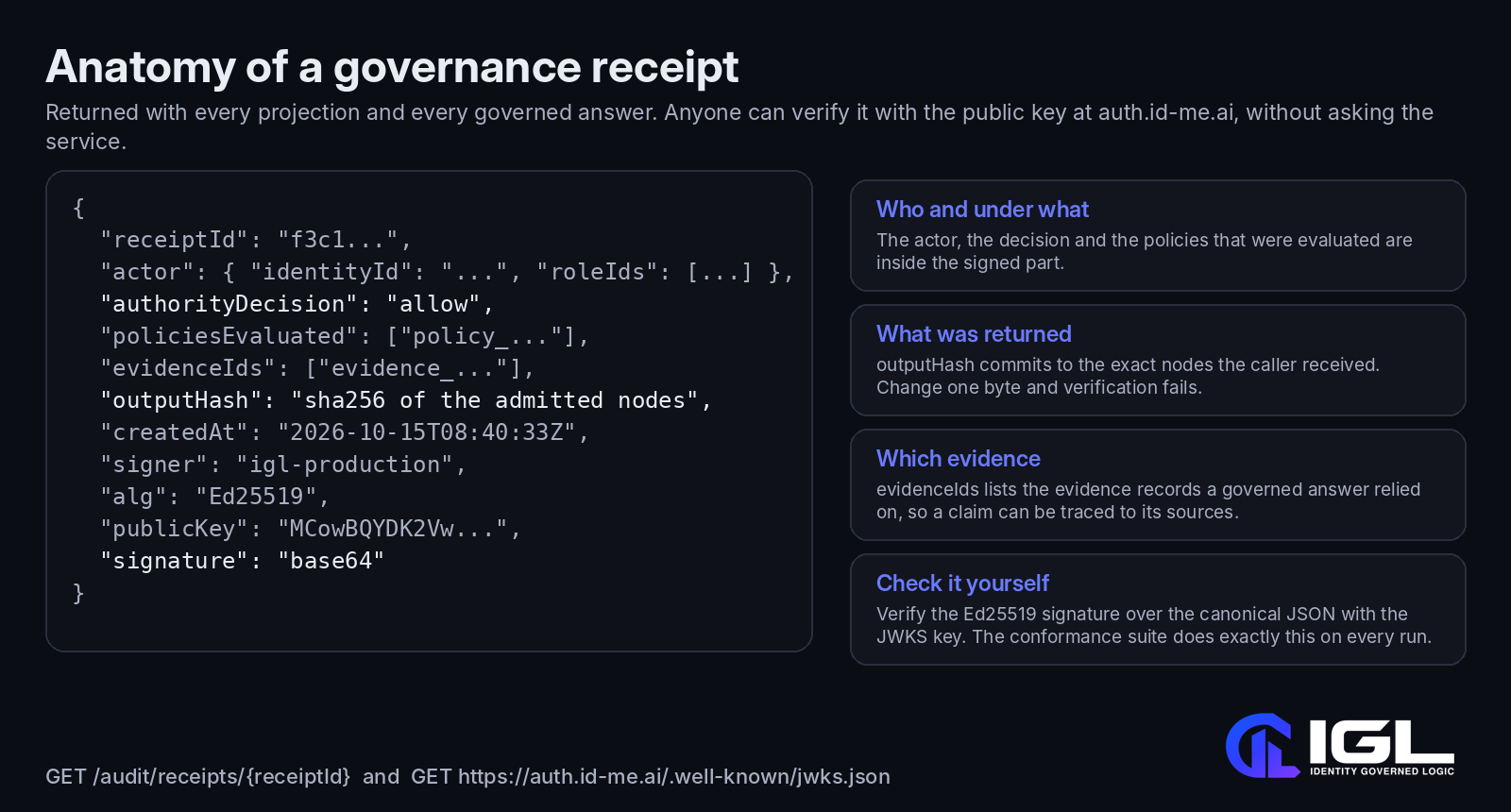
Signup created a Person identity for you (the part of the email before the @), bound your key to it, and recorded consent for the default purpose, identity-introduction. The response has four parts worth reading: nodes (what you were allowed to see), withheld (counts by type of what you were not), emptyWarning (set when an identity exists but nothing passed), and governance, the signed receipt.
curl -s -X POST https://sandbox.id-me.ai/v1/identities \
  -H "authorization: Bearer $IGL_KEY" -H "x-igl-tenant-id: $IGL_TENANT" \
  -H "content-type: application/json" -H "idempotency-key: org-1" \
  -d '{"type":"organization","displayName":"Rio Diablo Operating, LLC","attributes":{"jurisdiction":"US-TX","industry":"oil-and-gas"}}'
Send the same request again with the same idempotency-key and you get the same response back with idempotent-replayed: true instead of a duplicate. Send a different body under the same key and you get a 409.
Now relate yourself to it. Replace the two ids with yours:
curl -s -X POST https://sandbox.id-me.ai/v1/graph/relationships \
  -H "authorization: Bearer $IGL_KEY" -H "x-igl-tenant-id: $IGL_TENANT" \
  -H "content-type: application/json" \
  -d '{"fromId":"<your identityId>","type":"employed_by","toId":"<the organization id>","status":"certified","confidence":0.95}'
Relationships carry a status. A proposed relationship, which is what a model would create, never appears in a projection. Only certified edges between admitted nodes are returned.
curl -s "https://sandbox.id-me.ai/v1/identities/<your identityId>/projection?purpose=identity-introduction" \
  -H "authorization: Bearer $IGL_KEY" -H "x-igl-tenant-id: $IGL_TENANT"
You will see your Person node, the Role, the Organization you just connected and a Jurisdiction. Now ask under a purpose that permits more node types but for which no consent exists:
curl -s "https://sandbox.id-me.ai/v1/identities/<your identityId>/projection/explain?purpose=scientific-research" \
  -H "authorization: Bearer $IGL_KEY" -H "x-igl-tenant-id: $IGL_TENANT"
The explain endpoint lists every node that was considered and, for each, the four gates it passed or failed and the first failure. This is the page to show a compliance reviewer: nothing is hidden about why something was hidden.

Save the governance object from the projection response in step 4 (the explain response has no receipt; the projection does) to a file named receipt.json. Then save the JavaScript below, exactly as written, to a file named verify.mjs next to it. It is a program for Node, not shell commands; do not paste it at a prompt. It fetches the public key from the JWKS endpoint and checks the Ed25519 signature over the canonical JSON, exactly as the conformance suite does:
// verify.mjs
import { createPublicKey, verify } from "node:crypto";
import { readFileSync } from "node:fs";

const { signer, alg, publicKey, signature, ...receipt } = JSON.parse(readFileSync("receipt.json", "utf8"));
const canonical = (x) => Array.isArray(x) ? "[" + x.map(canonical).join(",") + "]"
  : (x && typeof x === "object") ? "{" + Object.keys(x).sort().map((k) => JSON.stringify(k) + ":" + canonical(x[k])).join(",") + "}"
  : JSON.stringify(x === undefined ? null : x);

const jwks = await (await fetch("https://sandbox.id-me.ai/.well-known/jwks.json")).json();
const pub = createPublicKey({ key: Buffer.from(publicKey, "base64"), format: "der", type: "spki" });
const ok = verify(null, Buffer.from("IGL-RECEIPT-v0.2:" + canonical(receipt)), pub, Buffer.from(signature, "base64"));
const sameKey = Buffer.from(jwks.keys[0].x, "base64url").equals(Buffer.from(publicKey, "base64").subarray(-32));
console.log({ signer, alg, ok, sameKey, outputHash: receipt.outputHash });
node verify.mjsok: true means the receipt was signed by the service's key. sameKey: true means that key is the one published at the JWKS endpoint. outputHash is the SHA-256 of the nodes you received; recompute it and you have proof of exactly what was returned. For production, use https://auth.id-me.ai/.well-known/jwks.json.
The key doubles as an OAuth 2.0 client. Exchange it for a short-lived token with a narrower scope:
curl -s -X POST https://sandbox.id-me.ai/oauth2/token \
  -d grant_type=client_credentials -d client_id=<clientId> -d client_secret=$IGL_KEY -d scope=igl.read
The token is an EdDSA JWT. Use it in authorization: Bearer the same way. A read-only token that tries to write gets a 403 with insufficient_scope.
Paste each block as a whole. The backtick at the end of a line continues it; Invoke-RestMethod parses the JSON answer into an object, so $r.apiKey works directly.
# 1. Tenant and key
$r = Invoke-RestMethod -Method Post -Uri "https://sandbox.id-me.ai/sandbox/signup" `
  -ContentType "application/json" `
  -Body '{"organization":"Rio Diablo Operating","email":"maria@example.com","jurisdiction":"US-TX"}'
$r
$env:IGL_KEY = $r.apiKey; $env:IGL_TENANT = $r.tenantId; $me = $r.identityId
$H = @{ authorization = "Bearer $env:IGL_KEY"; "x-igl-tenant-id" = $env:IGL_TENANT }
# 2. See who you are
Invoke-RestMethod -Uri "https://sandbox.id-me.ai/v1/identities/me?purpose=identity-introduction" -Headers $H | ConvertTo-Json -Depth 8# 3. Add an organization and connect it
$org = Invoke-RestMethod -Method Post -Uri "https://sandbox.id-me.ai/v1/identities" `
-Headers ($H + @{ "idempotency-key" = "org-1" }) -ContentType "application/json" `
-Body '{"type":"organization","displayName":"Rio Diablo Operating, LLC","attributes":{"jurisdiction":"US-TX","industry":"oil-and-gas"}}'
Invoke-RestMethod -Method Post -Uri "https://sandbox.id-me.ai/v1/graph/relationships" -Headers $H -ContentType "application/json" `
-Body (@{ fromId = $me; type = "employed_by"; toId = $org.id; status = "certified"; confidence = 0.95 } | ConvertTo-Json)# 4. Projection, then the explain view under a purpose with no consent
$p = Invoke-RestMethod -Uri "https://sandbox.id-me.ai/v1/identities/$me/projection?purpose=identity-introduction" -Headers $H
$p | ConvertTo-Json -Depth 8
Invoke-RestMethod -Uri "https://sandbox.id-me.ai/v1/identities/$me/projection/explain?purpose=scientific-research" -Headers $H | ConvertTo-Json -Depth 8# 5. Save the receipt for verify.mjs (the Node script above runs unchanged on Windows)
[IO.File]::WriteAllText("$PWD\receipt.json", ($p.governance | ConvertTo-Json -Depth 8)) # UTF-8 without a BOM, which JSON.parse would reject
node verify.mjs# 6. A short-lived read-only token
Invoke-RestMethod -Method Post -Uri "https://sandbox.id-me.ai/oauth2/token" `
-Body @{ grant_type = "client_credentials"; client_id = $r.clientId; client_secret = $env:IGL_KEY; scope = "igl.read" }A non-2xx answer makes Invoke-RestMethod throw; the problem document is in $_.ErrorDetails.Message inside a catch. If you have real curl installed, curl.exe takes the bash flags exactly as written above, with backticks in place of the backslashes.
The generated reference at id-me.ai/#docs lists all 51 operations with their schemas; the contract itself is spec/openapi.yaml. Errors are application/problem+json; the type URL ends in a stable error code such as tenant_mismatch or uncited_answer. Rate limiting on the sandbox is a bucket of 60 per key refilled at 1 per second, where a read costs 1, a write 5 and an MCP call 2.
Next: give an assistant the same powers through MCP Integration, or learn what the purposes and gates mean in Purposes and Projections.