Repository navigation
Remote Self-Control 1.0.0: Page Editor


Back up your remote's configuration in the web configurator before installing. If you already use the integration, also save a Backup in its builder first.
Install: web configurator → Integrations → Add new → Install custom → uc-intg-self-control-1.0.0.tar.gz. To update, tick Update existing driver. Your settings are kept.
New in 1.0.0: the Page Editor
A new first tab in the builder that edits your remote on a picture of your Remote 3 or Remote Two (picked from its model number). It covers most of what you'd otherwise do in the web configurator, and saves straight to the remote.
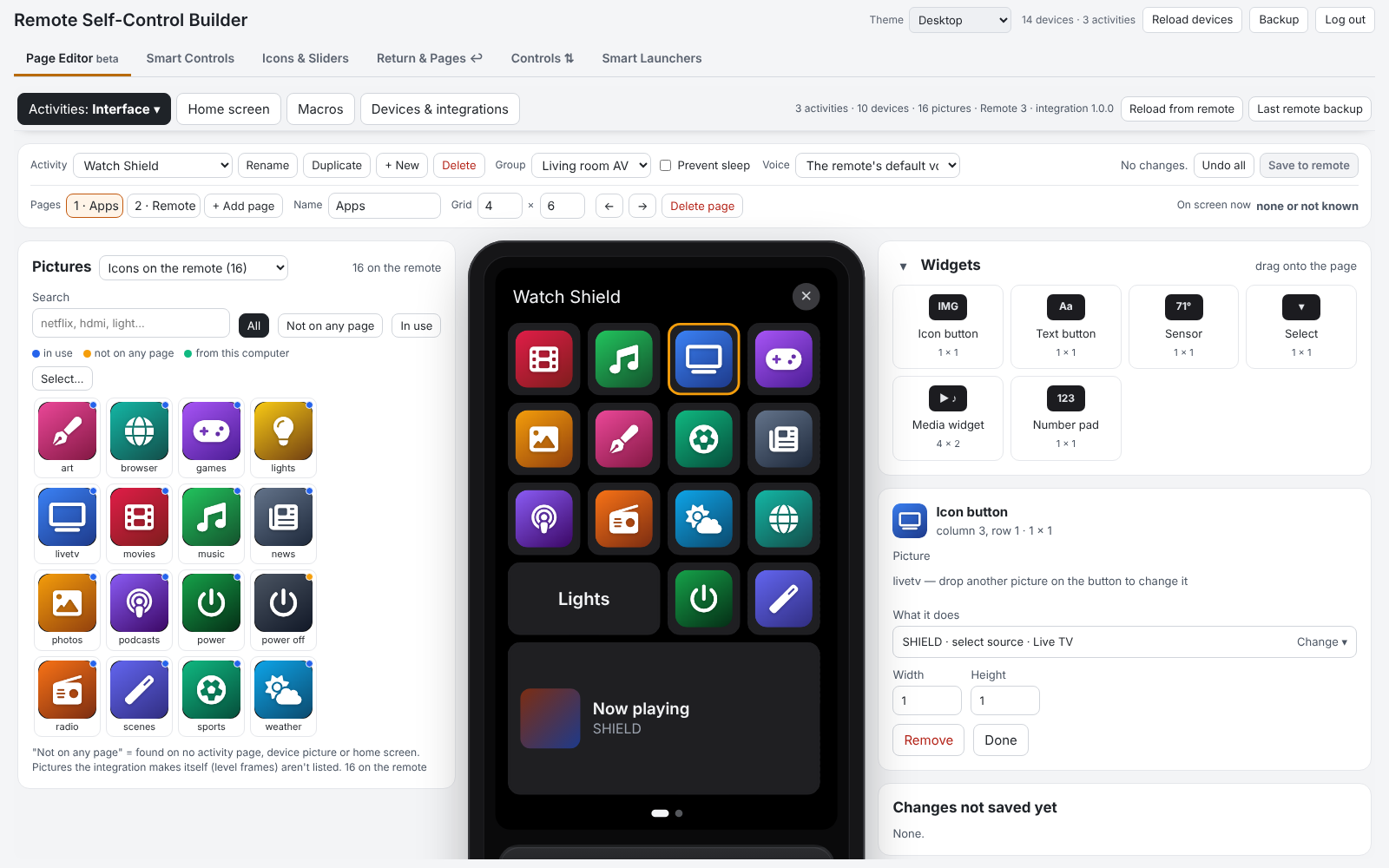
- Activities and pages
- Drag pictures onto the remote's screen. The Pictures window sits beside it, with as many pictures per row as the page has columns, each at the size it will have on a button. Sources: Icons on the remote, the remote's built-in icons, Channel icons, or a folder on your computer (uploaded when you save).
- Widgets: text button, sensor, select, media widget, number pad.
- What it does: pick a device, then its command, or search (shield movies). Custom value sends a typed value such as an app link. Not added yet adds a device straight from an integration.
- Physical keys and the touch slider; pages (add, rename, grid, move, delete); activities (rename, duplicate, delete, new, group, prevent sleep, voice assistant).
- Start and stop, with a guided setup. The start and off sequences, readiness check and what happens on a failed command. Give a button a command of a device that isn't in the sequences yet and a short setup asks what kind of device it is (display, AV receiver, streaming device, amp / subwoofer, Home Assistant, other). It then puts its steps in signal-flow order with recommended waits:
- on = display → 1.5 s → sources → 2 s → receiver + input → 3 s → amps;
- off = amps → 1 s → receiver → 1 s → display → 0.5 s → sources.
- Activity groups: what switching between activities turns off, in one plain sentence, with a grid of every switch.
- Home screen: home pages, tiles and background pictures.
- Macros: steps, duplicate, delete (shows where it's used), Try it now.
- Devices & integrations: what's on the remote and what each integration offers to add, rename, enable / disable, reconnect. + Add an integration opens Integration Manager if it's installed.
- Android TV app links: load a text file with
market://launch?id=… = Namelines. The apps show by name everywhere ("select source · Tivimate"), also on buttons that already use them. Apps the device already lists aren't added twice. - Themes for the whole builder: Automatic, Desktop, Dark mode, Remote style, Midnight blue, High contrast.
Safe saving
- A full remote backup (the same file as the web configurator's) is made before the first change of each visit. The newest two are kept on the remote, and Last remote backup downloads it.
- Pages are read again before saving, so a button you didn't touch keeps what the remote has now.
- The activity on screen is saved once you leave it, so the screen doesn't jump.
- Locked: activities made by integrations and Smart Launcher copies.
- The editor can't touch API keys, system commands or the remote's settings.
Also new since 0.8.7
- Backups with Integration Manager (0.8.8): Reconfigure → Back up settings shows your settings as text, and Restore settings from a backup puts them back. Integration Manager's Backup Config uses the same text. The app links are included.
- Faster builder: pages and larger answers are sent compressed, and the editor reads everything from the remote in parallel.
Everything else, in short
Smart Controls (if / else buttons) · state icons · sliders, quick menus and 16 level-picture designs · Controls for the volume rocker and touch slider · ↩ return to the previous activity · page jumps and start pages · Smart Launchers · the remote's own settings as entities · live device states · backup and restore. All in the README, with pictures.
Tested on one Remote 3. Issues and ideas are welcome.