-
Notifications
You must be signed in to change notification settings - Fork 1k
Sync to teams 403 forbidden #5425
Copy link
Copy link
Closed
Labels
area:spfxCategory: SharePoint Framework (not extensions related)Category: SharePoint Framework (not extensions related)area:spfx-msteamsCategory: SharePoint Framework & Microsoft Teams supportCategory: SharePoint Framework & Microsoft Teams supportstatus:fixedIssue was fixed in current or prior release.Issue was fixed in current or prior release.type:bug-suspectedSuspected bug (not working as designed/expected). See “type:bug-confirmed” for confirmed bugs.Suspected bug (not working as designed/expected). See “type:bug-confirmed” for confirmed bugs.

Description
Metadata
Metadata
Assignees
Labels
area:spfxCategory: SharePoint Framework (not extensions related)Category: SharePoint Framework (not extensions related)area:spfx-msteamsCategory: SharePoint Framework & Microsoft Teams supportCategory: SharePoint Framework & Microsoft Teams supportstatus:fixedIssue was fixed in current or prior release.Issue was fixed in current or prior release.type:bug-suspectedSuspected bug (not working as designed/expected). See “type:bug-confirmed” for confirmed bugs.Suspected bug (not working as designed/expected). See “type:bug-confirmed” for confirmed bugs.
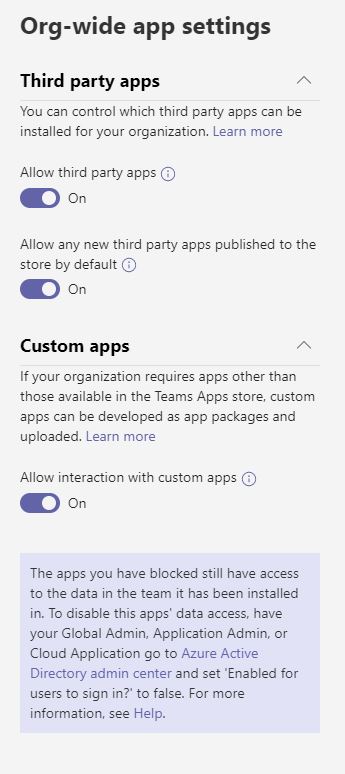
Select the SPfx solution in the app catalog, click Sync to Teams -> error message "Failed to sync solution to Teams", further investigation in dev tools reveals the following error message:
{"error":{"code":"-1, System.Net.WebException","message":{"lang":"en-US","value":"The remote server returned an error: (403) Forbidden."}}}Some additional details:


-The user is a global admin
-The same solution with the same user was syncing successfully yesterday
-Tried new solution on different tenants, same issue
-I think it has something to do with the new teams admin portal, the old 'Allow sideloading of external apps' in the o365 admin center is off and disabled
and you are directed to the new Teams Admin portal, but everything there is enabled as well
Steps to reproduce
Expected behavior
Sync to teams successfully
Developer environment