How to configure & call an Azure AD protected API with downstream calls #8940

Description

What type of issue is this?
Question
What SharePoint development model, framework, SDK or API is this about?
💥 SharePoint Framework
Target SharePoint environment
SharePoint Online
What browser(s) / client(s) have you tested
- 💥 Internet Explorer
- 💥 Microsoft Edge
- 💥 Google Chrome
- 💥 FireFox
- 💥 Safari
- mobile (iOS/iPadOS)
- mobile (Android)
- not applicable
- other (enter in the "Additional environment details" area below)
Additional environment details
- SPFx version: 1.17.1
- Node.js version: 16.20.0
- etc
Issue description
Hello team,
We are an ISV and create WebParts (& application customizers) and need to call our own Azure AD protected APIs (which calls other APIs).
We try to follow the document on how to configure it (https://learn.microsoft.com/en-us/sharepoint/dev/spfx/use-aadhttpclient) but all articles refers to calling APIs backed by Azure AD apps defined in the same tenant (which is not our case).
We try to add our scope in the webApiPermissionRequests section of the package-solution.json file but we always have the following error message in the admin center when trying to approve it:
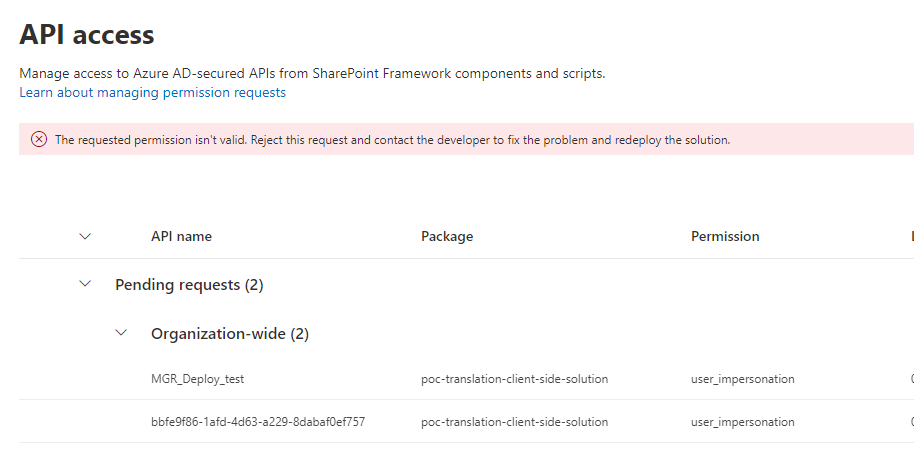
As you can see, we try to use both the name and the App Id of the Azure AD application (defined in another tenant to behave like our clients).
How can we securely call "externals" API secured by Azure AD (except MS Graph which is the only other example) ?
Thanks in advance.