Description
Found a problem with the wrapping of long words.
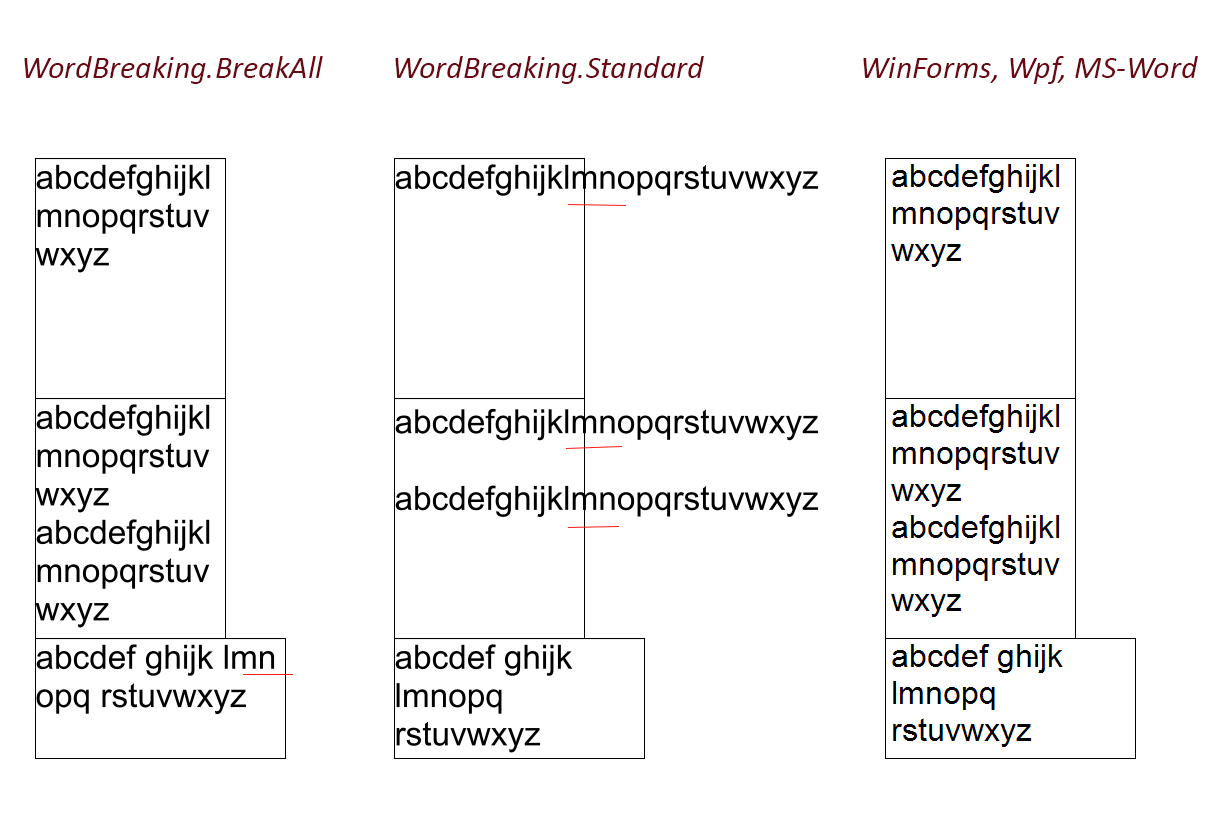
In WinForms/Wpf/MS-Word, if a long word does not fit entirely into the output rectangle, it is split into parts.
In this library, long words are not broken into parts, they are displayed further outside the rectangle.
The textOptions.WordBreaking property does not help: BreakAll mode breaks all words, Standard mode does not break long words.
Steps to Reproduce
var text1: "abcdefghijklmnopqrstuvwxyz"
var text2: "abcdefghijklmnopqrstuvwxyz \r\n abcdefghijklmnopqrstuvwxyz"
var text3: "abcdef ghijk lmnopq rstuvwxyz"
....
var textOptions = new SixLabors.Fonts.TextOptions(font);
textOptions.WrappingLength = layoutRectangle.Width;
textOptions.WordBreaking = SixLabors.Fonts.WordBreaking.BreakAll; //or Standard

canvasImage.AddDrawingOperation(DrawingOptions, (x, o) => x.DrawText(o, textOptions, text1, brush, null));
Results:
Of course, I can write my big method using TryMeasureCharacterBounds, which will determine where the line goes outside the rectangle and break it. But I would like an easier and faster way.
System Configuration
Fonts version: current source code
Other Six Labors packages and versions: none
Environment (Operating system, version and so on): Win10
.NET Framework version: .Net 6.0
Description
Found a problem with the wrapping of long words.
In WinForms/Wpf/MS-Word, if a long word does not fit entirely into the output rectangle, it is split into parts.
In this library, long words are not broken into parts, they are displayed further outside the rectangle.
The textOptions.WordBreaking property does not help: BreakAll mode breaks all words, Standard mode does not break long words.
Steps to Reproduce
Results:

Of course, I can write my big method using TryMeasureCharacterBounds, which will determine where the line goes outside the rectangle and break it. But I would like an easier and faster way.
System Configuration
Fonts version: current source code
Other Six Labors packages and versions: none
Environment (Operating system, version and so on): Win10
.NET Framework version: .Net 6.0