Repository navigation
MCC v1.0.0

Minecraft Control Center v1.0.0
The first public release of Minecraft Control Center - a standalone Windows app for
managing a Crafty-based Minecraft setup from one place.
Changes in this release
- Converted the original server control script into a maintainable standalone app.
- Added installed and portable distribution modes.
- Removed dependencies on the app's placement and added automatic discovery for
Crafty, PlayIt, Prism Launcher, and TLauncher. - Added remembered, user-editable provider locations under
%LOCALAPPDATA%\MinecraftControlCenter. - Added a common provider contract for installation, running state, start, stop, and
status handling. - Refined the launcher row so the selected launcher appears as the program, with a
seamless dropdown shown only when multiple launchers are detected. - Added secure GitHub Releases updates with checksum validation, automatic restart,
UAC support, atomic replacement, and rollback. - Added application uninstall support for installed and portable copies.
- Added repeatable builds for the standalone executable, portable ZIP, checksum, and
Inno Setup installer. - Kept live server worlds, logs, backups, credentials, and browser data out of release
packages.
Features
- Start and stop Crafty, PlayIt, your Minecraft launcher, and Minecraft.
- Start or stop the complete setup with one button.
- Automatically detect Crafty, PlayIt, Prism Launcher, and TLauncher.
- Remember detected locations in an editable configuration file.
- Detect local Crafty Minecraft servers and their game ports.
- Open and sign in to the Crafty dashboard.
- Create custom Windows shortcuts.
- Check for and install future updates from GitHub.
- Uninstall installed or portable copies directly from the app.
Reliability and safety
- Self-contained .NET 8 application - no separate .NET installation required.
- Application files can be installed or extracted anywhere.
- App settings and browser data are stored separately under
%LOCALAPPDATA%\MinecraftControlCenter. - Update downloads are verified using SHA-256 checksums.
- Updates use atomic replacement and automatic rollback on failure.
- Single-instance protection prevents conflicting app and configuration writes.
- Uninstall removes only Minecraft Control Center files and its recorded shortcuts.
- Crafty, PlayIt, launchers, servers, worlds, logs, and credentials are preserved.
Supported providers
- Server manager: Crafty
- Connection: PlayIt
- Launchers: Prism Launcher and TLauncher
Installation
For a normal Windows installation, download and run:
MinecraftControlCenter-Setup.exe
For portable use, download and extract:
MinecraftControlCenter.zip
Windows 10 or later on a 64-bit PC is required.
Included release assets
MinecraftControlCenter-Setup.exeMinecraftControlCenter.zipMinecraftControlCenter.zip.sha256
This is the initial v1.0.0 release. Feedback and issue reports are welcome.
Coming in the next major release
The next major release is planned to add a compatibility matrix so you can clearly
see which server managers, remote-connection providers, and game launchers are
available and supported. The current roadmap includes:
| Component | Planned choices |
|---|---|
| Server manager | Crafty Controller, AMP, direct .jar server |
| Remote connection | Playit, direct port forwarding, Tailscale |
| Game launcher | Prism, official Minecraft Launcher, Modrinth App, ATLauncher |
| Later additions | PufferPanel, Pterodactyl, GDLauncher, CurseForge |
These plans may change as compatibility work and testing progress.
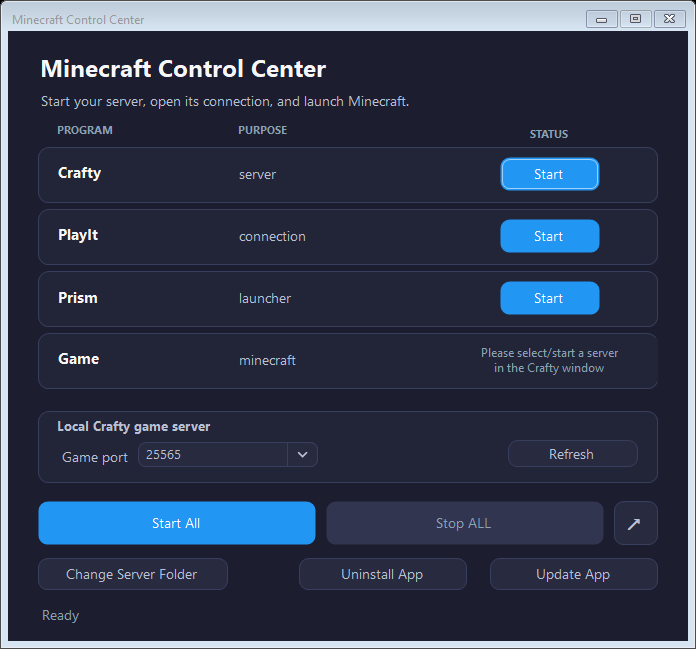
Interface preview