Repository navigation
Releases: TheQuantifier/MinecraftControlCenter
Release list
MCC v1.0.8

Minecraft Control Center v1.0.8
This maintenance release fixes the underlying cause of Crafty failing immediately after an
in-app MCC update: the administrator update helper was relaunching MCC with elevated process
and console state.
Changes in this release
- Relaunches an updater-started elevated MCC instance through the signed-in user's Explorer
session before initializing the application. - Prevents Crafty from inheriting the update helper's closed console stream and exiting
cleanly with exit code 0. - Adds a guarded relaunch path that avoids loops on systems where Explorer is also elevated.
- Changes newly generated update scripts to restart MCC through Explorer after successful
updates and rollback recovery. - Keeps the reliable, console-preserving Crafty launch behavior used by the early releases.
- Retains the complete two-minute Crafty readiness monitor and explicit startup diagnostics.
- Retains verified multi-process Crafty shutdown, force-stop fallback, stale session-lock
removal, and safe SQLite shared-memory recovery. - Adds automated checks for standard-user relaunch configuration and generated updater
scripts.
Supported providers
- Server manager: Crafty
- Connection: PlayIt
- Launchers: Prism Launcher and TLauncher
Installation
For a normal Windows installation, download and run:
MinecraftControlCenter-Setup.exe
For portable use, download and extract:
MinecraftControlCenter.zip
Windows 10 or later on a 64-bit PC is required.
Included release assets
MinecraftControlCenter-Setup.exeMinecraftControlCenter.zipMinecraftControlCenter.zip.sha256
Coming in the next major release
The next major release is planned to add a compatibility matrix covering additional
server managers, remote-connection providers, and game launchers.
| Component | Planned choices |
|---|---|
| Server manager | Crafty Controller, AMP, direct .jar server |
| Remote connection | Playit, direct port forwarding, Tailscale |
| Game launcher | Prism, official Minecraft Launcher, Modrinth App, ATLauncher |
| Later additions | PufferPanel, Pterodactyl, GDLauncher, CurseForge |
These plans may change as compatibility work and testing progress.
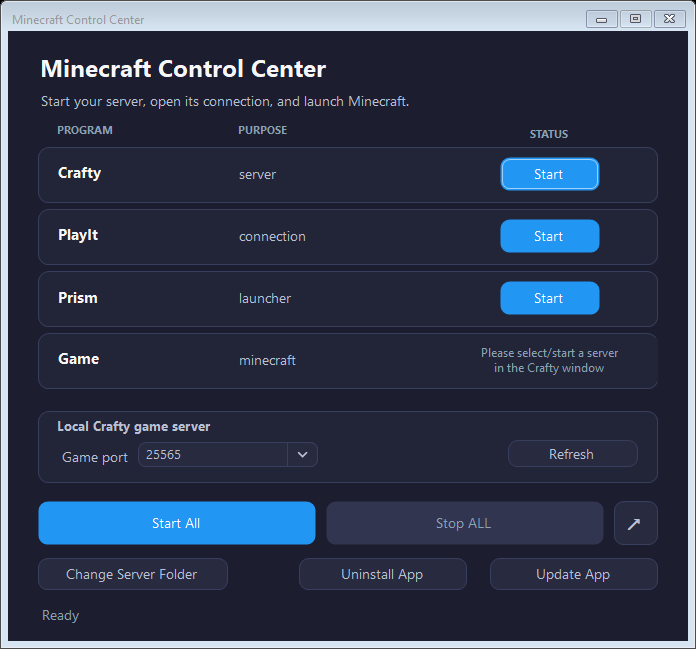
Interface preview
MCC v1.0.7
Minecraft Control Center v1.0.7
This hotfix restores reliable Crafty startup after v1.0.6 caused Crafty to exit cleanly
before its dashboard became ready.
Changes in this release
- Restores the shell-based Crafty launch mode proven in v1.0.0 through v1.0.2.
- Preserves the console stream required by Crafty's interactive command loop, preventing an
immediate EOF shutdown with exit code 0. - Keeps Crafty's console window hidden while the service continues running normally.
- Retains the complete two-minute
Starting...readiness state introduced in v1.0.6. - Retains explicit reporting for genuine early exits, startup timeouts, and dashboard
readiness failures. - Retains the verified force-stop, stale session-lock cleanup, and safe SQLite recovery from
v1.0.5. - Adds a regression check for the required shell-launch and console settings.
Supported providers
- Server manager: Crafty
- Connection: PlayIt
- Launchers: Prism Launcher and TLauncher
Installation
For a normal Windows installation, download and run:
MinecraftControlCenter-Setup.exe
For portable use, download and extract:
MinecraftControlCenter.zip
Windows 10 or later on a 64-bit PC is required.
Included release assets
MinecraftControlCenter-Setup.exeMinecraftControlCenter.zipMinecraftControlCenter.zip.sha256
Coming in the next major release
The next major release is planned to add a compatibility matrix covering additional
server managers, remote-connection providers, and game launchers.
| Component | Planned choices |
|---|---|
| Server manager | Crafty Controller, AMP, direct .jar server |
| Remote connection | Playit, direct port forwarding, Tailscale |
| Game launcher | Prism, official Minecraft Launcher, Modrinth App, ATLauncher |
| Later additions | PufferPanel, Pterodactyl, GDLauncher, CurseForge |
These plans may change as compatibility work and testing progress.
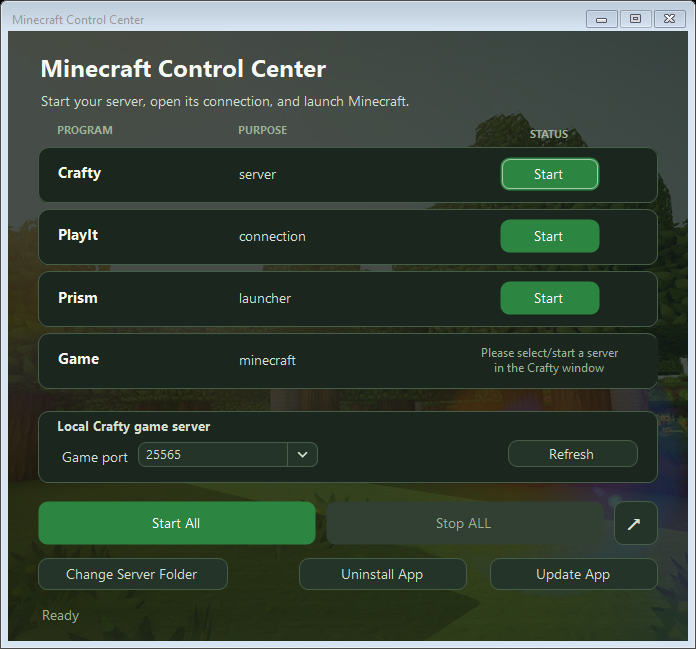
Interface preview
MCC v1.0.6
Minecraft Control Center v1.0.6
This maintenance release fixes an intermittent Crafty startup failure and makes the
startup state and error reporting accurately reflect what Crafty is doing.
Changes in this release
- Launches Crafty directly as a hidden, console-free process without relying on the Windows
shell. - Uses Crafty's configured installation directory as its working directory.
- Keeps the Crafty control and batch buttons in the
Starting...state for the complete
two-minute dashboard readiness window instead of reverting after 20 seconds. - Detects when the launched Crafty process exits before port 8443 becomes ready.
- Reports an early Crafty exit and its exit code instead of silently returning the control
toStart. - Distinguishes between an exited Crafty process, a startup timeout, and a running Crafty
process whose dashboard has not become ready. - Adds automated coverage for the exact Crafty process-launch configuration.
- Retains the verified force-stop, stale lock cleanup, and safe SQLite recovery introduced
in v1.0.5.
Supported providers
- Server manager: Crafty
- Connection: PlayIt
- Launchers: Prism Launcher and TLauncher
Installation
For a normal Windows installation, download and run:
MinecraftControlCenter-Setup.exe
For portable use, download and extract:
MinecraftControlCenter.zip
Windows 10 or later on a 64-bit PC is required.
Included release assets
MinecraftControlCenter-Setup.exeMinecraftControlCenter.zipMinecraftControlCenter.zip.sha256
Coming in the next major release
The next major release is planned to add a compatibility matrix covering additional
server managers, remote-connection providers, and game launchers.
| Component | Planned choices |
|---|---|
| Server manager | Crafty Controller, AMP, direct .jar server |
| Remote connection | Playit, direct port forwarding, Tailscale |
| Game launcher | Prism, official Minecraft Launcher, Modrinth App, ATLauncher |
| Later additions | PufferPanel, Pterodactyl, GDLauncher, CurseForge |
These plans may change as compatibility work and testing progress.
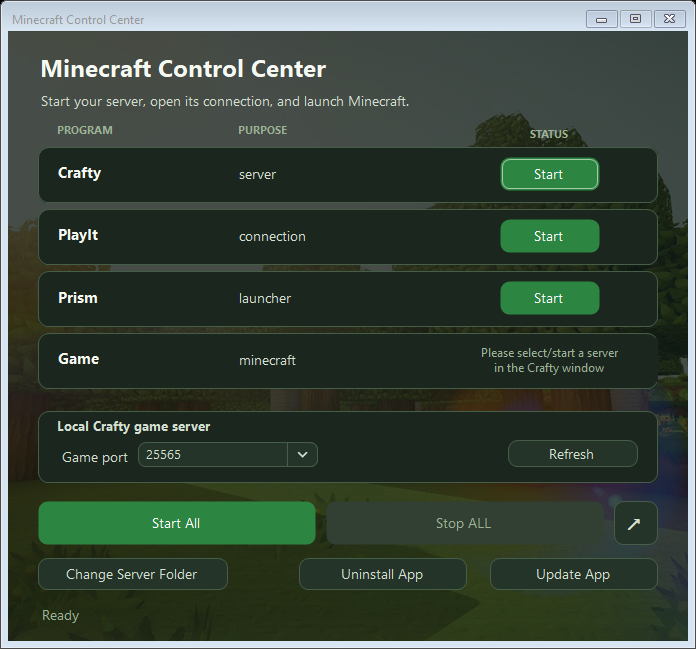
Interface preview
MCC v1.0.5
Minecraft Control Center v1.0.5
This maintenance release makes Crafty startup and shutdown resilient to stale process
metadata and SQLite state left behind after an interrupted or forced termination.
Changes in this release
- Prepares Crafty's SQLite state before startup when Crafty is confirmed stopped and port
8443 is free. - Removes only the rebuildable
crafty.sqlite-shmindex while preserving the main database
and write-ahead log so committed data is not discarded. - Clears stale read-only attributes that can otherwise cause Crafty to fail with an
attempt to write a readonly databaseerror. - Recognizes a running Crafty instance through its verified session-lock PID when Windows
process inventory is temporarily incomplete. - Opens the Crafty dashboard once port 8443 is ready instead of depending solely on process
inventory results. - Requests a normal Crafty server and application shutdown first, allowing time for a clean
exit. - Force-stops only processes whose executable path and start identity match the configured
crafty.exewhen normal shutdown does not finish. - Tracks Crafty's PyInstaller parent and child processes, including children that appear
during shutdown, so the app cannot report success while one remains running. - Removes stale
session.lockand SQLite shared-memory state only after Crafty is confirmed
stopped. - Keeps the Crafty row and batch controls disabled as
Stopping...until shutdown and
recovery are complete. - Adds automated coverage for SQLite recovery, verified Crafty process handling, and the
stopping interface state.
Supported providers
- Server manager: Crafty
- Connection: PlayIt
- Launchers: Prism Launcher and TLauncher
Installation
For a normal Windows installation, download and run:
MinecraftControlCenter-Setup.exe
For portable use, download and extract:
MinecraftControlCenter.zip
Windows 10 or later on a 64-bit PC is required.
Included release assets
MinecraftControlCenter-Setup.exeMinecraftControlCenter.zipMinecraftControlCenter.zip.sha256
Coming in the next major release
The next major release is planned to add a compatibility matrix covering additional
server managers, remote-connection providers, and game launchers.
| Component | Planned choices |
|---|---|
| Server manager | Crafty Controller, AMP, direct .jar server |
| Remote connection | Playit, direct port forwarding, Tailscale |
| Game launcher | Prism, official Minecraft Launcher, Modrinth App, ATLauncher |
| Later additions | PufferPanel, Pterodactyl, GDLauncher, CurseForge |
These plans may change as compatibility work and testing progress.
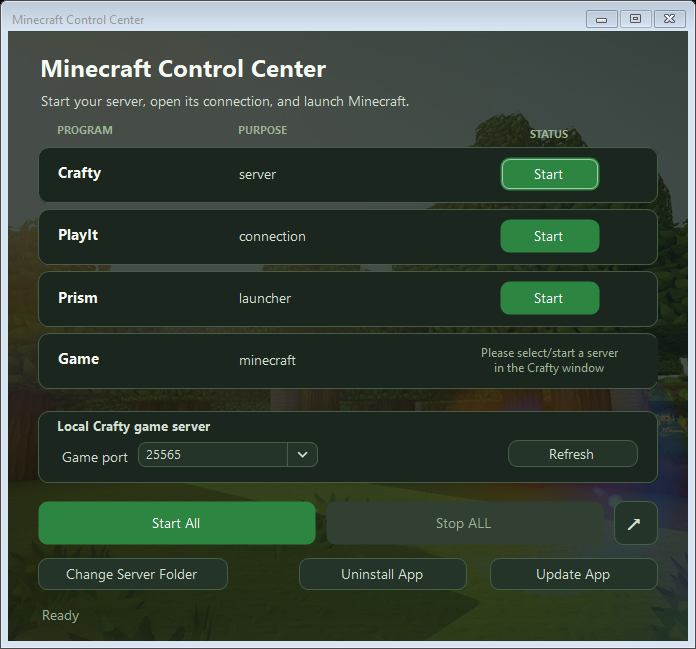
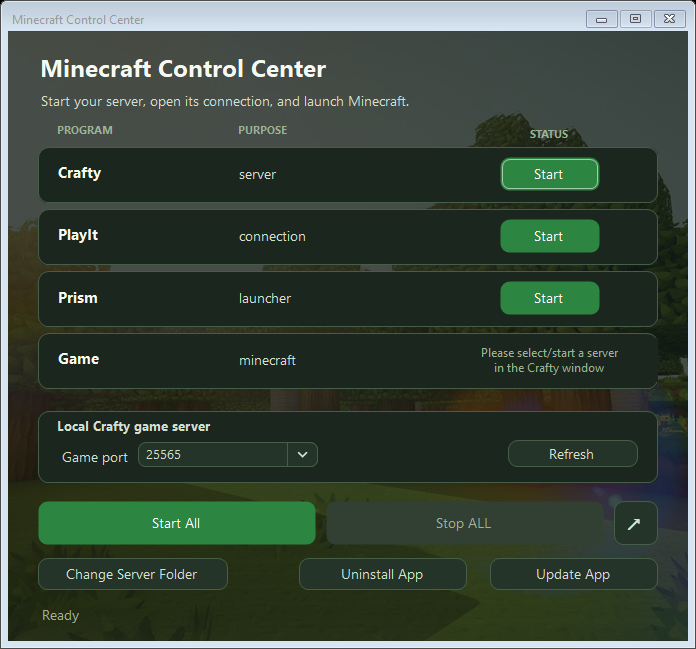
Interface preview
MCC v1.0.4
Minecraft Control Center v1.0.4
This maintenance release prevents stale Crafty session locks from blocking startup and
makes Minecraft Control Center uninstall completely, including its local application data.
Changes in this release
- Detects when Crafty's
session.lockPID has been reused by an unrelated Windows process. - Removes the exact stale Crafty lock only after confirming that Crafty is not running, its
dashboard is not listening on port 8443, and the lock did not change during validation. - Preserves valid and unverifiable locks to avoid disrupting an active Crafty instance.
- Cleans up a stale Crafty lock after Minecraft Control Center safely stops Crafty.
- Closes only Edge or Chrome processes using Minecraft Control Center's isolated dashboard
profile before uninstalling. - Retries removal of
%LOCALAPPDATA%\MinecraftControlCenter, including settings, browser
data, cached icons, and update remnants. - Removes recorded shortcuts, portable application files, rollback files, and temporary
uninstall scripts. - Adds automated self-tests for Crafty lock handling and uninstall-script generation.
Supported providers
- Server manager: Crafty
- Connection: PlayIt
- Launchers: Prism Launcher and TLauncher
Installation
For a normal Windows installation, download and run:
MinecraftControlCenter-Setup.exe
For portable use, download and extract:
MinecraftControlCenter.zip
Windows 10 or later on a 64-bit PC is required.
Included release assets
MinecraftControlCenter-Setup.exeMinecraftControlCenter.zipMinecraftControlCenter.zip.sha256
Coming in the next major release
The next major release is planned to add a compatibility matrix covering additional
server managers, remote-connection providers, and game launchers.
| Component | Planned choices |
|---|---|
| Server manager | Crafty Controller, AMP, direct .jar server |
| Remote connection | Playit, direct port forwarding, Tailscale |
| Game launcher | Prism, official Minecraft Launcher, Modrinth App, ATLauncher |
| Later additions | PufferPanel, Pterodactyl, GDLauncher, CurseForge |
These plans may change as compatibility work and testing progress.
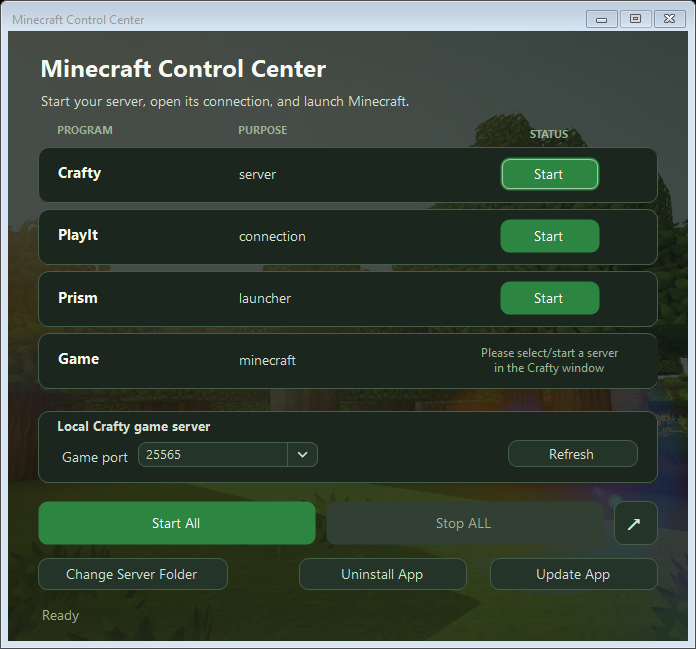
Interface preview
MCC v1.0.3
Minecraft Control Center v1.0.3
This patch makes Crafty dashboard sign-in more reliable, especially during the first
browser launch after installing or updating Minecraft Control Center.
Changes in this release
- Waits until Crafty's login document is completely loaded before filling credentials
and submitting the form. - Sends both input and change notifications after filling the username and password so
the Crafty page reliably observes the new values. - Reuses a valid isolated-browser DevTools session instead of deleting its live port
information, while still clearing stale session data automatically. - Parses DevTools results as structured data instead of relying on fragile response-text
matching. - Continues reading credentials from the detected Crafty installation at
app\config\default-creds.txtwithout copying or logging their values.
Supported providers
- Server manager: Crafty
- Connection: PlayIt
- Launchers: Prism Launcher and TLauncher
Installation
For a normal Windows installation, download and run:
MinecraftControlCenter-Setup.exe
For portable use, download and extract:
MinecraftControlCenter.zip
Windows 10 or later on a 64-bit PC is required.
Included release assets
MinecraftControlCenter-Setup.exeMinecraftControlCenter.zipMinecraftControlCenter.zip.sha256
Coming in the next major release
The next major release is planned to add a compatibility matrix covering additional
server managers, remote-connection providers, and game launchers.
| Component | Planned choices |
|---|---|
| Server manager | Crafty Controller, AMP, direct .jar server |
| Remote connection | Playit, direct port forwarding, Tailscale |
| Game launcher | Prism, official Minecraft Launcher, Modrinth App, ATLauncher |
| Later additions | PufferPanel, Pterodactyl, GDLauncher, CurseForge |
These plans may change as compatibility work and testing progress.
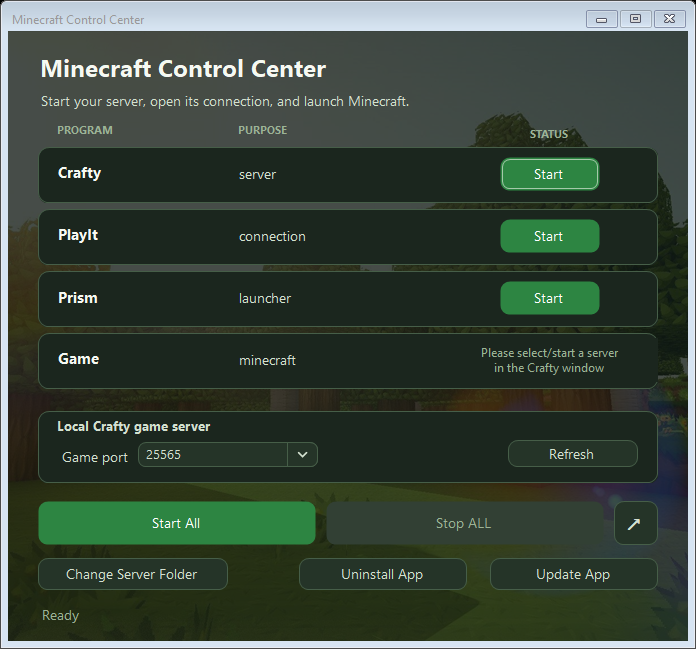
Interface preview
MCC v1.0.2
Minecraft Control Center v1.0.2
This patch fixes stale Windows shortcut icons after updating Minecraft Control Center.
Changes in this release
- Added a version-specific shortcut icon file so Windows does not reuse an icon cached
for an older executable at the same path. - Existing desktop, Start menu, and app-created shortcuts that target Minecraft Control
Center are repaired automatically when the app starts. - Newly created shortcuts now reference the version-specific icon directly.
- Notifies Windows Explorer after shortcut repairs so the refreshed icon appears without
rebuilding the system-wide icon cache. - Keeps the executable, installer, background, and interface styling introduced in
v1.0.1.
Supported providers
- Server manager: Crafty
- Connection: PlayIt
- Launchers: Prism Launcher and TLauncher
Installation
For a normal Windows installation, download and run:
MinecraftControlCenter-Setup.exe
For portable use, download and extract:
MinecraftControlCenter.zip
Windows 10 or later on a 64-bit PC is required.
Included release assets
MinecraftControlCenter-Setup.exeMinecraftControlCenter.zipMinecraftControlCenter.zip.sha256
Coming in the next major release
The next major release is planned to add a compatibility matrix covering additional
server managers, remote-connection providers, and game launchers.
| Component | Planned choices |
|---|---|
| Server manager | Crafty Controller, AMP, direct .jar server |
| Remote connection | Playit, direct port forwarding, Tailscale |
| Game launcher | Prism, official Minecraft Launcher, Modrinth App, ATLauncher |
| Later additions | PufferPanel, Pterodactyl, GDLauncher, CurseForge |
These plans may change as compatibility work and testing progress.
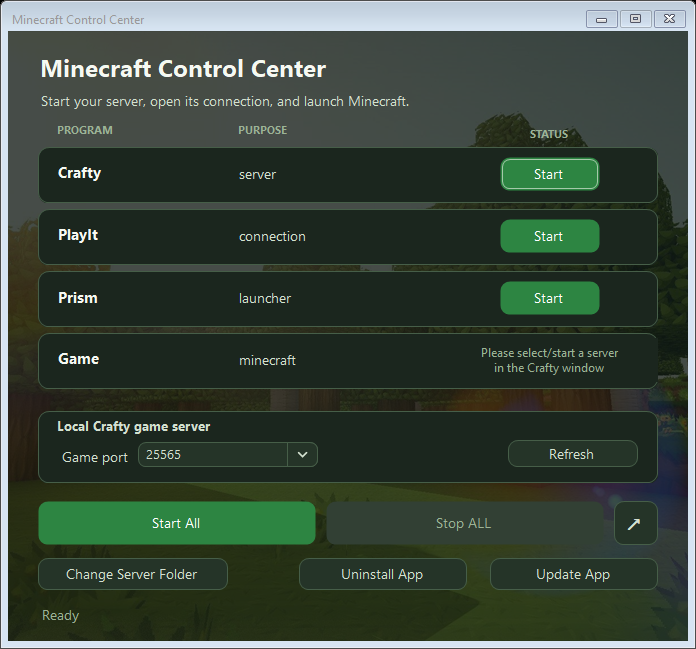
Interface preview
MCC v1.0.1
Minecraft Control Center v1.0.1
This patch release refreshes Minecraft Control Center's visual identity while keeping
the focused v1 provider set and workflow intact.
Changes in this release
- Replaced the application and installer icon with the new Minecraft Control Center
artwork. - Added a faded Minecraft landscape that fills the window without distortion and is
cropped evenly from opposing sides as needed. - Reworked the interface palette around forest green, grass, stone, and warm earth
tones taken from the new icon and background. - Preserved strong contrast for program rows, status text, controls, and keyboard
focus states over the new artwork. - Kept the launcher selector visually seamless with the Program column, showing a
dropdown only when multiple supported launchers are detected.
Supported providers
- Server manager: Crafty
- Connection: PlayIt
- Launchers: Prism Launcher and TLauncher
Installation
For a normal Windows installation, download and run:
MinecraftControlCenter-Setup.exe
For portable use, download and extract:
MinecraftControlCenter.zip
Windows 10 or later on a 64-bit PC is required.
Included release assets
MinecraftControlCenter-Setup.exeMinecraftControlCenter.zipMinecraftControlCenter.zip.sha256
Coming in the next major release
The next major release is planned to add a compatibility matrix covering additional
server managers, remote-connection providers, and game launchers.
| Component | Planned choices |
|---|---|
| Server manager | Crafty Controller, AMP, direct .jar server |
| Remote connection | Playit, direct port forwarding, Tailscale |
| Game launcher | Prism, official Minecraft Launcher, Modrinth App, ATLauncher |
| Later additions | PufferPanel, Pterodactyl, GDLauncher, CurseForge |
These plans may change as compatibility work and testing progress.
Interface preview
MCC v1.0.0
Minecraft Control Center v1.0.0
The first public release of Minecraft Control Center - a standalone Windows app for
managing a Crafty-based Minecraft setup from one place.
Changes in this release
- Converted the original server control script into a maintainable standalone app.
- Added installed and portable distribution modes.
- Removed dependencies on the app's placement and added automatic discovery for
Crafty, PlayIt, Prism Launcher, and TLauncher. - Added remembered, user-editable provider locations under
%LOCALAPPDATA%\MinecraftControlCenter. - Added a common provider contract for installation, running state, start, stop, and
status handling. - Refined the launcher row so the selected launcher appears as the program, with a
seamless dropdown shown only when multiple launchers are detected. - Added secure GitHub Releases updates with checksum validation, automatic restart,
UAC support, atomic replacement, and rollback. - Added application uninstall support for installed and portable copies.
- Added repeatable builds for the standalone executable, portable ZIP, checksum, and
Inno Setup installer. - Kept live server worlds, logs, backups, credentials, and browser data out of release
packages.
Features
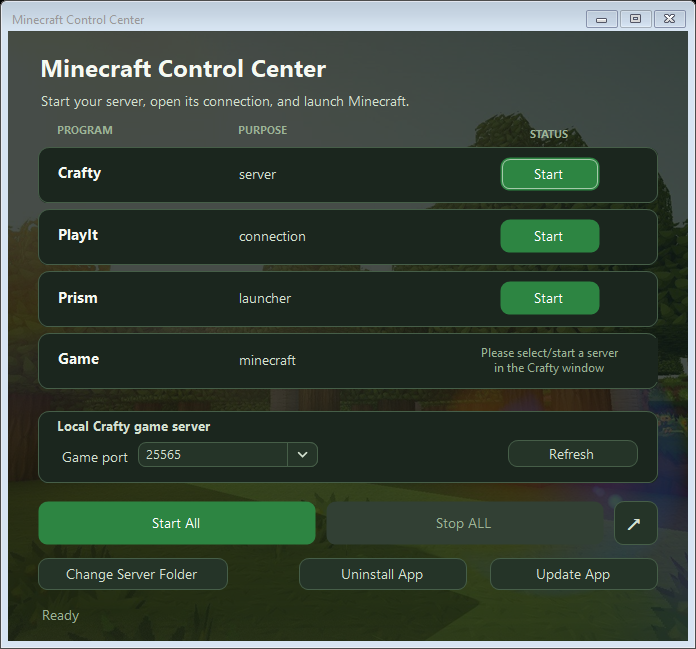
- Start and stop Crafty, PlayIt, your Minecraft launcher, and Minecraft.
- Start or stop the complete setup with one button.
- Automatically detect Crafty, PlayIt, Prism Launcher, and TLauncher.
- Remember detected locations in an editable configuration file.
- Detect local Crafty Minecraft servers and their game ports.
- Open and sign in to the Crafty dashboard.
- Create custom Windows shortcuts.
- Check for and install future updates from GitHub.
- Uninstall installed or portable copies directly from the app.
Reliability and safety
- Self-contained .NET 8 application - no separate .NET installation required.
- Application files can be installed or extracted anywhere.
- App settings and browser data are stored separately under
%LOCALAPPDATA%\MinecraftControlCenter. - Update downloads are verified using SHA-256 checksums.
- Updates use atomic replacement and automatic rollback on failure.
- Single-instance protection prevents conflicting app and configuration writes.
- Uninstall removes only Minecraft Control Center files and its recorded shortcuts.
- Crafty, PlayIt, launchers, servers, worlds, logs, and credentials are preserved.
Supported providers
- Server manager: Crafty
- Connection: PlayIt
- Launchers: Prism Launcher and TLauncher
Installation
For a normal Windows installation, download and run:
MinecraftControlCenter-Setup.exe
For portable use, download and extract:
MinecraftControlCenter.zip
Windows 10 or later on a 64-bit PC is required.
Included release assets
MinecraftControlCenter-Setup.exeMinecraftControlCenter.zipMinecraftControlCenter.zip.sha256
This is the initial v1.0.0 release. Feedback and issue reports are welcome.
Coming in the next major release
The next major release is planned to add a compatibility matrix so you can clearly
see which server managers, remote-connection providers, and game launchers are
available and supported. The current roadmap includes:
| Component | Planned choices |
|---|---|
| Server manager | Crafty Controller, AMP, direct .jar server |
| Remote connection | Playit, direct port forwarding, Tailscale |
| Game launcher | Prism, official Minecraft Launcher, Modrinth App, ATLauncher |
| Later additions | PufferPanel, Pterodactyl, GDLauncher, CurseForge |
These plans may change as compatibility work and testing progress.
Interface preview