Repository navigation
MCC v1.0.1

Minecraft Control Center v1.0.1
This patch release refreshes Minecraft Control Center's visual identity while keeping
the focused v1 provider set and workflow intact.
Changes in this release
- Replaced the application and installer icon with the new Minecraft Control Center
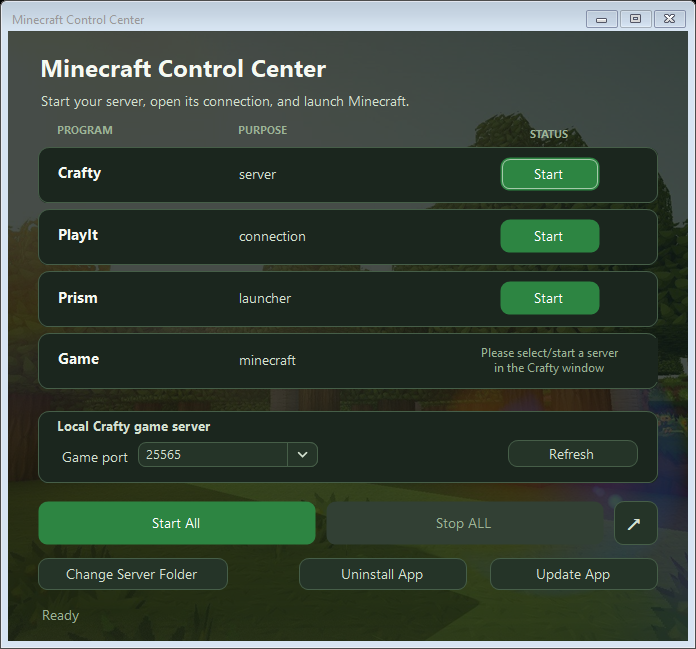
artwork. - Added a faded Minecraft landscape that fills the window without distortion and is
cropped evenly from opposing sides as needed. - Reworked the interface palette around forest green, grass, stone, and warm earth
tones taken from the new icon and background. - Preserved strong contrast for program rows, status text, controls, and keyboard
focus states over the new artwork. - Kept the launcher selector visually seamless with the Program column, showing a
dropdown only when multiple supported launchers are detected.
Supported providers
- Server manager: Crafty
- Connection: PlayIt
- Launchers: Prism Launcher and TLauncher
Installation
For a normal Windows installation, download and run:
MinecraftControlCenter-Setup.exe
For portable use, download and extract:
MinecraftControlCenter.zip
Windows 10 or later on a 64-bit PC is required.
Included release assets
MinecraftControlCenter-Setup.exeMinecraftControlCenter.zipMinecraftControlCenter.zip.sha256
Coming in the next major release
The next major release is planned to add a compatibility matrix covering additional
server managers, remote-connection providers, and game launchers.
| Component | Planned choices |
|---|---|
| Server manager | Crafty Controller, AMP, direct .jar server |
| Remote connection | Playit, direct port forwarding, Tailscale |
| Game launcher | Prism, official Minecraft Launcher, Modrinth App, ATLauncher |
| Later additions | PufferPanel, Pterodactyl, GDLauncher, CurseForge |
These plans may change as compatibility work and testing progress.
Interface preview