Repository navigation
MCC v1.0.3

Minecraft Control Center v1.0.3
This patch makes Crafty dashboard sign-in more reliable, especially during the first
browser launch after installing or updating Minecraft Control Center.
Changes in this release
- Waits until Crafty's login document is completely loaded before filling credentials
and submitting the form. - Sends both input and change notifications after filling the username and password so
the Crafty page reliably observes the new values. - Reuses a valid isolated-browser DevTools session instead of deleting its live port
information, while still clearing stale session data automatically. - Parses DevTools results as structured data instead of relying on fragile response-text
matching. - Continues reading credentials from the detected Crafty installation at
app\config\default-creds.txtwithout copying or logging their values.
Supported providers
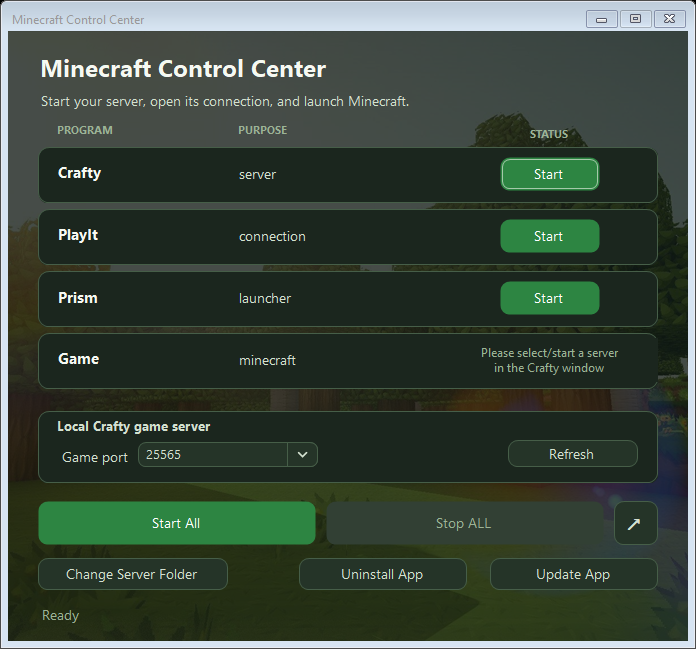
- Server manager: Crafty
- Connection: PlayIt
- Launchers: Prism Launcher and TLauncher
Installation
For a normal Windows installation, download and run:
MinecraftControlCenter-Setup.exe
For portable use, download and extract:
MinecraftControlCenter.zip
Windows 10 or later on a 64-bit PC is required.
Included release assets
MinecraftControlCenter-Setup.exeMinecraftControlCenter.zipMinecraftControlCenter.zip.sha256
Coming in the next major release
The next major release is planned to add a compatibility matrix covering additional
server managers, remote-connection providers, and game launchers.
| Component | Planned choices |
|---|---|
| Server manager | Crafty Controller, AMP, direct .jar server |
| Remote connection | Playit, direct port forwarding, Tailscale |
| Game launcher | Prism, official Minecraft Launcher, Modrinth App, ATLauncher |
| Later additions | PufferPanel, Pterodactyl, GDLauncher, CurseForge |
These plans may change as compatibility work and testing progress.
Interface preview