Repository navigation
MCC v1.0.5

Minecraft Control Center v1.0.5
This maintenance release makes Crafty startup and shutdown resilient to stale process
metadata and SQLite state left behind after an interrupted or forced termination.
Changes in this release
- Prepares Crafty's SQLite state before startup when Crafty is confirmed stopped and port
8443 is free. - Removes only the rebuildable
crafty.sqlite-shmindex while preserving the main database
and write-ahead log so committed data is not discarded. - Clears stale read-only attributes that can otherwise cause Crafty to fail with an
attempt to write a readonly databaseerror. - Recognizes a running Crafty instance through its verified session-lock PID when Windows
process inventory is temporarily incomplete. - Opens the Crafty dashboard once port 8443 is ready instead of depending solely on process
inventory results. - Requests a normal Crafty server and application shutdown first, allowing time for a clean
exit. - Force-stops only processes whose executable path and start identity match the configured
crafty.exewhen normal shutdown does not finish. - Tracks Crafty's PyInstaller parent and child processes, including children that appear
during shutdown, so the app cannot report success while one remains running. - Removes stale
session.lockand SQLite shared-memory state only after Crafty is confirmed
stopped. - Keeps the Crafty row and batch controls disabled as
Stopping...until shutdown and
recovery are complete. - Adds automated coverage for SQLite recovery, verified Crafty process handling, and the
stopping interface state.
Supported providers
- Server manager: Crafty
- Connection: PlayIt
- Launchers: Prism Launcher and TLauncher
Installation
For a normal Windows installation, download and run:
MinecraftControlCenter-Setup.exe
For portable use, download and extract:
MinecraftControlCenter.zip
Windows 10 or later on a 64-bit PC is required.
Included release assets
MinecraftControlCenter-Setup.exeMinecraftControlCenter.zipMinecraftControlCenter.zip.sha256
Coming in the next major release
The next major release is planned to add a compatibility matrix covering additional
server managers, remote-connection providers, and game launchers.
| Component | Planned choices |
|---|---|
| Server manager | Crafty Controller, AMP, direct .jar server |
| Remote connection | Playit, direct port forwarding, Tailscale |
| Game launcher | Prism, official Minecraft Launcher, Modrinth App, ATLauncher |
| Later additions | PufferPanel, Pterodactyl, GDLauncher, CurseForge |
These plans may change as compatibility work and testing progress.
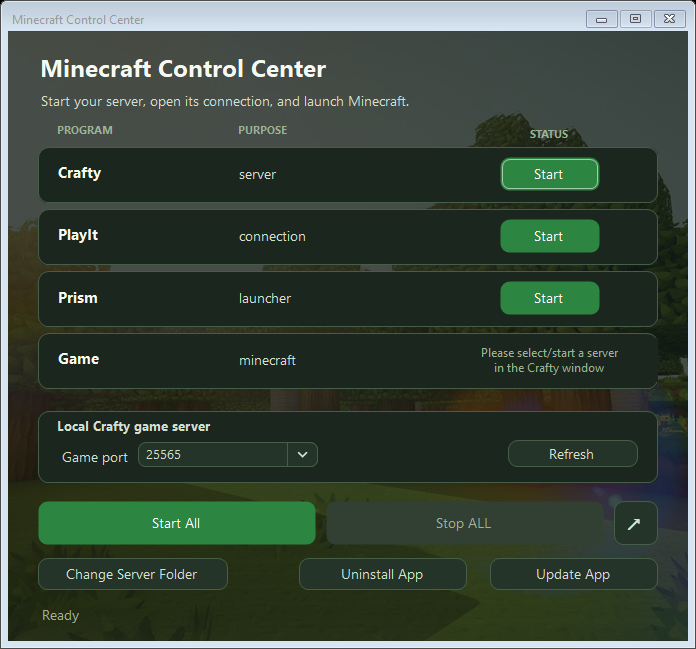
Interface preview