Repository navigation
MCC v1.0.7

Minecraft Control Center v1.0.7
This hotfix restores reliable Crafty startup after v1.0.6 caused Crafty to exit cleanly
before its dashboard became ready.
Changes in this release
- Restores the shell-based Crafty launch mode proven in v1.0.0 through v1.0.2.
- Preserves the console stream required by Crafty's interactive command loop, preventing an
immediate EOF shutdown with exit code 0. - Keeps Crafty's console window hidden while the service continues running normally.
- Retains the complete two-minute
Starting...readiness state introduced in v1.0.6. - Retains explicit reporting for genuine early exits, startup timeouts, and dashboard
readiness failures. - Retains the verified force-stop, stale session-lock cleanup, and safe SQLite recovery from
v1.0.5. - Adds a regression check for the required shell-launch and console settings.
Supported providers
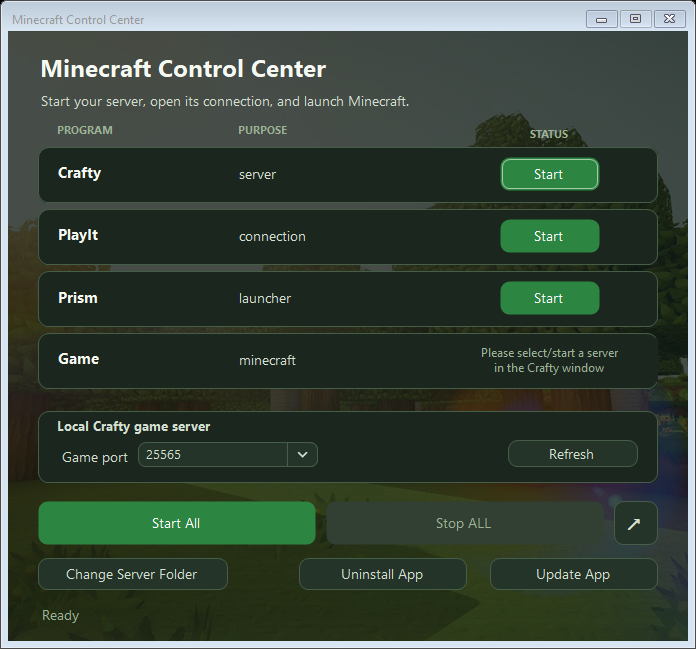
- Server manager: Crafty
- Connection: PlayIt
- Launchers: Prism Launcher and TLauncher
Installation
For a normal Windows installation, download and run:
MinecraftControlCenter-Setup.exe
For portable use, download and extract:
MinecraftControlCenter.zip
Windows 10 or later on a 64-bit PC is required.
Included release assets
MinecraftControlCenter-Setup.exeMinecraftControlCenter.zipMinecraftControlCenter.zip.sha256
Coming in the next major release
The next major release is planned to add a compatibility matrix covering additional
server managers, remote-connection providers, and game launchers.
| Component | Planned choices |
|---|---|
| Server manager | Crafty Controller, AMP, direct .jar server |
| Remote connection | Playit, direct port forwarding, Tailscale |
| Game launcher | Prism, official Minecraft Launcher, Modrinth App, ATLauncher |
| Later additions | PufferPanel, Pterodactyl, GDLauncher, CurseForge |
These plans may change as compatibility work and testing progress.
Interface preview