02 How this works
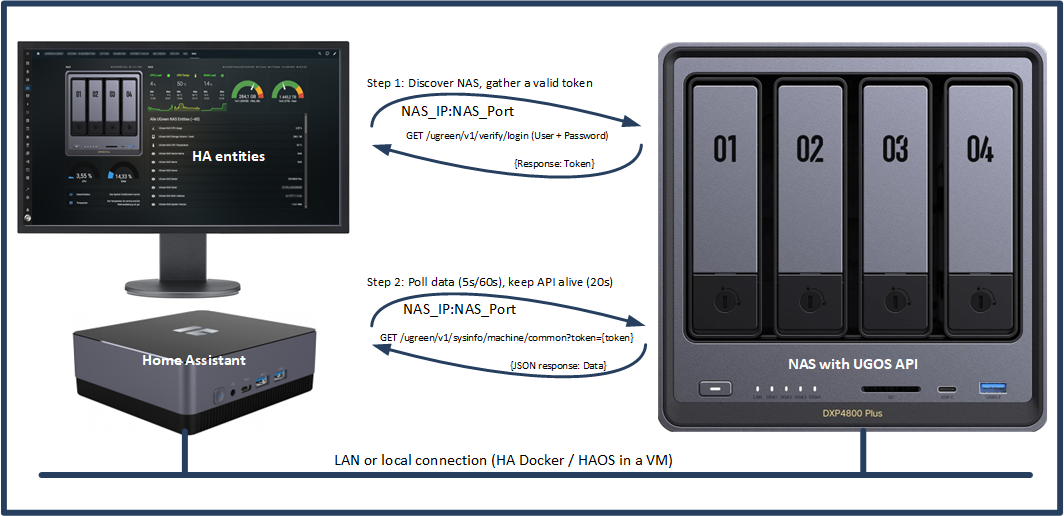
UGOS has a built-in API that is utilized by e.g. the UGreen Mobile App and the UGOS Web GUI. After receiving a valid end point request through http, the API will respond with the data of that endpoint. The integration will then process and forward those data to pre-defined entities in HA.
Every API request is only possible with a valid token, which the integration gathers and decrypts upon startup. During runtime, the token is automatically renewed as needed.
A token is a commonly used digital key for accessing a web service. It tells the NAS that you're authorized to access it, so you don’t need to log in from scratch each time. The token is generated after the initial login and typically appears as a long string of letters and numbers.
Most API tokens are only valid for a limited period. Once expired, a new login is required to obtain a fresh token. Based on current observations, tokens on Ugreen NAS devices appear to remain valid for up to one year (unverified).
After the integration has received a valid token, it can read data from the NAS by using a set of dedicated commands (see here in the API description).
Example command:
GET /ugreen/v1/sysinfo/machine/common?token=ABCDEF1234567890FEDCBA
The NAS will answer the request with a so-called JSON string of keys and corresponding data (key1:data,key2:data,...):
{"code":200,"msg":"success","data":{"common":{"nas_name":"NAS","nas_owner":"-","model":"DXP4800 Plus","serial":"▨▨▨▨▨▨▨","color":"gray","mac":["▨▨▨▨▨▨"],"system_version":"1.5.0.2628","run_time":2763634,"last_turn_on_time":"2025-06-05 20:51:06","last_turn_on_timestamp":1749149466,"repair_start_time":0,"repair_end_time":0},"hardware":{"cpu":[{"model":"Intel(R) Pentium(R) Gold 8505","ghz":4400,"core":5,"thread":6,"temperature":50}],"mem":[{"manufacturer":"Micron Technology","model":"CT32G48C40S5.M16A1","size":34359738368,"mhz":"4800 MHz"},{"manufacturer":"Micron Technology","model":"CT32G48C40S5.M16A1","size":34359738368,"mhz":"4800 MHz"}],"net":[{"model":"bridge0","ip":"192.168.178.9","mac":"deleted","speed":1000,"duplex":"","mtu":1500,"mask":"255.255.255.0"}],"ups":[{"model":"1","vendor":"noname","power_free""}],"usb":[{"model":"WDC WD50NDZW-11BCSS1","vendor":"Western Digital Technologies, Inc.","device_type":0}],"gpu":null}},"time":0.495011955}You can even check this out yourself yourself in any browser - see here.