Repository navigation
Enemies
Basic enemies are skeleton warriors. Enemies are made with modularity in mind, meaning swappable and equippable weapons.
Every enemy is an Entity built by a static method on NPCFactory. An enemy is not a subclass: it is a base entity (physics, collider, hitbox, AI) with a set of components added to it. What makes a Minotaur a Minotaur is which attack components, which AI tasks and which config block it gets.
Using the Platform Base NPC Factory, NPCs built with the purpose of existing and interacting in a platforming environment can be created. This is largely thanks to the PlatformWanderTask, which extends off WanderTask to replicate its behavior in a horizontally based game environment. Using dual raycasts downwards, the ground can be detected by the entity using the task and reset its wandering starting point from the ground instead of the air. It also waits to be grounded before attempting to move, and attempts to stay on the ground while it's on a platform. The Platform Wander Task, and by extension the Platform Base NPC, are built around the use of the Physics Engine's gravity, and therefore will have unintended effects in environments without it.
AI Task UML Class Diagram:
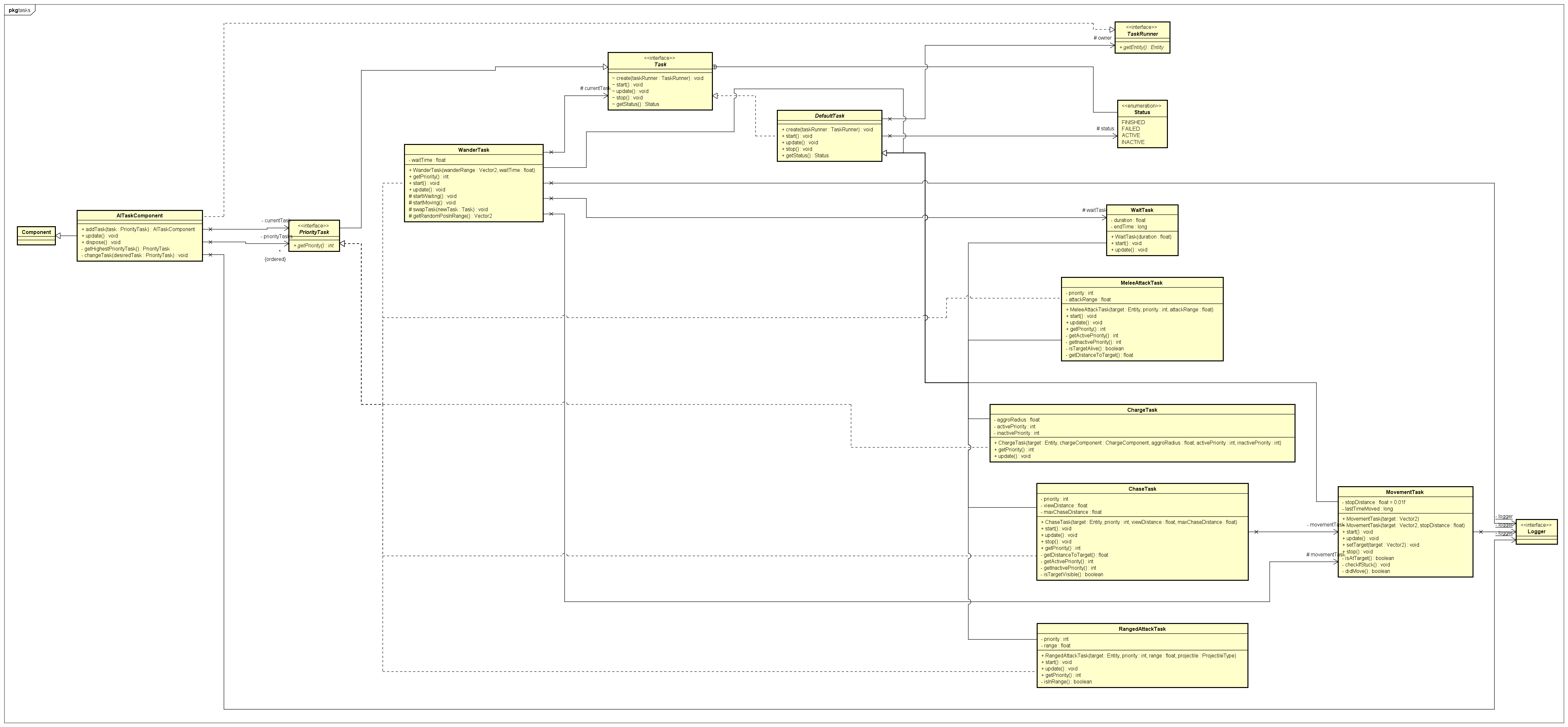
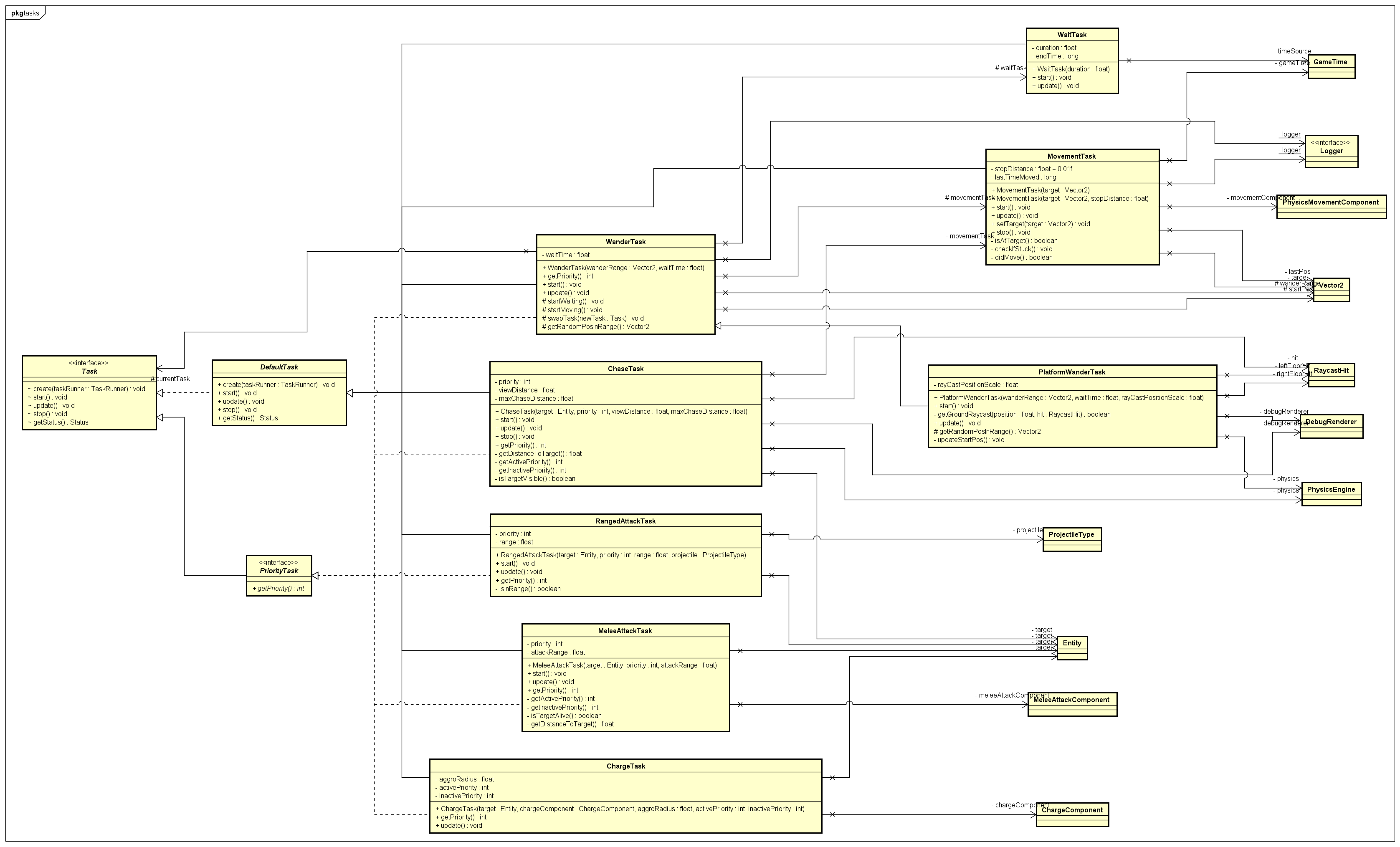
JUnit tests have mock components and services to ensure that gravity has an effect on the NPC and is working as intended. JUnit also tests PlatformWanderTask for the wanderStart event is still sent just as if it were its superclass. Otherwise manual testing must be done for more active functionality:
-
>debug onfor enemy collision boxes, wander start position (small magenta box) and floor raycasts (dual while lines downwards). - Check NPC properly falls to the ground without strange movement.
- Ensure NPC is not moving in any direction other than down while in the air.
- Wander start position should be on the ground, and if airborne, attached to the NPC.
There are ten enemy types, listed in the EnemyType enum. Each enemy carries an EnemyTypeComponent holding its type. The numbers below are the values in assets/configs/NPCs.json at the time of writing.
| Enemy | Health | Base attack | Movement | Attacks | Weapon |
|---|---|---|---|---|---|
| Skeleton | 30 | 5 | walks on platforms | melee | generated sword, tier 1 |
| Ranged Skeleton | 20 | 5 | walks on platforms | ranged (arrow) | generated bow, tier 1 |
| Minotaur | 55 | 5 | walks on platforms | melee, charge | generated axe, tier 2 |
| Centaur | 40 | 7 | walks on platforms | ranged (arrow), charge | generated bow, tier 1 |
| Cyclops | 70 | 10 | walks on platforms | stomp, thrown rock, laser | natural weapons |
| Medusa | 150 | 8 | paces around a fixed spot | bite, petrifying gaze | natural weapons |
| Cerberus | 250 | 12 | stands still | bite | natural weapon |
| Zeus | 300 | 10 | walks on platforms | sword, lightning | generated sword, tier 2, and a natural weapon |
| Harpy | 30 | 6 | flies | melee | generated sword, tier 1 |
| Ranged Harpy | 40 | 5 | flies | ranged (aimed arrow) | generated bow, tier 1 |
A generated weapon is a normal WeaponItem held in the enemy's inventory and dropped when it dies. A natural weapon is built with WeaponItem.natural(...) for an attack that is part of the enemy's body (a bite, a stomp, a gaze); its damage is the enemy's base attack and its windup comes from the enemy's config. In both cases the weapon supplies only the damage and the windup. Range, knockback and cooldown are the enemy's own config values.
Minotaur
A melee charger. Idles/patrols within its aggro radius; once the player is noticed, it winds up and charges toward them with a speed boost.
- Attack type: Melee (
MeleeAttackComponent), cooldown 5 s, range 2.5. - Charge:
ChargeComponent/ChargeTask, shared with the Centaur. A charge lasts 4 s in total: a 2.5 s stationary windup, then a rush at 2 times speed for up to 1.5 s. It deals 1.5 times the base attack. The charge deals its own damage on contact throughTouchAttackComponent; it does not change the damage of the melee attack. It ends on the first hit. See Charge. - Weapon: Generated
WeaponItem(axe, tier 2). The factory sets this axe's windup to 0, so the Minotaur's melee attack has no windup and lands on the next frame. - Sprite: Elthen's Pixel Art Minotaur Sprites (name-your-own-price, itch.io).
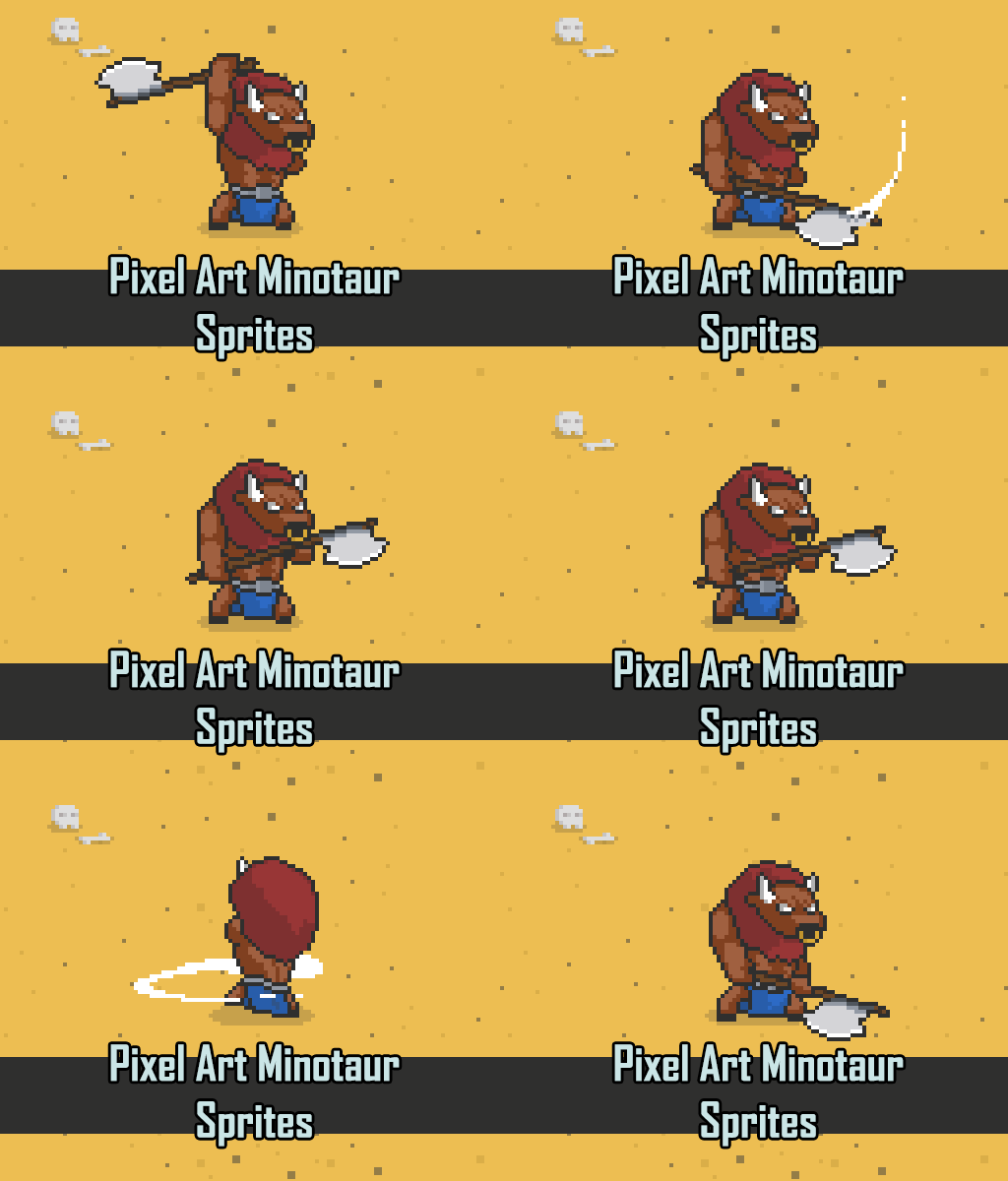
Real animation states: Idle, Move, Taunt, Attack1-4, Damage1-2, Death.
- Loot: Stocked at spawn via
InventoryComponent, dropped viaItemDropComponenton death. See Loot Generation.
Centaur
A ranged charger: the mobile, hit-and-run counterpart to the Ranged Skeleton.
- Attack type: Ranged (
RangedAttackComponent), range 8, cooldown 5 s. - Charge: Reuses
ChargeComponent/ChargeTaskfrom the Minotaur. The same shared mechanic, not duplicated. As with the Minotaur, the charge deals its own contact damage throughTouchAttackComponent. - Weapon: Generated
WeaponItem(bow, tier 1). - Sprite: Elthen's Pixel Art Centaur Sprites.
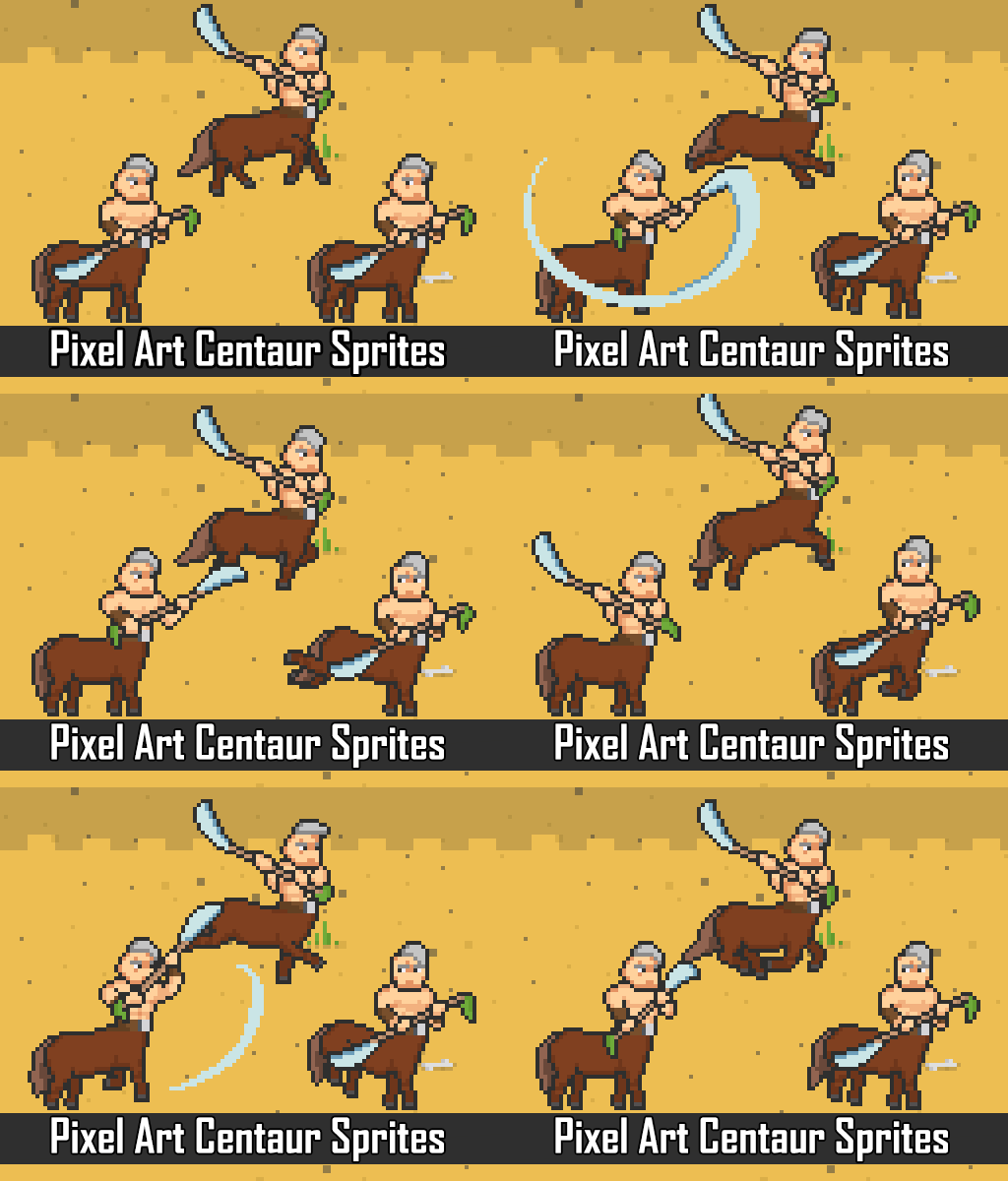
Real animation states: idle, movement, attack, charge, damage, kick, death.
Cyclops (mini-boss)
A tougher mini-boss with three attacks, chosen by how far away the player is.
| Attack | Component | Range | Cooldown | Windup | Damage |
|---|---|---|---|---|---|
| Stomp | MeleeAttackComponent |
2.5 | 4 s | 0.4 s | base attack |
| Laser | LaserAttackComponent |
7 | 4 s | 0.5 s | 0.6 times base attack |
| Thrown rock | RockAttackComponent |
11 | 7 s | 1.1 s | 1.5 times base attack |
-
LaserAttackComponentandRockAttackComponentboth extendRangedAttackComponent. The rock is thrown in an arc; the laser travels in a straight line. - Weapons: Three natural weapons ("Cyclops Fists", "Cyclops Rock Throw", "Cyclops Laser"), one per attack. Natural weapons never drop, so the Cyclops carries 12 gold instead of the usual 3.
- Which attack is used is decided by task priority and range, the same range-based arbitration
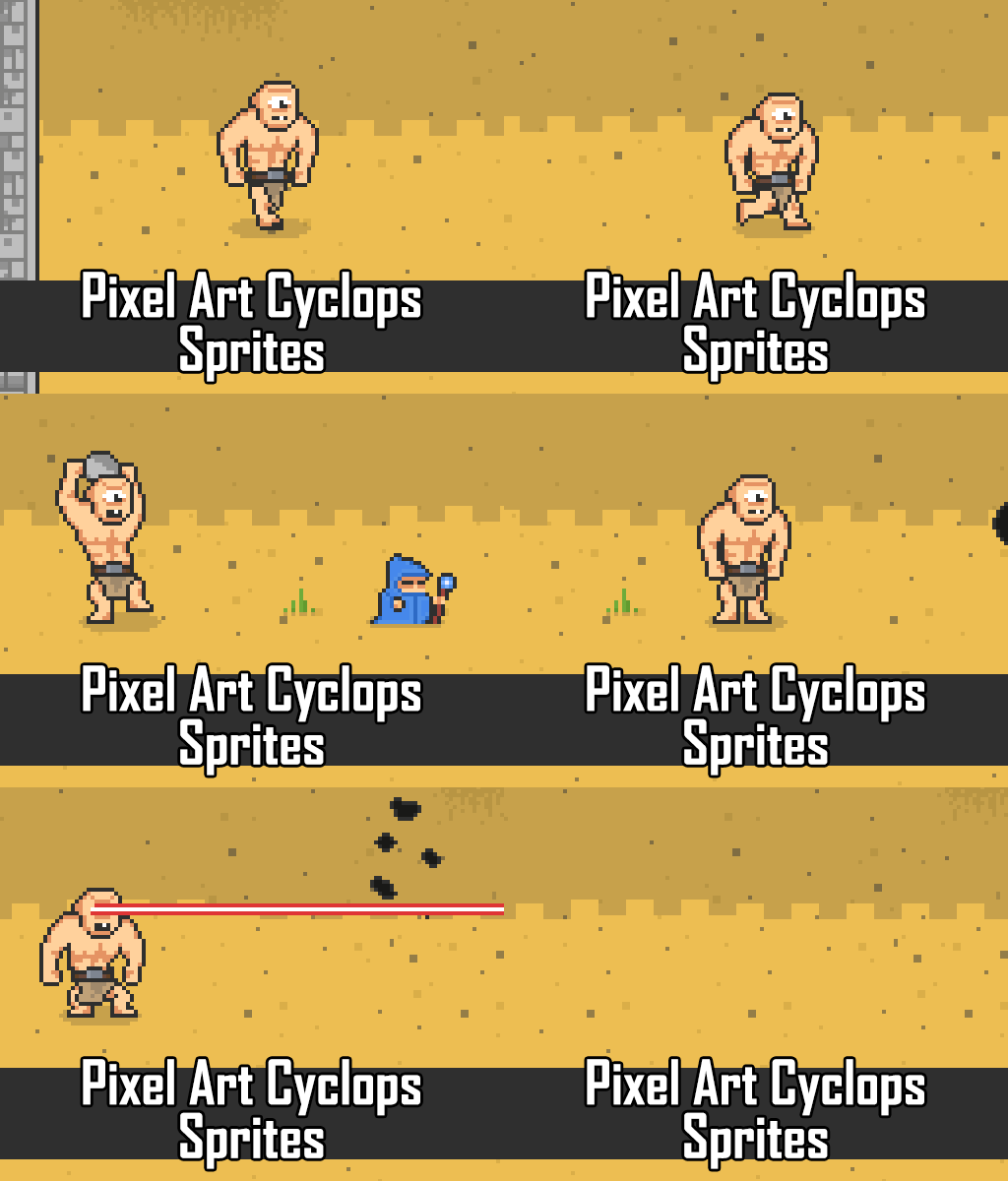
RangedAttackTaskuses againstChaseTask. No new arbitration logic was needed. - Sprite also from Elthen (name-your-own-price, itch.io).
Medusa (mini-boss)
A mini-boss that paces around a fixed spot and petrifies the player with her gaze.
- Attack types: Melee bite (
MeleeAttackComponent, range 2.5, cooldown 4 s) and a ranged gaze (RangedAttackComponent, range 7, cooldown 7 s, windup 1 s). - Gaze effect: A gaze that hits petrifies the player for 3 s, which stops the player walking.
NPCFactory.createMedusadoes this with a listener on Medusa's own"rangedAttackHit"event, which triggers"applySpeedEffect"on the entity that was hit with a speed multiplier of 0 for the petrify duration (the same speed effect that lightning uses). APetrifyEffectComponentexists incomponents/attacks/and is unit tested, but it is not attached to anything yet; see Known gaps below. The gaze cooldown is at least twice the petrify duration, so the player always has time to move between gazes (checked byEnemyDesignRulesTest). - Movement: Built from the stationary base, with a pacing radius of 2.
- Weapons: Two natural weapons ("Medusa Bite", "Medusa Gaze"). She carries 12 gold, because natural weapons never drop.
- Design rules:
createMedusathrows if her melee range is not below her gaze range, or if the gaze cooldown is less than twice the petrify duration.
Cerberus (mini-boss)
A fast, aggressive melee "guard dog" that stands its ground.
- Attack type: Melee only (
MeleeAttackComponent), with a natural weapon ("Cerberus Bite"). - Distinguishing stats: The shortest melee cooldown of any enemy (1.5 s), the longest melee reach (4), and 250 health.
- Movement: Built from the stationary base, so it does not wander or chase. Its melee task's range is its effective aggro radius.
- Loot: 12 gold, and no weapon.
Zeus (final boss)
The final boss, found only in Level 3. Defeating him wins the game (see Win System).
- Attack types: Melee with a generated tier 2 sword (
MeleeAttackComponent, range 3, cooldown 4 s), and lightning (RangedAttackComponent, range 9, cooldown 5 s, windup 1 s) with a natural weapon ("Zeus Lightning"). - Lightning: Called down from above the target instead of flying from Zeus. See Lightning Attack.
- Loot: Drops his sword and 3 gold on death.
Harpy and Ranged Harpy
Flying enemies. They are built from the flying base, which adds a FlightComponent.
- Flight:
FlightComponentswitches gravity off on the body and sets a damping value (2.0), so a harpy hovers where it is and knockback fades instead of carrying it away. - Harpy: Melee (
MeleeAttackComponent, range 1.5, cooldown 4 s) with a generated tier 1 sword. - Ranged Harpy: Ranged (
RangedAttackComponent, range 8, cooldown 5 s) with a generated tier 1 bow. Its shots are aimed, so they travel up or down towards the target.
- pegasus
- hydra
- poseidon
NPCFactory has four private base builders. Each public create... method starts from one of them.
| Base builder | Gives the enemy | Used by |
|---|---|---|
createBasePlatformerNPC |
physics, movement, collider, hitbox, a generated name (NameComponent), and AI with platform wander (priority 1), chase (10) and a melee task (15, reach 1) |
Skeleton, Ranged Skeleton, Minotaur, Centaur, Cyclops, Zeus |
createBaseStationaryNPC |
physics, movement, collider, hitbox, an empty AI component | Medusa, Cerberus |
createBaseFlyingNPC |
the same plus a FlightComponent, with wander and chase tasks |
Harpy, Ranged Harpy |
createBaseNPC |
free-roaming wander and chase | nothing at present; it is left over from the original ghost enemies |
On top of the base, a create... method adds:
-
CombatStatsComponentwith the health and base attack from the config. -
EnemyTypeComponentwith the enemy's type. - One or more attack components.
- An
InventoryComponent, anItemDropComponentand anEnemyDeathComponent, so the enemy drops gold and its weapon when it dies. - An animator and that enemy's animation controller.
- Its attack tasks, added to the
AITaskComponent. - The hazard components, on every enemy except the two harpies (see Hazards below).
The eight walking and stationary enemies call addHazardRules, which adds both components below. The Harpy and the Ranged Harpy do not call it, so they have neither: a harpy takes no damage from a hazard tile and does not avoid one.
-
HazardContactDamageComponentmakes an enemy take the hazard tile's damage, at most once every 500 ms. -
HazardAvoidanceComponentcasts a short ray ahead of a grounded enemy and stops the walk if a hazard is within reach, through theMovementGuardhook onPhysicsMovementComponent. - Grounded enemies cannot jump, so a hazard strip across a floor acts as a wall to them.
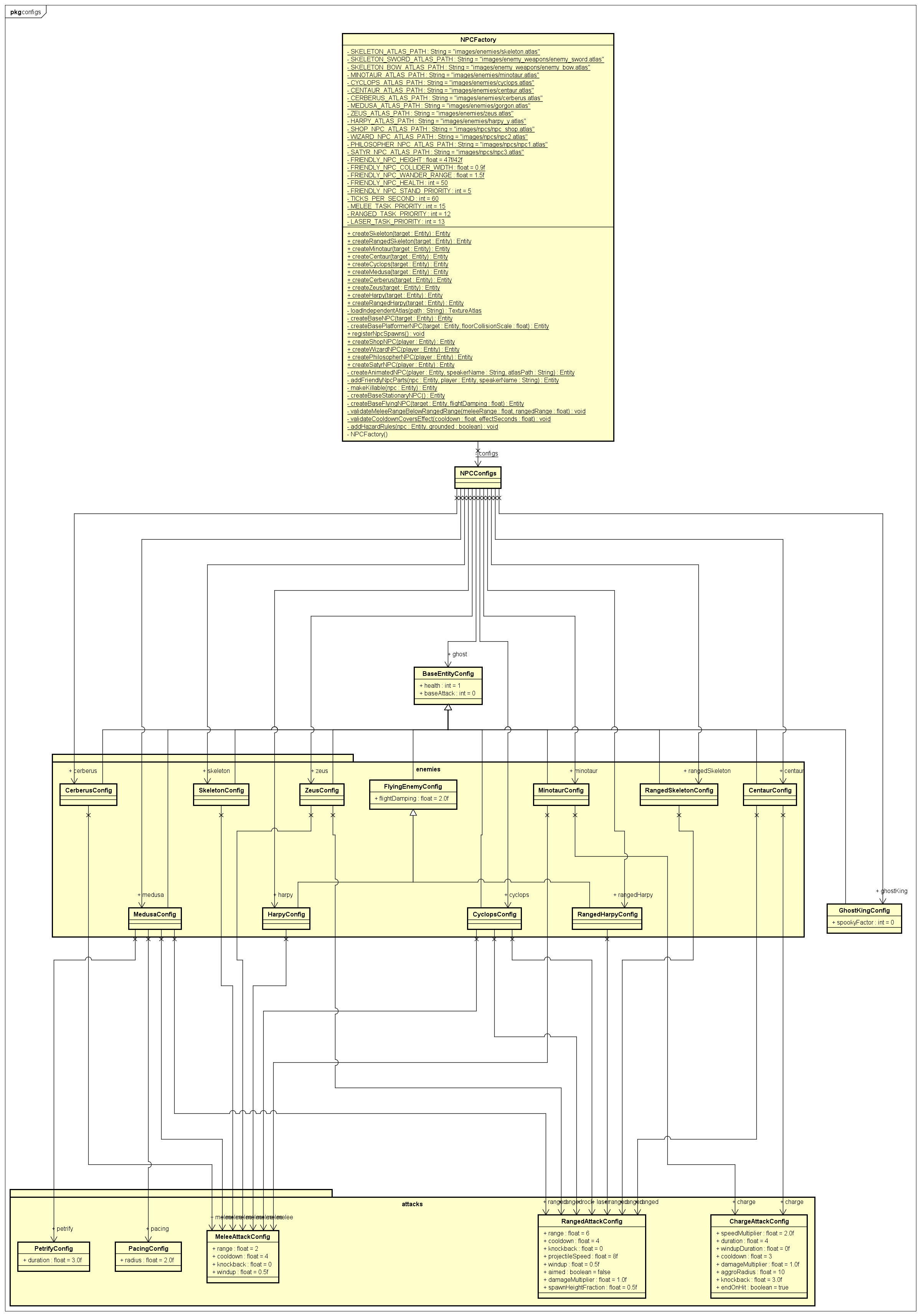
Enemy numbers live in assets/configs/NPCs.json, not in code. The file is read into NPCConfigs, which has one field per enemy. Attack numbers are nested blocks:
| Block | Class | Fields |
|---|---|---|
melee |
MeleeAttackConfig |
range, cooldown, knockback, windup
|
ranged, rock, laser
|
RangedAttackConfig |
range, cooldown, projectileSpeed, knockback, windup, aimed, damageMultiplier, spawnHeightFraction
|
charge |
ChargeAttackConfig |
speedMultiplier, duration, windupDuration, cooldown, damageMultiplier, aggroRadius, knockback, endOnHit
|
petrify |
PetrifyConfig |
duration |
pacing |
PacingConfig |
radius |
To rebalance an enemy, change the JSON. NPCConfigsLoadingTest and EnemyDesignRulesTest check the design rules, for example that a windup is always shorter than its cooldown.
- Add a value to
EnemyType. - Add a config class (or reuse the attack config blocks) and a field on
NPCConfigs; add the block toNPCs.json. - Write
NPCFactory.createYourEnemy(Entity target), starting from the base builder that matches how it moves. - Register its map name in
DefaultEntitySpawns. - Add its collider size to the
BODIEStable inAllMapEnemyPlacementTest, or every map test that places it will fail with "No collider recorded". - Add a row for it in
NPCFactoryTest.
-
Every platformer enemy has the base's melee task.
createBasePlatformerNPCadds aMeleeAttackTaskwith a reach of 1 to every enemy built from it. The Skeleton relies on that task alone, so it only starts a swing within 1 unit even though itsmelee.rangeis 2. The Minotaur, Cyclops and Zeus add a second melee task with their real range. The Ranged Skeleton and the Centaur carry the task with noMeleeAttackComponent, so it does nothing except hold priority when the player is within 1 unit. - Harpies ignore hazards. See Hazards above.
-
Medusa's petrify does not use
PetrifyEffectComponent. The component is designed to sit on the gaze projectile and petrify whatever that projectile hits. TheGAZEprojectile type it was written for was removed, so Medusa fires a normal arrow-type projectile and the factory applies the speed effect itself. Both routes trigger the same"applySpeedEffect"event, so the player sees no difference. To use the component, attach it to Medusa's projectile and remove the listener fromcreateMedusa.
Entity animations are handled using an AnimationController which directly extends from a Component. As of now there are the following AnimationController classes:
- SkeletonAnimationController
SkeletonWeaponAnimationControllerMinotaurAnimationControllerCentaurAnimationControllerCyclopsAnimationControllerMedusaAnimationControllerCerberusAnimationControllerZeusAnimationControllerHarpyAnimationControllerGhostAnimationController
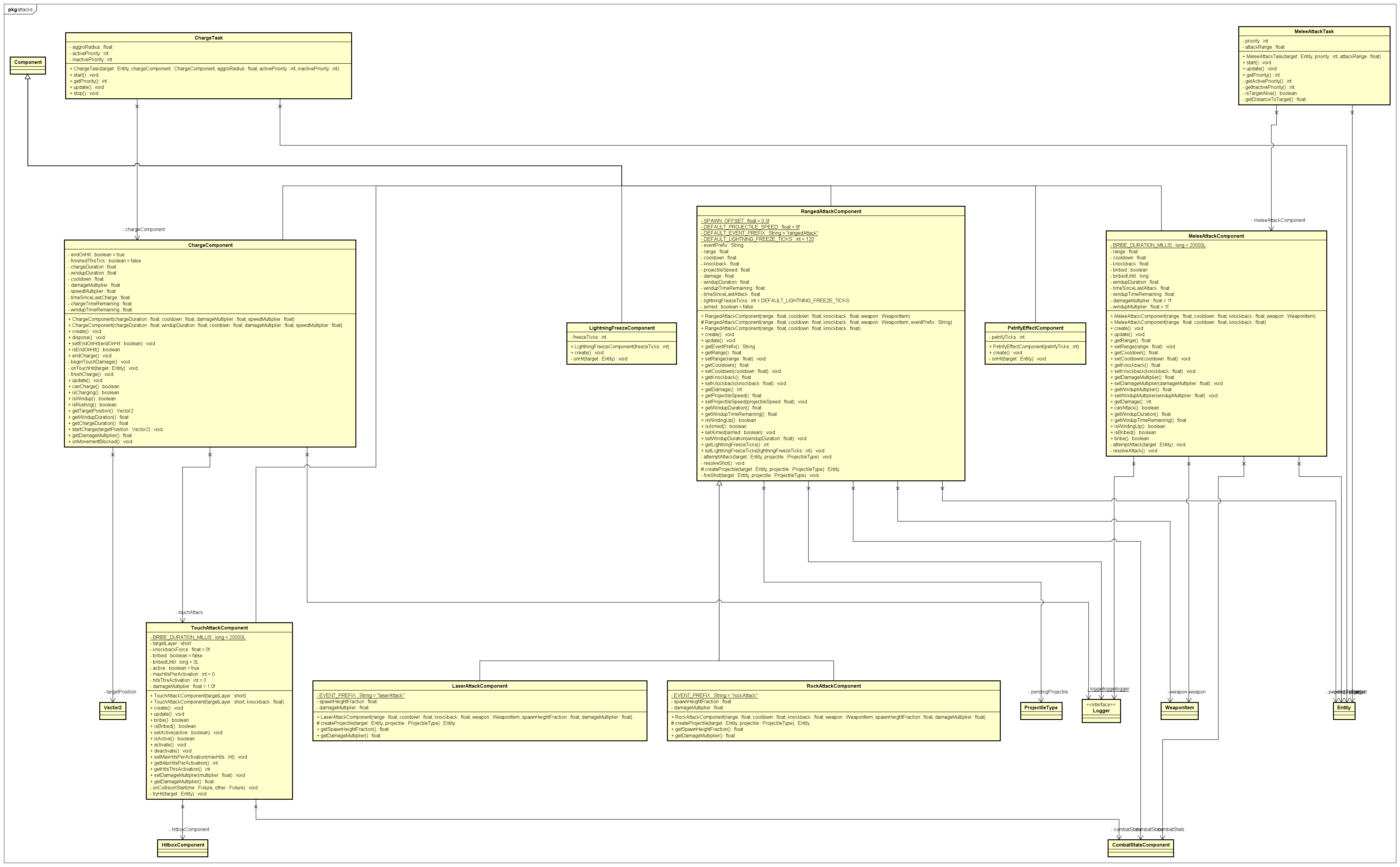
Enemies attack through attack components, each of which directly extends from a Component, and can carry an attachable special effect handled by OnHitEffectComponent. The attack classes and the effect component are:
- Melee-Attacks
- Range-Attack
- Lightning-Attack
- On-Hit-Effect-Component
- Charge-Action
- Enemy-Attack-System (how all the attack components fit together)
- Enemy-AI-Tasks (how an enemy chooses what to do)
The following are the special Effect classes that add additional damage to the attacks above:
The MeleeAttackTask creates an AI task to detect when the enemy is within the reasonable range to attack its target.
Enemies are given an InventoryComponent to store the items and amount of gold that they will drop on their death. On their deaths, any weapons, consumables, or currency in the enemy's inventory will be dropped for the player to be able to pick up.
Each spawned enemy also gets a stable id of the form <map name>:<x>,<y> (EnemyId). When it dies the id is recorded in EnemyRegistry, so a killed enemy stays dead after a save and load. The win system uses the same ids to know which bosses have been defeated.
Tests were created to ensure that removing gold gets declined if it would result in a negative net gold balance
Tests were created to ensure the following:
- Calling
dropGold()on an entity with a positive gold balance should spawn a new gold coin entity with that balance - Calling
dropGold()fails if the entity has zero gold
Tests were created to ensure the following:
- When an entity gets its health set to zero, the death event should be called
- The death event should not get called if the entity's health gets set to a positive value
Tests were created to ensure the following:
- If an enemy dies, it should drop loot
- An enemy's death event triggers the disposal of that enemy
- An enemy's death event still triggers the disposal of that enemy if it does not have an
ItemDropComponent
| Test class | What it checks |
|---|---|
NPCFactoryTest |
every enemy builds, has stats, a type, an attack and its config values |
NPCConfigsLoadingTest, EnemyDesignRulesTest
|
the config file loads and obeys the design rules |
FlightComponentTest |
gravity off, damping, knockback fading |
HazardContactDamageComponentTest, HazardAvoidanceComponentTest
|
hazard damage and avoidance in a real physics world |
AllMapEnemyPlacementTest, SideRoomsTest
|
every placed enemy has footing, headroom and is not inside a wall or hazard |
*AnimationControllerTest |
the right animation is requested for each event |
To spawn enemies with the terminal, the spawn command must be used.
The spawn command spawns an enemy of the type given in the first argument after the spawn keyword.
All enemies spawned with this method will be spawned at the player's current position.
Example use:
- Press
F1to enable the terminal. - Type "spawn skeleton" making the terminal display
>spawn skeleton. - Press
Enterand the skeleton should spawn at exactly the players position.
The spawn names are the ones registered in DefaultEntitySpawns, which are also the names used in map files:
- 'skeleton' or 'enemy-skeleton-hoplite'
- 'ranged-skeleton'
- 'minotaur'
- 'centaur' or 'enemy-centaur'
- 'cyclops'
- 'medusa' or 'enemy-medusa'
- 'cerberus' or 'enemy-cerberus'
- 'zeus' or 'enemy-zeus'
- 'harpy'
- 'ranged-harpy'
- The friendly NPCs are registered the same way, as 'npc:shop', 'npc:wizard', 'npc:philosopher' and 'npc:satyr'.