Repository navigation
Releases: Vulkandr/roon-toasted
Release list
Roon: Toasted 1.2.1

A stability release for the Wrapper, plus a narrower window.
Fixes
- Wrapper freezing. Resizing the Wrapper could lock the whole app up, leaving the tray menu and controls unresponsive. Fixed.
- Wrapper too small. The Wrapper could shrink below Roon's own minimum size and crop Roon. It now has a fixed minimum that matches Roon's.
- Play greyed out. Play could stay greyed out after zone changes. Zone updates are now read correctly.
Good to know
- Narrower Wrapper. The Wrapper can now be about 760 px wide. The seek and volume bars shrink to fit, and you can collapse Roon's sidebar (the hamburger menu brings it back).
Install
Download Roon Toasted_1.2.1_x64-setup.exe and run it. If you already have Roon: Toasted installed, it will offer the update on its own.
Roon: Toasted 1.2.0
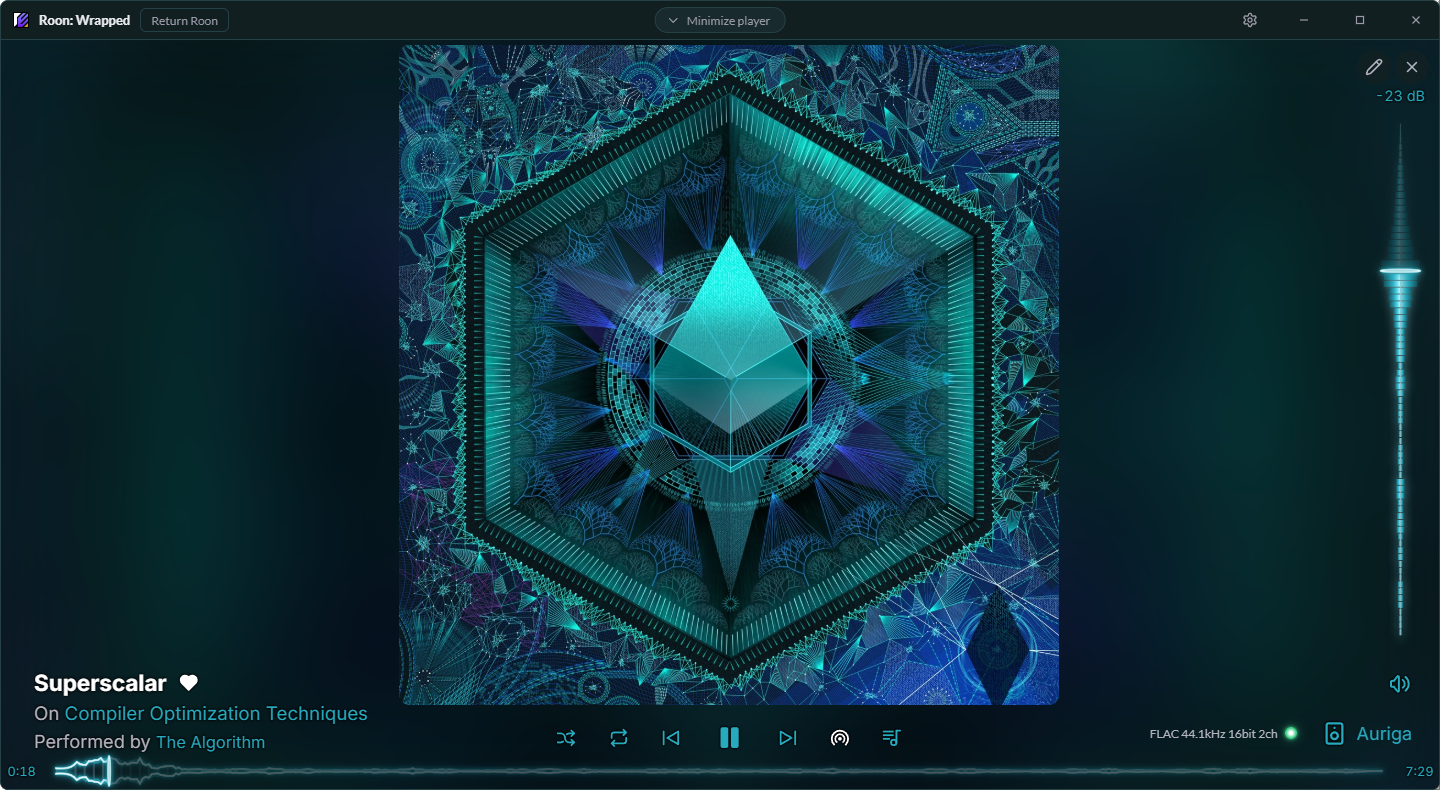
Roon: Toasted 1.2.0 brings Roon: Wrapped: the Roon app inside a Toasted window, with a Now Playing screen you design yourself.
What's new
- Roon: Wrapped (experimental). The Roon app inside a Toasted window, with Toasted's player along the bottom. Switch it on in Settings > The Wrapper, then open it from the tray, its hotkey (Ctrl+Alt+W) or Settings. Closing it keeps Roon running out of sight, so it reopens instantly.
- Now Playing, your way. Click the album art for a full-window player, then the pencil to move and resize every piece. Pick fonts, icon packs and colors (the app's, the album's or your own), and save your layouts as profiles.
- Animated bars. 15 styles for the seek bar and volume, from the classic Line to Wave, Spectrum, Glow line, LED meter, Neon tube, Plasma and more.
- Real waveforms. With Hearts & Library on, the seek bar can show a local file's actual waveform from Roon, in six looks, optionally Alive and colored by loudness.
- Audio quality. A small light shows what's playing as Roon receives it: Low Quality, CD Quality or Hi-Res, and in Now Playing the file's format too.
- Return Roon. Gives Roon its own window back, with an Enable Wrapper button in its title bar to wrap it up again.
- Toaster on or off. Only want the Wrapper? Switch the Toaster off and its hotkeys and links open the Wrapper instead.
- Search in Roon. The Search hotkey and Stream Deck search can open Roon's own search.
- Main artist only. Tracks with a long list of supporting artists show just the main one (Settings > General > Artists).
- New look. A new Toasted icon, a Roon: Wrapped logo, and a changelog that opens after each update.
Good to know
- The Wrapper is experimental. It works with Roon's own window, so a Roon update could change how it behaves.
- Hearts & Library, the quality light and waveforms use Roon's internal protocol and are experimental too.
- Waveforms are for local files. Roon only has them for files in your library, not streaming; the seek bar uses your bar style for the rest.
- Updates are now checked 10 seconds after Toasted starts, and again when Settings opens.
- Tray: Toaster, Wrapper and Taskbar Widget switches.
Install
Download Roon Toasted_1.2.0_x64-setup.exe below and run it, or use Install in Settings > Updates if you're on 1.1.0 or later. It upgrades in place and keeps your settings.
Roon: Toasted 1.1.1
Roon: Toasted 1.1.1 fixes the Core search on PCs with more than one network adapter, and adds a manual Core address, a Search button and Diagnostics.
Fixes
- Finding your Core. The search for your Roon Core now goes out on every network adapter instead of only the one Windows picks. If a VPN, Hyper-V, WSL or VirtualBox adapter was winning that choice, the Core was never found until a reboot happened to change it (#1). Toasted also remembers where your Core was last seen and asks that address directly on every search.
What's new
- Search button. Look for Cores again right now, without restarting Toasted.
- Manual Core address. If the search still can't find your Core, press Manual in Settings > Roon Core and type its IP address. Leave the port as is unless you changed it in Roon. The address is asked directly, and if it still doesn't answer, Toasted connects straight to it.
- Diagnostics. A button at the bottom of the Roon Core card shows what the search is doing: each network adapter searched, answers received, and when the last search and answer happened. Copy puts it on the clipboard for a bug report.
Good to know
- This is the first update delivered through the built-in updater. If it doesn't show up, download the installer below and run it; it upgrades in place.
- 1.0.0 has no updater, so install this version manually by running the installer. From here on, updates arrive inside the app.
Install
Run Roon.Toasted_1.1.1_x64-setup.exe. Windows SmartScreen may warn about an unknown publisher; choose "More info" and "Run anyway".
Roon: Toasted 1.1.0
Roon: Toasted 1.1.0 adds experimental hearts and library controls, full album and artist pages, and built-in update checks.
What's new
- Hearts and Library (experimental). Heart the playing track, or add it to your library, straight from Toasted. You can add just the song or the whole album. It's on by default, and one switch in Settings turns it off.
- Album pages for the playing artist. Open any album by the artist you're listening to and see the complete release, including tracks that aren't in your library yet. Every track is playable and can be hearted, and the album header has its own add and heart buttons.
- Artist page split. The artist page now has Albums and Singles & EPs sections. Albums you don't own show as tiles marked with a +.
- Automatic update checks. Toasted checks GitHub a minute after launch, then every 6 hours. When a new version is out, a badge appears in the title bar and the tray menu offers "Update to x". Nothing downloads until you press Install, and every update is signed and verified. A switch in Settings turns the checks off.
- Stream Deck link. The Roon: Dialed Up plugin (2.1.0) has a new Add to Library / Heart key that works alongside Toasted.
Fixes
- Tidied Settings: the Updates card is in, the experimental features sit together, and the Legend is folded away by default.
Good to know
- Hearts and library controls use Roon's internal protocol, not the official extension API. A Roon update could break them. If that happens the controls simply hide and the rest of Toasted keeps working.
- 1.0.0 has no updater, so install 1.1.0 manually by running the installer. From 1.1.0 on, updates arrive inside the app.
Install
Download Roon.Toasted_1.1.0_x64-setup.exe below and run it. The .sig and latest.json files are used by the in-app updater, so you can ignore them.
Roon: Toasted 1.0.0
First public release of Roon: Toasted, a companion app for Roon that lives in your Windows tray. It works on its own and pairs with Roon: Dialed Up if you have a Stream Deck.
What's in it
• The Toaster: now playing, queue, browse and search for any zone, with playback, volume, shuffle, repeat, Roon Radio and zone controls. Open it from the tray, a hotkey (Ctrl + Alt + Z, or Ctrl + Alt + S for Search), or a roon-toasted:// link.
• Now-playing toasts when the track changes, in the corner and on the monitor you choose. They skip exclusive full-screen games so they never minimize your game.
• Taskbar widget (experimental): a mini player on your main taskbar.
• Album Art colors for the Toaster, toasts and widget.
• Tray quick settings, Start with Windows, zoom, light and dark themes, and windows that fit your screen.
• First-run help: Settings opens by itself and points you to the one step you need in Roon.
Install
- Download Roon.Toasted_1.0.0_x64-setup.exe below and run it. It installs for your user only and needs no administrator rights.
- Start Roon: Toasted. Settings opens the first time.
- In Roon, go to Settings > Extensions and enable Roon: Toasted.
Windows may warn you, because the installer isn't code-signed yet:
• SmartScreen: choose More info, then Run anyway.
• Some antivirus programs flag new, unsigned apps by mistake. The full source is in this repo if you want to check it or build it yourself.
Requirements and limits
• Windows 11 (built and tested there). Windows 10 should work but is untested.
• A Roon Core on your network.
• Mac and Linux aren't supported, may be added later.
• Roon doesn't share audio quality info, queue reordering or deep links with extensions, so the app doesn't show or do those.
Found a bug? Please open an issue.