Repository navigation
Roon: Toasted 1.2.0

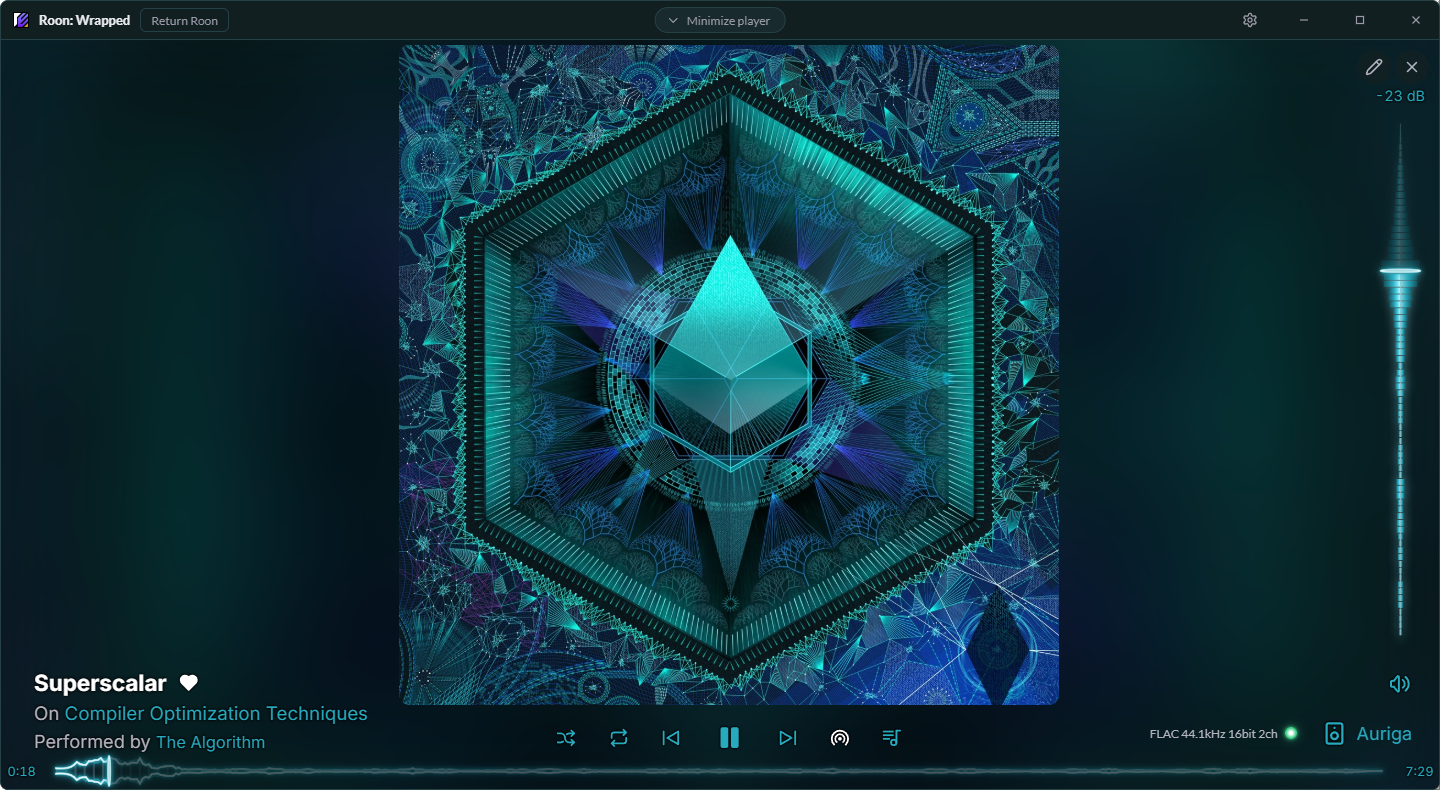
Roon: Toasted 1.2.0 brings Roon: Wrapped: the Roon app inside a Toasted window, with a Now Playing screen you design yourself.
What's new
- Roon: Wrapped (experimental). The Roon app inside a Toasted window, with Toasted's player along the bottom. Switch it on in Settings > The Wrapper, then open it from the tray, its hotkey (Ctrl+Alt+W) or Settings. Closing it keeps Roon running out of sight, so it reopens instantly.
- Now Playing, your way. Click the album art for a full-window player, then the pencil to move and resize every piece. Pick fonts, icon packs and colors (the app's, the album's or your own), and save your layouts as profiles.
- Animated bars. 15 styles for the seek bar and volume, from the classic Line to Wave, Spectrum, Glow line, LED meter, Neon tube, Plasma and more.
- Real waveforms. With Hearts & Library on, the seek bar can show a local file's actual waveform from Roon, in six looks, optionally Alive and colored by loudness.
- Audio quality. A small light shows what's playing as Roon receives it: Low Quality, CD Quality or Hi-Res, and in Now Playing the file's format too.
- Return Roon. Gives Roon its own window back, with an Enable Wrapper button in its title bar to wrap it up again.
- Toaster on or off. Only want the Wrapper? Switch the Toaster off and its hotkeys and links open the Wrapper instead.
- Search in Roon. The Search hotkey and Stream Deck search can open Roon's own search.
- Main artist only. Tracks with a long list of supporting artists show just the main one (Settings > General > Artists).
- New look. A new Toasted icon, a Roon: Wrapped logo, and a changelog that opens after each update.
Good to know
- The Wrapper is experimental. It works with Roon's own window, so a Roon update could change how it behaves.
- Hearts & Library, the quality light and waveforms use Roon's internal protocol and are experimental too.
- Waveforms are for local files. Roon only has them for files in your library, not streaming; the seek bar uses your bar style for the rest.
- Updates are now checked 10 seconds after Toasted starts, and again when Settings opens.
- Tray: Toaster, Wrapper and Taskbar Widget switches.
Install
Download Roon Toasted_1.2.0_x64-setup.exe below and run it, or use Install in Settings > Updates if you're on 1.1.0 or later. It upgrades in place and keeps your settings.