Repository navigation
Releases: WastedDesigner/Kinetik
Release list
Kinetik Stats v4.0.1

A QR code for the web dashboard.
- New: QR code button next to Copy link in Settings → Dashboard. Point your phone's camera at it to open the web dashboard, no typing needed. It shows when Allow other devices on my network is on, and the code is made inside the app, so the link and its key never go to an online QR service.
Downloads: KinetikStats.zip is the app. Kinetik.zip holds the same build named Kinetik.exe, so Kinetik 3.2 and earlier (and Kinetik Hub 1.x) can update themselves to it; on its first start it copies itself to KinetikStats.exe, runs that and carries your settings over.
SHA-256 of KinetikStats.exe: 34CB19A6AF91EE72912D5F95ECAFC7FEBA7B810EC1130678E23513F61FB7ED75
SHA-256 of Kinetik.exe: 34CB19A6AF91EE72912D5F95ECAFC7FEBA7B810EC1130678E23513F61FB7ED75
Kinetik Stats v4.0.0
Kinetik is now the name of the suite of Kinetik apps, and this app is Kinetik Stats.
- New name: Kinetik is now the name of the suite, and this app is Kinetik Stats:
KinetikStats.exe, settings inHKCU\Software\KinetikStats, aKinetikStatsstartup task andC:\Program Files\KinetikStats. Updating carries everything over by itself; the old startup task is replaced the first time it runs as administrator. - Redesigned Settings: grouped sidebar, page titles, settings that join into cards, and themed drop-downs, buttons and text boxes.
- Themes for the windows of every Kinetik app (details), and new OLED black, Mocha and Match app theme widget themes.
- Screen time: daily screen time per app with processor, memory and disk use (details).
- Timeline of what changed on the PC, and Crashes explained in plain words (details).
- Restart as administrator always closes the old copy, and a new Graphite glass app icon (the tray icon is unchanged).
Downloads: KinetikStats.zip is the app. Kinetik.zip holds the same build named Kinetik.exe, so Kinetik 3.2 and earlier (and Kinetik Hub 1.x) can update themselves to it; on its first start it copies itself to KinetikStats.exe, runs that and carries your settings over.
SHA-256 of KinetikStats.exe: 6E96C74BD32C745F9204823A40AE40D031FD24ACEC3C27382A994CF0A2E48A8F
SHA-256 of Kinetik.exe: 6E96C74BD32C745F9204823A40AE40D031FD24ACEC3C27382A994CF0A2E48A8F
Kinetik v3.1.3
A fix for the Settings window.
- Fixed: Settings opened again as soon as you closed it when Kinetik's taskbar button was on. Closing Settings handed the focus to the taskbar button's hidden window, which took that as a click and reopened Settings. Now only a real click on the taskbar button opens it.
SHA-256 of Kinetik.exe: 8DC114EDA81BEEBC1813FFAC4A07682B3044F7FEBF016AF9F2E83BB60638B9E6
Kinetik v3.1.2
Fixes and polish for the taskbar bar and desktop widget.
Desktop widget
- Dividers always show. They were drawn as a faint, smoothed 1-pixel line that could all but vanish; now they're crisp, visible on every theme, and kept even right before a group heading
- New: Divider thickness (1–8 px) in Settings → Widget
- More in the right-click menu: Theme, Size, Font, Background opacity and Placement, the same as the other Kinetik apps
- Right-click menus close when you click elsewhere, the desktop included. They used to stay open
Updating
- The built-in updater stages the new files, checks them, then swaps them in, and rolls back if anything fails. A half-finished update can no longer leave a broken exe, and its recovery files are kept
- Same-version updates are compared by SHA-256, not just file size
Also
- Closes cleanly when Kinetik Hub asks it to, so Hub can restart and update it without force-closing it
- Safer settings: out-of-range values are backed up and corrected when the app starts, and settings that can't be read are never saved over
- Default widget background opacity is 95%
build.batkeeps the exe it replaces in..\Old Versions, andbuild.bat packagechecks every file in the release zip against its SHA-256 hash
SHA-256 of Kinetik.exe: 47DB02D0F55D5F30749726DA94DD9B629D4376FDFD0A5B5BC3FFC53691369BC4
Kinetik v3.1.0: live dashboard, web dashboard and Now playing
Kinetik 3.1 adds a live dashboard (as a window and as a web page), Now playing on the taskbar, a settings backup next to the exe, and lighter animation.
Dashboard
- New: dashboard window. Cards for CPU, GPU, memory, network, disk, temperatures, power, game FPS, CPU cores and system: current readings, average and peak, and graphs of the last 1–10 minutes. Opens from the right-click menu, Ctrl+Shift+F9 or
--dashboard(which also reaches a copy that's already running). The grid fits the window and scales text, gauges and graphs to match. - New: web dashboard. The same dashboard in a browser on this PC or, optionally, other devices on your network. Every request needs the secret key in the link from Settings; New link replaces it. Profiles and backups leave the key out.
- Layout editor: Settings → Dashboard → Layout reorders cards and their stats and switches them on or off. All 44 stats are available.
- Themes: Modern, plus Terminal, Amber terminal and Yellow terminal looks for the window and the web page.
- Both are off by default; extra readings are only measured while the window is open or a browser is showing the page.
Now playing
- New: Now playing stat. What's playing in Spotify, browsers and media players, read from Windows' media controls, with its cover. By default it sits on its own in the taskbar's left corner; it can also join the bar, the widget and the game overlay.
- Click to play or pause, middle-click for the next track, scroll to change track. Hover for a card with the cover, artist, album, progress and playback buttons. Long titles scroll instead of being cut short.
Also new
- Settings backup: Settings → General → Profiles and backup has Back up / Restore, which save
Kinetik settings.kinetiknext to the exe. On a fresh Windows with no settings, Kinetik offers to restore it. - Widget font: any installed font via More….
- Companion apps: a companion app (such as a USB sensor-panel driver) can ask Kinetik for readings through a shared memory block readable only by your Windows account. Nothing changes while none runs.
Faster
- Icon glows and the widget's shadow are cached: bar frames take about 40% less time, a full widget repaint about 45% less.
- Animations pause while the screen is off or the PC is locked, and the widget stops animating while another window covers it.
Fixed
- The Profiles submenu leaked a window each time it was rebuilt, and the notification timer gained a handler with every notification.
- A normal launch while an elevated copy runs no longer crashes; it signals the running copy instead.
Kinetik v3.0.0: FPS overlay with 1% lows, frame generation FPS and notifications
Kinetik 3 is a big update for gaming: frame-generation-aware FPS, 1% lows, frame times and latency on the game overlay, which now shows itself, follows your game to its monitor and closes with it. There are also notifications, hover graphs on the bar, 14 new stats, profiles, and updates that install themselves.
For gaming
- New: Base FPS. The frame rate the game renders itself, before DLSS or FSR frame generation adds frames. FPS keeps showing what reaches the screen. Works in games with NVIDIA Reflex, which every DLSS frame generation game has.
- New: 1% and 0.1% lows. The frame rate that 99% (or 99.9%) of frames beat over the last 10 seconds. They show stutter that an average hides.
- New: frame time graph. The time per frame, with a little graph of the last 3 seconds. Spikes are stutters.
- New: render latency. Time from a game starting a frame to presenting it, in games with NVIDIA Reflex.
- New: show the overlay automatically. Settings → Overlay → Show automatically in games brings the overlay up while a fullscreen or borderless game is in front, and hides it when you leave. Ctrl+Shift+F10 hides it for the rest of that game.
- New: the overlay follows your game. On a PC with several monitors, the overlay moves to the same spot on whichever monitor the game is on, and back afterwards (Move to the game's monitor).
- New: the overlay closes with the game. When the game it was showing for exits, the overlay turns off, even if you turned it on yourself (Close with the game).
- New: session summaries. When a game closes, a notification shows how long you played, the average FPS, the 1% low and the peak GPU temperature. Each session of a minute or more is also saved to
Documents\Kinetik\Sessions.csv, including when Kinetik closes before the game. - New: benchmark recording. Ctrl+Shift+F11 (or Record benchmark in the right-click menu) records every stat, each update, to a CSV file in
Documents\Kinetik\Benchmarks. Press it again to stop.
Notifications (Settings → General → Notifications)
- When the CPU or GPU stays above its warning temperature for 30 seconds.
- When a Bluetooth device's battery, or the laptop's, drops below its warning level.
- When the free-space drive runs low (at most every 6 hours).
- Optional: when ping stays high or times out.
On the bar
- New: hover graphs. Hover over a stat for its last minute as a graph, its minimum, average and maximum, and the processes using the most CPU, memory, GPU, disk or network. Turn it off in Settings → Appearance → Hover graphs.
- New: show on all taskbars. Settings → General → Show on all taskbars puts a copy of the bar on every monitor's taskbar.
New stats
- GPU hot spot and GPU memory temperature (not every card reports these).
- Drive temperature (the hottest drive) and RAM temperature (if your memory reports it). Both need administrator rights.
- Top network app (needs administrator rights), VPN status, public IP address (asks api.ipify.org every 5 minutes while it's shown), time and date.
Settings
- New: profiles. Save your setup under a name (for example Gaming and Work) in Settings → General → Profiles and backup, and switch between them there or from the right-click menu.
- New: back up and restore every setting to a
.kinetikfile. - New: install updates from Kinetik. Settings → About → Check for updates can now download and install a new version. It checks the download against the SHA-256 in the release notes before changing anything, keeps the old files until the next start, and restarts Kinetik. Include test versions also offers test builds.
Notes
- FPS, the lows, frame times, latency, game detection and per-app network all need Kinetik to run as administrator, like before.
- While Base FPS or render latency is shown, games with NVIDIA Reflex measure their own latency a few times a second, as they do with NVIDIA FrameView.
- An elevated startup copy in
C:\Program Files\Kinetikis now only ever replaced by a newer version, so running an older copy as administrator no longer downgrades it.
Updating from v2.x: right-click the bar → Exit, then extract the zip into the folder where your old Kinetik.exe was, replacing it and its lib folder. From v3.0.0 on, Settings → About → Check for updates installs new versions for you. If you use Run at startup, run the new Kinetik once as administrator so the startup copy is updated too.
SHA-256 of Kinetik.exe: 007D3B8BFAF418DA771A539FFA725C1C442255B9282E586A67CEA7E79B061EAD. To check your copy, run Get-FileHash Kinetik.exe in PowerShell.
Kinetik v2.0.4: zip download
- The download is now a zip.
Kinetik.zipcontainsKinetik.exeand alibfolder. Extract it anywhere and keep the two together. Thelibfolder holds the LibreHardwareMonitor library that reads CPU temperature and AMD / Intel GPUs.- Until now that library was packed inside the exe and unpacked into memory when Kinetik started. Antivirus software treats programs that do this with suspicion, which is the likely reason some people saw Windows Defender flag Kinetik. The exe no longer does it, and is now about 290 KB instead of 3.3 MB.
- Security: every DLL is checked before it loads. Kinetik compares each file in
libwith the exact version it was built with (by SHA-256) and refuses any that don't match. A DLL swapped into the folder can't run inside Kinetik, even when it's running as administrator. - Elevated startup copies the
libfolder too. With Run at startup on as administrator,C:\Program Files\Kinetiknow gets thelibfolder alongside the exe.
Updating from v2.0.3 or earlier: right-click the bar → Exit, then extract the zip into the folder where your old Kinetik.exe was, replacing it. If you use Run at startup, run the new Kinetik once as administrator (right-click → Restart as administrator) so the startup copy is updated too.
SHA-256 of Kinetik.exe: 399B8797D5B98BE607CDEE1779BA50D7ED10ABAD2BBC00C5B7A3CC3C6BCF77E1. To check your copy, run Get-FileHash Kinetik.exe in PowerShell.
Kinetik v2.0.3: game overlay and FPS counter
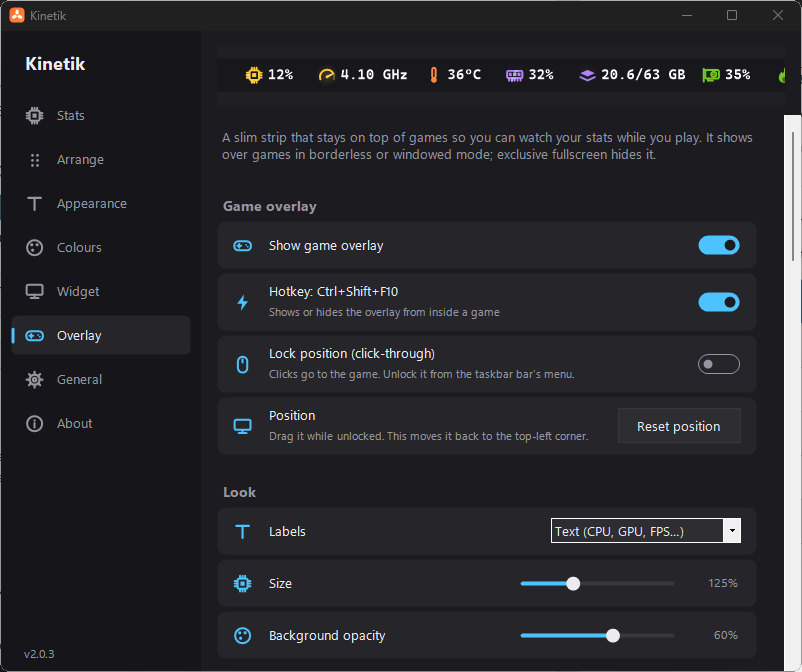
- New: game overlay. A slim, always-on-top strip of stats you can keep on screen while you play.
- Turn it on from the bar's right-click menu (Game overlay), in Settings → Overlay, or with Ctrl+Shift+F10. The hotkey also works from inside a game.
- It has its own list of stats and order, with dividers, separate from the bar and the widget. Show them with text labels (
CPU,GPU,FPS…) or icons, and adjust the size and background opacity. - Drag it anywhere. It snaps to the screen's edges and top centre. Lock position makes it click-through, so clicks go to the game.
- It stays visible over fullscreen apps, unlike the bar and widget. It shows over games in borderless or windowed mode. Exclusive fullscreen owns the whole display, so no overlay can draw there.


- New: FPS counter. Shows the frame rate of the app in front, on the overlay (on by default), the bar or the widget. It counts the frames Windows' graphics system reports for DirectX 9–12 games, and for OpenGL and Vulkan games. Like CPU temperature, it needs Kinetik to run as administrator.
- Fix: CPU power and temperature on laptops. Some laptops showed neither, because they were only read through LibreHardwareMonitor, which needs the PawnIO driver.
- CPU power now falls back to Windows' own power meter, which needs no driver or admin rights.
- CPU temperature falls back to the ACPI thermal zone on PCs that report a believable one (most laptops). The tooltip marks this reading as approximate.
- Clearer messages for CPU temperature. Settings → General says when the PawnIO driver is missing and has a Get PawnIO button. It no longer claims temperatures are available just because Kinetik is running as administrator. The bar's tooltip says what's missing.
Kinetik v2.0.2
- Fix: in Settings → Widget, the Background colour row's colour square and Default button were pushed up and cut off. Controls on the right of settings rows now stay centred once they've settled to their final size.
Kinetik v2.0.1: security fixes and update check
- Security: elevated startup now runs a protected copy. With Run at startup on as administrator, Kinetik starts elevated at sign-in without a UAC prompt. Until now that ran the exe from wherever you'd put it, usually a folder any program on your account can write to. Malware already running as you could have replaced it, or dropped a DLL next to it, to get admin rights at your next sign-in.
- Elevated startup now installs a copy to
C:\Program Files\Kinetik, which only administrators can change, and runs that. Without admin rights, startup falls back to a normal, unelevated start. - Existing elevated startup entries are moved over automatically the next time Kinetik runs as administrator. Run Kinetik once as administrator after updating (right-click → Restart as administrator).
- When you run a newer Kinetik as administrator, the installed copy is updated to match. Turning Run at startup off removes it.
- Elevated startup now installs a copy to
- Security: DLLs and helper programs only load from Windows' System32 folder. Kinetik no longer looks for
nvml.dll(NVIDIA stats), Windows' own DLLs or Task Manager by name alone, which would have searched its own folder first.nvml.dllis loaded from System32, or from NVIDIA's admin-only install folder on older drivers. - Security: startup tasks are registered directly through the Task Scheduler API. No more
schtasks.exeor temporary task file that another program could swap before Windows read it. - Hardening: no error log is written while running as administrator, and the desktop shortcut's icon file is never written through a redirected folder or an existing file.
- The exe's product version now shows the right number in its file properties (v2.0.0 still said 1.4.1).
- New: check for updates. Settings → About → Check for updates asks GitHub for the latest version. If there's a newer one, the button opens its release page in your browser. Nothing is downloaded or run automatically.
- Hardening: settings read from the registry are kept within safe limits, so a bad or tampered value can't crash Kinetik or make it draw an enormous window.
- Fix: long descriptions in Settings no longer run underneath the button or switch beside them.