Repository navigation
Backups and Restore
A suite is a group of apps backed up together with one schedule and one
retention policy ([[suite]] in wranglarr.toml; the example has media
and downloads). Each backup run produces a version:
appdata/backups/<suite>/<YYYYMMDDTHHMMSSZ>/
├── manifest.json
├── RESTORE.md                          how to run this version without wranglarr
├── compose.yaml, .env                  standalone stack, images pinned to what was running
├── postgres/initdb/10-restore.sh       stock postgres image restores the dumps on first start
├── globals.sql                         pg_dumpall --globals-only (roles)
├── radarr/config/                      Radarr's /config as-is (config.xml, asp/ keys, …)
├── radarr/config.sha256                sha256sum -c format
├── radarr/radarr.dump             pg_dump -Fc per database
├── radarr/radarr-log.dump
├── radarr/radarr_backup_v5…zip         the app's own Backup task output (config.xml)
├── prowlarr/…                          Prowlarr: the same files as an arr
├── bazarr/config/                      Bazarr's /config (config/config.yaml, …)
├── bazarr/bazarr.dump
├── bazarr/bazarr_backup_v1…zip
└── qbittorrent/config/                 qBittorrent's /config (qBittorrent.conf, BT_backup/, …)
Every app's config/ folder is its /config in the app's own layout, so it
can be mounted back as /config as-is. Left out:
| App | Left out |
|---|---|
| arrs |
logs/, Backups/, MediaCover/ (poster cache, re-downloaded), UpdateLogs/, Sentry/, live SQLite files |
| Prowlarr | as the arrs, plus the files directly in Definitions/ (indexer definitions it downloads on start, about 5 MB); Definitions/Custom/, your own definitions, is kept |
| Bazarr |
log/, backup/, cache/, restore/, live SQLite files |
| qBittorrent |
logs/, GeoDB/ (re-downloaded), lockfile
|
| SABnzbd | logs/ |
| NZBGet | nzbget.log* |
| Seerr |
logs/, cache/, live SQLite files |
On every app, *.pid, *.lock and *.log files are skipped too. Live
SQLite files are never copied, because copying one while the app writes to
it can tear it. On Postgres they're unused leftovers from the first start. An
arr or Bazarr in SQLite mode gets the consistent copy from its own backup
zip, laid over the folder. Seerr has no supported SQLite backup here: a Seerr
entry without a configured PostgreSQL database is marked incomplete. Run
Seerr on PostgreSQL and list its database in wranglarr, or back up its SQLite
database separately while Seerr is stopped. The Seerr status API does not report
the database engine; ensure the configured database matches the running app.
A download client's backup holds the torrents and NZBs themselves, not what they downloaded:
| Client | In the backup |
|---|---|
| qBittorrent | the .torrent file of every torrent plus its resume data (BT_backup/: progress, save path, category, tags), and the settings |
| SABnzbd | the queue and history, a copy of every NZB added (nzb_backup_dir, set to nzb-backup by init.sh), NZBs in a watched folder inside /config, and the settings. If download_dir is inside /config, only each job folder's __ADMIN__ (its NZB) is kept |
| NZBGet | the queue (QueueDir: each job's NZB and download state) and incoming NZBs (NzbDir) when they are inside /config, and the settings |
Download folders that sit inside /config are left out. The downloaded files
live on the shared /data mount (/data/torrents, /data/usenet), the same
disk as the media, so they belong to your normal file backups. A client's
backup is a few kilobytes per torrent or NZB, however large the download.
After a restore, torrents re-check the data still on /data and carry on (or
download again if it is gone); an interrupted usenet job can be added again
from its saved NZB.
The downloads suite page has a What a downloads backup holds panel:
per client, the counts in the newest version (torrent files, resume files,
NZB copies, queued jobs) and the paths that are not in it.
manifest.json records, per app: kind, version, database type and
migration version, instance name, the collection snapshot (movies /
series / artists, files, missing, bytes on disk; Bazarr: series, movies,
wanted; download clients: torrents or queue, history), the configuration
scope (indexers, download clients, quality profiles, custom formats, import
lists, notifications, tags, root folders + free space), live database sizes,
and the sha256 of every file. Plus the Postgres server version and the VPN
state at the time. The manifest is the source of truth: the store can be
copied elsewhere and still be understood.
Why both halves: on Postgres the arrs' own backup contains only config.xml
and skips the database; pg_dump knows nothing about config.xml.
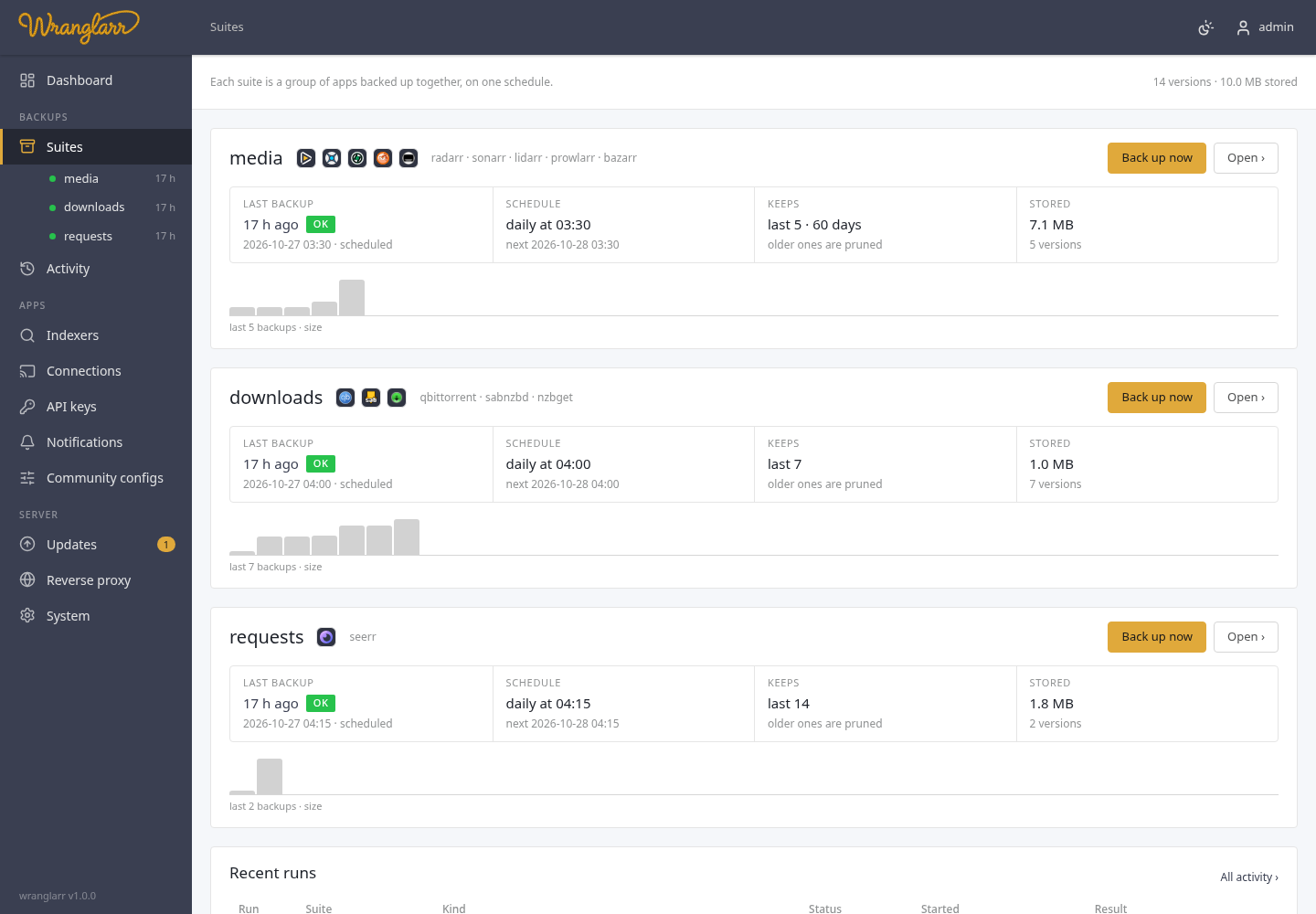
Suites in the sidebar lists every suite with its apps' logos, then four facts: the last backup (how long ago, and OK, partial or failed), the schedule in words ("daily at 03:30") with the next run, what the retention keeps, and how much is stored. Below that a bar per backup, the last 30, as high as the backup is big: a partial or failed one is orange or red with a !. Point at a bar for its date and size; click it to open that version. Under the sidebar's Suites, each suite has a dot (green: last backup OK, orange: partial, red: failed, pulsing: running now) and its age.
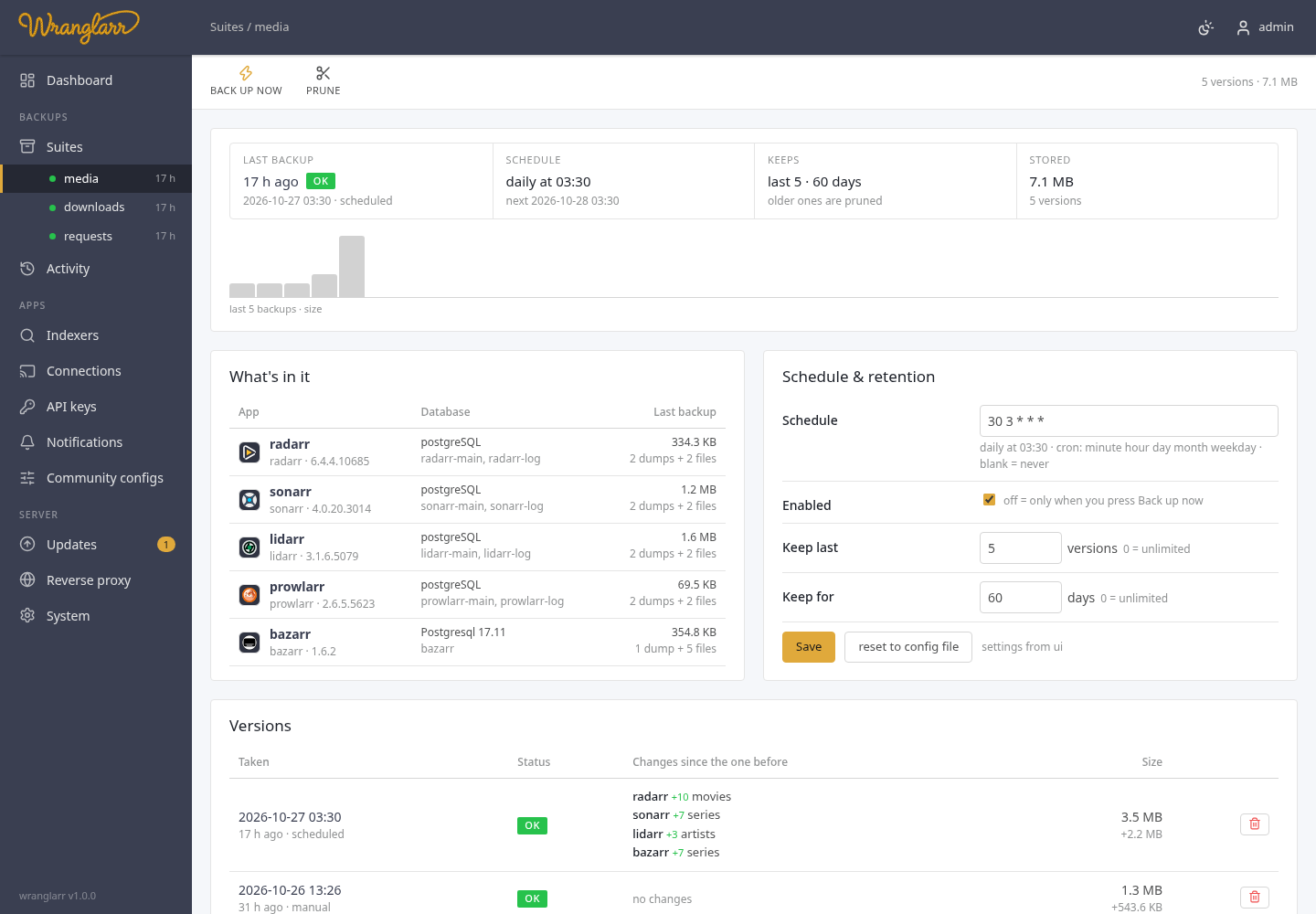
A suite's own page adds:
- What's in it: each app, its version, its database and what the newest backup holds for it (dumps and config files, and their size).
- Schedule & retention, editable.
-
Versions: each backup with what changed since the one before: an
app upgraded (
lidarr 3.1.0.4875 → 3.1.6.5079), more or fewer films, series or torrents, an app added or left out, an error. The size and how much it grew or shrank. - Other runs: restores, syncs and anything that failed. Each successful backup is already a version, so it isn't listed twice.
-
Backup now on the Suites page / a suite's page, or
POST /api/suites/{s}/backup. -
Schedule: cron per suite, in the container's
TZ, editable in the UI (overrides the config file; "reset to config file" undoes it). Missed runs within an hour are run on startup. - Runs are serialised (one at a time) and logged; the run page streams the log.
keep_last (number of versions) and keep_days (age) per suite; 0 means
unlimited. Pruning runs after every backup and on Prune / POST /api/suites/{s}/prune.
Only good versions (status OK) count, so a run of failed backups never pushes a good one out:
- the newest good version always stays, however old it is;
- a failed, partial or unfinished version is removed once a newer good version exists, and kept until then. The version list shows deltas against the previous version: an app upgrade (⬆) and the change in the primary count (+12 movies).
Per app, per version: databases, config, or both. Every file is checksum- verified against the manifest first.
| App type | Databases | Config |
|---|---|---|
| arrs |
pg_restore --clean --if-exists --single-transaction into each database (created if missing). Docker control and container are required: the app must be confirmed stopped before any database write. A failed stop aborts the restore. It is restarted after success only if it was running before. |
zip uploaded to system/backup/restore/upload, then the app is restarted to apply config.xml. The restored config.xml keeps this stack's Postgres connection (host, port, user and password, read from the app's current config.xml), so a backup from another install doesn't bring back that install's password; the database names stay as backed up. A changed API key is picked up again from the config file. |
| Bazarr | same |
config.yaml written into the mounted config dir (previous kept as config.yaml.pre-wranglarr), Bazarr restarted via API, because Bazarr's own restore refuses a zip without bazarr.db
|
| qBittorrent, SABnzbd, NZBGet | — | the version's <app>/config/ is verified and staged with the container stopped (Docker control required). Every file must appear in the checksum list; extra files, links and special files are refused. Previous contents are retained in a unique recovery folder. |
Config-directory restores stage all incoming files before replacing live entries. A complete recovery copy is retained beside the config directory as <config-dir>.pre-wranglarr (later restores use unique suffixes), or under WRANGLARR_PRE_RESTORE when the parent is not writable. These recovery copies are never overwritten automatically; remove old copies only after verifying the restored application.
A failed installation attempts to put the original entries back. A failed database or file restore leaves the container stopped; inspect the run log before starting it. If wranglarr is interrupted during file installation, .wranglarr-restore-transaction/recovery.json inside the config directory identifies the complete recovery copy and original/replacement entries. Keep the application stopped, restore the original config from that copy, then remove the transaction directory before retrying. Its presence prevents a subsequent restore from overwriting unresolved recovery data. Replacement uses renames within the mounted config filesystem; it does not fall back to a destructive cross-filesystem copy.
API config restores are successful only after the application becomes ready again. A timeout is a failed run even when the upload succeeded.
The setup wizard writes appdata/wranglarr/restore-plan.json listing
app@version items to restore after a fresh install. wranglarr shows them
as a banner with Run plan (one run restores each item, databases + config)
and Discard. Items whose version is missing from the store are shown as
such and retained as pending work. Each successful item is removed from the plan immediately, so retrying does not repeat completed restores. A run with unavailable or failed items reports partial/failed status and preserves those items. A failure stops the plan because some writes may already have completed. Failed and interrupted items remain marked and block automatic replay: inspect its run and application, then discard the plan and restore any remaining items individually.
Every version is a complete stack on its own. If wranglarr is gone, broken or never coming back:
cp -a appdata/backups/media/20261026T093520Z ~/arrs-restored   # work on a copy
cd ~/arrs-restored
sha256sum -c --quiet */config.sha256 && echo "configs intact"
docker compose up -d                                            # or: podman compose up -d
What happens on up:
-
Postgres starts on an empty
postgres/dataand runspostgres/initdb/10-restore.sh, which creates each database andpg_restores its dump. Its healthcheck uses TCP, so it only passes once the restore is done. -
The apps wait for that, then start on their own
config/folders with the same API keys, settings and database contents. The images are pinned by digest to the ones that were running, and can be overridden withRADARR_IMAGE=…etc. in.env. -
.envholds the Postgres login the apps' configs expect,PUID/PGID/TZ/UMASK, and the host data paths as they were mounted (DATA_ROOT=…). Fix those if the data moved. -
Apps that ran behind a VPN (the shared one, or their own with per-app
VPN) are put in a
downloadsprofile, because the tunnel isn't part of this stack. They only start withdocker compose --profile downloads up -d, and then without a VPN. -
Apps that were behind AuthTunnel have no login of their own (the gate
did that). They're published on
127.0.0.1only, so open them from the same machine, or give each one a login in its settings before changing the port to8989:8989style. -
Suites without databases join the
arrs-restorenetwork created by the one with Postgres. Start that one first, ordocker network create arrs-restore.
Each version's RESTORE.md repeats this with its own versions and file list.
This was tested by backing up a live stack, copying the version folder out
and starting it with plain podman compose. Radarr, Sonarr, Lidarr and
Bazarr came back on Postgres with their tags, instance names and API keys.
Single pieces work too: docker run -v "$PWD/radarr/config:/config" … on
the same image, pg_restore -d radarr --no-owner radarr/radarr.dump
with any Postgres client, unzip for the apps' own zips.
globals.sql has the roles if you move to a new cluster by hand.
Container updates back up the affected suite before replacing a
container. Those versions carry trigger pre-update. A failed update puts the
app's data back from it by itself, and Roll back offers to.
They're kept apart from the suite's keep_last and keep_days, so scheduled
backups never push out what a rollback needs:
-
The newest one stays, and pushes the older ones out
(
[updates] pre_update_keep, default 1). Once a version has run until the next update, the backup from before it has done its job. -
Except in a run of quick updates. Updates less than
pre_update_settle_daysapart (default 7) make a run, like catching up through several versions in a day. Each version in between ran only briefly and never proved it left the data sound, so the run also keeps its oldest backup: the one from before the run began, with the data of the last version that had settled. The ones in between go. -
The run ends when its newest update has had its
pre_update_settle_dayswithout another update; then only the newest stays again. Its time is the time of its backup. A failed update doesn't change this: the version from before it is the one still running, and it has run at least that long.
A run of updates that never settles, like a development track that updates
every day, keeps pre_update_keep + 1 backups for as long as it goes on: the
newest ones, and the one from before the run began. pre_update_settle_days = 0 turns the exception off.
Pre-update backups made by wranglarr before 1.1.1 were counted with the
scheduled ones, and still are: they follow the suite's keep_last and
keep_days until they age out, so updating never prunes what the earlier rule
would have kept. Only backups made by 1.1.1 or later are kept apart.
Pre-update manifests record pre_update_run, the original backup's ID, before
intermediate backups are pruned. That keeps the same recovery point protected
across repeated pruning and restarts. Deleting one by hand works like any other
version; if you delete that original backup, retention protects the oldest
remaining backup from the run instead.