Repository navigation
Community Configs
Setting up an arr for one job takes custom formats, a quality profile that scores them, quality sizes, and sometimes release profiles, a delay profile, a tag or an auto tagging rule, all clicked in by hand. Two examples of such jobs:
- "x265 preferred, smallest file at the best quality, up to 1080p";
- "anime, English dub only".
A community config is that whole job as one JSON file. One person sets it up once and exports it; everyone else pastes it in.
Community configs in the sidebar (under Apps) does three things:
- import a config: shows exactly what would change in each app first, and every import can be undone;
- test a release name against the result;
- export the settings for a job from your own apps.
It has two tabs. Import holds the import box, what's installed, and the
release-name test; Export holds the export form. The address keeps the open
tab (/configs#export).
-
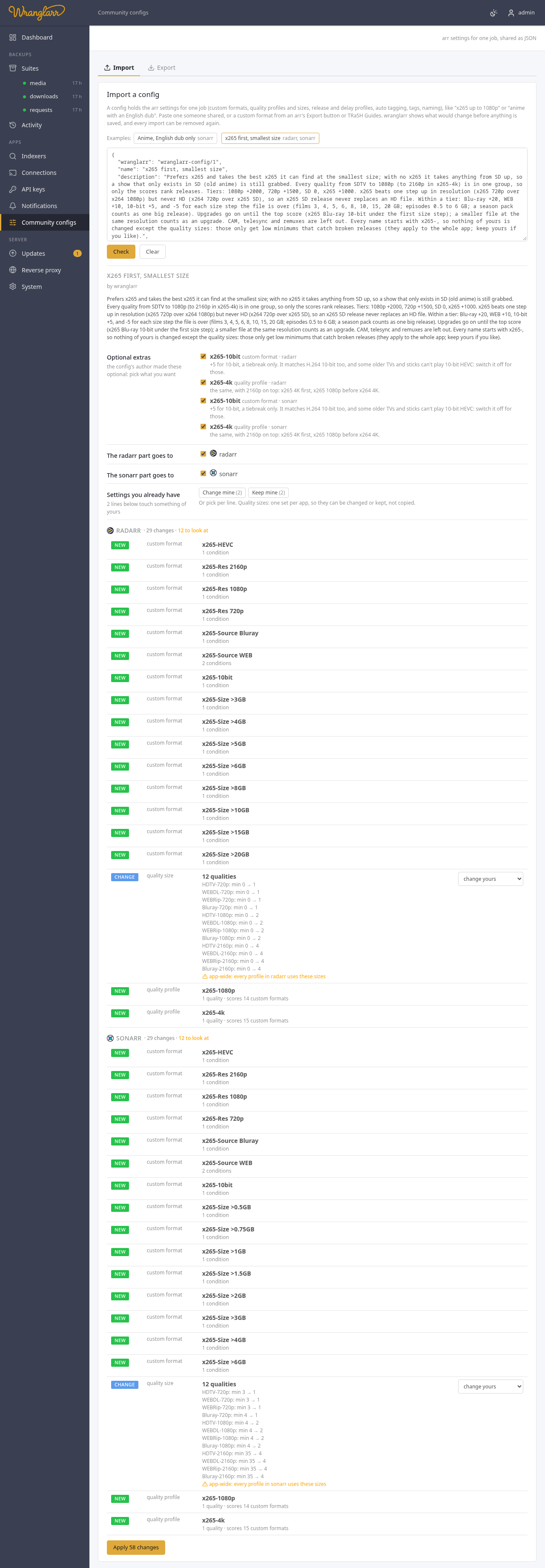
Paste the config into the box, or click one of the Examples.
-
Check. wranglarr reads each app the config is for and lists every item:
Mark Meaning new the app doesn't have one by that name; it's added change the app has one by that name and it's different; the line says how (a condition, the cutoff, a score, a size) same already set up like this; left alone problem it can't go into this app (an unknown quality, a condition type the app doesn't have, a score for a custom format nobody has); nothing is applied while one is listed Lines marked with a warning sign need a look before you apply:
- a profile the arr ships with (
HD-1080p,Any…), or one your films or series use ("used by 733 movies"); - a custom format your own profiles score;
- a tag already on series, release profiles or indexers;
- settings for the whole app: quality sizes, file naming, media management, the default delay profile;
- a new auto tagging rule, which tags matching items in your library.
- a profile the arr ships with (
-
Optional extras, if the config has any, are listed first with the author's note on each. They're the parts of a job people disagree on: a group they prefer, a bonus for 10-bit. Tick or untick them; the list below follows. Switching off a custom format also drops the scores the config's profiles give it.
-
Under each part ("The radarr part goes to…"), tick the apps it goes to. With two Radarrs (say
radarrandradarr-4k) you pick one, both or neither. The list updates as you tick. -
Settings you already have: each line that would change something of yours has a choice:
Choice What happens change yours the config's version replaces yours (the default) keep yours, skip this yours stays; the config's is left out add a copy yours stays, and the config's goes in as a copy named with a prefix ( v2 · HD-1080p). A copy of a profile starts from yours, with the config's changes on topChange mine, Keep mine and Add copies named set every line that allows it at once (the count says how many); type the prefix first. The rest of the config follows a copy: its profiles score the copied custom format, its auto tagging points at the copied profile, and a copied tag (
v2-anime) goes on its release and delay profiles. Quality sizes, file naming and media management are one set per app, and a delay profile is matched by its tags: these can be changed or kept, not copied. When a config touches only those, Add copies named isn't offered. -
Apply. When it's done, the check runs again and should say already set up like this.
Everything is matched by name: a custom format called x265 / HEVC in the
config updates the one called x265 / HEVC in the app, or is added if
there isn't one. Nothing else in the app is touched. Your other custom formats
and profiles stay, and so do the scores your existing profiles give them.
A config only adds and changes things. To put a profile to work:
- Existing films and series keep their profile. Switch them with the arr's mass editor (Movies or Series → Edit → select → Quality Profile), or pick the profile when you add new ones. A copy made on import is a new profile, so nothing uses it until you switch.
- Quality sizes belong to the whole app. Every profile in that app uses them. The preview reminds you when a config changes them.
- A config can't reach anything else. Indexers, download clients, root folders, paths, permissions, logins and API keys are out of its reach. It holds the parts listed under The format, and of media management only options that name no path. Every condition, with its regular expression, is visible in the JSON before you apply it.
History saves the previous values before each change is sent to an app. If an apply stops partway, its partial history entry remains available for Undo. Undo can retry changes that failed. If a create request loses its response, the app may have created the item without returning its ID. Check the app for that item; Undo leaves it alone and keeps the history entry until you resolve it and forget the entry. Unfinished history entries are kept even when the normal history limit is reached.
An interrupted removal also leaves a partial recovery entry in History. Undo can restore replaced values, but a deleted item may need to be restored by hand: recreating it can give it a different ID and break references. A completed removal discards its temporary recovery entry. If an app cannot be read, removal waits until its current settings can be verified.
wranglarr keeps each app's settings as a timeline under Installed, newest first. The timeline is a list of keyframes: each value a config can set (a profile's cutoff, one score, the minimum size of one quality, a whole custom format) gets a keyframe whenever something changes it. There are three kinds of entry:
- Before wranglarr: what each setting was before wranglarr first changed it, saved the first time an install touches it.
- A config: what that install changed. Each one has a Remove button.
- External manual change and a date: changes made in the app itself that wranglarr noticed. It looks when the page opens, and before every install and removal. The date is the day it noticed.
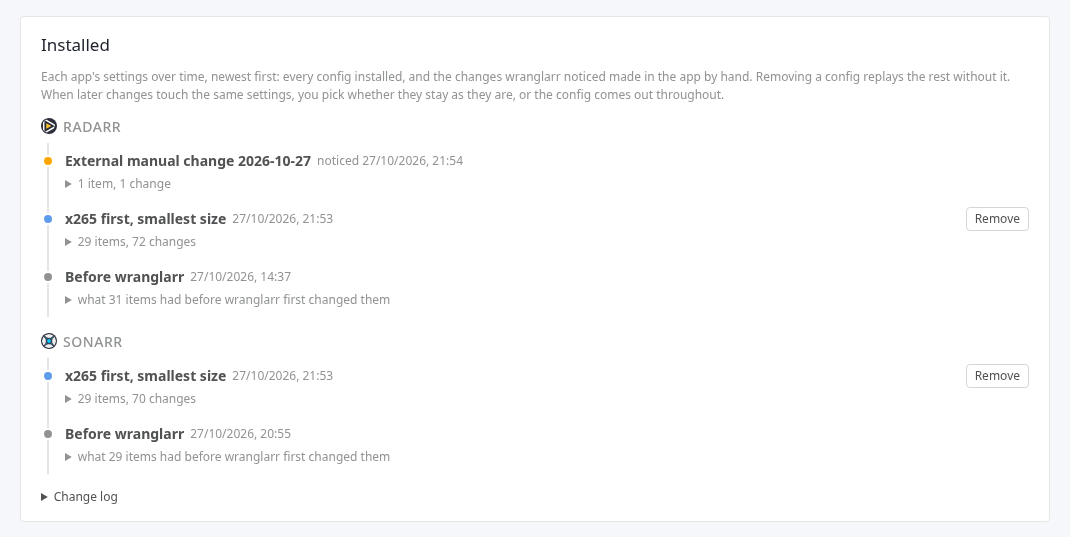
Removing a config replays the timeline without it. What it changed goes back to the value before it (another config's, or the app's own), and what it added is deleted. A tag still used by something in the app stays.
What wranglarr asks depends on what came after it:
- Nothing changes in the app: it's removed straight away. For example, 1080p was at 2, Better 1080p set it to 4, then you set it back to 2 by hand. Removing Better 1080p leaves 2 either way.
- Only its own changes go back: you get one confirmation listing them.
-
Later changes touch the same settings, or use what it made: you pick one of two:
- Keep dependent changes as they are: later changes stay. Whatever they use stays too, such as a custom format a profile you edited by hand still scores. The config stays listed as partly removed with what it still holds, and you can remove it again later.
- Remove its changes throughout: its settings go back to how they were before it, over the later changes, manual ones included. The dialog lists each later change this overrides. Scores and fields of what it made go along with it.
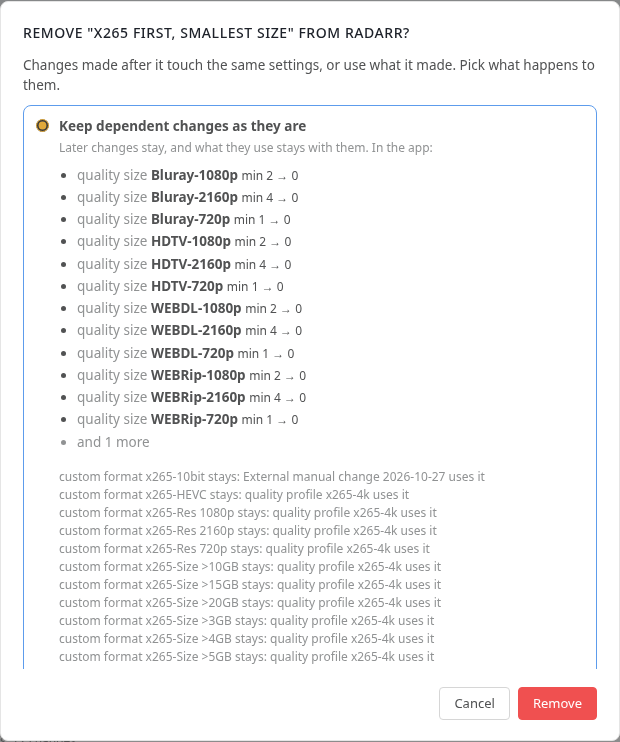
Until the blast-radius checks are in (see What's next), the removal dialog says it hasn't checked which films, series or artists use what it changes. Changed settings apply to all of them. A profile it removes may still be set on some. The app may refuse to delete a profile in use: it then stays, and the removal says so. Check the library first when it matters.
Before applying, wranglarr asks you to confirm when a config changes:
- something the arr ships with (
HD-1080p,Any, Lidarr'sStandard); - an app-wide part (quality sizes, file naming, media management);
- the default delay profile;
- settings another installed config set.
The dialog says which. Through the API, apply then needs "ack": true.
Under Change log, every import is listed with the copies of what it replaced. Undo there puts those copies back as they were, so edits made to the same settings since are lost. Remove under Installed keeps them. Forget only takes a line off the log.
If an arr refuses part of an import (it goes offline half way, say), what was already saved is still listed, marked partly.
The box also takes a custom format on its own, or a list of them, as the arrs' own Export button (Settings → Custom Formats → a format → Export) or TRaSH Guides give it. A bare format doesn't say which app it's for, so you tick the apps it goes to.
TRaSH's trash_id and trash_scores fields are ignored. Set the score in
a profile, or wrap the format in a config with a formatScores entry.
Both examples ship with wranglarr. Apply them as they are, or use them as a starting point and export your own.
Two quality profiles, x265-1080p and x265-4k. They take x265 whenever
it exists, the best x265 at the smallest size, and anything else when there's
no x265. Every name starts with x265-, so importing it changes none of your
own profiles or custom formats.
-
Qualities: one group, x265-any, from SDTV, DVD and 480p through 720p and 1080p (and 2160p in x265-4k). Inside a group every quality counts the same, so only the scores below rank releases. A show that only exists in SD, like old anime, is still grabbed. CAM, telesync, telecine, workprints and remuxes are left out.
-
Scores, in tiers:
Custom format Score x265-HEVC(x265, h265, h.265, HEVC)+1000 x265-Res 2160p(x265-4k only) /x265-Res 1080p/x265-Res 720p+2500 / +2000 / +1500; SD 0 x265-Source Bluray/x265-Source WEB+20 / +10 x265-10bit+5, a tiebreak only. It matches H.264 10-bit too. An optional extra: switch it off if something you watch on can't play 10-bit HEVC x265-Size >3GB,>4GB,>5GB,>6GB,>8GB,>10GB,>15GB,>20GB(films);>0.5GB…>6GB(episodes)−5 each, so they add up: the bigger the file, the lower x265 is worth more than one step of resolution but less than HD itself: x265 720p (2500) beats x264 1080p (2000), and x264 720p (1500) beats x265 SD (1000). So an SD x265 never replaces an HD file. All the size steps together (−40 at most) stay smaller than one resolution step, and only decide between releases of the same tier.
-
Upgrades run until the top score: x265, the top resolution, Blu-ray, 10-bit and under the first size step (3025 for x265-1080p, 3525 for x265-4k). An upgrade needs at least +5, one size step: a smaller x265 at the same resolution counts. The size formats are scored on the file you have too, so a 5.5 GB x265 on disk (2995) is replaced by a 2.5 GB one (3010), not by another 5.8 GB one.
-
Quality sizes: only low minimums that catch broken releases, for the 720p, 1080p and 2160p qualities (1, 2 and 4 MB per minute). They apply to the whole app, so the preview offers to keep yours. Sonarr ships with 35 MB per minute for 2160p, which turns away small x265 4K episodes. The "small" part is done by the size formats inside the profiles, not by these limits.
-
x265-4k is an optional extra: the same, with 2160p on top. It's x265 4K first, and x265 1080p before x264 4K.
Season packs in Sonarr are one release, so the size formats see the whole pack: a pack scores lower than single episodes of the same tier.
Then set your films or series to x265-1080p or x265-4k, as above.
Only grabs anime releases that have an English audio track.
| Custom format | Score | Matches |
|---|---|---|
| English audio | +100 |
Dubbed, (Dub), English Dub, English Audio, Dual Audio, [Dual], JA+EN / JPN+ENG / Japanese.English, Multi Audio, [Multi], and DUAL or MULTi after the resolution or source tag (so a show called Dual! doesn't count). Whole words only, with dots, spaces, dashes or underscores around them: Individual and Multiverse don't match |
| English dub groups | +100 | releases from Golumpa, KaiDubs, KamiFS, KS, torenter69 or Yameii, which put out English dubs even when the name doesn't say so |
| Other-language audio | −1000 | the name gives another audio language and doesn't name English: PT-BR, Dublado, Latino, Castellano, VF, TRUEFRENCH, German DL, ITA-JAP, Hindi, German Dubbed, ITA Dub… It outweighs English audio, so Dual Audio PT-BR or MULTi VF is skipped, while Dual Audio [Hindi-English] and Multi-Audio ENG/GER/FRE are kept |
Subtitles never count as English audio: Dual-Subs, Multi-Sub, Multiple Subtitle and Eng Subs score nothing (so Dual Audio PT-BR [Eng Subs] is
still skipped).
The profile Anime, English dub has a minimum score of 100, so
subtitle-only releases (most fansubs, [SubsPlease], Eng-Subs) are
skipped.
To use it, set each show's Series Type to Anime and its profile to Anime, English dub (or set both when you add the show).
For anime films in Radarr, export the three custom formats and the profile's
scores from Sonarr, change the app key to radarr, and import that. The
quality names are the same.
Release names don't always say what audio they carry. Before you rely on a config, check a few real names under Test a release name (below).
Pick an app, paste a release name, Test. The arr parses it and wranglarr shows:
- the quality it reads;
- the language;
- the custom formats it matches;
- the score each of the app's quality profiles gives it, with whether that profile would take the release (would take it, skipped: needs 100, or quality not in this profile).
On the Export tab:
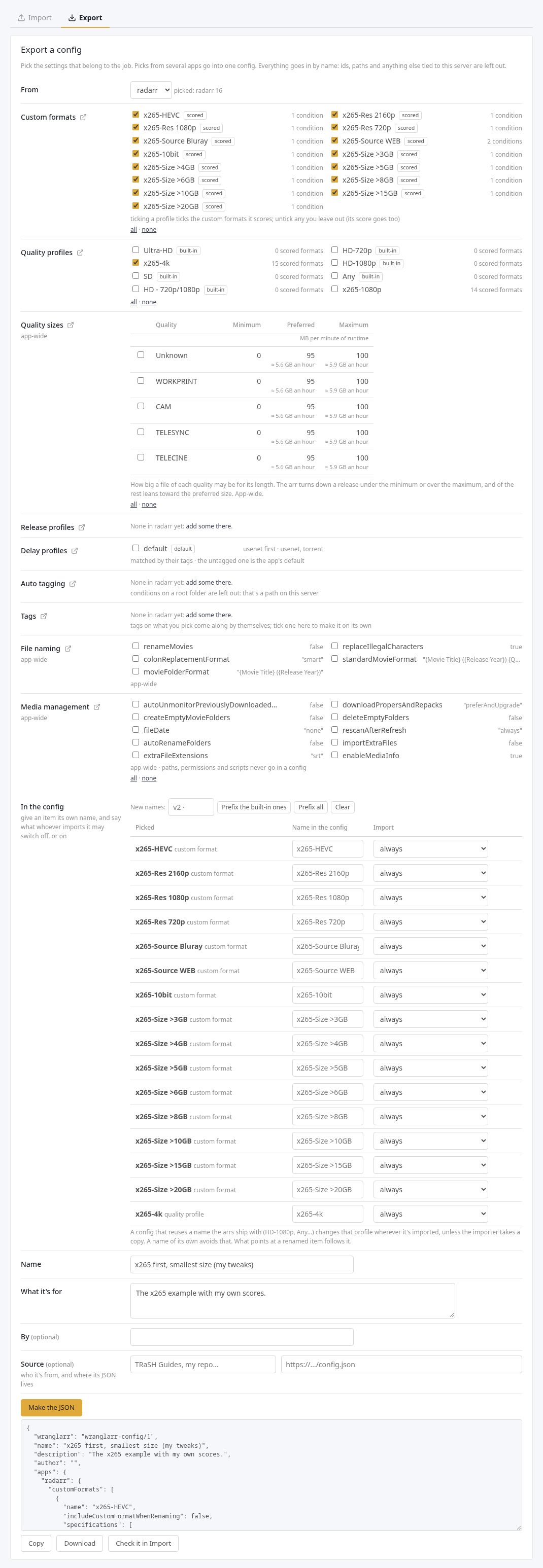
- Pick an app under From. Everything it has that a config can hold is listed, part by part: custom formats, quality profiles, metadata profiles (Lidarr), quality sizes, release profiles, delay profiles, auto tagging, tags, file naming and media management. The icon next to each part's name opens that part's page in the app itself, in a new tab. Quality sizes come as a table: the minimum, preferred and maximum size for each quality (MB per minute of runtime; in Lidarr an average bitrate in kbit/s), with what that comes to for an hour. The app turns down a release under the minimum or over the maximum, and of the rest leans toward the preferred size.
- Tick what belongs to the job. Ticking a profile ticks the custom formats it scores (marked scored); untick any you'd rather leave out, and its score goes too.
- Switch to another app and tick more if you like. Picks from several apps go into one config, keyed by the kind of app.
- Under In the config, every named item going into the config is listed:
-
Name in the config: give it a name of its own. An item named like
one the arrs ship with (marked built-in:
HD-1080p,Any…) changes that profile wherever it's imported, unless the importer takes a copy. Prefix the built-in ones puts the prefix in front of those names; Prefix all does every name. What points at a renamed item follows it. - Import: leave an item on always, or make it an extra, on unless switched off or off unless switched on, and say in a few words what it does. That note is what the importer reads next to its switch.
-
Name in the config: give it a name of its own. An item named like
one the arrs ship with (marked built-in:
- Give it a Name and say what it's for, then Make the JSON. Notes under the button say what was left out: a score for a custom format you didn't pick, an auto tagging condition on a root folder.
- Copy or Download it. Check it in Import switches to the Import tab and runs the preview on it; against the app it came from, everything should be same (renamed items show up as new).
Only names and values go into the file:
- no ids;
- no root folders or other paths;
- nothing else that only makes sense on your server.
Tags, profiles and select options go in by name (Anime, English, HD-1080p); the
importing app creates any tag it doesn't have.
For now a config is shared as JSON: in a gist, a repository, a forum post. Whoever uses it pastes it in.
In this order (the whole plan is in the roadmap):
-
Blast-radius checks. Today neither an install nor a removal looks at
which films, series or artists use what it changes. A removal only warns
you about that (see below). Next:
- show, for each profile, tag or setting a change touches, how many items use it, and which;
- before a profile they use is removed, offer to move them to another one;
- hold back a removal that would leave items on a profile that's gone.
-
Config providers. You'll add a repository of configs (a Git repository
or any web address with an index file) and pick from its list on the same
page, with updates when it changes. A config's
sourceURL is where wranglarr will look for a newer version. The format below is what those repositories will hold.
{
  "wranglarr": "wranglarr-config/1",
  "name": "x265 up to 1080p",
  "description": "What it does and how to use it once imported.",
  "author": "you",
  "link": "https://example.com/where-it-came-from",
  "source": {"name": "TRaSH Guides", "url": "https://example.com/x265-small.json"},
  "apps": {
    "radarr": {
      "customFormats": [
        {
          "name": "x265 / HEVC",
          "includeCustomFormatWhenRenaming": false,
          "extra": { "default": true, "note": "Only if your players handle HEVC" },
          "specifications": [
            { "name": "x265 / HEVC", "implementation": "ReleaseTitleSpecification",
              "negate": false, "required": false,
              "fields": { "value": "[xh][ ._-]?265|\\bHEVC(\\b|\\d)" } }
          ]
        }
      ],
      "qualityProfiles": [
        {
          "name": "x265 up to 1080p",
          "upgradeAllowed": true,
          "cutoff": "1080p",
          "qualities": [
            { "name": "1080p", "qualities": ["Bluray-1080p", "WEBDL-1080p", "WEBRip-1080p", "HDTV-1080p"] },
            "Bluray-720p"
          ],
          "minFormatScore": 0, "cutoffFormatScore": 100, "minUpgradeFormatScore": 1,
          "language": "Original",
          "formatScores": { "x265 / HEVC": 100 }
        }
      ],
      "qualityDefinitions": {
        "Bluray-1080p": { "min": 5, "preferred": 20, "max": 70 }
      },
      "releaseProfiles": [
        { "name": "No cams", "enabled": true, "required": [], "ignored": ["HDCAM", "TELESYNC"], "tags": ["no-cams"] }
      ]
    },
    "sonarr": {
      "tags": ["anime"],
      "delayProfiles": [
        { "tags": ["anime"], "preferredProtocol": "torrent", "usenetDelay": 0, "torrentDelay": 60 }
      ],
      "autoTags": [
        { "name": "Anime series", "tags": ["anime"], "removeTagsAutomatically": false,
          "specifications": [
            { "name": "anime", "implementation": "SeriesTypeSpecification", "fields": { "value": "Anime" } }
          ] }
      ],
      "naming": { "renameEpisodes": true },
      "mediaManagement": { "downloadPropersAndRepacks": "doNotPrefer" }
    },
    "lidarr": {
      "metadataProfiles": [ { "name": "Albums and EPs", "primaryAlbumTypes": ["Album", "EP"] } ]
    }
  }
}| Key | What it is |
|---|---|
wranglarr |
always wranglarr-config/1
|
name, description, author, link
|
shown in the preview. Only name is needed, and link must be http(s) |
source |
optional: who the config is from and where its JSON lives, as a name, a URL, or both ({"name", "url"}). A plain string starting with http(s):// is the URL, any other the name. Shown in the preview and on the installed timeline |
apps |
one part per kind of app: radarr, sonarr, lidarr, whisparr. Each part holds any of the keys below |
tags |
tag names to create: lower-case letters, digits and dashes. Tags named anywhere else in the config are created too |
customFormats |
the shape the arrs' own Export button writes, so formats copied from an arr or TRaSH Guides go in as they are. fields may be {"value": …} or the API's [{"name","value"}]. For a choice field (source, resolution, language…), the value is the arr's number, or the label as the arr shows it ("English", "Bluray") |
qualityProfiles |
qualities lists the allowed qualities best first. A group is {"name", "qualities": [...]}, and its qualities count as equal. Anything not listed is not allowed. cutoff names a quality or a group (default: the first). formatScores maps custom format names to scores; formats left out keep the score the profile already gives them (0 for a new profile). language exists in Radarr only. Left-out keys keep the app's value |
qualityDefinitions |
quality name → any of min, preferred, max: MB per minute of runtime in Radarr, Sonarr and Whisparr, an average bitrate in kbit/s in Lidarr. null means no limit. These are app-wide |
extra |
on a custom format, quality profile, metadata profile, release profile or auto tagging rule: makes it optional. default is whether it's on until the importer changes it, note what it does (up to 300 characters). Without extra an item is always imported |
releaseProfiles |
required (at least one must be in the name) and ignored (none may be) terms, enabled, tags by name |
delayProfiles |
matched by their tags; no tags is the app's default delay profile. Any of enableUsenet, enableTorrent, preferredProtocol (usenet or torrent), usenetDelay and torrentDelay (minutes), bypassIfHighestQuality, bypassIfAboveCustomFormatScore, minimumCustomFormatScore. Lidarr lists its protocols as items instead |
autoTags |
auto tagging rules: name, the tags they add, removeTagsAutomatically, and specifications in the custom format shape. A quality profile, tag or choice is given by name ("HD-1080p", ["anime"], "Anime"). Root folder conditions aren't allowed |
metadataProfiles |
Lidarr only: name, and the allowed primaryAlbumTypes, secondaryAlbumTypes and releaseStatuses by name. Lists left out keep the app's (a new profile starts from Lidarr's Standard) |
naming |
file naming settings by the API's names (renameEpisodes, standardMovieFormat…). App-wide |
mediaManagement |
a few media management options that name no path: downloadPropersAndRepacks, deleteEmptyFolders, importExtraFiles, extraFileExtensions, fileDate, rescanAfterRefresh, enableMediaInfo, episodeTitleRequired, the autoUnmonitorPreviouslyDownloaded… and createEmpty…Folders options, Lidarr's allowFingerprinting and watchLibraryForChanges. App-wide |
Quality names are the app's own and differ slightly between apps. For
example, Radarr has Remux-1080p where Sonarr has Bluray-1080p Remux. Check
a config against the app to see any it doesn't know.
The same name may not appear twice in one list. A config is at most 512 KB.
| What you see | Why, and the fix |
|---|---|
| not valid JSON: … at line N column M | a comma or quote is off, often from copying only part of a file. Copy it again whole |
| radarr has no quality "X" | quality names differ between apps, or there's a typo. Use the app's name for it (Settings → Quality lists them) |
| has no condition type "X" | the condition only exists in the other app (Radarr's EditionSpecification, Sonarr's ReleaseTypeSpecification…). Take it out of that app's part |
| scores custom format "X", which neither the config nor the app has | add the custom format to the config, or remove the score |
| has no quality profile "X" (auto tagging) | the rule points at a profile the app doesn't have: put the profile in the config too, or make one by that name |
| a root folder is a path on one server | an auto tagging condition on a root folder can't be shared: take it out |
| refused the host name | the arr's Allowed Hosts setting: see Troubleshooting |
| a profile is set, but nothing gets grabbed | test a real release name: the score may be under the profile's minimum, or the quality not in it. Check the quality sizes too: a release over the max is refused |