Repository navigation
Connections
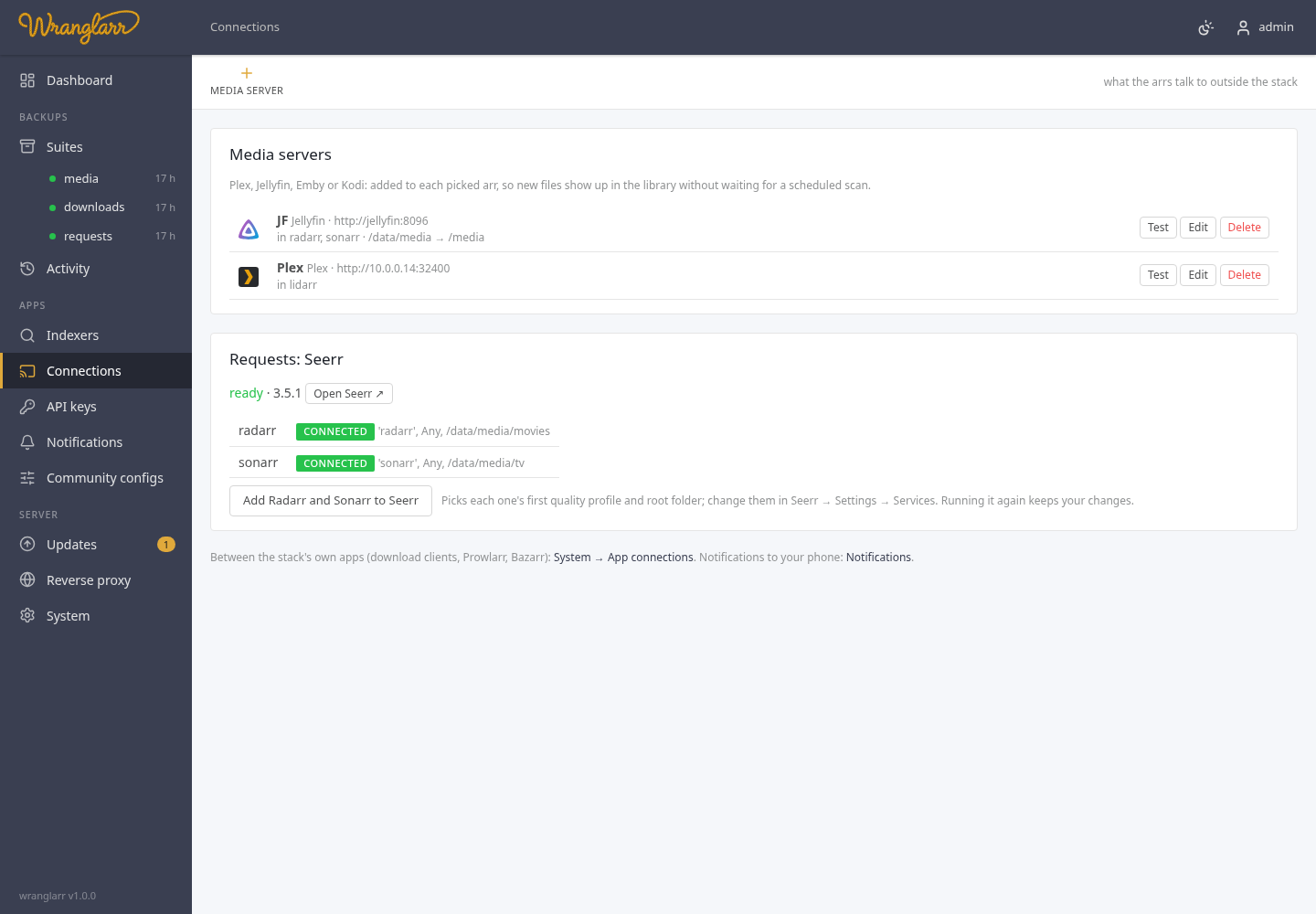
Connections in the sidebar links the stack to the apps around it:
- Media servers. Plex, Jellyfin, Emby or Kodi, added to the arrs so they tell the server to rescan after they import, upgrade, rename or delete something. New episodes show up in your library within seconds instead of at the next scheduled scan.
- Seerr, the request app, when its profile is on (Service: Seerr).
The connections between the stack's own apps (download clients, Prowlarr, Bazarr) are on the System page (App Connections).
-
Media server in the toolbar, and pick Plex, Jellyfin, Emby or Kodi.
-
Address: how the arrs reach the server, e.g.
http://192.168.1.10:32400(Plex) orhttp://jellyfin:8096when it runs on the same Docker network.https://and a path (https://media.example.com/jellyfin) work too. -
The token:
Server Token Easiest way to get it Plex Plex token Sign in with Plex: a plex.tv window opens, you approve wranglarr, and the token fills in (and the address, from the servers on your account). wranglarr never sees your Plex password Jellyfin / Emby API key Get a key: enter an administrator's user and password once; wranglarr signs in, creates a key called wranglarr-arrs, and signs out. The password isn't kept. Or paste a key from Dashboard → API KeysKodi user and password the web server login under Kodi's Settings → Services → Control -
Library, rescan when an arr imports…: on by default. Off keeps the entry but the arr won't trigger scans.
-
Path mapping, only when the server sees the files under a different path than the arrs. The arrs see
/data/media/movies/...; if Plex runs elsewhere and has them at/mnt/media/movies/..., map/data/media/to/mnt/media/. Leave both blank when the paths are the same. -
Pick the arrs under In these arrs (Radarr, Sonarr, Lidarr), Test, Save.
wranglarr adds an entry called wranglarr · <name> to each picked arr's
Settings → Connect, with every event that changes files switched on
(import, upgrade, rename, delete) and the rest (grab, health) off. The arr
tests the connection itself before saving. Changing the server here updates
those entries; un-picking an arr or deleting the server removes it from there.
Lidarr's Jellyfin / Emby connection has no path mapping; the path must be the same for both.
When the stack runs Seerr, this page shows whether it's up, whether its first-run setup is done, and which arrs are in it.
Seerr needs you once: open it and sign in with your Plex, Jellyfin or Emby account. That's Seerr's own setup and makes you its administrator. Until then wranglarr can't use its API, and the Radarr / Sonarr links show waiting. wranglarr checks every 5 minutes and adds them by itself when the setup is done.
What wranglarr sets in Seerr (Settings → Services):
- every Radarr and Sonarr in the stack, by service name and API key, tested by Seerr first;
- the first quality profile and root folder of each. Whatever you change in Seerr later is kept when Connect runs again;
- an app with
4kin its name (radarr-4k) as Seerr's 4K server; - the address you open the arr at, so Seerr's "open in Radarr" links work.
Add Radarr and Sonarr to Seerr on this page runs it straight away (the same as Connect apps on the System page, for these links only).
An arr with no root folder yet is refused by Seerr: add one in the arr (Settings → Media Management), then Connect apps on the System page.
GET    /api/connections                  media servers (tokens masked), the arrs, and Seerr's state and links
POST   /api/connections/media            {"kind":"plex","name":"Plex","url":"http://…:32400","token":"…","update_library":true,
                                          "map_from":"","map_to":"","arrs":["radarr","sonarr"]}
PUT    /api/connections/media/{id}       same body; "••••••••" keeps the stored token
DELETE /api/connections/media/{id}       also removes it from the arrs
POST   /api/connections/media/test       {"server":{…},"id":"…"}
POST   /api/connections/plex/pin         start a Plex sign-in: {"id", "auth_url"} (open auth_url)
GET    /api/connections/plex/pin/{id}    {"done":false}, or {"done":true,"token","servers":[{"name","addresses"}]} once approved
POST   /api/connections/jellyfin/key     {"url","username","password"} -> {"token"}