Repository navigation
Reverse Proxy
To reach the stack from outside your network, or by name instead of
IP:port, put a reverse proxy in front of it (or use Tailscale: see
Remote access). wranglarr writes the config for
you: Reverse proxy in the sidebar. It changes nothing itself. You paste the
result into your proxy.
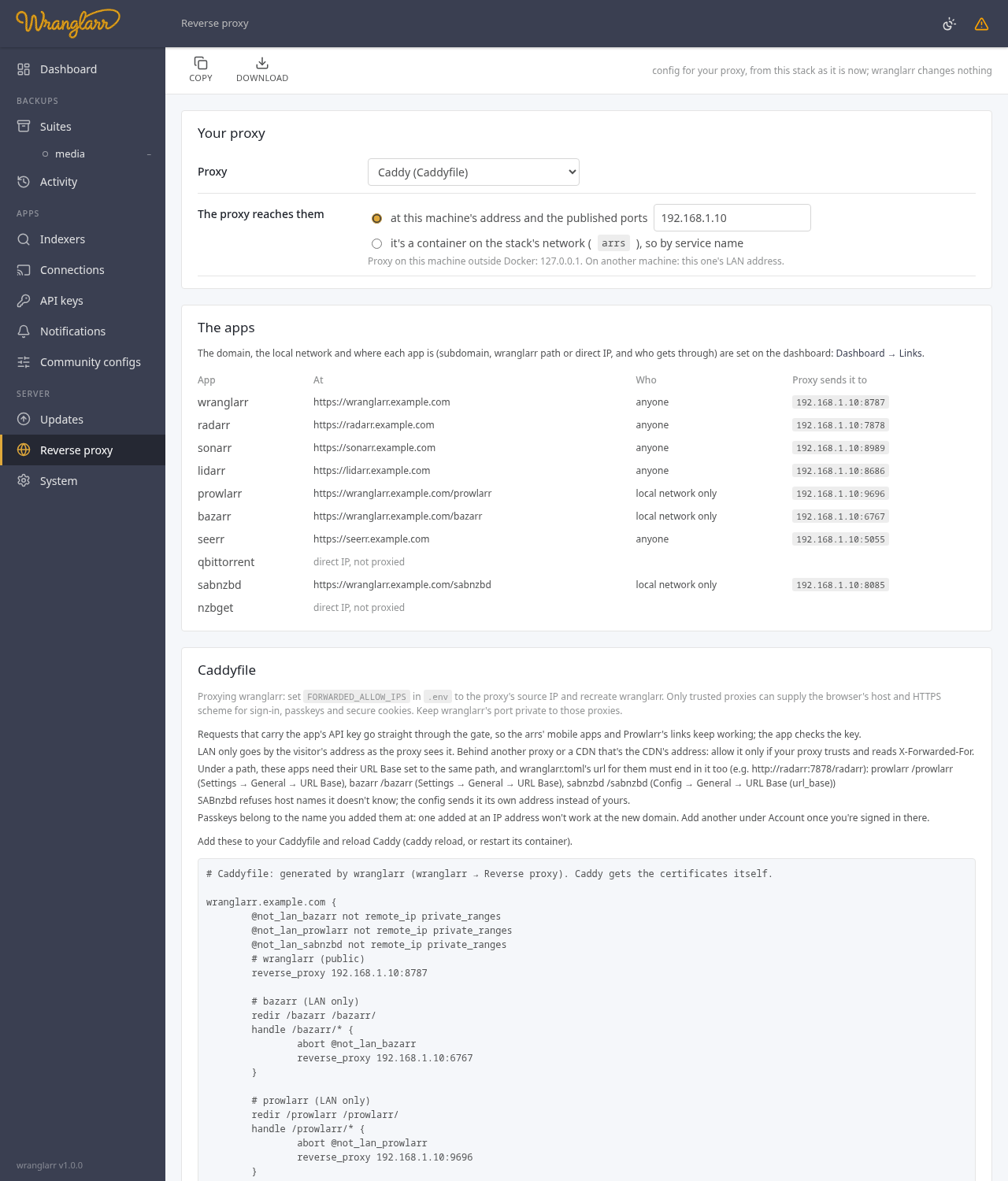
| Setting | |
|---|---|
| Proxy | Caddy, nginx, Traefik (file provider or Docker labels), caddy-docker-proxy (Docker labels), Cloudflare Tunnel, Nginx Proxy Manager |
| The proxy reaches them | at this machine's address and the published ports (the proxy runs on the host, or on another machine), or by service name (the proxy is a container on the stack's arrs network) |
The domain, the local network, and where each app is are set on the dashboard, under Links (Dashboard), so the cards and the config agree. Per app, and for wranglarr itself:
| Subdomain | its own name, https://radarr.example.com
|
| Path on the domain (wranglarr) |
https://myhouse.com/wranglarr, with WRANGLARR_URL_BASE=/wranglarr
|
| wranglarr path | under wranglarr's name, https://wranglarr.example.com/radarr
|
| Direct IP | not proxied: only http://<this machine>:<port>
|
| local only | proxied, but only for addresses on your local network (an IP allowlist in the proxy) |
This page lists them, with where the proxy sends each.
When proxying wranglarr, set FORWARDED_ALLOW_IPS in .env to the proxy's exact
source IP as seen by wranglarr, then recreate its container. It defaults to
127.0.0.1; Docker and remote proxies usually need another address. The proxy
must replace forwarded host and scheme headers, and wranglarr's port must be
private to those proxies. These settings let wranglarr recognize HTTPS for
passkeys and secure cookies, and the browser's host for origin checks.
See Login for details.
Opening an app to the internet needs a login in front of it:
-
AuthTunnel (App logins): the proxy points at the same
ports, which now belong to wranglarr-gate, so every app asks for your wranglarr
sign-in. Set
AUTH_COOKIE_DOMAINto your domain andAUTH_LOGIN_URLto wranglarr's name (wranglarr-setup --auth), and proxy wranglarr too. The page warns when they don't match. With Docker labels or by service name, the config points atwranglarr-gate, never at the apps directly. - One login for every app: set ask for it everywhere. Through a proxy, every visitor can look local to the app, so "not on the local network" means no login.
- Manual: make sure each public app has a login. Dashboard → Logins shows the ones that don't.
Seerr is the exception: it has its own sign-in with your media server's accounts and is meant for people without a wranglarr account, so it's never put behind wranglarr-gate.
Caddy. Add the blocks to your Caddyfile, caddy reload. Caddy gets the
certificates itself. LAN only is abort for anything outside remote_ip.
nginx. One file, arrs.conf, that goes inside http { }:
- Debian / Ubuntu (
sites-available):sudo cp arrs.conf /etc/nginx/sites-available/arrs sudo ln -s /etc/nginx/sites-available/arrs /etc/nginx/sites-enabled/arrs
- elsewhere:
/etc/nginx/conf.d/arrs.conf.
Get the certificates before enabling it: nginx refuses to start while an
ssl_certificate file is missing. The top of the file lists one
sudo certbot certonly --nginx -d <name> per name; with a wildcard certificate,
point the ssl_ lines at its folder instead. Then
sudo nginx -t && sudo systemctl reload nginx. The port-80 block redirects to
HTTPS but leaves /.well-known/acme-challenge/ alone, so renewals keep
working. LAN only is allow / deny all. HTTP/2 is commented out: http2 on;
needs nginx 1.25.1, newer than Debian 12 (1.22) and Ubuntu 24.04 (1.24) ship.
Traefik, file provider. Save in the folder providers.file.directory points
at; Traefik picks it up. Entry point and certificate resolver names are settings
on the page (websecure, letsencrypt by default). LAN only is the
ipAllowList middleware (Traefik v3; it's ipWhiteList on v2).
Traefik or caddy-docker-proxy, Docker labels. The page writes
compose.proxy.yaml: labels on the right containers (the apps, the VPN container
when they share its network, or wranglarr-gate with AuthTunnel), and the
proxy's network. Save it next to compose.yaml, add it to COMPOSE_FILE in
.env (compose.yaml:compose.proxy.yaml), docker compose up -d. init.sh
keeps it there when it adds or removes AuthTunnel's file.
Cloudflare Tunnel. Merge the ingress: rules into cloudflared's
config.yml, add the DNS names (cloudflared tunnel route dns <tunnel> radarr.example.com),
restart cloudflared. The generated tunnel config cannot enforce local only:
set those apps to Direct IP, or use another proxy. Paths that need stripping
(qBittorrent and NZBGet) must use subdomains instead. Unsupported combinations
are rejected when saving.
Nginx Proxy Manager. It's set up in its web UI; the page lists the steps per host (forward host and port, websockets, the LAN-only access list). Access lists apply to the whole hostname: wranglarr and apps under its paths must all have the same local only setting. Use separate subdomains for different access rules.
To serve wranglarr at https://myhouse.com/wranglarr:
-
Set
WRANGLARR_URL_BASE=/wranglarrin.env(blank by default). -
Recreate wranglarr so it reads the new setting:
docker compose up -d --force-recreate wranglarr
-
Under Dashboard → Links, set Proxy domain to
myhouse.com, and choose Path on the domain for wranglarr, with namewranglarr(without/). The resulting path must matchWRANGLARR_URL_BASE. -
Copy the generated config from Reverse proxy into your proxy and reload it. Pass
/wranglarrthrough unchanged; do not strip it.
You can still open the dashboard directly by IP and port while configuring the proxy. For AuthTunnel, set the login address below before recreating wranglarr.
Apps set to wranglarr path are siblings on that domain:
https://myhouse.com/radarr, rather than /wranglarr/radarr. With AuthTunnel,
set AUTH_LOGIN_URL=https://myhouse.com/wranglarr and
AUTH_COOKIE_DOMAIN=myhouse.com. Cookies keep Path=/ so sibling app paths
share the sign-in. Passkeys still belong to the host, regardless of the path.
Both bare and prefixed wranglarr routes work. Internal gate checks, webhooks,
healthchecks and smoke tests keep using their bare Docker-network addresses.
The base is matched on path boundaries: /wranglarr-other is not stripped.
Changing the base requires recreating wranglarr and updating the proxy config.
A wranglarr path, https://wranglarr.example.com/radarr, needs no name or
certificate of its own, and shares wranglarr's sign-in cookie. When wranglarr
is at a path on the domain, these app paths go directly under that same domain.
Each app has to know its path:
- Radarr, Sonarr, Lidarr, Prowlarr: Settings → General → URL Base
/radarr, restart; - Bazarr: Settings → General → URL Base; SABnzbd: Config → General → URL Base;
- then wranglarr's own address for that app has to include it: in
appdata/wranglarr/wranglarr.toml,url = "http://radarr:7878/radarr".
qBittorrent and NZBGet have no URL Base; the config strips the path for them.
Seerr and the media servers always get a name of their own
(seerr.example.com): they don't work under a path. Settings saved before the
apps had a place each, with "a path each", now put the paths under wranglarr's
name rather than the bare domain.
Saving validates the complete routing table before changing settings. Two apps
cannot share the same hostname and path. Paths owned by wranglarr, including
/api, /static, /login and /account, are reserved. An app that needs its
own hostname cannot be placed under a path, and path apps require wranglarr to
be proxied. Proxy-specific restrictions above are checked at the same time.
If previously saved settings become invalid (for example after an app is added), the proxy editor explains the conflict and withholds the generated config until it is corrected. IPv6 upstream addresses are supported.
-
SABnzbd refuses host names it doesn't know. The configs send it its own
address instead of yours, so you don't have to edit
host_whitelist. - LAN only goes by the visitor's address as your proxy sees it. Behind a CDN (Cloudflare's orange cloud) that's the CDN's address, so every visitor is outside; configure your proxy's trusted proxies first.
-
Passkeys belong to the name you added them at. One added at
192.168.1.10won't work atwranglarr.example.com; add another under Account once you're signed in there. - Posters open the proxied names when you've opened wranglarr through the proxy (at the domain or a name under it), and the Direct IP apps by this machine's address.
proxy-setup prints the same config as the page, for the settings saved there
and under Dashboard → Links, so it can go straight into a file. The notes go to
the terminal (stderr), not into the file:
docker compose exec -T wranglarr proxy-setup > Caddyfile.wranglarr
docker compose exec -T wranglarr proxy-setup --kind nginx | sudo tee /etc/nginx/sites-available/wranglarr >/dev/null
sudo nginx -t && sudo systemctl reload nginx-
-Tmatters: without it Compose gives the command a terminal, and the file gets Windows line endings. - Use
>(ortee), not>>: each run prints the whole config, so appending repeats it. -
--kindwrites it for another proxy (caddy,nginx,traefik-file,traefik-labels,caddy-labels,cloudflared,npm) without changing the saved choice. - When the settings need attention (the page says what), it prints nothing to
stdout and exits 1.
>empties the file before the command runs, so to keep a working config, write a new file and move it into place only on success:docker compose exec -T wranglarr proxy-setup > new.conf && mv new.conf wranglarr.conf.
GET  /api/proxy     settings, the plan per app and the rendered config
PUT  /api/proxy     {"kind":"caddy","domain":"example.com",
                     "upstream":"host"|"docker","upstream_host":"","lan":"",
                     "apps":{"radarr":{"at":"subdomain"|"path"|"direct","local":true,"sub":""}}}