Repository navigation
Dashboard
wranglarr opens on the Dashboard: every app in the stack, grouped by what it does, and under each one what it's working on:
| Group | Apps | Shown as | Underneath |
|---|---|---|---|
| Media | Radarr, Sonarr, Lidarr (Readarr, Whisparr) | a poster | coming up and recently missing, in one table |
| Downloads | qBittorrent, SABnzbd, NZBGet | a card | the client's queue |
| Requests | Seerr | a card | the latest requests |
| Indexers & subtitles | Prowlarr, Bazarr | a card | Prowlarr's indexers, Bazarr's wanted subtitles |
Click a poster or card to open that app in a new tab; click a row in a list to open that film, series or album in the app.
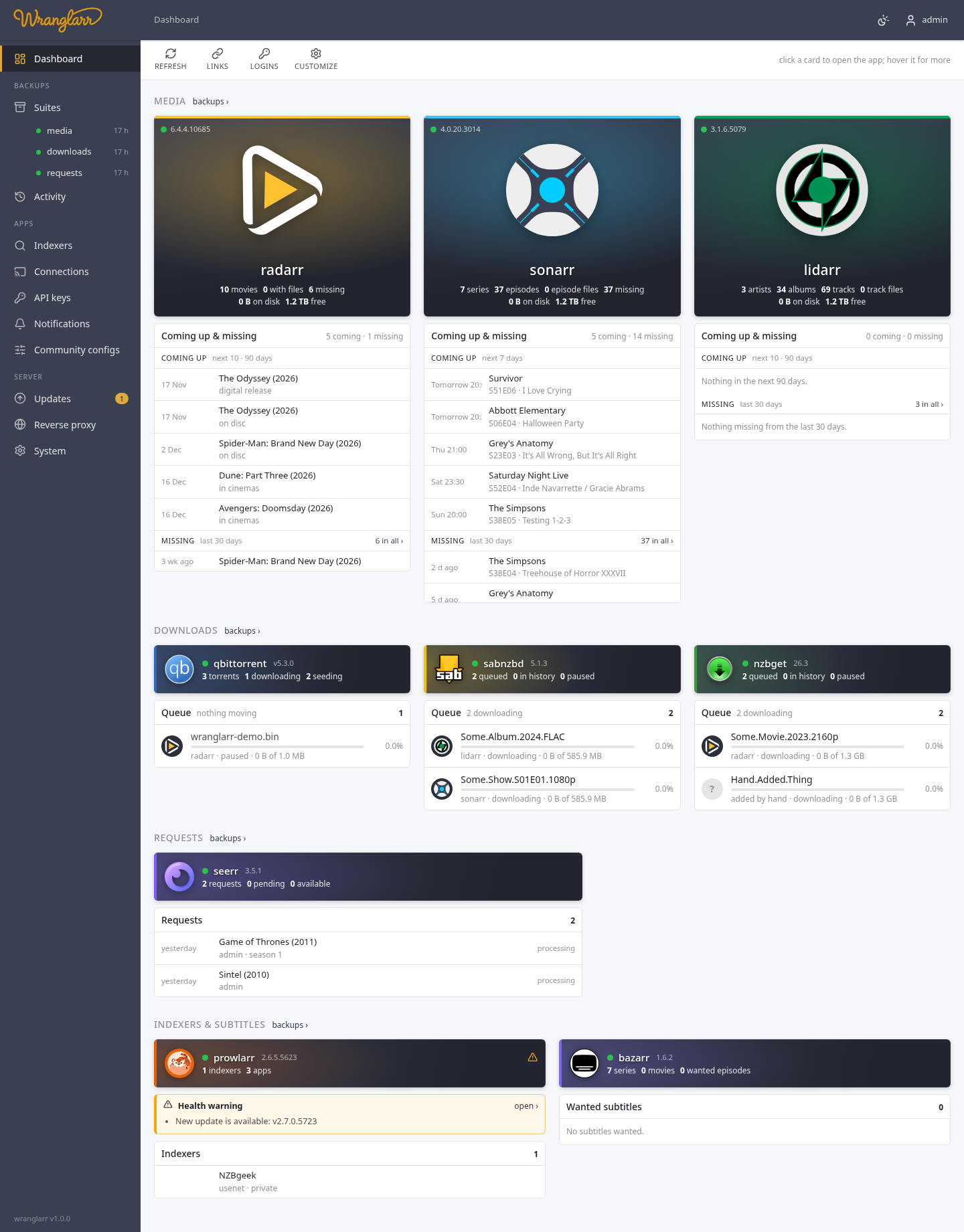
Each poster or card shows the app's own logo (read from the app, so it matches the version you run), a green or red dot for whether it answers, and its version. A poster also shows what the arr holds (movies, files, missing) and its disk space: used, and free in its root folders. A card shows the two or three numbers that matter most (torrents and downloading, queued, requests); a download client also shows its speed.
Health warnings are never hidden: they're listed in an orange box right above the app's list, with open › to the app's own status page. The ⚠ and its count on the poster or card say the same at a glance.
Point at a poster or card for the rest: its indexers and download clients, the app's login, and the address it opens at (a card also shows its disk space there). Prefer to see everything all the time? Set Card details to always under System → Dashboard. On a touch screen the details are always shown.
Refresh reads everything again. The stats are otherwise cached for 5 minutes (the same stats the Suites page shows), the lists for 2. backups › next to a group goes to its suite's backups, when the whole group is in one suite.
Under each arr's poster (as wide as the table), one table:
- Coming up: what the arr's calendar has next, soonest first. Episodes air every week, so Sonarr shows the next 7 days, with the time they air (in your browser's time zone). Films, albums and books come out rarely, so Radarr, Lidarr and Readarr show the next 10 within 90 days: films with which release it is (in cinemas, digital, on disc), albums and books by release date. A ✓ means it's downloaded already.
- Missing: monitored, out, and not downloaded, from the last 30 days, newest first. A film that isn't out yet doesn't count. N in all › opens the arr's own Wanted → Missing with everything older too.
Missing is cut at 25 items, episodes coming up too; the table scrolls.
Under each download client, its queue: everything that isn't finished yet (downloading, queued, paused, stalled, checking, unpacking, in error). Each row has:
-
the logo of the arr that sent it. wranglarr knows it from the
category, which App Connections sets to the arr's
name. A
?means no arr: added by hand, or a category no arr uses; - the name, a progress bar and the percentage;
- the arr's name, the state, speed, time left, and how much is done.
The queues update every 5 seconds while something is downloading, every 15 otherwise, and not at all while the tab is hidden. They're a heads-up, not a remote control: to pause or remove something, open the client. For a message when a download gets stuck, see Notifications.
| App | List |
|---|---|
| Seerr | the latest requests: title, who asked, and where it is (pending approval, approved, processing, available, declined) |
| Prowlarr | its indexers, failing ones first (red), switched-off ones greyed |
| Bazarr | episodes and films still missing subtitles, with the languages |
Customize in the toolbar goes there.
| Setting | Default | |
|---|---|---|
| Card details | on hover | on hover, or always below each poster and card |
| Upcoming | on, next 7 days | how far ahead for episodes (1–90 days); optionally unmonitored ones too |
| Films, albums and books | next 10 within 90 days | how many (1–200) and how far ahead (1–365 days) |
| Missing | on, last 30 days | how far back; 0 shows all of it |
| Downloads | on | each client's queue |
| Others | on | Seerr's requests, Prowlarr's indexers |
| Items per list | 25 | for coming up and for missing each |
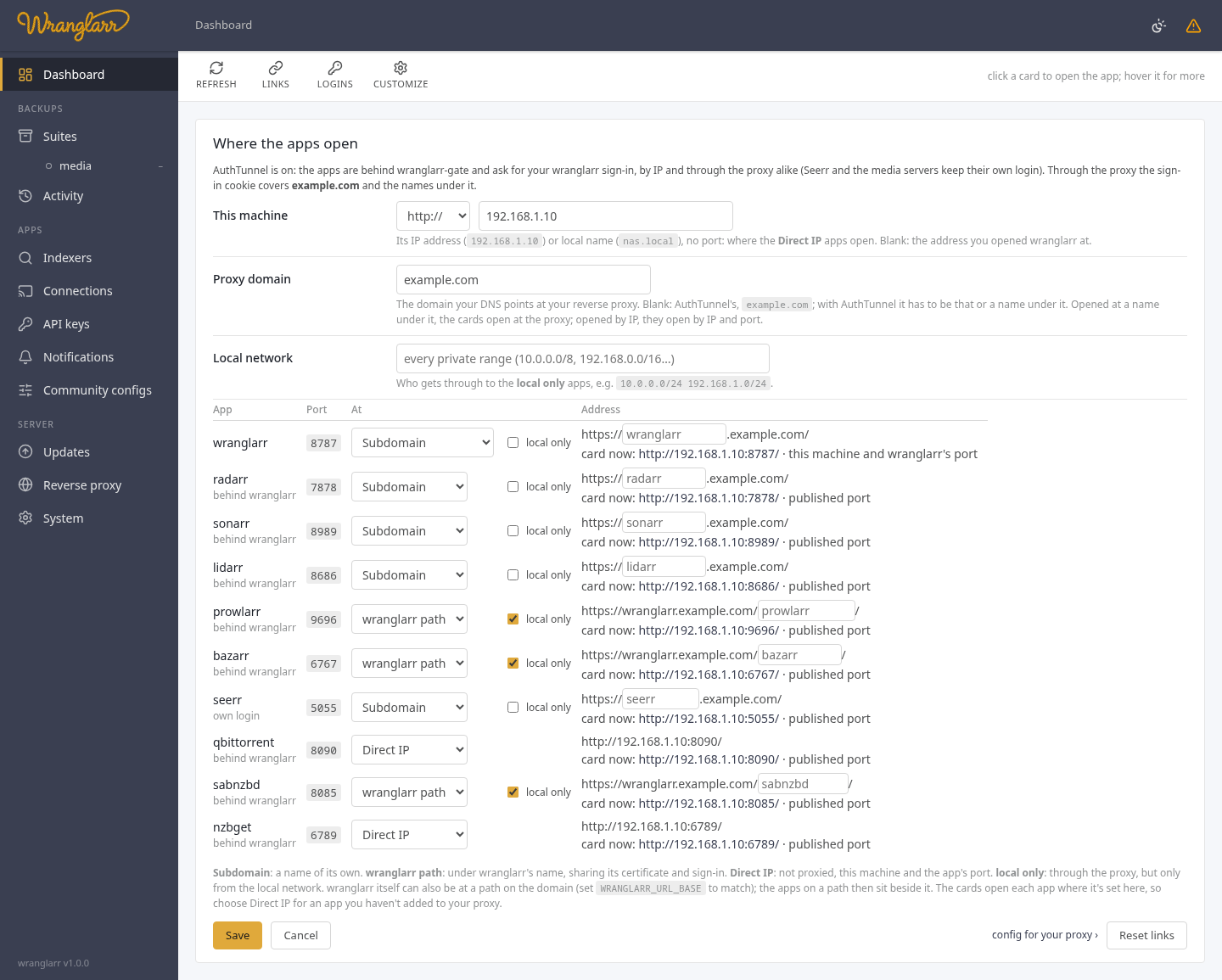
A poster or card opens where its app is. Links in the toolbar sets that, and where each app sits on your reverse proxy, in one place:
| Setting | |
|---|---|
| This machine | its IP address or local name (192.168.1.10, nas.local), no port: where the Direct IP apps open. Blank: the address you opened wranglarr at, or through the proxy HOST_IP, which setup found |
| Proxy domain | the domain your DNS points at your reverse proxy, e.g. example.com. Blank with AuthTunnel: its AUTH_COOKIE_DOMAIN
|
| Local network | who gets through to the local only apps, e.g. 192.168.1.0/24. Blank: every private range |
Then a row for wranglarr and each app, with the port Docker publishes it on
(read from the container, so changing RADARR_PORT in .env needs nothing
here; in the VPN setups it's the VPN container's, with AuthTunnel
wranglarr-gate's):
| At | The app opens at |
|---|---|
| Subdomain | a name of its own, https://radarr.example.com
|
| wranglarr path | under wranglarr's name, https://wranglarr.example.com/radarr: the same certificate and AuthTunnel sign-in cookie as wranglarr. Seerr and the media servers need a name of their own; some apps need their URL Base set (Reverse proxy) |
| Direct IP | not proxied: this machine and the app's port, http://192.168.1.10:7878
|
| Other address | somewhere else: http://192.168.1.20:8080, https://sab.example.com
|
Wranglarr also offers Path on the domain, e.g. https://myhouse.com/wranglarr.
Set WRANGLARR_URL_BASE=/wranglarr in .env, recreate wranglarr, and let the
proxy pass the path through unchanged. Apps using wranglarr path then open
as siblings, e.g. https://myhouse.com/radarr. With AuthTunnel,
AUTH_LOGIN_URL includes wranglarr's path. See Reverse proxy.
Local only, for a subdomain or a wranglarr path: through the proxy, but only from the local network.
With AuthTunnel the apps sit behind wranglarr-gate and ask for your wranglarr
sign-in (Seerr and the media servers keep their own login); each row says which.
The panel then checks what the sign-in needs, and says so as you change things:
wranglarr itself on the proxy (the gate sends you to its page), the proxy domain
within AUTH_COOKIE_DOMAIN (or the cookie doesn't reach the apps' names), and
wranglarr's address matching AUTH_LOGIN_URL. Without a cookie domain, only a
wranglarr path on the same host shares your sign-in. wranglarr itself is at a subdomain, the domain itself,
at a path on the domain, or direct IP. Each row shows the address as you change it, and where the card
opens now.
Open wranglarr at the proxy domain or a name under it
(https://wranglarr.example.com) and the cards open at the proxy; open it by IP
and they open by IP and port, as before. Through the proxy, the Direct IP apps
open local only, at This machine (else the Reverse proxy page's "the
proxy reaches them" address; setup puts this machine's IP in .env as HOST_IP,
so it's known from the start). With none, the card has no link and says why,
rather than a wrong one like https://wranglarr.example.com:8080.
Placement is explicit: choose Direct IP for an app you haven't added to the proxy, or Other address for a different browser URL. wranglarr does not probe DNS or compare login pages to decide whether a link exists. An outage, split DNS, or a shared login page never silently changes a configured link.
Save validates links and proxy placement together and saves both in one
transaction. A failed save changes neither. The Reverse proxy page writes
your proxy's config from the same settings. Reset links forgets This machine and the other addresses. A
domain pattern saved before (https://{name}.home.example.com) keeps working
until you save the panel.
A poster or card without a link is greyed out and says why. Usually the app isn't
published on the host (no ports: in compose); give it an Other address.
Each poster and card shows the app's login (point at it): 🔒 admin, 🛡 behind wranglarr with
AuthTunnel, or 🔓 no login in orange. Logins in the toolbar lists them
all, with what looks wrong.
wranglarr doesn't change the apps' logins from here: that's part of setup.
The panel shows the two commands that change it (the setup wizard with
--auth, then ./scripts/init.sh --auth). See App logins.
GET    /api/links                 the settings and every app's link
PUT    /api/links/configuration   {"proxy": {"domain":"example.com","apps":{…}}, "links": {"host":"192.168.1.10","apps":{…}}}
PUT    /api/links                 {"mode":"port"|"domain","scheme":"http","host":"","pattern":"","apps":{"sabnzbd":"http://…"}}
DELETE /api/links                 back to the defaults
GET    /api/apps/{app}/logo       the app's own logo, passed through
GET    /api/app-logins            APPS_AUTH and each app's login now: method, username, behind the gate, warnings
GET    /api/downloads[?refresh=1] the current downloads: {"clients":[{name,kind,ok,error,count,speed}],"items":[…],"speed"}
GET    /api/home/feeds[?refresh=1] the lists under each app: {"settings":{…},"apps":{"sonarr":{"lists":[{"key":"upcoming"|"missing"|…,"items":[…],"total"}]}}}
GET    /api/home/settings         what the dashboard shows
PUT    /api/home/settings         {"details":"hover","upcoming":true,"days":7,"unmonitored":false,"missing":true,"missing_days":30,
                                   "queue":true,"requests":true,"indexers":true,"limit":25}
DELETE /api/home/settings         back to the defaults
The logo is served with Content-Security-Policy: sandbox, so an SVG from an
app can't run script on wranglarr's pages.