Repository navigation
Graphics and Performance
The engine renders with Vulkan 1.3 and its own NVN replay layer. The launcher writes the settings the engine reads
into fefw.ini and controls.ini before each start; only values that changed since the last start are written, so a
setting changed in the game's own F1 menu stands until you change it on the launcher page.
| Setting | Range / values |
|---|---|
| Resolution | 1280×720 to 3840×2160, or Native display (the console's own size) |
| Render scale | 0.50× to 2.00×, with the upscaler filling the rest |
| Display mode | Windowed, borderless, exclusive fullscreen |
| Aspect ratio | The shape the game renders |
| VSync | Presentation sync |
| Frame-rate limit | Presentation cap |
| Sharpening | Off, Low, Default (0.8) or High; applies live |
Graphics > What the game will start with lists what the engine will actually do on the next start and names any setting still waiting for that start.
| Upscaler | Type | Requirements |
|---|---|---|
| FSR 1.0 | Spatial | Any Vulkan GPU; built into the engine |
| NVIDIA Image Scaling | Spatial | Any GPU; up to 2× per side |
| MAKO | Spatial | Any GPU, any scale; single-pass sharpened cubic |
| FSR 4.1.2 / FSR 3.1 | Temporal | AMD FidelityFX SDK 2.4 Vulkan DLLs; FSR 4.1.2 on supported Radeon GPUs, FSR 3.1 otherwise |
| DLSS / DLAA | Temporal | NVIDIA Streamline + DLSS DLLs; RTX-class GPU |
| XeSS | Temporal | Intel XeSS libxess.dll; any GPU with DP4a |
| FSR 3 frame generation | Frame gen | FidelityFX 1.1.4 amd_fidelityfx_vk.dll alongside the loader pair |
| DLSS Frame Generation | Frame gen | Streamline + DLSS-G DLLs; RTX 40 class and Windows hardware GPU scheduling |
| AMD Fluid Motion Frames 2.1 | Driver frame gen | Adrenalin 25.3.1+, RX 7000, borderless fullscreen, VSync off |
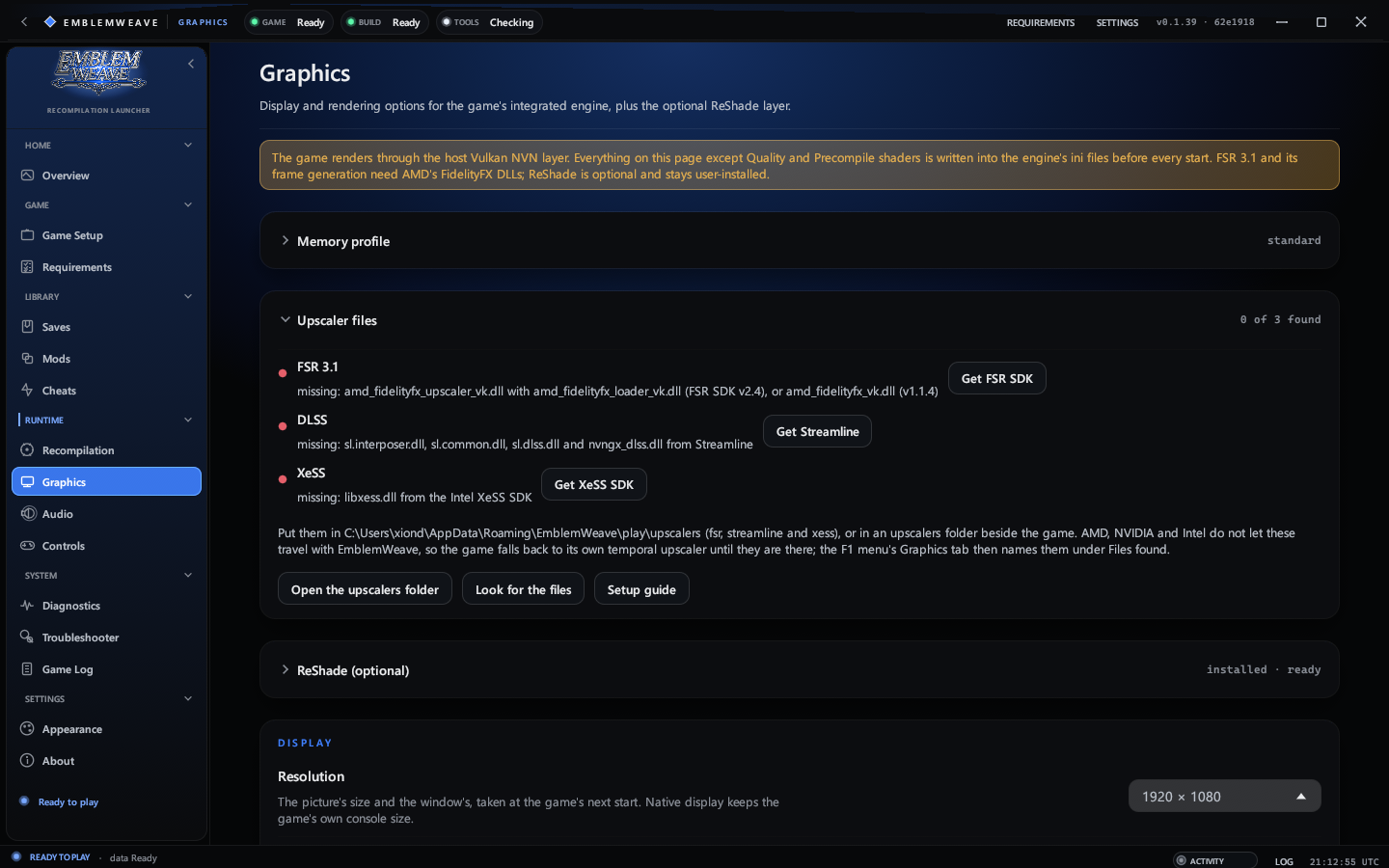
AMD, NVIDIA and Intel DLLs cannot be shipped. Put them in the run folder's upscalers subfolders:
| Upscaler | Folder | Files |
|---|---|---|
| FSR |
upscalers/fsr (or fsr3) |
amd_fidelityfx_loader_vk.dll, amd_fidelityfx_upscaler_vk.dll; frame gen adds amd_fidelityfx_vk.dll
|
| DLSS | upscalers/streamline |
sl.interposer.dll, sl.common.dll, sl.dlss.dll, nvngx_dlss.dll; frame gen adds sl.dlss_g.dll, sl.reflex.dll, sl.pcl.dll, nvngx_dlssg.dll, NvLowLatencyVk.dll
|
| XeSS | upscalers/xess |
libxess.dll plus the VC++ 2015–2022 runtime |
Graphics > Upscaler files shows the folder each set was found in, or the exact files missing. Look for the files searches the launcher folder, engine folder, Downloads and Desktop one level deep and copies what it finds.
The engine also searches upscalers/upscaler folders beside fefw.exe and above it, up through the engine checkout.
Graphics > GPU enumerates the PC's Vulkan 1.3 physical devices and lists each by name, type and video memory, alongside Automatic, Discrete and Integrated.
- Choosing an adapter writes its full Vulkan name to
[gfx] gpu; the engine matches it case-insensitively. - Automatic uses the engine's rule: the discrete adapter with the most video memory.
- A saved device that is no longer installed is shown as not detected and the engine logs its fallback.
The launcher does not link Vulkan; the scan is dynamic and a machine without the loader keeps the category choices with an explanation.
The Performance page and the engine's F1 Performance tab control:
-
Adaptive Performance Controller: a 300-frame window classifies CPU, GPU, VRAM, streaming, shader-compilation,
scheduling and synchronization pressure. It reports average FPS, 1 % and 0.1 % lows, P50/P95/P99, CPU/GPU/upload/replay
time and shader backlog, and writes
play/perf_status.jsononce a second. - Frame-Time Stability: recurring spikes are counted and a detail increase is held back until a spike settles. The controller adds no synchronization to the frame loop.
- Scene-aware profiles: exploration, crowded, combat, cinematic, menu and loading are recognised from workload shape, not location names. Combat and cinematics resist detail changes; an override exists for A/B runs.
- Modes: Automatic, Conservative, Balanced, Aggressive and Manual. Manual never actuates.
-
Adaptive texture detail (experimental): a sampler LOD offset moves toward cheaper mips under sustained GPU/VRAM
pressure and is released when pressure ends. Your
[nvn] lod_biasis never rewritten.
The controller's report is infrastructure for measurement. No gameplay FPS gain is claimed for 0.1.41; representative scene A/B captures were not run for that release.
ReShade is optional and user-provided. The launcher can apply the XiØN palette through ReShade's documented [STYLE]
custom-style keys (StyleIndex=4) and keeps a one-time ReShade.ini.xion-backup. No binary is patched. The native
overlays do not depend on ReShade.
| File | Keys |
|---|---|
data/play/fefw.ini |
[gfx], [nvn], [upscale], [dlss], [perf], [fs], [audio] and the rest of the engine configuration |
data/play/controls.ini |
Resolution, display mode, aspect, VSync, frame cap, master volume, equalizer |
The full key list is in
runtime/docs/CONFIG.md.