Repository navigation
Using EmblemWeave
The launcher is a custom egui shell: a rail of grouped pages, a status column that says where the game, the recompiler and the runtime stand, and a live game log. It opens at 1440×900 and works down to 1120×720.
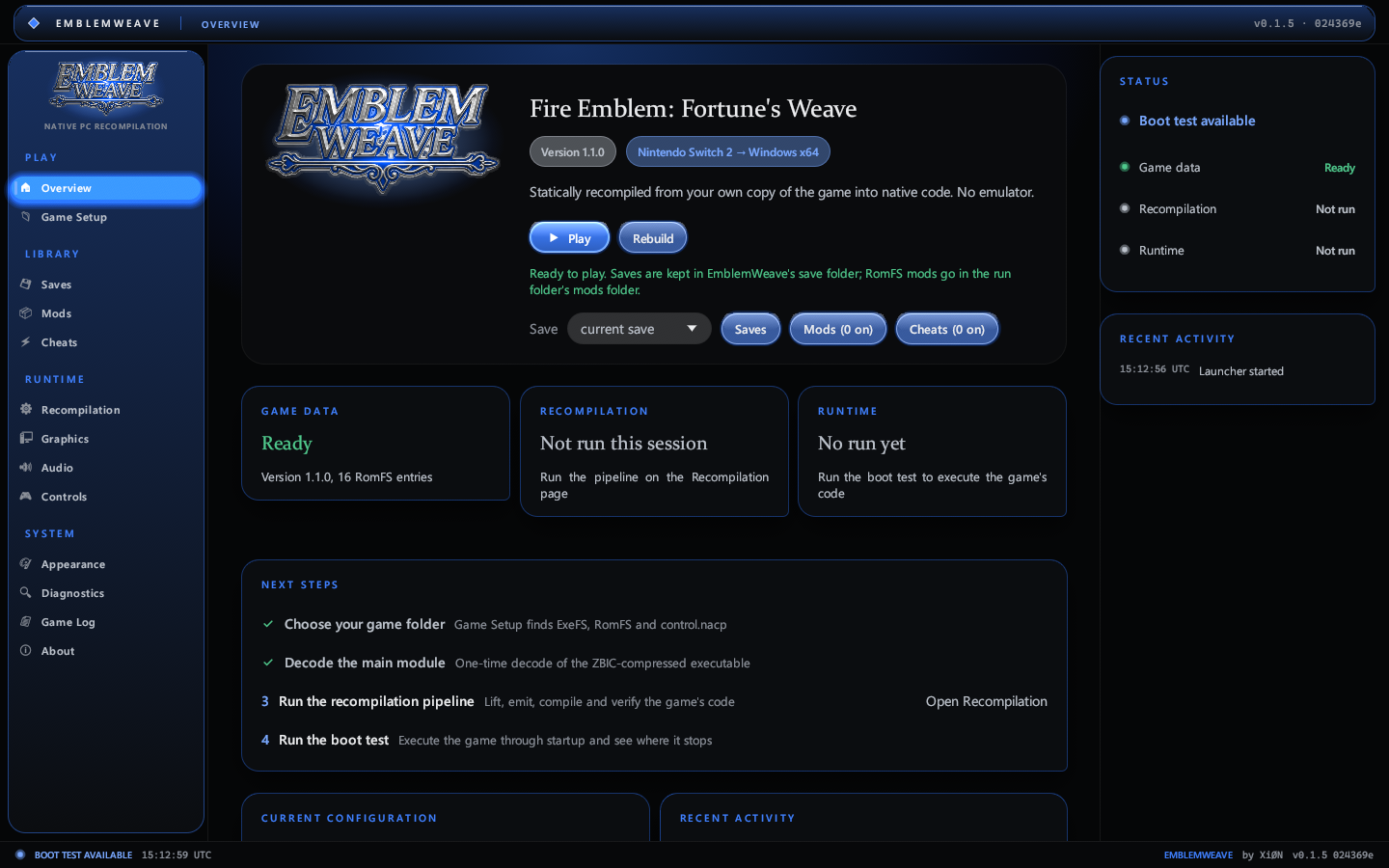
A new install starts in Standard mode:
- Home: Overview
- Game: Game Setup, Requirements
- Library: Saves, Mods, Cheats
- Runtime: Graphics, Audio, Controls
- System: Troubleshooter
- Settings: Appearance, About
Appearance → Interface → Advanced adds Recompilation, Diagnostics and Game Log without moving files or changing settings. A direct link to one of those pages reveals Advanced automatically. The choice is saved.
| Page | What it does |
|---|---|
| Overview | Play starts the game; Build the game compiles it. Load a save profile, jump to the editor, mods or cheats. Shows readiness, the boot test, next steps and recent activity. |
| Game Setup | Choose and validate your dump (.nup, .nx, plaintext .nsp, plaintext .xci, folder), set language/profile, decode main, choose an engine folder. |
| Saves | Save profiles, the slots in the current save, and the editor: gold, renown, level, experience, max HP, stat gains, weapon masteries, items and spells. Imports emulator saves and exports to the emulator layout. |
| Mods | Installed RomFS mods with on/off toggles. Installs from .zip, .7z, .rar, a folder, a GameBanana link or the browsable GameBanana list. Handles code mods and ExeFS patches. |
| Cheats | Atmosphere cheat codes (pasted or .txt), applied while the game runs; Cheat Engine .CT tables with live, editable, freezable values; quick per-unit cheats; party and free-time cheats. |
| Graphics | Standard presets plus resolution, display mode, VSync, frame cap, render scale, FSR 1.0/native upscaling, sharpening and shader precompiling. Advanced adds FSR 4.1.2/3.1, NIS, DLSS/DLAA, XeSS, frame generation, ReShade, upscaler folders, the GPU picker and shader tuning. |
| Audio | Master volume 0–200%, ten-band equalizer with presets, and the game's own music/effects/voice mix. |
| Controls | Gamepad layout and ZL/ZR travel. Full rebinding is in the engine's F1 menu. |
| Performance | Adaptive Performance Controller, frame-time stability, scene profiles, operating modes, adaptive texture detail and live diagnostics. |
| Appearance | Standard/Advanced switch and six colour schemes: XiØN, Arcade, FE, Ember, Verdant, Frost. |
| Recompilation | Runs the nine-stage pipeline with live progress and per-stage output. |
| Diagnostics | Stop reason, guest threads, host events, imports reached, the last events before a stop, search and export; the Log tab lists every task log. |
| Troubleshooter | Re-runs the real game-data and toolchain checks, offers safe repairs, explains long-session memory use, and creates a report bundle. |
| Requirements | Every build dependency, its purpose, whether it is installed, the official install command and Check again. |
| Game Log | The engine's log, followed live, with level filters, search, copy, current/previous run and Pop out. |
| About | Version, build revision, runtime information, credits, legal and storage/update settings. |
Screenshots of each page are in the project docs.
| Shortcut | Action |
|---|---|
Ctrl + 1 … 9
|
Jump between rail pages |
F10 |
In-game EmblemWeave menu (or Back + RB on a gamepad) |
F1 |
The engine's full in-game menu |
While the game runs, F10 opens EmblemWeave's overlay on top of it:
- pause and resume;
- take a screenshot of the game window (saved to
Pictures\EmblemWeave); - restart at the title screen;
- stop and return to the launcher;
- quick cheats, cheat codes and Cheat Engine tables;
- display settings: window mode, picture size, frame-rate counter;
- the controls in use.
The engine's own F1 menu has nine tabs: Overview, Graphics, Performance, Upscaling, Pacing, Audio, Advanced (Controls / Game / Mods), Diagnostics and System.
| Flag | Effect |
|---|---|
--page <name> |
Open a page, for example --page Diagnostics
|
--build-engine |
Build the game as soon as game data is detected |
--boot-test |
Run the boot test |
--screenshot <file.png> |
Save the launcher's own frame and close |
--tour |
Walk through the features automatically for recording; never saves settings |
--fetch-tools |
Force the bundled tool fetch into the foreground |
--check-toolchain |
Check compiler, SDK and CMake before a long build |
--compare-data <game.nup> <folder> <report.json> |
Compare an extracted folder with a package without building |
The launcher writes its fefw.ini into the run folder:
- portable:
data/play/ - profile:
%APPDATA%\EmblemWeave\play\
RomFS mods go in play/mods/<mod name>/romfs/. Upscaler DLLs go in play/upscalers/{fsr,streamline,xess}. The game
log is play/fefw.log; task logs are under logs/.
Every engine option is documented in
runtime/docs/CONFIG.md.