Releases: ZoutMax/FifineControlDeck
Release list
v0.9.0

Full Changelog: v0.8.2...v0.9.0
v0.8.2
v0.8.1
Dark-mode color picker + reliable quit
Fixed
- The color picker is readable in dark mode. It could open as the platform's native chooser — a white window unreadable against the app's themed text. The app now always builds Qt's own dialog with the dark theme applied directly to it. Verified on GNOME/Wayland hardware.
fifine-control-deck --quitnow waits for the instance to actually exit (up to 10 s, watching the IPC socket file). The old fire-and-forget return made "quit && relaunch" a race that could leave a stale instance running.
Both fixes were found through real daily use and verified on physical hardware before release.
Install
sudo add-apt-repository ppa:zoutmax/fifine
sudo apt update
sudo apt install fifine-control-deck
v0.8.0
Press-and-hold, one-click GPU temperature, clock formats
Added
- Press-and-hold key actions: every key can carry a second action that fires after holding it ~0.5 s — long-press Back to leave a folder, long-press a monitor key to run something, double what 15 keys can do. Keys without a hold action keep firing instantly on press-down, exactly as before.
- GPU temperature, one click: the new
gputempmonitor metric auto-picks the sensor (NVIDIA via NVML, AMD via theamdgpuedge sensor) — and on hybrid laptops it always reads the dGPU, never the iGPU. - Clock formats: 12h/24h with or without seconds, plus date styles (weekday, ISO, US, none). AM/PM renders in every locale — no more ambiguous midnight/noon on European systems.
Quality
The 0.6.2-style gauntlet again: 427 tests (48 new, each proven to fail on the previous release), a four-dimension adversarial audit that caught and fixed 5 defects before release (hold-record leak on unplug, hybrid-GPU sensor mispick, unbounded sensor re-probe, locale-ambiguous clock, one dishonest test), mutation-verified test honesty, and live journeys on real hardware including a physical press-and-hold. The hardware harness now ships in tools/e2e_live.py.
Install
sudo add-apt-repository ppa:zoutmax/fifine
sudo apt update
sudo apt install fifine-control-deck
Or grab the attached .deb (amd64/arm64) below.
v0.7.0
Monitor keys, round 2 — plus a working Flatpak autostart
Added
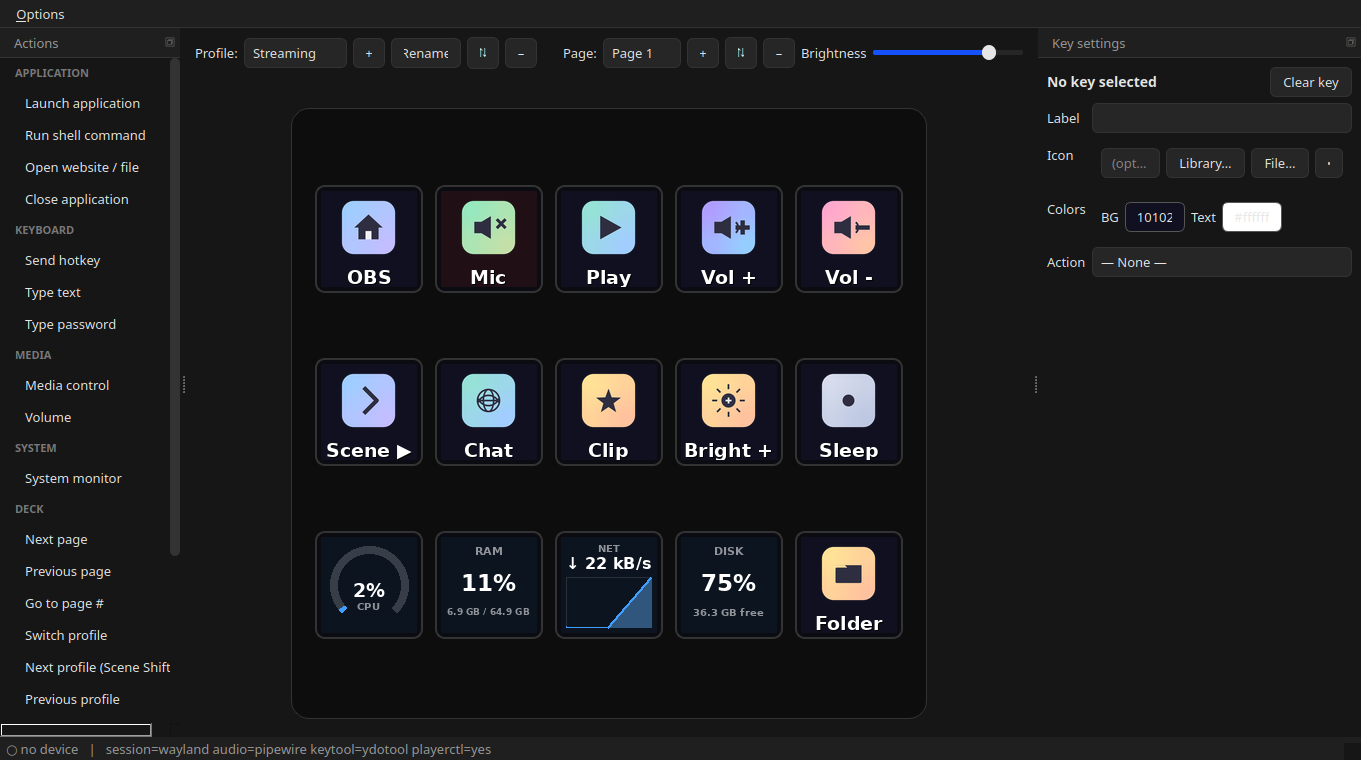
- GPU load metric — NVIDIA via NVML, AMD via sysfs
gpu_busy_percent, with graceful per-vendor detection andn/adegradation. - Temperature metric — any
psutilsensor. Auto-picks the CPU package; the target field selects others aschiporchip:label(e.g.nvme:Composite). 90 °C+ turns the gauge warn-red. - Clock key — time + date on a key LCD; shows seconds at refresh intervals under 5 s.
- Flatpak: "Start on login" now actually works via the XDG Background portal (the old toggle wrote a
.desktopfile into the sandbox — a silent no-op). Denials revert the toggle and say why.
Changed
- Gauge face readable at arm's length: value text grew 20% → 26% of key size (capped to the arc's inner opening) and the label moved into the gauge's bottom gap.
- Autostart entry path honors
XDG_CONFIG_HOME.
Fixed
- VRAM metric no longer dead on AMD systems: pynvml imports fine without an NVIDIA driver, and the probe never fell through to the working amdgpu sysfs backend (flaw since 0.6.0). The new GPU metric shares the corrected probe.
Quality
Shipped through the full 0.6.2-style gauntlet: 379 tests (43 new, each proven to fail on pre-change code), a six-dimension adversarial audit (8 defects found and fixed before release — including two critical portal bugs proven fixed against a validating fake portal on a private D-Bus), mutation-tested test honesty, and live end-to-end journeys on real hardware.
Install
sudo add-apt-repository ppa:zoutmax/fifine
sudo apt update
sudo apt install fifine-control-deck
Or grab the attached .deb (amd64/arm64) below.
v0.6.2
v0.6.1
v0.6.0
System-monitor keys 📊
A key can now be a live system readout, rendered right on its LCD — like the official app's widgets, but native on Linux:
- Metrics: CPU, RAM, VRAM, network rate, disk space
- Styles: big number, 270° gauge (percentage metrics; a network key falls back to the number face), or a scrolling graph
- Per-key refresh interval (0.5–60 s); number/gauge keys are re-pushed only when their displayed value changes, keys showing the same metric share one sample stream, and with no monitor keys on the visible page nothing is ever sampled
- VRAM is detected per GPU vendor: NVIDIA via NVML (install the recommended
python3-pynvml), AMD via sysfs; shared-memory iGPUs have nothing to report - Pressing a monitor key does nothing, and press-flash skips it so the readout is never overpainted
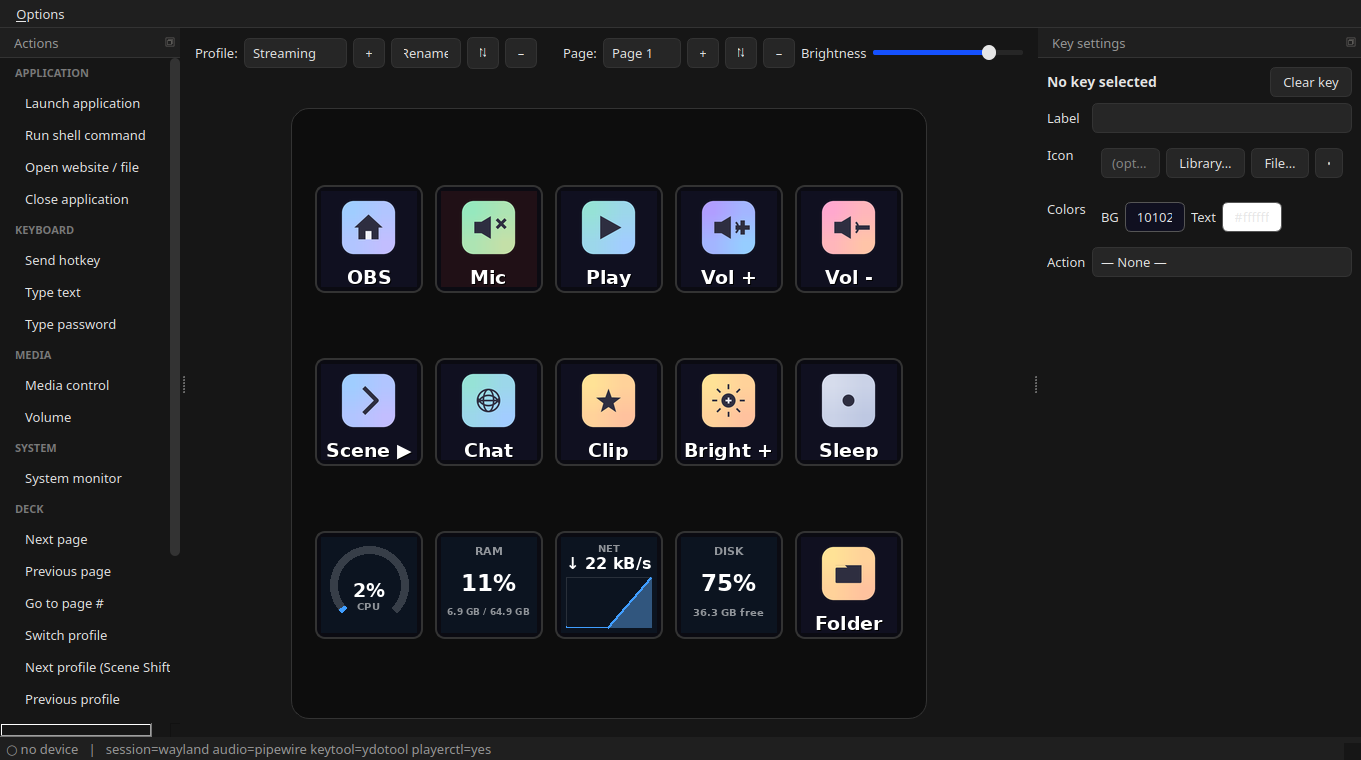
Drag System monitor from the Actions catalog onto a key and pick your metric.
Hardening
The feature shipped through two adversarial review rounds — 34 confirmed defects fixed before release, each pinned by a regression test (suite: 226 → 275). Highlights: shared-stream sampling (psutil's CPU/network counters are since-last-call deltas — naive per-key sampling corrupts every key after the first), warm-up/gap-aware graph history, mid-tick edit/page-switch guards, failed-write retry, and release tooling that refuses to tag without a changelog section. New dependency: python3-psutil.
Install
sudo add-apt-repository ppa:zoutmax/fifine
sudo apt install fifine-control-deck
or grab the .deb for your architecture below.
Full Changelog: v0.5.8...v0.6.0
v0.5.8
v0.5.7 — classic snap drives the deck + one-click device access
Added
- Classic-confinement Snap that actually drives the deck. The deck is
controlled over/dev/hidraw, which strict snap confinement cannot grant —
the classic build reaches the device just like the.debdoes. - One-click "Enable device access" button in the Snap. A snap can't install
the udev rule the deck needs, so the classic snap bundles the rule and, when
the device isn't reachable, offers a button that installs it viapkexec
(graphical auth) and reconnects live — no terminal, no relaunch.
Fixed
- Snap boots reliably: bundle the Python interpreter + stdlib and pin
PYTHONHOME(core24's base providespython3.12, so snapcraft otherwise
prunes it from the classic payload — fatal at runtime). - Snap shows the device-access hint even when the deck enumerates over libusb
with empty firmware (the false "connected" used to suppress it).
Changed
- Packaging:
debian/source/optionskeeps build artifacts (dist/,*.snap,
caches) out of the native source tarball. - Docs:
SNAP.mddocuments the working classic build; the README leads with the
PPA and flags that the current store snap (strict) can't drive the deck.
Install
PPA / .deb — recommended (installs the udev rule for you, drives the deck out of the box):
sudo add-apt-repository ppa:zoutmax/fifine
sudo apt install fifine-control-deck
…or download a .deb below (amd64 / arm64).
Snap: the classic build (with device control + the one-click access button)
is pending Snap Store classic-confinement review; the snap currently on the
store is strict-confined and opens but cannot drive the deck.
Full Changelog: v0.5.6...v0.5.7