v0.6.0

System-monitor keys 📊
A key can now be a live system readout, rendered right on its LCD — like the official app's widgets, but native on Linux:
- Metrics: CPU, RAM, VRAM, network rate, disk space
- Styles: big number, 270° gauge (percentage metrics; a network key falls back to the number face), or a scrolling graph
- Per-key refresh interval (0.5–60 s); number/gauge keys are re-pushed only when their displayed value changes, keys showing the same metric share one sample stream, and with no monitor keys on the visible page nothing is ever sampled
- VRAM is detected per GPU vendor: NVIDIA via NVML (install the recommended
python3-pynvml), AMD via sysfs; shared-memory iGPUs have nothing to report - Pressing a monitor key does nothing, and press-flash skips it so the readout is never overpainted
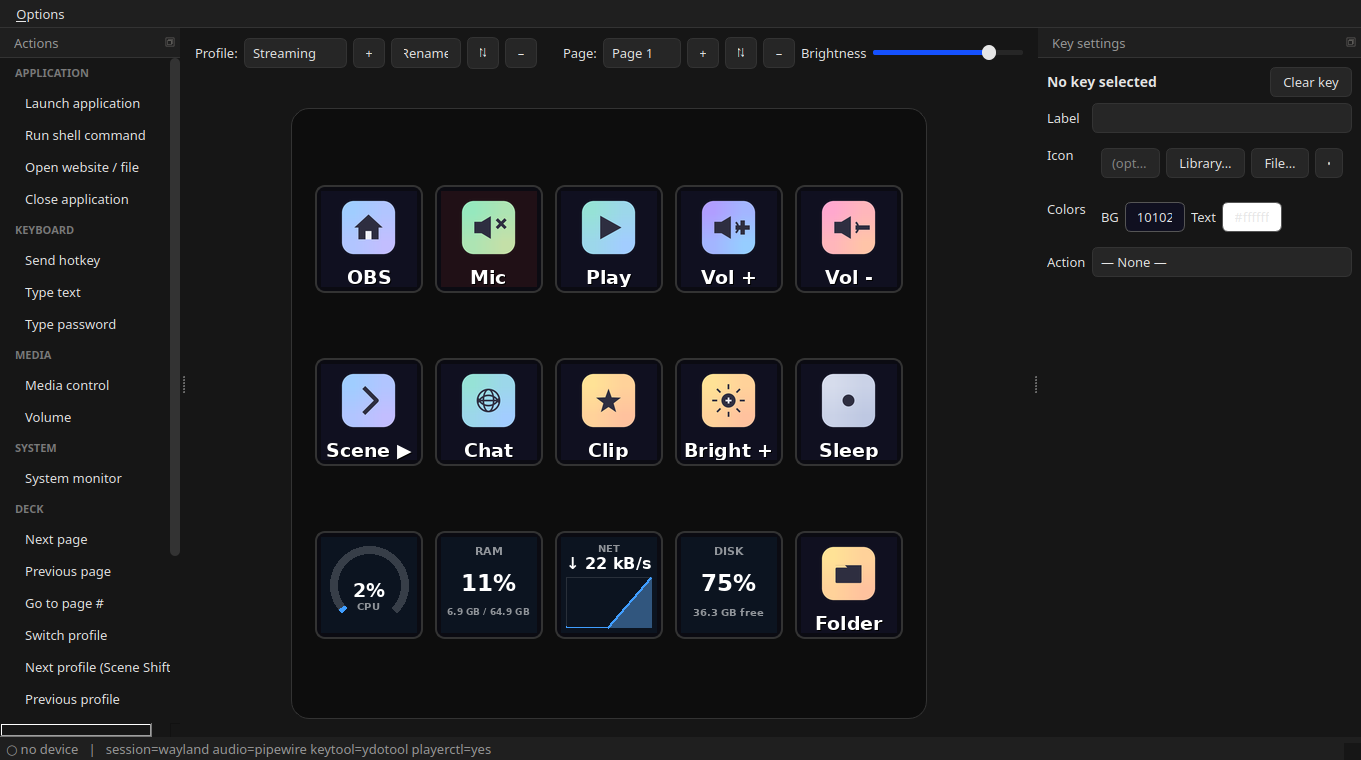
Drag System monitor from the Actions catalog onto a key and pick your metric.
Hardening
The feature shipped through two adversarial review rounds — 34 confirmed defects fixed before release, each pinned by a regression test (suite: 226 → 275). Highlights: shared-stream sampling (psutil's CPU/network counters are since-last-call deltas — naive per-key sampling corrupts every key after the first), warm-up/gap-aware graph history, mid-tick edit/page-switch guards, failed-write retry, and release tooling that refuses to tag without a changelog section. New dependency: python3-psutil.
Install
sudo add-apt-repository ppa:zoutmax/fifine
sudo apt install fifine-control-deck
or grab the .deb for your architecture below.
Full Changelog: v0.5.8...v0.6.0