Improve handling of ListView disabled rows, and add storybook controls#3123
Improve handling of ListView disabled rows, and add storybook controls#3123
Conversation


Bug found via storybook controls


|
Build successful! 🎉 |
…rum into listview-disabled-rows
|
Build successful! 🎉 |
|
Build successful! 🎉 |
…disabled-rows

# Conflicts:
#	package.json
#	packages/@react-spectrum/list/src/ListView.tsx
#	packages/@react-spectrum/list/src/ListViewItem.tsx
#	packages/@react-spectrum/list/stories/ListView.stories.tsx
#	yarn.lock
…disabled-rows

# Conflicts:
#	packages/@react-spectrum/list/stories/ListView.stories.tsx
|
Build successful! 🎉 |

 snowystinger
left a comment
snowystinger
left a comment
snowystinger
left a comment
There was a problem hiding this comment.
Problem for later probably, but in https://reactspectrum.blob.core.windows.net/reactspectrum/6db0e0700bb199c3577b53c1ba64fe1719512ee7/storybook/index.html?path=/story/listview-selection--onaction-disable-folder-selection
if I keyboard navigate into the first disabled folder, then shift tab to the breadcrumbs and go up a level, then tab back into the listview, a focus ring gets stuck on the breadcrumb root
Can any of the selection stories be crossed with drag and drop?
only odd case is still the highlight mode but only selection disabled, but I think that is what it is at this point, though should we swallow the spacebar on those elements? https://reactspectrum.blob.core.windows.net/reactspectrum/6db0e0700bb199c3577b53c1ba64fe1719512ee7/storybook/index.html?path=/story/listview-selection--disable-folder-selection&args=selectionStyle:highlight
it causes the listview to scroll
otherwise, this has my approval, tested a bit in chrome and it felt much more natural

|
Build successful! 🎉 |
|
Build successful! 🎉 |


| (args) => render(args) | ||
| ) | ||
| .add( | ||
| 'value: 50', |
There was a problem hiding this comment.
Would we eventually want this story to work with controls or remove it since controls allow us to adjust to 50 or 100(next story)?
There was a problem hiding this comment.
Seems weird to have a hardcoded value of 50 in the story, but allow it to be edited in controls also?
There was a problem hiding this comment.
I just edited my comment to suggest removing the hardcoded 50 and 100 stories without realizing you'd replied.
| .add( | ||
| 'Default', | ||
| () => render() | ||
| args => render(args) |
There was a problem hiding this comment.
This story used to have a value of 0, but because of the default args for the other stories it uses value=32. This default change is okay, but feels weird.
| .add( | ||
| 'dynamic with disabled, multiple selection, highlight', | ||
| () => ( | ||
| <TableView disabledKeys={['Foo 1', 'Foo 3']} aria-label="TableView with dynamic contents" selectionStyle="highlight" selectionMode="multiple" width={300} height={200} onSelectionChange={s => onSelectionChange([...s])}> |
There was a problem hiding this comment.
I wish there was a way to surface which keys are disabled without having to remember or check the code.
| <Item textValue="Adobe Illustrator">Adobe Illustrator</Item> | ||
| <Item textValue="Adobe XD">Adobe XD</Item> | ||
| .add('dynamic items + renderEmptyState', args => (<EmptyTest {...args} />)) | ||
| .add('with ActionBar', args => <ActionBarExample {...args} />) |
There was a problem hiding this comment.
The controls don't work with this story because ActionBarExample wasn't updated to spread them. Is that something to fix now or with the CSF 3.0 refactor? I'm noticing this is true for some other stories too.
| ) | ||
| ) | ||
| .add( | ||
| 'Drag within list (Reorder)', |
There was a problem hiding this comment.
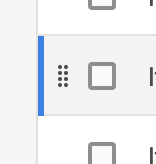
I'm noticing the drag handler shows up after a drag. It is existing behavior.
There was a problem hiding this comment.
I think because it becomes keyboard focused (intentionally I believe), so that causes the drag handle to also appear.
There was a problem hiding this comment.
This is the only story I saw do this. 🤷
There was a problem hiding this comment.
I'd expect drag between lists to behave the same, right? It doesn't show the drag handler after a drag from one list to the other.
| <Item textValue="Adobe Photoshop">Adobe Photoshop</Item> | ||
| <Item textValue="Adobe Illustrator">Adobe Illustrator</Item> | ||
| <Item textValue="Adobe XD">Adobe XD</Item> | ||
| .add('overflowMode="truncate" (default)', args => ( |
There was a problem hiding this comment.
Shouldn't this be a control and not its own story? Maybe the story is long text values?
There was a problem hiding this comment.
Updated. Actually this uncovered a bug that the row height doesn't update when switching between overflow modes. Maybe we can address that separately though.
 ktabors
left a comment
ktabors
left a comment
ktabors
left a comment
There was a problem hiding this comment.
Not a fan of controls persisting state for that story. I go to another story and come back and it remembers that state. I reloaded the browser and it remembered that state. There is the reset button... maybe I'll get used to it.

|
Heh, I wanted the controls to persist between stories so if you set quiet then switch stories it would stay quiet. 🤷 |
|
Build successful! 🎉 |

I'm not seeing the persistence between stories, I'm only seeing it persisting within that story. In ListView stories, goto |
ktabors
left a comment
ktabors
left a comment
There was a problem hiding this comment.
Thanks for the changes, looks good!

|
Build successful! 🎉 |
|
Build successful! 🎉 |


6 participants


Reorganized the storybook for ListView to use the controls addon, and organize the stories into categories. Now mostly the stories are about data differences, and controls are used for props that could apply to any story.
Also working on some updates to the selection/navigation behavior for ListView. The new selection stories have an example with hierarchical data and breadcrumbs, which illustrates the behavior better. When an item is disabled, only selection is disabled, and not actions.
To do