Network Players
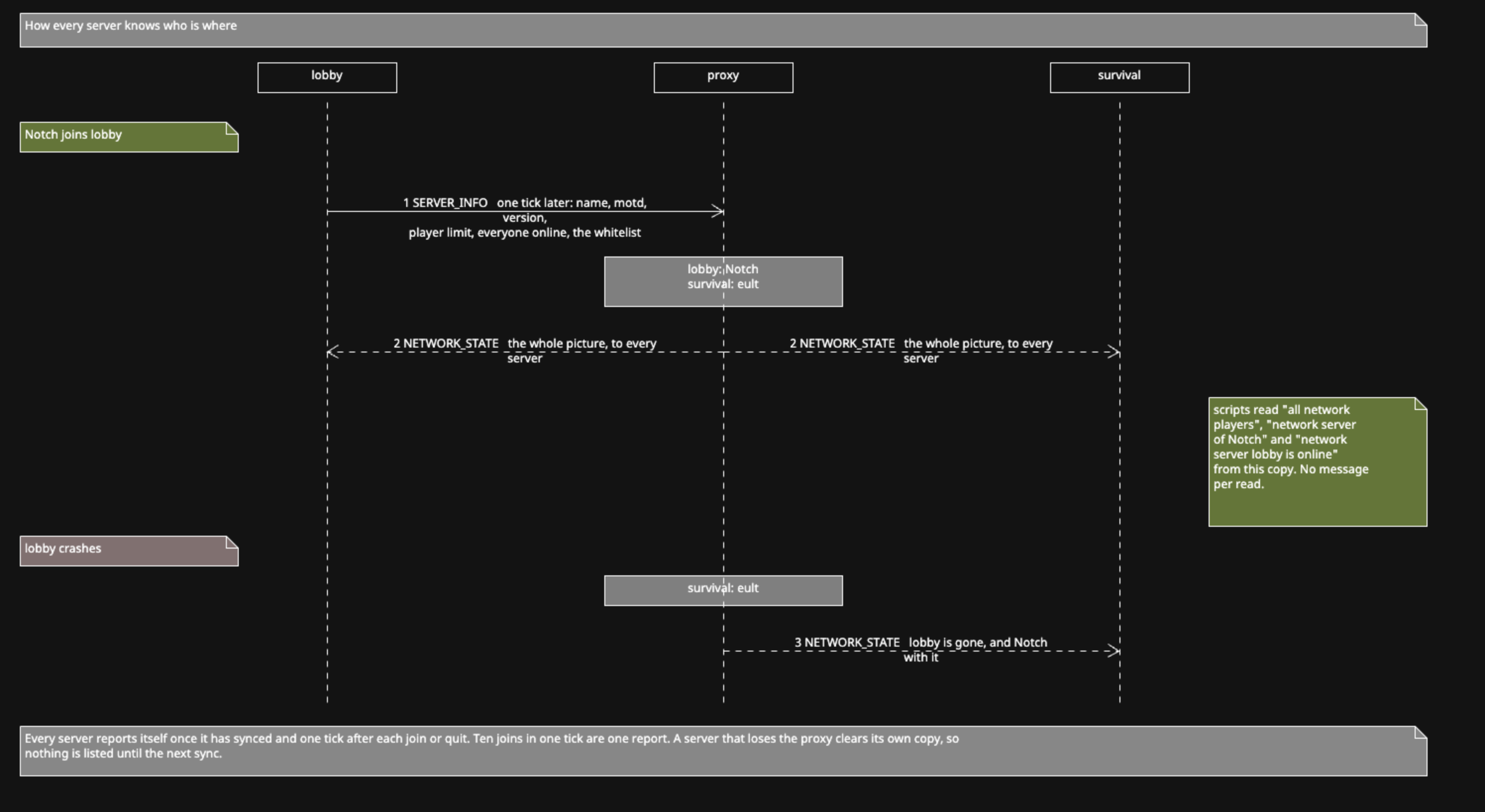
skNetwork knows who is on every server, and can reach them from any other. Every game server tells the proxy about itself, the proxy hands the whole picture to every server, and your scripts read it from memory like any other network variable.
All of this is on by default. It can be turned off with players: false in the proxy
config, see Configuration.
When a server syncs, and again one tick after every join and quit, it sends the proxy:
- its name, the same
server-namethatnetwork server namereturns - its message of the day and Minecraft version
- its player limit
- the names of everyone online
- the names on its whitelist
The proxy keeps the latest report from each server and sends the full set to every server whenever any of it changes. A server that disconnects is removed straight away, so a crash takes its players out of the list instead of leaving them there.
Reads answer from your server's own copy. Nothing goes over the network when a script asks.
send "Online: %all network servers%"if network server "survival" is online:
send "Survival is up."
else:
send "&cSurvival is down."A server counts as online once it has finished its first sync. One that is still starting up is not listed, because nothing sent to it would arrive yet.
Both forms take lists:
if network servers "lobby" and "lobby2" are online:
	send "Both hubs are up."
Names are exact. "Survival" and "survival" are two different servers.
send "%size of all network players% players on the network"
send "On the hubs: %network players on "lobby", "lobby2"%"
loop all network players:
send "- %loop-value%"An unknown server name gives an empty list, not an error.
This replaces the {?online::%network server name%::*} list you may have built by hand
in earlier versions. That list needed an on network sync block to survive a crash.
This one doesn't, because the proxy rebuilds it from what each server reports.
command /find <text>:
	trigger:
		set {_where} to network server of arg-1
		if {_where} is set:
			send "%arg-1% is on %{_where}%."
		else:
			send "%arg-1% is not online."
"%player%"'s network server means the same thing. Player names are matched without
caring about case, so "notch" finds Notch.
While a player is moving between two servers, both may list them for a moment. The answer is then the server that saw them most recently, which is the one they are arriving on.
send "survival runs %version of network server "survival"%"
send "%motd of network server "lobby"%"
send "%max player count of network server "survival"% slots"
if size of network players on "lobby" >= max player count of network server "lobby":
send "&cThe lobby is full."if "%player%" is not whitelisted players of network server "survival":
send "&cYou are not whitelisted on survival."message of the day of network server and motd of network server are the same.
player limit of network server is the same as max player count.
Every value is what that server actually reported. The whitelist is the one it will enforce, not a copy kept on the proxy.
All of these are empty for a server that isn't online.
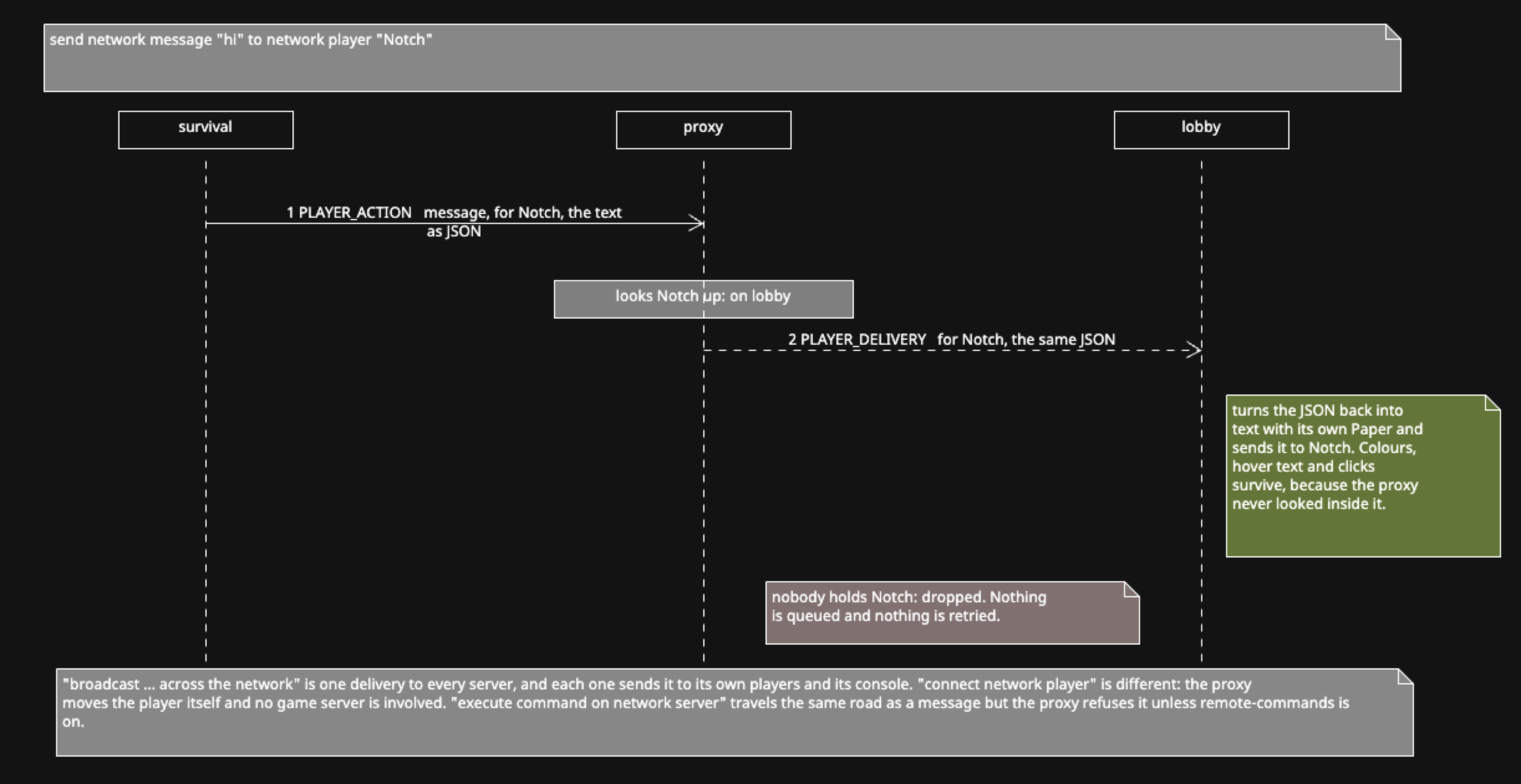
send network message "&aYou were paid $50." to network player "Notch"The proxy finds which server holds that player and passes the message there. It is rendered on the server the player is on, so colours, hover text and clickable parts made with Skript's text syntax all survive the trip.
A player nobody is holding is skipped. Nothing waits for them to come online.
broadcast "&e%player% just won the event!" across the networkEvery player on every server sees a broadcast, and every server prints it to its
console. to the network works as well as across the network.
Action bars work the same way:
send network action bar "&cThe event starts in 10 seconds" to network players "Notch", "eult"
send network action bar "&aServer restart in 5 minutes" to the whole networkconnect network player "%player%" to "survival"This is the one thing the proxy has to do itself. Nothing happens if the player isn't on the network, or the server name isn't one the proxy has configured. Check first:
command /survival:
	trigger:
		if network server "survival" is not online:
			send "&cSurvival is down right now."
			stop
		if network server of "%player%" is "survival":
			send "&eYou are already there."
			stop
		connect network player "%player%" to "survival"
send network player ... to ... means the same as connect. The server name has to be
the one the proxy knows, which is the name in the proxy's own server list, not
necessarily skNetwork's server-name. Keep the two the same and there is nothing to
think about.
execute command "save-all" on network server "survival"
execute command "whitelist reload" on the network
The command runs on that server's console. on the network runs it everywhere,
including the server the script is on.
This is off by default. Anyone who can write a script on one server would otherwise
have console on every server, so the proxy refuses until you set
remote-commands: true in its config. A refused command shows up in the proxy's log:
lobby tried to run 'op eult' on another server, but 'remote-commands' is off
in the proxy config.
With it on, every command is logged on the proxy with the server that sent it. Read Limitations before turning it on.
Its copy of the network picture is cleared. all network servers is empty,
network server ... is online is false for everything, and messages can't be sent. It
all comes back with the next sync.
The player list on the proxy changes one tick after a join or quit, plus the trip to
the proxy and back. A script that runs network players inside on join sees the
list from before that player arrived.
A message sent to a player who logs off, or switches server, in the same instant is dropped. There is no queue and no retry.
- Syntax reference for every pattern on one page.
-
Configuration for the
playersandremote-commandskeys. - Examples for these in full scripts.