Youtube 字幕全自動開關 v0.1.1

Youtube 字幕全自動開關 v0.1.1
繁體中文(預設)
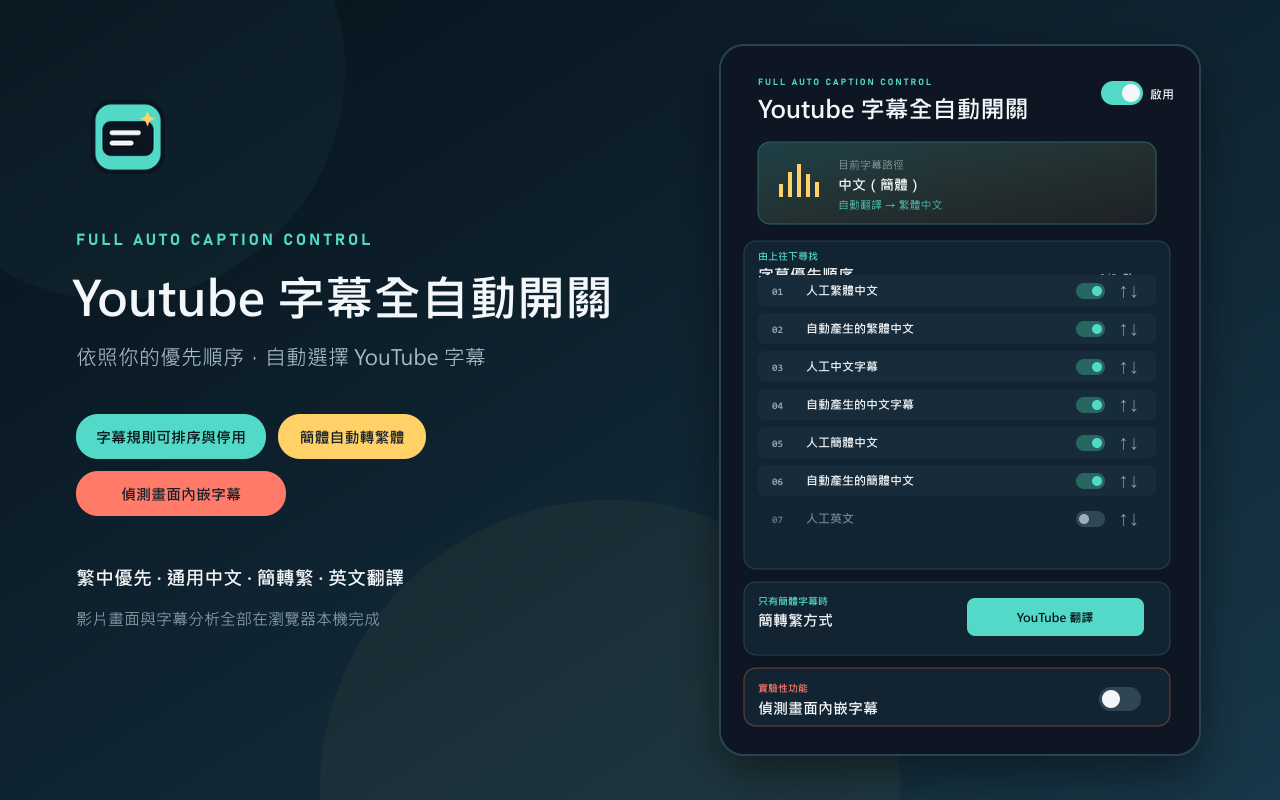
第一個測試版本,提供 YouTube 字幕自動選擇、簡轉繁與實驗性內嵌字幕偵測。
功能重點
- 自動依優先順序選擇繁體中文、通用中文與簡體中文字幕。
- 字幕規則可排序並個別啟用或停用。
- 簡體字幕預設使用 YouTube 翻譯為繁體中文,也可選擇本機 OpenCC。
- 人工英文、自動英文與其他可翻譯語言預設停用。
- 支援 YouTube 單頁式影片切換。
- 工具列圖示會反映總開關狀態。
- 實驗性內嵌字幕偵測最早能在第三段有效字幕完成判斷,完成後停止監控。
- 所有字幕及畫面分析都在瀏覽器本機完成。
安裝
下載 youtube-subtitle-auto-switch-v0.1.1.zip,解壓縮後由 chrome://extensions 的「載入未封裝項目」選取該資料夾。
SHA-256:B0E06DB93133BD4B70B35C7851C3CB4073F52C01651F21091AAB1E181E7EE7EC
English
This is the first test release of Youtube Subtitle Auto Switch, providing automatic YouTube caption selection, Simplified-to-Traditional Chinese conversion, and optional experimental burned-in caption detection.
Highlights
- Automatically prioritizes Traditional Chinese, generic Chinese, and Simplified Chinese caption tracks.
- Caption rules can be reordered and individually enabled or disabled.
- Simplified Chinese uses YouTube translation to Traditional Chinese by default, with local OpenCC as an alternative.
- Manual English, automatic English, and other translatable languages are disabled by default.
- Supports YouTube single-page video navigation.
- The toolbar icon reflects the master enabled state.
- Experimental embedded-caption detection can finish on the third valid cue and stops monitoring after a decision.
- Caption and image analysis stays entirely in the user's browser.
Installation
Download youtube-subtitle-auto-switch-v0.1.1.zip, extract it, then use Load unpacked at chrome://extensions and select the extracted folder.
SHA-256: B0E06DB93133BD4B70B35C7851C3CB4073F52C01651F21091AAB1E181E7EE7EC