Releases: ahui3c/youtube-subtitle-auto-switch
Release list
v0.3.2|24 小時 VIP 免費試用

中文
主要更新
- 每個 Google 帳號首次連接插件後,可免費試用全部 VIP 功能 24 小時。
- 試用時間由伺服器從首次成功綁定時計算;重新安裝、登出或重新登入不會重置。
- 插件面板會顯示試用狀態與到期時間。
- 試用到期後自動恢復免費版,保留設定資料但停止執行 VIP 功能。
- 已購買 VIP 終身版不受試用期限影響。
- 改善登入後連接插件並前往購買頁面的流程。
安裝
一般使用者建議直接從 Chrome 線上應用程式商店安裝。若要手動安裝,請下載下方 ZIP 並解壓縮,再到 Chrome 擴充功能頁開啟「開發人員模式」,選擇「載入未封裝項目」並指向解壓縮資料夾。
English
Highlights
- Each Google account receives one 24-hour trial of all VIP features after the first successful extension connection.
- Trial timing is enforced by the server and cannot be reset by reinstalling or signing in again.
- The extension displays the trial status and expiration time.
- VIP features automatically lock when the trial expires while local settings remain preserved.
- Lifetime VIP purchases are not affected by the trial period.
- Improved the connect-and-purchase flow for signed-in users.
Youtube 字幕全自動開關 v0.3.1
Youtube 字幕全自動開關 v0.3.1
本次更新加入 Google 帳號登入與 VIP 授權、選用的網站雲端同步,以及更完整的指定頻道規則。免費字幕選擇、YouTube 翻譯、本機 OpenCC 轉換與圖形 OCR 偵測流程仍維持原有運作方式。
VIP 帳號與授權
- 可從插件登入 Google 帳號並驗證 VIP 終身版資格。
- VIP 功能必須通過帳號授權後才會生效;未購買時,即使沿用舊版已開啟的設定也不會執行付費功能。
- 首次取得 VIP 時,預設啟用「使用台灣用語顯示」與「自訂詞彙替換」,「香港口語轉普通話」維持關閉。
- 登入連接前可切換 Google 帳號,避免誤綁帳號。
雲端同步
- VIP 可自行選擇是否把自訂詞彙與指定頻道規則同步到網站。
- 雲端同步預設關閉;關閉時資料仍只保存在目前瀏覽器。
- 離線時保留本機資料與待同步狀態,不會因連線失敗清空設定。
- 本機與網站同時修改時會顯示衝突處理,不會靜默覆蓋資料。
自訂詞彙與指定頻道
- 自訂詞彙替換上限提高為 100 組。
- 指定頻道規則上限提高為 50 組。
- 每個指定頻道可選擇:
- 停用全部功能
- 強制開啟字幕
- 強制開啟字幕 + 簡繁轉換
- 強制開啟字幕 + 簡繁粵語轉換
- 三種強制開啟模式都不進行 OCR;簡繁/粵語模式仍會依設定套用台灣用語與自訂詞彙。
權限與隱私
- 新增
identity權限,用於開啟網站的 Google 登入與插件連接流程;插件不會取得 Google 密碼。 - 新增
https://myapp.ahui3c.com/*網站存取權限,用於驗證 VIP 授權與使用者主動啟用的雲端同步。 - 字幕文字、影片畫面與 OCR 結果仍只在瀏覽器本機處理,不會上傳到網站。
English
This release adds Google account sign-in, VIP entitlement verification, optional website cloud sync, and expanded per-channel rules. The existing free caption selection, YouTube translation, local OpenCC conversion, and embedded-subtitle OCR flows remain available.
VIP account and entitlement
- Sign in with a Google account from the extension and verify the lifetime VIP entitlement.
- Paid features run only after entitlement verification. Legacy enabled settings remain stored but do not execute without VIP access.
- On first VIP activation, Taiwan terminology and custom replacements are enabled by default, while Hong Kong colloquial conversion remains disabled.
- Users can switch Google accounts before confirming the extension connection.
Optional cloud sync
- VIP users may optionally synchronize custom replacements and per-channel rules with the website.
- Cloud sync is disabled by default; local-only storage remains available.
- Offline failures preserve local data and pending sync state.
- Concurrent local and website changes use explicit conflict handling instead of silent overwrites.
Custom replacements and channel rules
- Up to 100 custom replacement rules.
- Up to 50 per-channel rules.
- Each channel can disable all extension features, force captions on, force captions on with Simplified/Traditional conversion, or force captions on with Simplified/Traditional plus Cantonese conversion.
- Forced modes skip OCR while still applying enabled Taiwan terminology and custom replacements where applicable.
Permissions and privacy
- Adds the
identitypermission for the website-based Google sign-in and extension connection flow. - Adds access to
https://myapp.ahui3c.com/*for entitlement verification and user-enabled cloud sync. - Caption text, video frames, and OCR results continue to be processed locally and are not uploaded to the website.
Youtube 字幕全自動開關 v0.2.12
Youtube 字幕全自動開關 v0.2.12
本次更新擴充指定頻道規則,調整 VIP 功能規格上限,並修正畫面中央章節標題被誤判為內嵌字幕的情況。
新增與調整
- 指定頻道規則最多 10 條。
- 自訂詞彙替換最多 40 條。
- 指定頻道規則提供五種模式:
- 停用全部
- 略過 OCR 字幕辨識
- 強制 OCR 字幕辨識
- 強置開啟字幕,不 OCR 偵測
- 強置關閉字幕,不 OCR 偵測
- 「強置開啟字幕」仍依原本字幕優先順序選擇字幕,並保留 YouTube 翻譯與本機轉換功能。
- 「強置關閉字幕」會關閉 CC、略過 OCR 並停止不必要的字幕監聽。
OCR 修正
- 修正影片中央固定章節標題在背景變化時,被三段樣本誤判為內嵌字幕的問題。
- 內嵌字幕判定現在只接受完整畫面底部約 30% 範圍的文字帶。
- 保留原有三段有效字幕即可判定、位置一致、不同畫面樣本及信心門檻。
- 字幕優先順序、翻譯、本機轉換與 CC cue 驅動取樣流程均未變更。
English
This release expands per-channel rules, adjusts VIP feature limits, and prevents centered chapter titles from being mistaken for burned-in subtitles.
Changes
- Up to 10 per-channel rules.
- Up to 40 custom replacement rules.
- Five per-channel modes: disable all automation, skip OCR, force OCR, force captions on without OCR, and force captions off without OCR.
- Force-on mode keeps the existing caption priority, YouTube translation, and local conversion behavior.
- Force-off mode closes CC, skips OCR, and stops unnecessary caption monitoring.
OCR fix
- Centered chapter titles are no longer accepted as bottom subtitle samples.
- Burned-in subtitle decisions now require text bands in approximately the bottom 30% of the full video frame.
- Existing three-sample, position-consistency, distinct-frame, confidence, caption-priority, translation, and cue-driven sampling behavior remains unchanged.
Youtube 字幕全自動開關 v0.2.5
v0.2.5 — 自訂詞彙限本機轉換
繁體中文(預設)
- 「自訂詞彙替換」現在與「地區用語轉換」一致,必須先選擇「本機轉換」才能使用。
- 使用 YouTube 翻譯時,自訂替換開關、新增表單與既有規則編輯功能會鎖定。
- 切換到 YouTube 翻譯不會刪除既有詞庫;再次選擇本機轉換後即可繼續使用。
- YouTube 翻譯模式不再對字幕套用自訂詞彙替換。
- 分頁進入背景、沒有 CC、OCR 判斷完成或功能關閉時,會自動解除不再需要的字幕監聽;本機轉換所需的字幕處理不受影響。
- OpenCC 詞庫只在「本機轉換」實際需要時載入目前 YouTube 分頁,並在載入後驗證轉換器可用;預設 YouTube 翻譯模式不載入。
- 執行狀態沒有變化時不再重複寫入
chrome.storage.local。 - 修正 YouTube 自動翻譯選單顯示
>> undefined,現在會傳入繁體中文的語言名稱。 - 畫面內嵌字幕 OCR 改為全新安裝時預設開啟;「簡體 CC 時略過偵測」改為預設關閉。沒有任何 CC 時仍不啟動 OCR。
- 字幕優先順序整理為「中文繁體字幕、中文字幕、中文簡體字幕、英文字幕、自動產生的英文字幕、其他可翻譯語言字幕」六項;移除很少使用的自動繁中、自動中文及自動簡中規則,其他功能不變。
English
- Custom word replacements now require Local Conversion, matching the regional terminology feature.
- The toggle, add form, and existing rule controls are locked while YouTube translation is selected.
- Existing rules are retained and become available again after switching back to Local Conversion.
- Custom replacements are no longer applied in YouTube translation mode.
- Unneeded caption observation now stops in background tabs, without CC tracks, after OCR completes, or when the extension is disabled; monitoring required for local conversion remains available.
- OpenCC is injected into the current YouTube tab only when Local Conversion needs it, and the converter is verified before use.
- Unchanged runtime status is no longer written repeatedly to
chrome.storage.local. - Fixed
>> undefinedin YouTube's auto-translate menu by supplying the target language display name. - Burned-in subtitle OCR is now enabled by default on fresh installations, while “skip detection for Simplified Chinese CC” is disabled by default. OCR still does not start when no CC track exists.
- Consolidated the caption priority list into six renamed items and removed the rarely used automatic Traditional, generic Chinese, and Simplified Chinese rules.
Youtube 字幕全自動開關 v0.2.4
v0.2.4 — 指定頻道規則
繁體中文(預設)
- 新增標示為 VIP 功能的「指定頻道規則」。
- 可從目前 YouTube 影片直接按下「將目前頻道加入規則」。
- 每筆規則顯示頻道名稱、穩定的 YouTube 頻道 ID、規則類型與刪除按鈕。
- 每個頻道可選擇:
- 「停用全部」:不自動調整 CC、不執行 OCR,也不套用文字轉換或替換。
- 「略過 OCR」:字幕選擇、翻譯、簡轉繁與詞彙替換照常執行,但不分析畫面內嵌字幕。
- 「強制 OCR」:覆寫「簡體 CC 時略過偵測」等略過條件;全域 OCR 開關關閉時仍不啟動。
- 頻道規則只保存在目前瀏覽器,不會傳送給開發者或第三方。
- 面板會直接查詢目前作用中的 YouTube 分頁,避免誤用其他分頁留下的頻道資料。
- 沒有任何 CC 字幕軌的影片不會啟動畫面擷取或 OCR 取樣,即使頻道規則設為「強制 OCR」也會略過。
English
- Adds the VIP-labeled Per-channel Rules feature.
- Add the current YouTube channel directly from the active video tab.
- Each entry shows the channel name, stable YouTube channel ID, selected mode, and a delete button.
- Available modes:
- Disable all: do not change CC, run OCR, or apply local text conversions/replacements.
- Skip OCR: keep caption selection, translation, conversion, and replacements, but skip embedded-caption analysis.
- Force OCR: override OCR skip conditions while still respecting the global embedded-caption detector switch.
- Channel rules remain in the current browser and are not sent to the developer or third parties.
- Videos without any CC tracks never start screen capture or OCR sampling, even under a Force OCR channel rule.
Youtube 字幕全自動開關 v0.2.0
Youtube 字幕全自動開關 v0.2.0
中文(預設)
- 台灣用語轉換改用 OpenCC
twp,同時處理繁體字與台灣慣用詞。 - 新增可獨立啟用的「香港口語轉普通話」實驗功能,內建保守的高頻詞組規則。
- 新增自訂詞彙替換:最多 100 條,可逐條啟用、停用、排序與刪除。
- 字幕文字處理順序為「香港口語 → 台灣用語 → 自訂替換」,自訂規則具有最高覆寫權。
- 台灣與香港地區用語只在選擇「本機轉換」後開放並執行。
- 自訂詞庫只保存在目前瀏覽器,避免 Chrome 同步儲存容量限制。
- 補齊 OpenCC 第三方授權文件及自動化測試。
香港口語轉換仍可能受到語境與粵語語法影響,因此預設關閉並標示為實驗性功能。
English
- Switched local Taiwan conversion to OpenCC
twp, including Taiwan regional phrases. - Added an optional experimental Hong Kong colloquial-to-Mandarin converter.
- Added up to 100 user-defined replacement rules with per-rule toggles, ordering, and deletion.
- Applied text processing in the order: Hong Kong colloquial, Taiwan terminology, then custom overrides.
- Limited Taiwan and Hong Kong regional conversion to local-conversion mode, with locked controls in YouTube translation mode.
- Stored custom rules locally to avoid Chrome sync-storage quota limits.
- Included third-party notices and expanded automated tests.
Youtube 字幕全自動開關 v0.1.1
Youtube 字幕全自動開關 v0.1.1
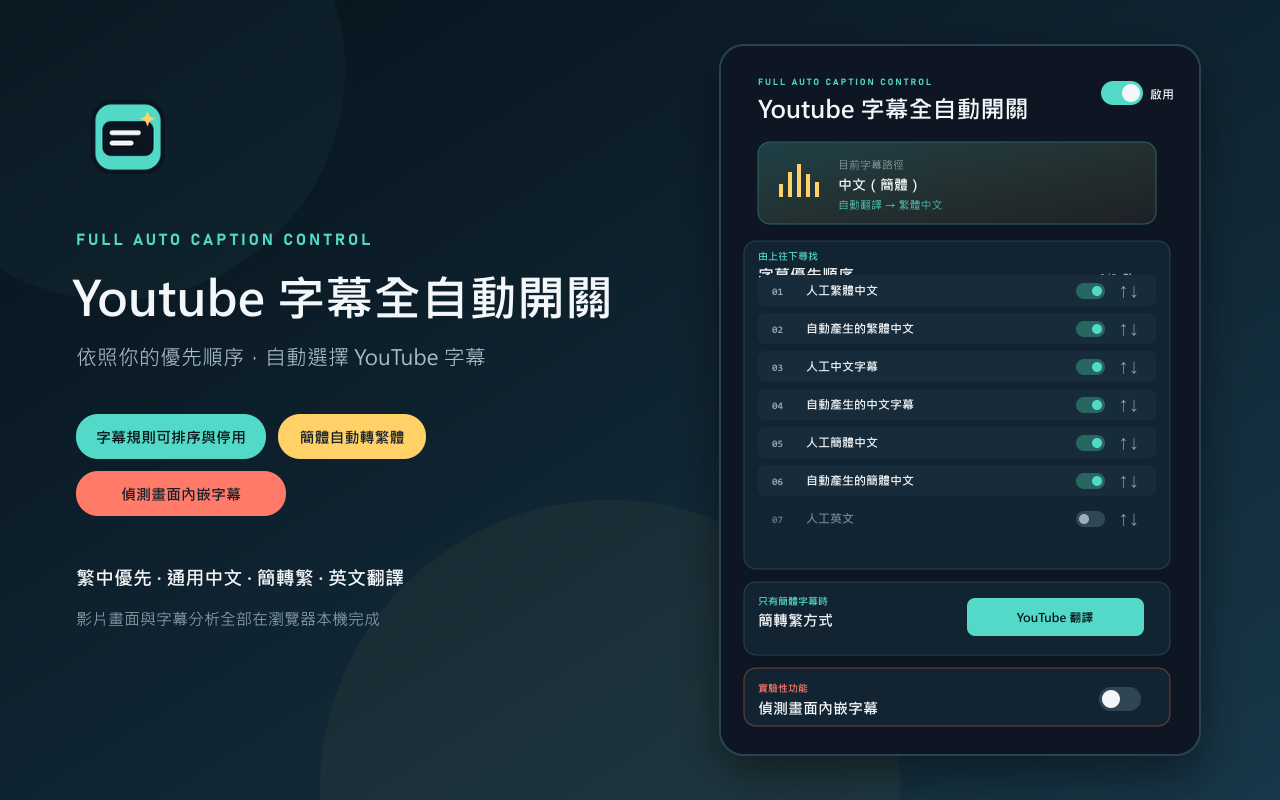
繁體中文(預設)
第一個測試版本,提供 YouTube 字幕自動選擇、簡轉繁與實驗性內嵌字幕偵測。
功能重點
- 自動依優先順序選擇繁體中文、通用中文與簡體中文字幕。
- 字幕規則可排序並個別啟用或停用。
- 簡體字幕預設使用 YouTube 翻譯為繁體中文,也可選擇本機 OpenCC。
- 人工英文、自動英文與其他可翻譯語言預設停用。
- 支援 YouTube 單頁式影片切換。
- 工具列圖示會反映總開關狀態。
- 實驗性內嵌字幕偵測最早能在第三段有效字幕完成判斷,完成後停止監控。
- 所有字幕及畫面分析都在瀏覽器本機完成。
安裝
下載 youtube-subtitle-auto-switch-v0.1.1.zip,解壓縮後由 chrome://extensions 的「載入未封裝項目」選取該資料夾。
SHA-256:B0E06DB93133BD4B70B35C7851C3CB4073F52C01651F21091AAB1E181E7EE7EC
English
This is the first test release of Youtube Subtitle Auto Switch, providing automatic YouTube caption selection, Simplified-to-Traditional Chinese conversion, and optional experimental burned-in caption detection.
Highlights
- Automatically prioritizes Traditional Chinese, generic Chinese, and Simplified Chinese caption tracks.
- Caption rules can be reordered and individually enabled or disabled.
- Simplified Chinese uses YouTube translation to Traditional Chinese by default, with local OpenCC as an alternative.
- Manual English, automatic English, and other translatable languages are disabled by default.
- Supports YouTube single-page video navigation.
- The toolbar icon reflects the master enabled state.
- Experimental embedded-caption detection can finish on the third valid cue and stops monitoring after a decision.
- Caption and image analysis stays entirely in the user's browser.
Installation
Download youtube-subtitle-auto-switch-v0.1.1.zip, extract it, then use Load unpacked at chrome://extensions and select the extracted folder.
SHA-256: B0E06DB93133BD4B70B35C7851C3CB4073F52C01651F21091AAB1E181E7EE7EC